List building services vs list building tools (2026 guide)
When to hire a B2B list building service and when to build lists yourself: what a custom list includes, how services price, and 8 quality checks to run.
Disclosure: This guide is published by Bitscale, which makes a list building tool. Every service price below comes from that vendor's own page, opened on October 20, 2026, and is listed under Sources.
The short answer: hire a list building service when you need one list, once, in a niche your team can't research, and you have no one to own a tool. Build lists in-house when you need fresh lists every month, want verification you can see, and want the data to land in your CRM instead of a spreadsheet. Bitscale sits in the middle: ready-made playbooks build the list, a waterfall across 18+ contact-data providers finds and verifies emails and phones, and Bitscale GTM engineers can set it up for you. Whichever route you pick:
- Write the list spec down before anyone starts: ICP, personas, fields, suppression and acceptance rules.
- Compare the cost of a usable, verified contact, not the price per row.
- Run the 8-point acceptance checklist on every file before it reaches your sequencer.
This guide covers what list building services deliver, when they're worth it, what a good custom list includes, how services price, and how to check quality. If you want the step-by-step method for building lists yourself, our lead list building guide covers it.
What a list building service actually delivers
A list building service gives you a file of companies and people that match criteria you set, usually with work emails, phone numbers and firmographic fields. "List building service" covers four quite different businesses, and the difference matters more than the name:
| Type of service | How the list is made | What you usually get | Watch for |
|---|---|---|---|
| Compiled data vendor | Records pulled from the vendor's own database | Fast, cheap rows | Verification may be extra or absent |
| Custom research agency | Researchers build the list to your spec, often with a sample to approve | Niche criteria, hand-checked fit | Minimum orders, slower turnaround |
| Managed outbound agency | The list is built as part of an SDR or campaign program | List plus outreach | You may not own or see the list workflow |
| Freelancer | One person, often using the same self-serve tools you could buy | Low commitment | Quality depends entirely on the person |
Whatever the type, the inputs are familiar: contact databases, LinkedIn, company websites and verification services. What you are really buying is someone's time and judgment applied to them. That is worth paying for in some cases, and not in others.
If what you want is a ready-made database rather than a done-for-you list, see our guide to B2B email list providers.
When to hire a list building service, and when to build lists yourself
The decision comes down to how often you need lists, how niche your criteria are, and whether anyone on your team will own the process.
| Situation | Hire a service | Build in-house (for example, in Bitscale) |
|---|---|---|
| You need one list for one campaign or event | Good fit | Also fine on a free plan |
| You need fresh lists every week or month | Costs repeat with every order | Better fit: rerun the same workflow |
| The criteria need manual research (niche roles, local businesses, unusual signals) | Good fit if they have researchers in that niche | Possible with AI research, scraping and Google Maps sources |
| Nobody on the team can own a tool | Good fit | Bitscale GTM engineers can set it up for you |
| You need to see how each email was verified | Ask for it in writing | Visible per row |
| The data must stay current in Salesforce or HubSpot | A one-off file starts aging on delivery | Two-way CRM sync keeps records current |
Hire a service if you have a short, one-off need, a budget line for it, and a clear spec. A good custom research agency will beat a rushed in-house list on a niche brief.
Build in-house if list building is a recurring part of your pipeline. Every month you outsource, you pay again for work you could have kept: the filters, the provider order, the verification rules and the suppression list. In Bitscale those live in a saved workflow you can rerun, and keeping lists fresh is the subject of our guide to prospect list automation.
There is a middle path that many teams miss. The main reason to hire a service is that nobody has time to learn a tool. Bitscale removes that reason: you start from a playbook, and Bitscale GTM engineers can handle setup and migration for you.
What a good custom list includes
Whether a service builds it or you do, a list is only as useful as its spec. Use this as the brief you hand to a vendor, or as the columns you set up in Bitscale.
| Layer | Fields | Why it matters |
|---|---|---|
| Account | Company name, domain, LinkedIn company URL, industry, headcount, HQ country and region | The domain is the key for deduplication and enrichment |
| ICP fit | The rule each account matched, such as "Series B SaaS, 50–200 staff, uses HubSpot" | Lets you audit fit without redoing the research |
| Signal | Why now: a funding round, a new executive, hiring for a role, an event attendance | Turns a list into a reason to reach out |
| Person | Full name, title, seniority, department, LinkedIn profile URL | The LinkedIn URL is what most phone searches need |
| Contact | Work email, verification status (valid or catch-all), mobile or direct dial | Status tells you what is safe to send |
| Provenance | Source of each field, date found, date verified | Lets you trace a bounce back to its source |
| Suppression flags | Existing customer, open opportunity, competitor, opted out | Stops you emailing people you shouldn't |
Two rules make this spec work. First, define your ICP before anyone searches; our guide to building an ideal customer profile has a template. Second, map the columns to your CRM fields up front, so the list syncs instead of being re-keyed. In Bitscale, the account and person layers come from its lead-list builder, which searches 300M+ contacts and 40M+ company records, and the contact layer comes from the email and phone waterfall.
For a full market rather than a campaign list, see how to build a clean TAM list.
How list building services price
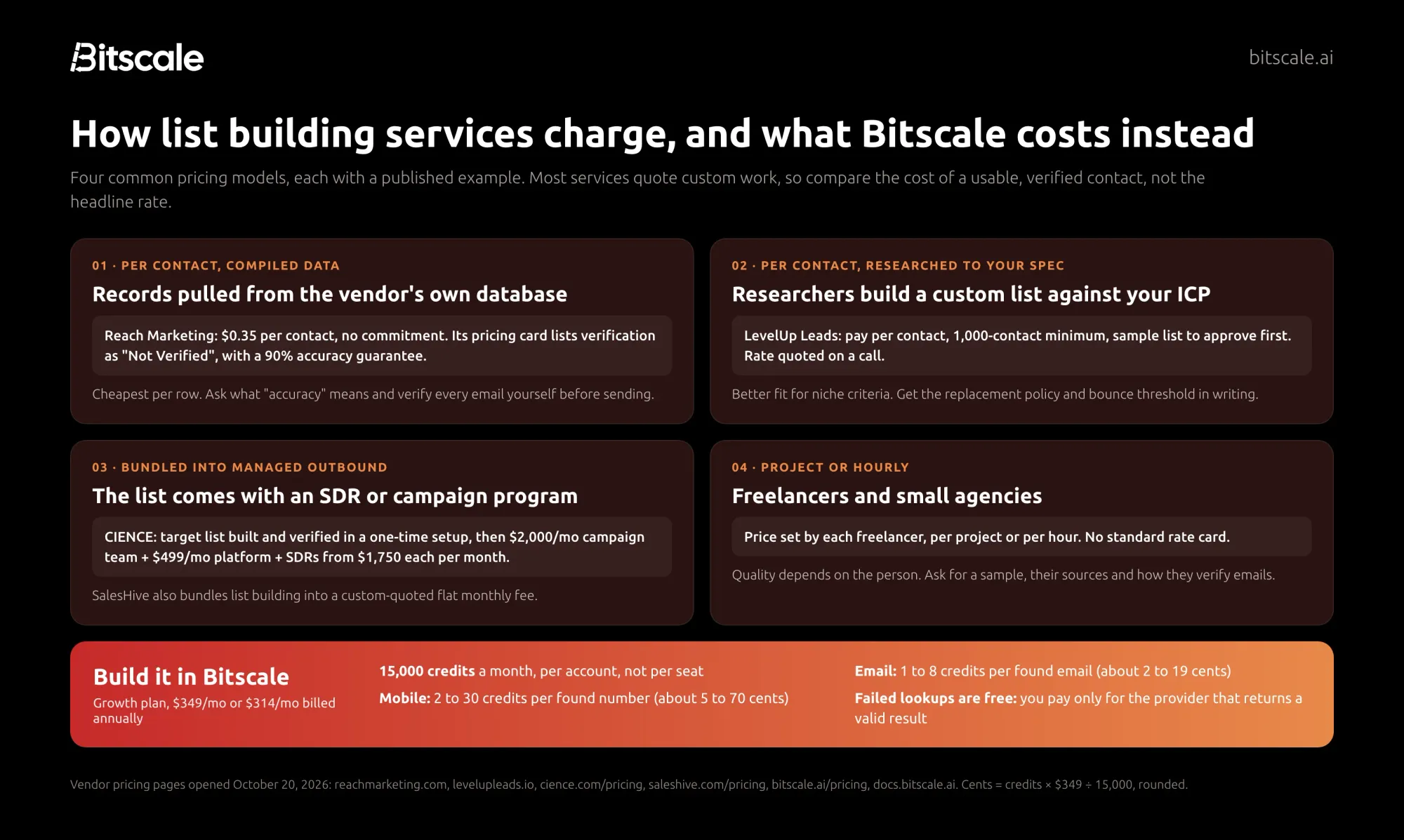
Few list building services publish a rate card. Most quote after a call. Those that do publish pricing fall into four models.
Model 1: Per contact, compiled data
You pay for each record delivered from the vendor's own database. Reach Marketing, for example, lists B2B list building at $0.35 per contact with no commitment. Its pricing card describes the source as "Data Compilation", lists verification as "Not Verified" and offers a 90% accuracy guarantee. This is the cheapest model per row. Before you buy, ask what the accuracy guarantee measures, and plan to verify every email yourself.
Model 2: Per contact, researched to your spec
Researchers build a custom list against your criteria. LevelUp Leads, for example, sells pay-per-contact lists with a 1,000-contact minimum and a sample list for you to approve first; the rate itself is quoted on a call. This model suits niche criteria. Get the bounce threshold and the replacement policy in writing.
Model 3: Bundled into managed outbound
The list comes as part of a campaign or SDR program. CIENCE publishes this structure:
- A one-time setup that includes "your target list, built and verified", with the price quoted.
- A $2,000 per month campaign team and a $499 per month platform.
- SDRs from $1,750 per SDR per month offshore, or $3,500 in the US and Europe, plus a performance bonus.
SalesHive also includes list building in a custom-quoted flat monthly fee. You get more than a list, but you are buying a full outbound program.
Model 4: Project or hourly
Freelancers and small agencies set their own project or hourly rates. There is no standard rate card. Ask for a sample, their data sources and how they verify emails.
What the same work costs in Bitscale
Bitscale charges in credits, per account rather than per seat. The Growth plan is $349 a month ($314 billed annually) for 15,000 credits, so a credit costs about 2.3 cents ($349 ÷ 15,000). In the email and phone waterfall, you pay only for the provider that returns a valid result:
- A found email costs 1 to 8 credits, depending on which provider finds it. That's about 2 to 19 cents.
- A found mobile number costs 2 to 30 credits, or about 5 to 70 cents.
- Failed lookups cost nothing.
As an illustration only: a 1,000-contact email list where every email came from a 2-credit provider would use 2,000 credits, about $47 at the Growth monthly rate. Your real cost depends on your provider order, your hit rate and any search or AI research steps in the workflow. Unused credits roll over up to 3x on monthly plans, so a quiet month isn't money lost.
The fair comparison is cost per usable, verified contact. A $0.35 row that bounces costs more than a verified email at 19 cents, because it also costs you sender reputation.
Quality checks before you accept a list
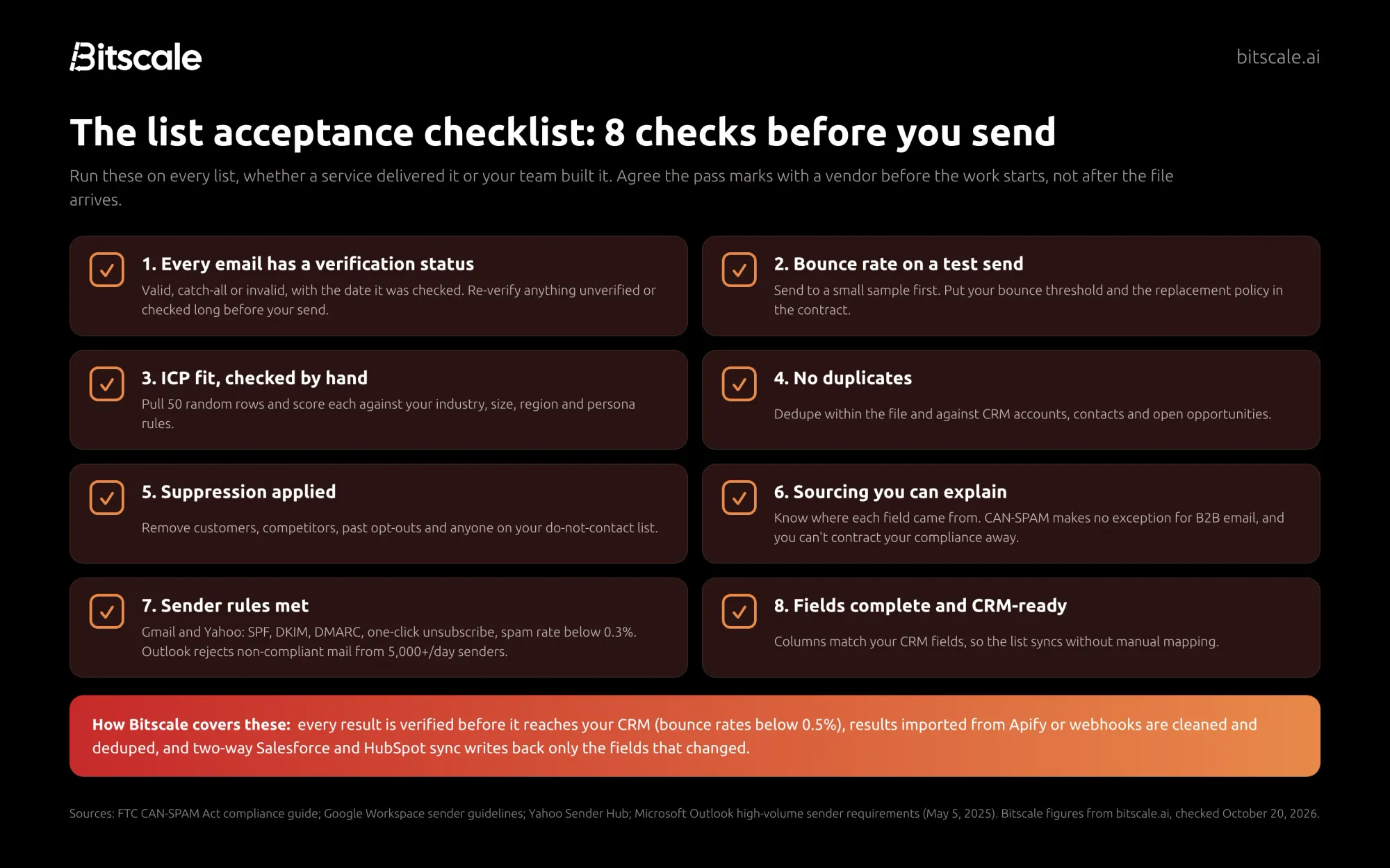
A list that looks complete can still damage your domain. Run these eight checks on every file, whoever built it, and agree the pass marks with a vendor before the work starts.
- Verification status on every email. Each address should be marked valid, catch-all or invalid, with the date it was checked. Treat catch-all as its own risk class. Our email verification guide explains the statuses.
- Bounce rate on a test send. Send to a small sample before the full list. Put your bounce threshold and the replacement policy in the contract, so bad rows are replaced, not argued about. For reference, Bitscale reports bounce rates below 0.5% on verified results.
- ICP fit, checked by hand. Pull 50 random rows and score each against your industry, size, region and persona rules. If more than a handful miss, send the list back.
- No duplicates. Dedupe within the file, then against CRM accounts, contacts and open opportunities. Match on domain and LinkedIn URL, not on company name.
- Suppression applied. Remove customers, competitors, past opt-outs and anyone on your do-not-contact list.
- Sourcing you can explain. Ask how each field was collected. Under the US CAN-SPAM Act, the FTC says "the law makes no exception for business-to-business email", each violating email can cost up to $53,088, and opt-outs must be honored within 10 business days. The FTC also warns that you can't contract away your legal responsibility, so hiring a service doesn't move the risk. If you prospect into the EU or UK, check the lawful basis with your legal team.
- Sender rules met. Since February 2024, Gmail and Yahoo require bulk senders to authenticate with SPF, DKIM and DMARC, offer one-click unsubscribe and keep spam rates below 0.3%. Gmail asks senders to aim for below 0.1%, and began tightening enforcement in November 2025. Microsoft Outlook has rejected non-compliant mail from domains sending 5,000+ emails a day since May 5, 2025.
- Fields complete and CRM-ready. Columns should match your CRM fields so the list syncs without manual mapping.
Checks 1, 2 and 4 are where most outsourced lists fail. In Bitscale they are built in: every result is verified before it reaches your CRM, results imported from Apify or webhooks are cleaned and deduped, and two-way sync writes back only the fields that changed.
How to brief a list building service
If you decide to hire, a tight brief saves a round of rework. Put these in writing:
- The ICP and personas, with the exact filters: industries, headcount, regions, titles and seniority.
- The field spec from the table above, including verification status and source per field.
- Volume and deadline, plus whether you want a one-off list or a monthly refresh.
- Your suppression file: customers, open opportunities and opt-outs.
- Acceptance rules: bounce threshold on a test send, ICP-fit sample rate, and how fast bad rows are replaced.
- Data ownership: whether you can reuse the list, and how the vendor sourced it.
If writing this brief feels like most of the work, it is. Once the spec exists, you can run the same brief yourself in Bitscale and compare the result with the vendor's sample before you commit to a recurring order.
How Bitscale helps: in-house list building that's as easy as hiring it out
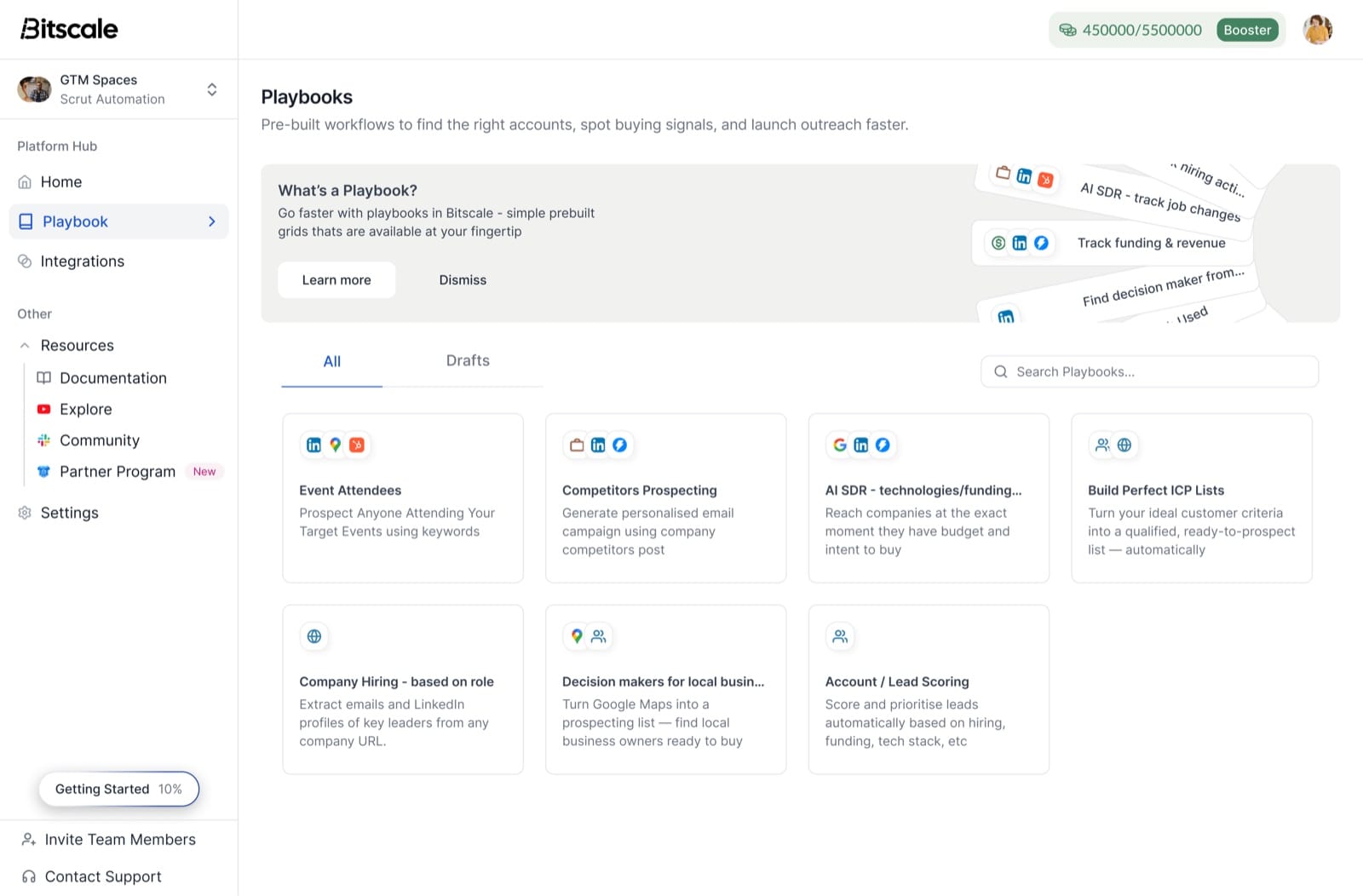
Bitscale's lead list builder gives you the speed of a service with the control of a tool. You describe who you want, Bitscale builds and verifies the list, and the result lands in your CRM.
Start from a playbook, not a blank grid. Ready-made Bitscale playbooks cover the most common list briefs:
- Build Perfect ICP Lists turns your ideal customer criteria into a qualified, ready-to-prospect list.
- Event Attendees finds people attending your target events using keywords.
- Company Hiring (based on role) extracts emails and LinkedIn profiles of key leaders from any company URL.
- Decision makers for local businesses turns Google Maps into a prospecting list of local business owners.
- Account / Lead Scoring scores and prioritizes leads automatically based on hiring, funding and tech stack.
Search a large base, then add niche sources. The lead-list builder searches 300M+ contacts and 40M+ company records with firmographic, technographic and persona filters you can save and reuse. It also takes in Sales Navigator searches, Google Maps, Google search results, and Apify or webhook data, which Bitscale cleans, dedupes and enriches.
Verify every contact across 18+ providers. Each row runs through one email and phone waterfall across 18+ contact-data providers, from 100+ data sources overall. If one provider misses, the next one tries, and every result is verified before it reaches your CRM. Bitscale reports 95% email and phone coverage with bounce rates below 0.5%. Guidebook's Shannon Jhanji, Growth Operations, put it this way: "Our email and phone waterfall hits 92% coverage on European ICP. Nothing else we tested came close."
Add a reason to reach out. Bitscale tracks 15 buying triggers, such as exec hires, tech-stack changes, funding and hiring posts, and lets you stack them on a list: for example, Series B plus hiring SDRs plus a new VP Sales. The AI research agent scrapes websites and runs Google and Perplexity research for details no database holds.
Keep the list current in your CRM. Two-way sync with HubSpot (Growth plan) and Salesforce (Booster plan) writes back only the fields that changed, so the list doesn't go stale in a spreadsheet.
Get it done for you. If nobody on your team has time to build workflows, Bitscale GTM engineers handle setup and migration. Paid plans include on-call support with a GTM engineer, and Enterprise includes a dedicated GTM engineer for a 4-week deployment.
Anderson Maia, GTM & Operations at Pensa Systems, described the difference from a single database: "From 10 leads, Apollo was returning results only from two or three. With Bitscale, I can look for email details in multiple sources and verify the email that returned — that's the ideal solution."
Pricing: Free with 200 credits, no card required. Growth is $349 a month ($314 annually) for 15,000 credits, Booster is $799 ($719 annually) for 50,000 credits, and Enterprise starts at $15K a year. Pricing is per account, paid plans include unlimited actions, and credits roll over up to 3x. To see how Bitscale compares with other prospecting tools, read our B2B prospecting tools guide.
Try Bitscale free
200 credits, no card required. Run the Build Perfect ICP Lists playbook on your own criteria and compare the result with a quote from a list building service.
Start for freeFrequently asked questions
What is a list building service?
A list building service researches and delivers a list of companies and contacts that match your criteria, usually with work emails, phone numbers and firmographic data. Types range from compiled data vendors and custom research agencies to managed outbound agencies and freelancers.
How much do list building services cost?
Few publish prices. Reach Marketing lists compiled B2B contacts at $0.35 each, marked not verified. Custom research is usually quoted per contact with minimums, and managed outbound bundles the list into monthly fees. In Bitscale, a found email costs about 2 to 19 cents on Growth.
Is it better to outsource list building or do it in-house?
Outsource for a one-off, niche list when no one can own a tool. Build in-house when you need lists every month, want to see how each email was verified, and want data synced to your CRM. Bitscale playbooks and GTM engineer setup make in-house nearly as hands-off.
What should a custom B2B list include?
Account fields (name, domain, industry, headcount, region), the ICP rule each account matched, a buying signal, person fields (name, title, seniority, LinkedIn URL), contact fields with verification status, the source and date for each field, and suppression flags.
How do I check the quality of a purchased list?
Check every email's verification status, run a small test send and measure bounces, hand-check 50 rows for ICP fit, dedupe against your CRM, apply suppression, confirm sourcing, and make sure your domain meets Gmail, Yahoo and Outlook sender rules.
Are list building services compliant with CAN-SPAM and GDPR?
That depends on how the data was collected and how you use it. The FTC says CAN-SPAM makes no exception for B2B email and that you can't contract away responsibility, so the sender stays accountable. For EU and UK contacts, confirm the lawful basis with your legal team.
Sources
List building service pricing (all opened October 20, 2026)
- Reach Marketing, B2B list building
- LevelUp Leads, list building services
- CIENCE pricing
- SalesHive pricing
Bitscale
- Pricing
- Lead list builder
- Homepage (providers, coverage, bounce rate)
- Docs: provider credit costs
- Docs: email and phone waterfalls
Compliance and sender rules