10 Essential RevOps Workflows That Keep Pipeline Moving in 2026
10 RevOps workflows for 2026 to automate enrichment, routing, CRM hygiene, attribution, and forecasting so pipeline stays fast and forecasts stay honest.
Revenue teams often struggle with disconnected processes across marketing, sales, and customer success. When workflows break down, pipeline slows, forecasts become less reliable, and manual work increases across the revenue engine. The issue is almost never tool count. It's the absence of well-designed RevOps workflows that keep marketing, sales, and customer success moving as one system. When those workflows snap, pipeline backs up, forecasts drift, and reps burn hours on work that should have been automated years ago.
The next ten workflows are the ones high-performing teams are running right now. They're concrete enough to build this quarter, and they're aimed at the quiet friction that drags down deal velocity. The goal here is simple: a playbook for pipeline operations that scales without turning your CRM into a full-time babysitting job.
What Are RevOps Workflows?
RevOps workflows are structured processes that connect marketing, sales, and customer success through shared data, automation, and operational rules. Their purpose is to reduce manual work, improve pipeline efficiency, and create more predictable revenue outcomes. Each workflow links a trigger (a form submission, a deal stage change, a renewal date approaching) to a defined action (routing a lead, enriching a record, updating a forecast). When these workflows run reliably, the entire revenue engine operates with less friction and greater consistency.
Why RevOps Workflows Matter More Than RevOps Tools
Gartner predicted that by 2025, 75% of the highest-growth companies would deploy a Revenue Operations model (Gartner, 2025). That ship has sailed. The real separator now is whether your workflows run cleanly without constant human supervision. A workflow is what connects a trigger (a form fill, a deal stage change, a renewal date) to an outcome (a routed lead, an enriched record, an updated forecast). Tools are swappable. Workflow logic is where your operating system actually lives.
Organizations that successfully align people, processes, and technology across revenue teams often achieve stronger growth, more predictable forecasting, and improved operational efficiency. The workflows below are designed to close the specific alignment gaps that chip away at those gains. If you are still choosing the right RevOps tools in 2026, do that first. Then come back and wire the stack into something that actually runs.
The 10 Workflows Every Revenue Team Needs
Use this table as the quick index. Each workflow maps to a recurring revenue bottleneck, the team that typically owns it, and the problem it removes from the system.
| # | Workflow | Primary Owner | Bottleneck Solved |
|---|---|---|---|
| 1 | Inbound Lead Enrichment | Marketing Ops | Missing fields slow routing and scoring |
| 2 | Speed-to-Lead Routing | Sales Ops / RevOps | Slow follow-up drags down conversion |
| 3 | CRM Hygiene Automation | RevOps | Dirty data distorts forecasts |
| 4 | Buying Signal Detection | RevOps / Sales | In-market accounts get missed |
| 5 | Deal Stage Validation | Sales Ops | Phantom pipeline inflates forecasts |
| 6 | Multi-Touch Attribution Sync | Marketing Ops | No clean campaign-to-revenue view |
| 7 | Renewal and Expansion Alerting | CS Ops | Churn surprises and missed upsells |
| 8 | Forecast Roll-Up Automation | RevOps | Manual forecasts fall behind reality |
| 9 | Account-Based Workflow Orchestration | RevOps / Demand Gen | Spray-and-pray outbound |
| 10 | Rep Productivity Scoring | Sales Ops | Activity without outcomes |
| Overview of the 10 essential RevOps workflows and the bottlenecks they solve. |
1. Inbound Lead Enrichment
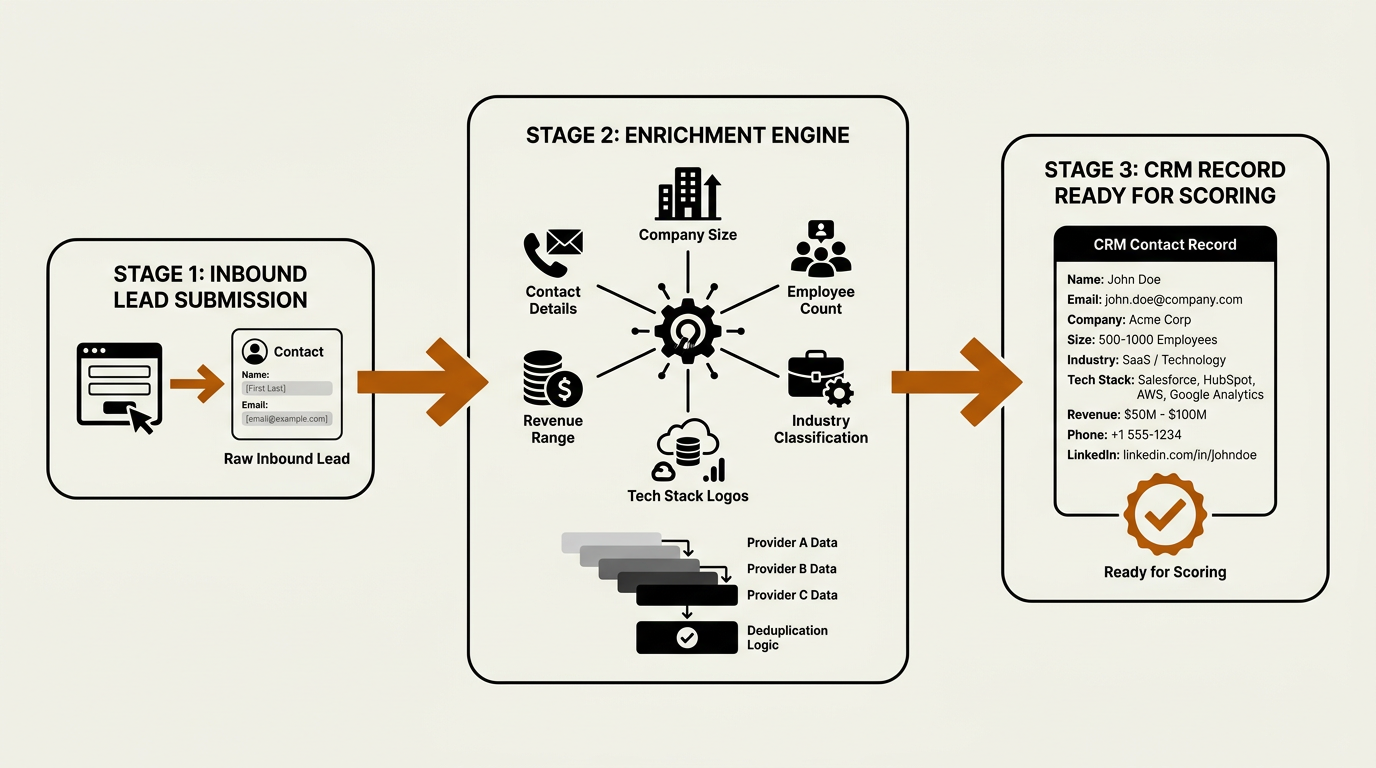
Enrichment should fire within seconds of form submission — not hours — before scoring runs.
Most pipeline issues trace back to the same root cause: the record was wrong or incomplete at creation. When a prospect submits a form with a name and an email, your scoring model isn't scoring; it's guessing. An inbound enrichment workflow fixes that by appending firmographic, technographic, and contact-level data as soon as the lead hits the CRM. The trigger is easy (new lead created). The difference between teams shows up in what happens next.
A solid enrichment workflow validates the email domain, resolves the company to a canonical record, appends revenue range, employee count, industry, and tech stack, then writes those fields back to the CRM before scoring runs. Bitscale approaches this as an operational layer: it pulls from multiple data providers via a single waterfall, deduplicates against existing accounts, and syncs enriched fields into HubSpot, Salesforce, or your CRM of choice. If you want the full build sequence, see this step-by-step lead enrichment workflow guide.
2. Speed-to-Lead Routing
Lead routing is the workflow most teams claim is "handled" while quietly bleeding conversion. The minutes between inbound and first contact are the highest-leverage window in the funnel. Faster response times consistently correlate with higher conversion rates, yet plenty of orgs run a basic round-robin that ignores territory, segment, and account ownership and then act surprised when reps chase the wrong leads.
A routing workflow worth trusting makes decisions off enriched fields, not whatever the prospect bothered to type. It checks whether the account already exists, whether there's an open opportunity, and whether the lead matches an ABM target list. Only after that does it assign an owner. If you are setting up lead scoring, routing, and enrichment from scratch, map the logic on paper first. The fastest way to create routing chaos is to encode a set of rules nobody can explain six months later.
3. CRM Hygiene Automation
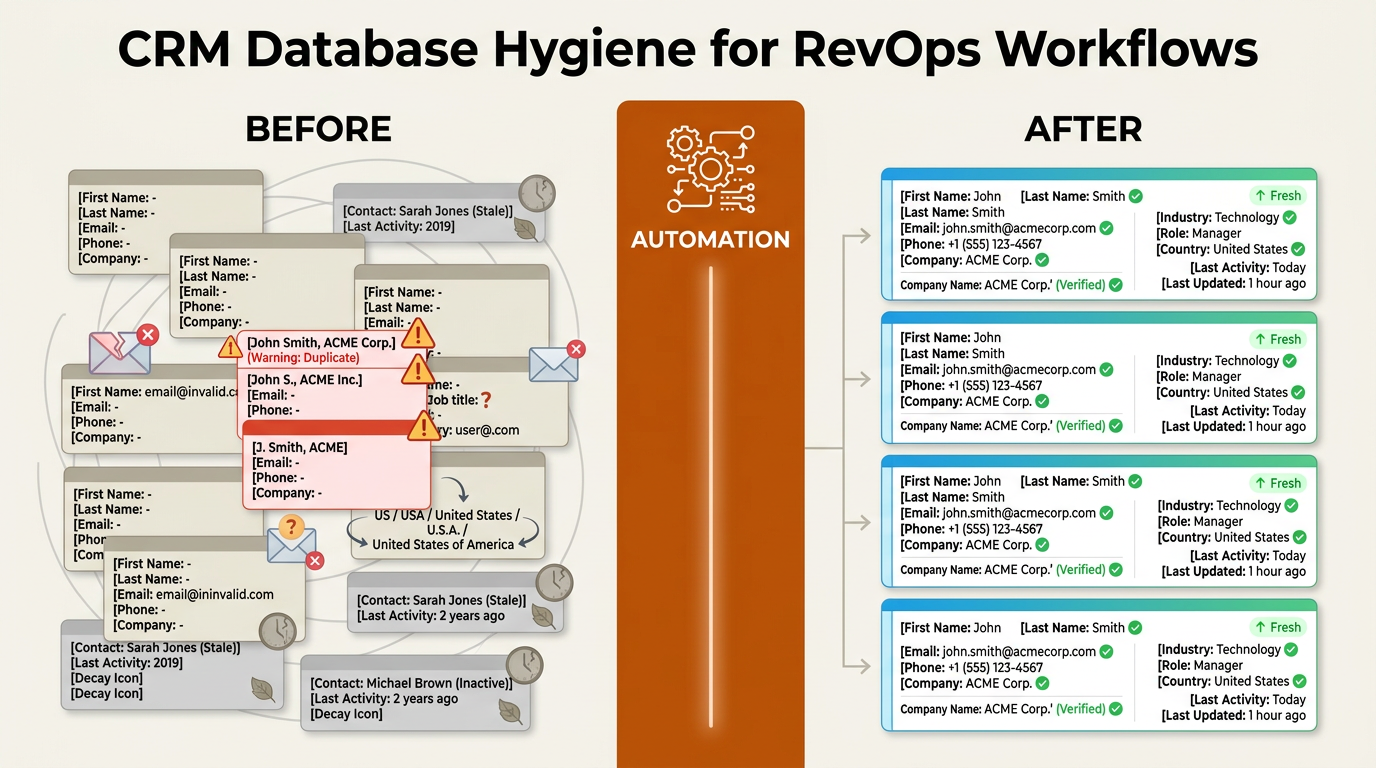
Automated CRM hygiene eliminates duplicates and stale records, powering reliable revops workflows.
Dirty CRM data isn't just annoying; it costs you money. When revenue leaders consistently report that data silos block accurate forecasting, the underlying culprit is usually the same: incomplete records, duplicates, and stale contacts that nobody owns. CRM hygiene automation runs on a schedule (daily or weekly) and does three unglamorous jobs that keep everything else honest: deduplication, field standardization, and decay detection.
A well-built CRM hygiene workflow should:
- Merge duplicate contacts and accounts using fuzzy matching on domain, name, and phone
- Standardize picklist values (e.g., 'US', 'United States', 'USA' all resolve to one value)
- Flag records where key fields (email, phone, job title) have not been updated in 90+ days
- Re-enrich stale records automatically through a provider like Bitscale to refresh job titles and company data
To see whether your hygiene automation is doing real work, track the contact data quality metrics that move outcomes: field completeness rate, duplicate ratio, and outbound email bounce rate. If those numbers are flat, your workflows are running, but they're not improving the dataset.
4. Buying Signal Detection and Account Prioritization
A lot of sales orgs still run on rep intuition: who "feels" ready, who "seems" warm. That's not a system. A buying-signal workflow watches intent data (content consumption, job postings, technographic changes, funding events) and promotes accounts that cross a defined threshold. The output should land where reps work: a prioritized queue each morning, not another dashboard they're supposed to remember to open.
Bitscale aggregates signals from multiple sources, scores them against your ICP criteria, and syncs high-intent accounts into your CRM or outbound sequencer. The real difference versus a generic intent feed is follow-through: the workflow doesn't stop at "flag account." It kicks off the next action (enrich contacts, add to a sequence, notify the AE). That's how automation compounds: one early signal can pull weeks out of a deal cycle.
5. Deal Stage Validation
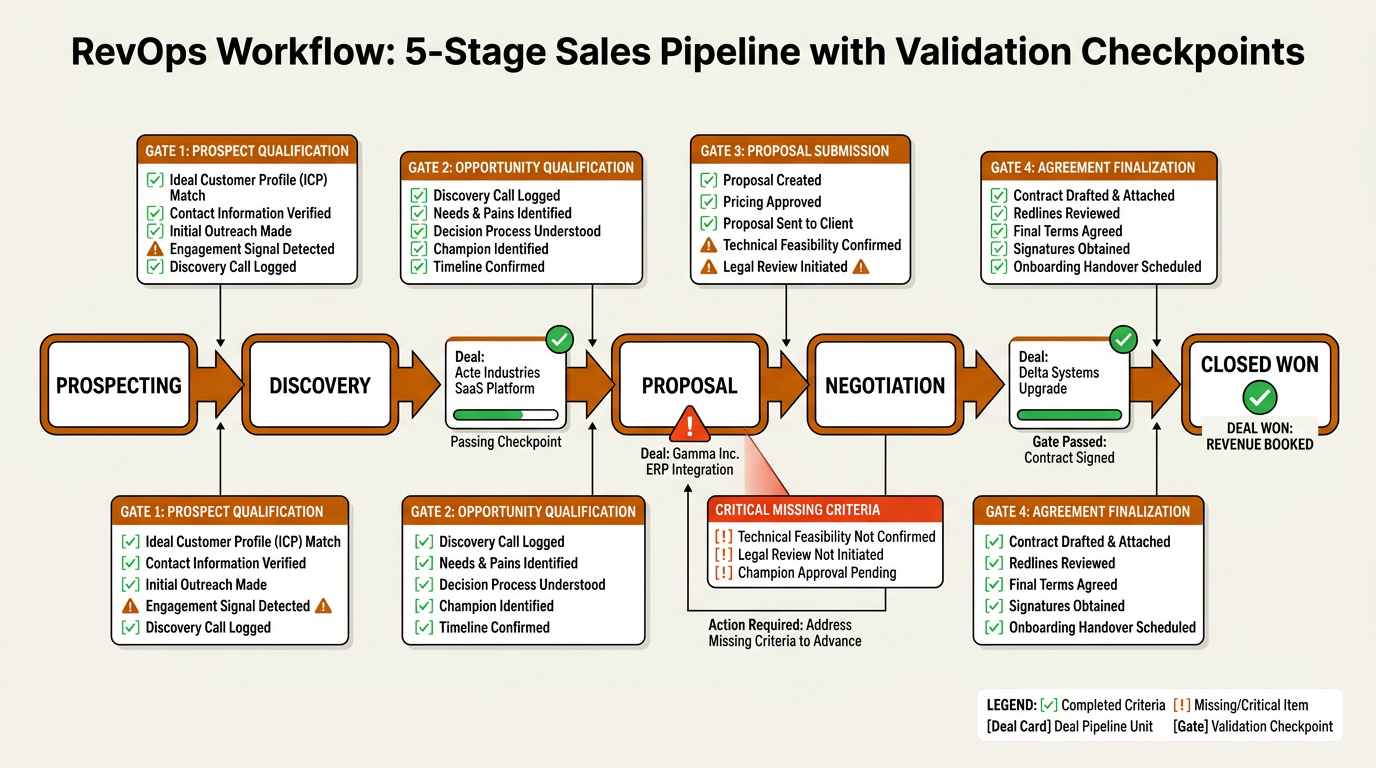
Deal stage validation gates ensure every pipeline opportunity meets objective exit criteria before advancing.
Pipeline discipline breaks the moment reps can advance deals without meeting exit criteria. A deal parked in "Negotiation" with no proposal sent isn't negotiating; it's hoping. Deal stage validation workflows enforce stage gates by checking for required fields and activities before a deal can move forward. If someone drags an opportunity to "Closed Won" without an attached contract, the workflow blocks the change and prompts for what's missing.
This isn't about policing reps; it's about keeping the forecast anchored to reality. When every stage represents objective criteria, your forecast model has real inputs instead of opinions. Sales teams that introduce stage validation often improve forecast accuracy and reduce the number of deals that remain stuck in later pipeline stages without meaningful progress.
6. Multi-Touch Attribution Sync
Teams that use unified RevOps data to track touchpoints across the buyer journey consistently report stronger campaign-to-revenue attribution. The workflow behind that result is conceptually simple and operationally messy. Each touchpoint (ad click, webinar attendance, sales email open, demo request) needs to land on the contact and opportunity record with a timestamp and source. Then your model (first-touch, multi-touch, or custom weighted) can assign credit.
The attribution model usually isn't what breaks. The plumbing does. Marketing automation, sales engagement, and event platforms all represent touchpoints differently, which means the CRM ends up with partial, inconsistent history. An attribution sync workflow normalizes events into a single schema and writes them into CRM campaign objects or custom fields. Without that normalization, marketing and sales will keep arguing about what sourced pipeline, and budget decisions will stay political instead of empirical.
7. Renewal and Expansion Alerting
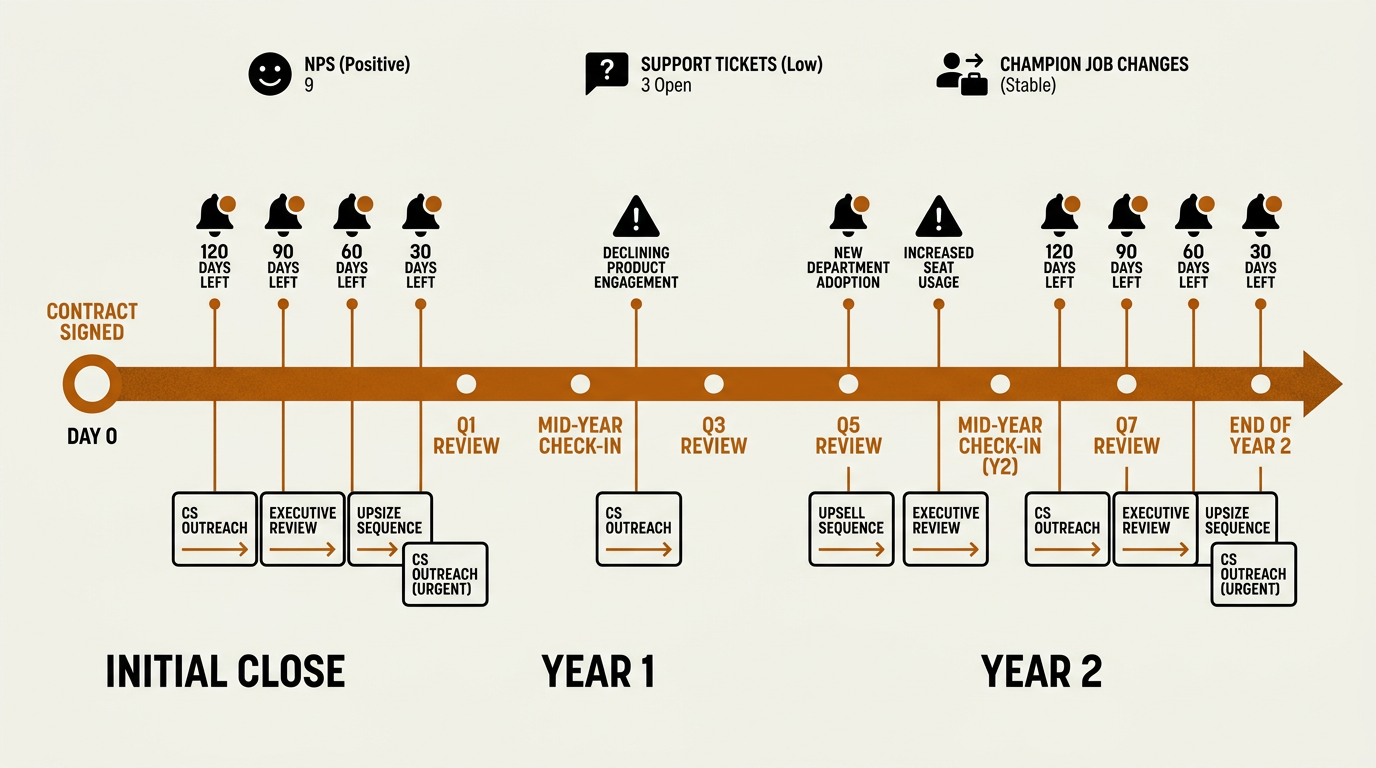
Renewal alerts at 120, 90, 60, and 30 days turn post-sale chaos into a predictable revenue motion.
Revenue doesn't end at closed-won, and your workflows shouldn't either. Customer success needs the same operational rigor sales gets. A renewal alerting workflow triggers on a set cadence (120, 90, 60, and 30 days before contract end) and checks health signals: product usage trends, support ticket volume, NPS scores, and champion job changes. If a champion leaves, Bitscale's enrichment layer can detect the change and flag the account before the CSM learns about it from a bounced email.
Expansion alerting follows the same pattern, but it watches for growth signals: new departments logging in, usage pushing past plan limits, or the account hiring into relevant roles. Those alerts should route to the owner with context and a recommended next step, not a drive-by notification. Organizations with strong alignment between sales, marketing, and customer success often achieve better retention, expansion opportunities, and overall revenue performance than teams operating in silos. Post-sale workflows are where that alignment stops being a slogan and starts showing up in the numbers.
8. Forecast Roll-Up Automation
If your CRM already produces a forecast you trust without spreadsheets, you're ahead of the pack. Most teams aren't. The common pattern is reps submitting calls, managers adjusting in a sheet, and a VP reconciling numbers that never quite match what's in the CRM. Forecast roll-up automation replaces that scramble by pulling weighted pipeline from validated stages, applying historical conversion rates by segment, and updating the forecast as the pipeline changes.
Workflow #5 (deal stage validation) is the prerequisite. If stage data is sloppy, an automated forecast just turns bad inputs into a faster bad output. Once your pipeline is credible, the roll-up workflow aggregates by rep, team, segment, and time period, then publishes the result to a dashboard or Slack channel. Done right, this removes the Sunday-night forecast email from your operating rhythm.
9. Account-Based Workflow Orchestration
ABM isn't a campaign format; it's a coordination problem with a budget. Account-based orchestration workflows keep outbound sequences, ad targeting, direct mail, and sales outreach synchronized against a shared account list and timeline. The trigger is usually an account entering a target segment based on ICP fit plus intent score. From there, the workflow fans out: marketing launches ads, SDRs get enriched contact lists with talk tracks, and the AE receives a briefing doc.
Bitscale plugs into this motion as the enrichment and signal layer. It builds contact lists, appends work emails and phone numbers, and keeps monitoring the account for buying signals while the play runs. For the full blueprint, see the guide on ABM workflow automation. The operating principle is simple: in ABM, actions should be triggered by data, not by someone remembering it's Tuesday.
10. Rep Productivity Scoring
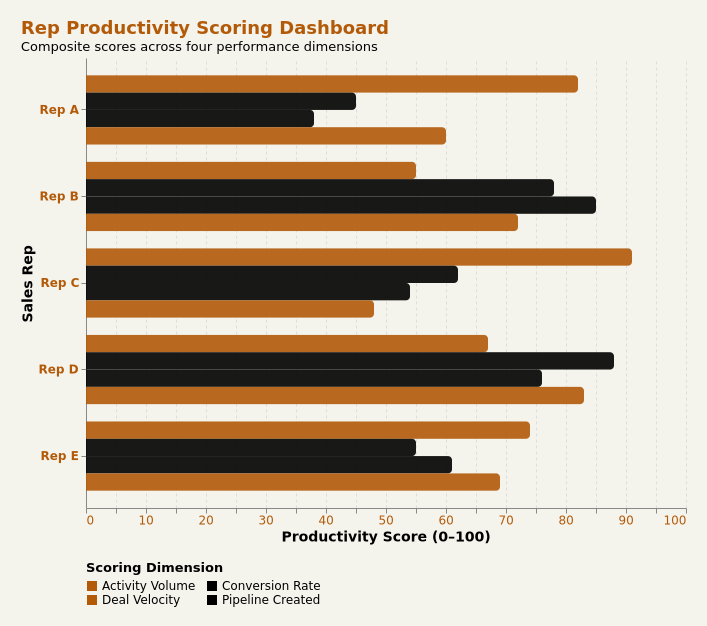
Composite scoring across four dimensions helps sales ops distinguish busy reps from truly productive ones.
Activity metrics are easy to measure and dangerously easy to misread. A rep logging 80 calls a day with zero pipeline created isn't productive; they're busy. Rep productivity scoring workflows blend activity data (calls, emails, meetings) with outcome data (opportunities created, pipeline value, win rate) to generate a composite score. The workflow pulls from your dialer, email platform, and CRM, normalizes the inputs, and updates a scorecard weekly.
This is a coaching tool, not a surveillance system. High activity with low conversion usually points to targeting or messaging, not effort. Low activity with high conversion often signals a rep who is capacity-constrained and ready for more accounts. Sales ops teams use these scores in 1:1s and QBRs to make grounded decisions about territory shifts, training investments, and promotion readiness.
Building Your RevOps Automation Stack
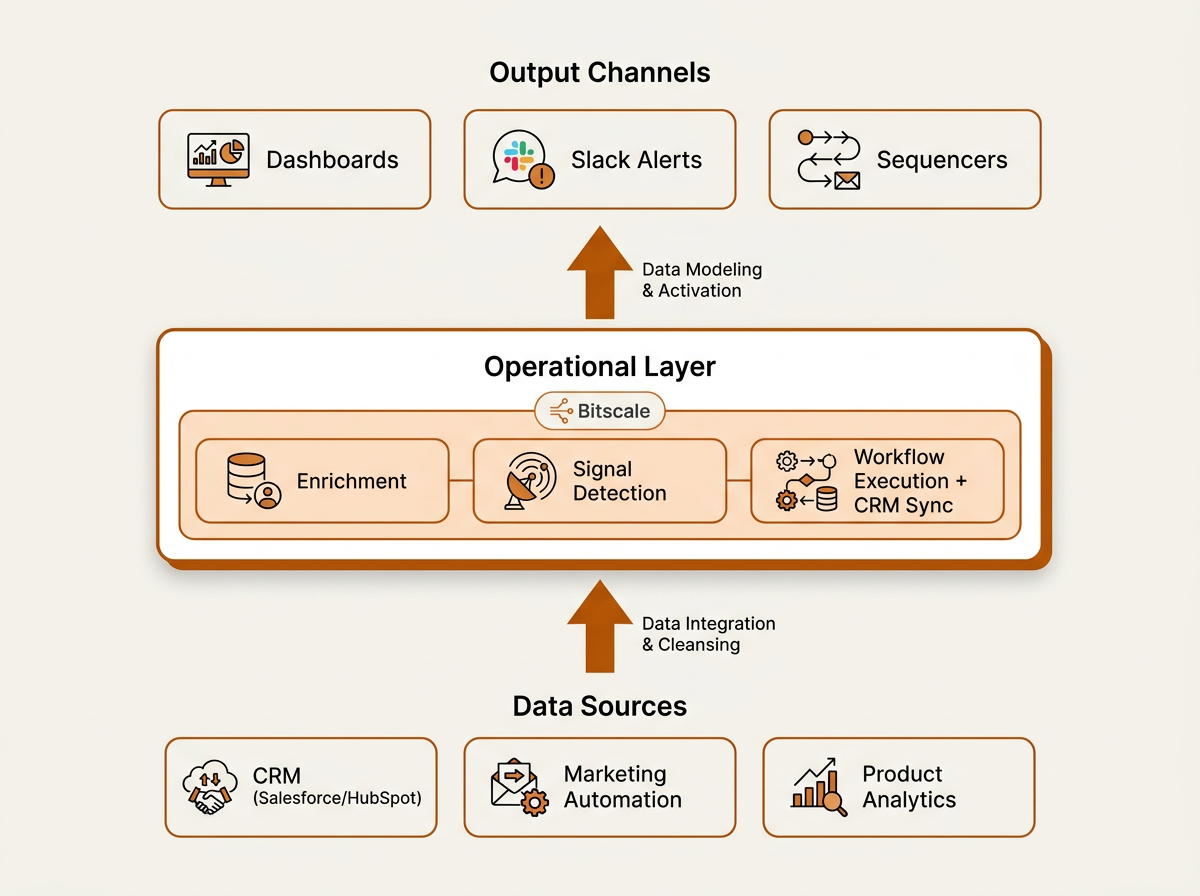
The operational middle layer — enrichment, signal detection, CRM sync — is where most RevOps stacks have critical gaps.
These workflows don't live on islands. Enrichment feeds routing, routing feeds pipeline, pipeline feeds forecasting. To support that chain, your stack needs three things. First, a CRM as the system of record (Salesforce, HubSpot, or similar). Second, an operational layer that handles enrichment, buying signals, CRM synchronization, and workflow execution. This is where Bitscale sits, bridging raw inputs and CRM-ready records. Third, a reporting layer that consumes clean, validated data without forcing RevOps to maintain a parallel spreadsheet universe.
Tools like Clay, Apollo.io, Cognism, and Lusha cover slices of the stack. Clay is strong at flexible data orchestration for technical teams. Apollo.io bundles prospecting with a built-in sequencer. Cognism and Lusha focus on compliant contact data, particularly in EMEA. Bitscale positions itself differently: enrichment, intent signals, and ready-made sales workflows with native CRM sync, so RevOps teams spend less time stitching integrations together and more time tuning the workflows that move pipeline. For the broader architecture view, see how to build a scalable GTM automation stack.
What Most Teams Get Wrong
The most common failure is automating before designing. Teams buy a tool, enable every default automation, and then wonder why the CRM fills up with junk and reps get leads that belong to someone else. Start on paper. Define the trigger, the branching logic, the data requirements, and the exit conditions. Then build it in your automation platform with rules your team can actually explain.
The next mistake is treating RevOps like a sales-only support function. Revenue operations workflows run across the full customer lifecycle. If customer success isn't in the room when workflows are designed, you'll optimize for acquisition and leak revenue after the close. The data from sales operations is clear: in mature B2B companies, retention and expansion revenue increasingly outpace new logo revenue. Your workflows need to reflect that shift.
The third mistake is letting data quality slide. Every workflow downstream of enrichment inherits whatever enrichment produced. If your data cleansing tools aren't running before routing and scoring, you're building on sand and then blaming the forecast when it collapses.
Key Takeaways and Next Steps
These ten RevOps workflows aren't aspirational; they're baseline infrastructure for predictable pipeline in 2026. Build the foundation first (enrichment, routing, CRM hygiene), then layer in advanced workflows (attribution, forecasting, ABM orchestration) as your data becomes trustworthy. For each workflow, assign a clear owner, set an SLA you can measure, and review performance quarterly so the system keeps up with how your GTM motion actually changes.
Your action plan for the next 30 days:
- Audit your current lead enrichment coverage: what percentage of new leads have complete firmographic data within 5 minutes of creation?
- Map your lead routing logic on paper and identify every exception that currently requires manual intervention
- Run a CRM duplicate report and measure your duplicate contact ratio
- Identify one buying signal source you are not yet capturing and plan a pilot workflow
- Review your forecast process: how many manual steps exist between CRM data and the number your VP presents to the board?
If you want to move faster, Bitscale's ready-made workflows for enrichment, signal detection, and CRM sync can shorten the build cycle. The goal isn't to automate everything in a weekend. It's to remove the specific friction points that slow pipeline velocity, one workflow at a time.
Frequently Asked Questions
What are RevOps workflows, and why do teams care about them?
RevOps workflows are automated processes that connect marketing, sales, and customer success through shared triggers and shared data. They matter because they remove manual handoffs, cut down data errors, and keep pipeline moving without constant human intervention. Organizations that align revenue operations workflows often achieve more predictable growth, better forecasting, and improved cross-functional coordination.
Which RevOps workflows should I build first?
Start where bad data does the most damage: inbound enrichment and CRM hygiene automation. Clean records are the prerequisite for everything downstream. Once your data is reliable, prioritize lead routing and deal stage validation because they directly affect pipeline flow and forecast accuracy.
What is the difference between sales workflow automation and RevOps automation?
Sales workflow automation typically supports individual rep tasks like sequences, reminders, and call logging. RevOps automation works at the system level: it orchestrates enrichment, routing, data flow, and reporting across marketing, sales, and customer success. In practice, RevOps automation makes sure sales automation is running on clean inputs and consistent rules.
Where does Bitscale fit in a RevOps automation stack?
Bitscale functions as the operational layer for enrichment, buying signals, and CRM synchronization. It enriches leads and accounts using multiple data providers, detects intent signals, and syncs clean fields into your CRM. That puts it between raw data sources and downstream workflows like routing, scoring, and outbound execution.
How often should CRM hygiene workflows run?
Deduplication and field standardization typically run daily. Decay detection (flagging stale records) is often a weekly job. Re-enrichment of stale records can run monthly or quarterly depending on volume. The goal is to catch data quality issues before they spill into forecasting and attribution.