Customer data enrichment: a practical B2B guide for 2026
Customer data enrichment for B2B: what to enrich on existing accounts, a step-by-step Salesforce and HubSpot workflow, GDPR basics and how to measure impact.
The short answer: Customer data enrichment means adding fresh outside data, such as verified emails, current titles, job changes, firmographics and buying signals, to the customer and account records you already hold in your CRM. Prospect enrichment helps you book a first meeting. Customer enrichment helps you keep, grow and market to the accounts that already pay you. Bitscale does this inside Salesforce and HubSpot: it pulls your customer list into a live grid, fills gaps through one waterfall across 18+ contact-data providers, flags job changes, bad emails and dead domains the day they happen, and writes back only the fields that changed.
Done well, enriched customer data gives you:
- Expansion: you see hiring, funding and new-executive signals at accounts you already serve.
- Retention: you know when a champion leaves, before the renewal call.
- Segmentation and personalization: marketing works from current titles, headcount and tech stack, not the values someone typed in three years ago.
- Deliverability: customer emails reach people who still work there.
This guide covers what's different about customer data, what to enrich, a step-by-step workflow in Bitscale, privacy basics and how to measure the result.
Customer data enrichment vs prospect enrichment
The mechanics are the same: match a record, query outside sources, verify, write the result back. If you want the fundamentals, our data enrichment guide covers them, and our guide to data enrichment services covers who should do the work and how you pay for it. What changes with customers is the starting point and the goal.
| Prospect enrichment | Customer data enrichment | |
|---|---|---|
| Starting point | A name, a domain or a list you built | Records you already own, plus contract, usage and support history |
| Main goal | Reach the right person for the first time | Keep the relationship current, then grow it |
| What matters most | Fill rate: how many records you can reach | Change detection: who left, who was promoted, what changed at the account |
| Who uses it | SDRs and outbound | Account managers, customer success, lifecycle and product marketing, RevOps |
| Relationship | None yet | An existing customer relationship, which affects your lawful basis under GDPR |
The biggest practical difference is that customer data decays while you're not looking. You enriched the account when it was a prospect, then it closed, and the record stopped getting attention. The US Bureau of Labor Statistics reports that wage and salary workers had a median of 4.1 years with their current employer in January 2026, and 3.0 years for workers aged 25 to 34. Over a multi-year customer relationship, the people who bought from you, use your product and sign the renewal will change. Bitscale is built to catch those changes as they happen rather than at the next data audit.
Why enrich customer data, not just prospect data
Most enrichment budgets go to the top of the funnel. Customer records often get one enrichment pass at the deal stage and nothing after. That leaves your highest-value records the least maintained. Leaders already doubt their data: in Salesforce's State of Data and Analytics report (November 2025), leaders estimated that 26% of their organizational data is untrustworthy.
Expansion and cross-sell
Your best expansion leads are accounts that already trust you. Signals such as a hiring push in the team that uses your product, a new funding round or a new executive in the buying department tell you when to start the conversation. Bitscale tracks 15 buying triggers, including exec hires, tech-stack changes, funding events and hiring posts, and lets you stack them, so an account with a new VP and an open headcount plan rises to the top of the account manager's list.
Champion and job-change tracking
A champion who leaves a customer is two events: a risk at the old account and an opportunity at the new one. Our guide to champion tracking covers the full practice, so here is only the data side. Bitscale's champion tracking checks tracked contacts daily against 100+ sources for a new title or employer, finds the new work email and mobile when someone moves, profiles the new employer against your ICP, and routes it to the rep who owned the relationship. It also flags promotions, not just departures.
Segmentation
Segments built on stale fields send the wrong message to the wrong account. If headcount, industry and tech stack are refreshed, you can segment customers by real size and fit, separate accounts that grew from those that shrank, and build lists such as "customers using a tool we integrate with." Phyllo, a Bitscale customer, runs account relevance and segmentation in Bitscale grids that sit on top of its CRM, pulling data in, improving it and pushing it back.
Marketing personalization
Marketing data enrichment is mostly customer data enrichment in practice. Lifecycle emails, webinar invites, advocacy asks and product announcements all depend on current names, titles and roles. Personalization built on a wrong title reads worse than no personalization. For the writing side, see how revenue teams use email personalization. The same applies to AI-written messages: Gartner predicts that organizations will abandon 60% of AI projects unsupported by AI-ready data through 2026. An AI model that drafts a customer email from a stale record gets the details wrong.
Renewal risk
Some churn signals come from your own systems: falling usage, open tickets, late invoices. Others only show up in outside data:
- your champion or economic buyer has left
- the account has been acquired, or its domain has stopped resolving
- headcount in the team that uses your product has dropped
- a new executive has arrived who didn't choose you
Bitscale's CRM enrichment flags job changes, bounced emails and dead domains in real time, so your customer success team hears about them while there's still time before the renewal.
What to enrich on customer and account records
Use this as a field map. The "source" column shows where each value comes from in a Bitscale setup; the "use" column is the reason to keep it current.
| Field | Source | Use |
|---|---|---|
| Work email | Bitscale waterfall across 18+ providers, verified before it reaches the CRM | Renewal, onboarding and product emails that arrive |
| Mobile or direct dial | Same waterfall | Reaching the economic buyer before renewal |
| Current title and seniority | Job-change scanning against 100+ sources | Promotion alerts, persona-based segments |
| Current employer | Job-change detection | Champion left (risk) or moved (new pipeline) |
| LinkedIn URL | Waterfall and enrichment sources | Matching the same person across records and companies |
| Headcount and industry | Firmographic sources with source attribution | Tiering, territory and segment rules |
| Tech stack | AI research agent and enrichment sources | Integration fit, cross-sell, competitive risk |
| Funding and hiring activity | Buying triggers and the AI research agent | Expansion timing |
| New executives | Exec-hire trigger | Multi-threading and re-introductions |
| Email and domain status | Bounce, bad-email and dead-domain flags | Hygiene and acquisition review |
Two rules keep this map useful:
- Keep first-party data first. Contract value, renewal date, product usage and support history live in your own systems and should never be overwritten by outside data. Enrichment tells you what changed outside the account; your own data tells you what changed inside it. Good segments use both.
- Write signals to their own fields. Don't overwrite "Title" with a guess. Write "Job change detected" with a date, or "Expansion signal" with the trigger name, to a dedicated field your team can filter and report on. Bitscale's field-level control lets you decide exactly which fields it may update.
For the CRM mechanics of field mapping, sync rules and deduplication, see our guides to CRM data enrichment and CRM enrichment fields, refresh cadence and dedup rules. For field-level detail on the two record types, see contact enrichment and company enrichment.
B2B vs B2C customer data enrichment
This guide is about B2B. The term "customer data enrichment" also covers B2C, where retailers and consumer brands add attributes such as demographics, location and interests to individual shoppers. The data, the sources and the privacy expectations are different, because B2C enrichment describes private individuals rather than people in their work roles.
B2B customer enrichment works at two levels: the account (the company that pays you) and the contacts inside it (the people who buy, use and approve). Most of the value comes from connecting the two, for example knowing that the account is hiring in the team your champion runs, or that the champion who signed has left. Bitscale works with both record types in the same grid.
A step-by-step customer data enrichment workflow with Bitscale
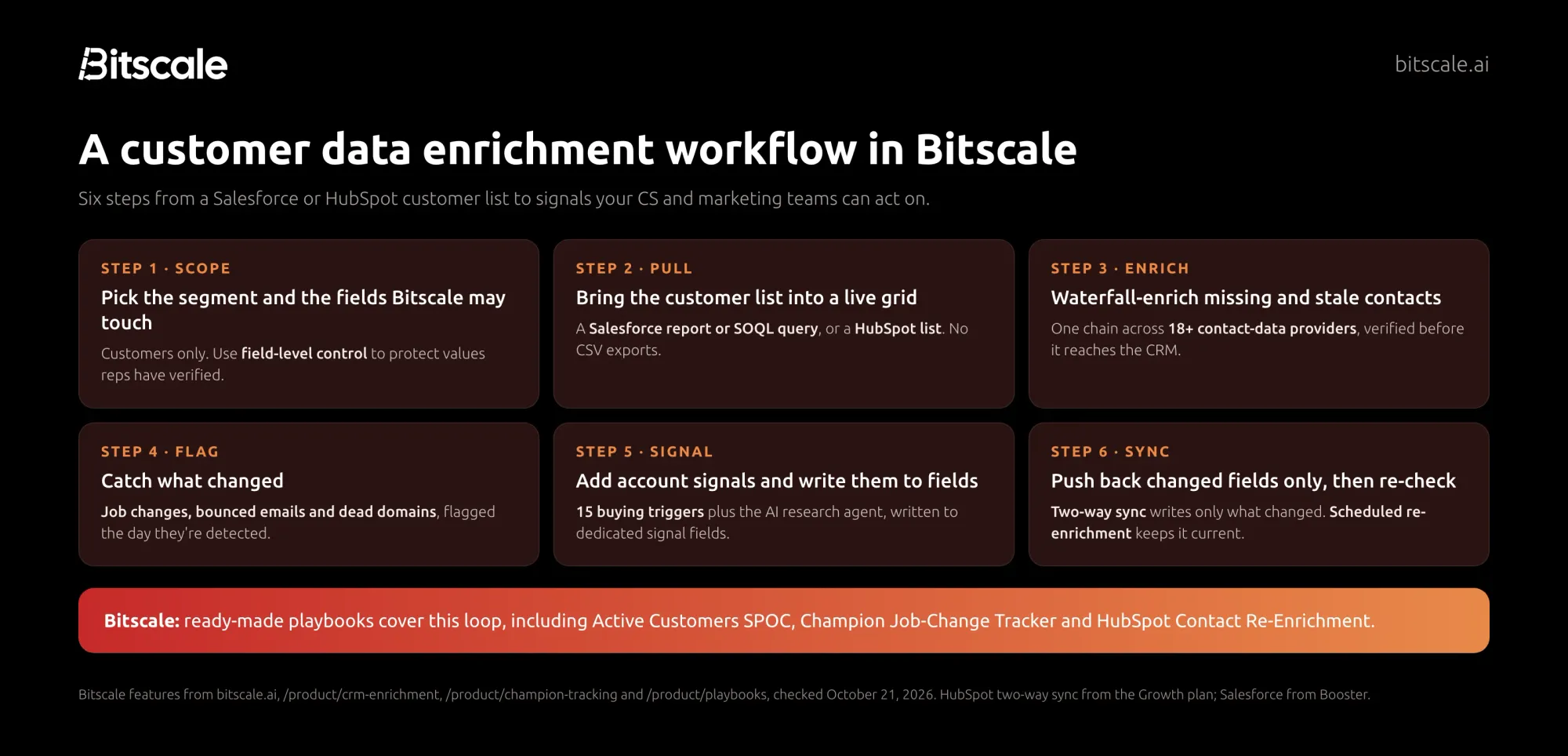
Step 1: Scope the segment and the fields
Start with one segment, such as all customer accounts, or customers renewing in the next two quarters. Decide which fields Bitscale may update and which it must never touch. Rep-verified phone numbers, contract fields and anything your billing system owns usually belong on the protected list. Bitscale's field-level control enforces this, so nothing gets overwritten by accident.
Step 2: Pull the customer list from Salesforce or HubSpot
In Bitscale, pull a Salesforce report or SOQL query, or a HubSpot list, straight into a live grid. Examples:
- Salesforce: a report of accounts where the type is Customer, with their related contacts.
- HubSpot: a list of contacts whose lifecycle stage is Customer.
There's no CSV export and re-import, so you avoid creating duplicates on the way back. HubSpot two-way sync is available from the Growth plan and Salesforce from Booster.
Step 3: Waterfall-enrich missing and stale fields
Run the contacts through Bitscale's waterfall. It queries 18+ contact-data providers in the order you set, stops at the first result that passes verification, and charges credits only for the provider that returns a valid result. Our waterfall enrichment guide explains how the chain works. For customer records, focus the waterfall on the gaps that block a play: missing emails for secondary stakeholders, missing mobiles for economic buyers, and titles that haven't been checked since the deal closed.
Step 4: Flag job changes, bad emails and dead domains
This is the step prospect workflows skip. Bitscale flags contacts who have left their company the day the change is detected, marks emails that start bouncing for re-enrichment, and surfaces company records tied to defunct or acquired domains for review. When a champion moves, Bitscale finds their new work email, mobile and company profile.
Step 5: Add account signals and write them to fields
Layer account-level signals on top: exec hires, funding events, hiring posts and tech-stack changes from Bitscale's 15 buying triggers, plus anything the AI research agent can extract from the web, such as tech stack or hiring data. Write each signal to a dedicated field with a date and a source, so the account manager, the CS dashboard and the marketing segment all read the same value.
Step 6: Sync back changed fields only, then re-check on a schedule
Bitscale's two-way sync pushes back only the fields that changed, which keeps your CRM's audit history readable and avoids rewriting good values. Then set the segment to re-enrich on a schedule. Scheduled re-enrichment catches decayed fields automatically, and Bitscale's HubSpot Contact Re-Enrichment playbook refreshes stale HubSpot contacts every week, updating job titles, replacing bad emails and flagging departed contacts.
You don't have to build these from scratch. Bitscale ships ready-made playbooks for this loop, including Active Customers SPOC (find and engage the right stakeholders inside active customer accounts, for expansion, upsell and renewal plays), Champion Job-Change Tracker and HubSpot Contact Re-Enrichment.
Turning customer signals into plays
Data only matters if someone acts on it. Map each signal to an owner and a next step before you switch the workflow on.
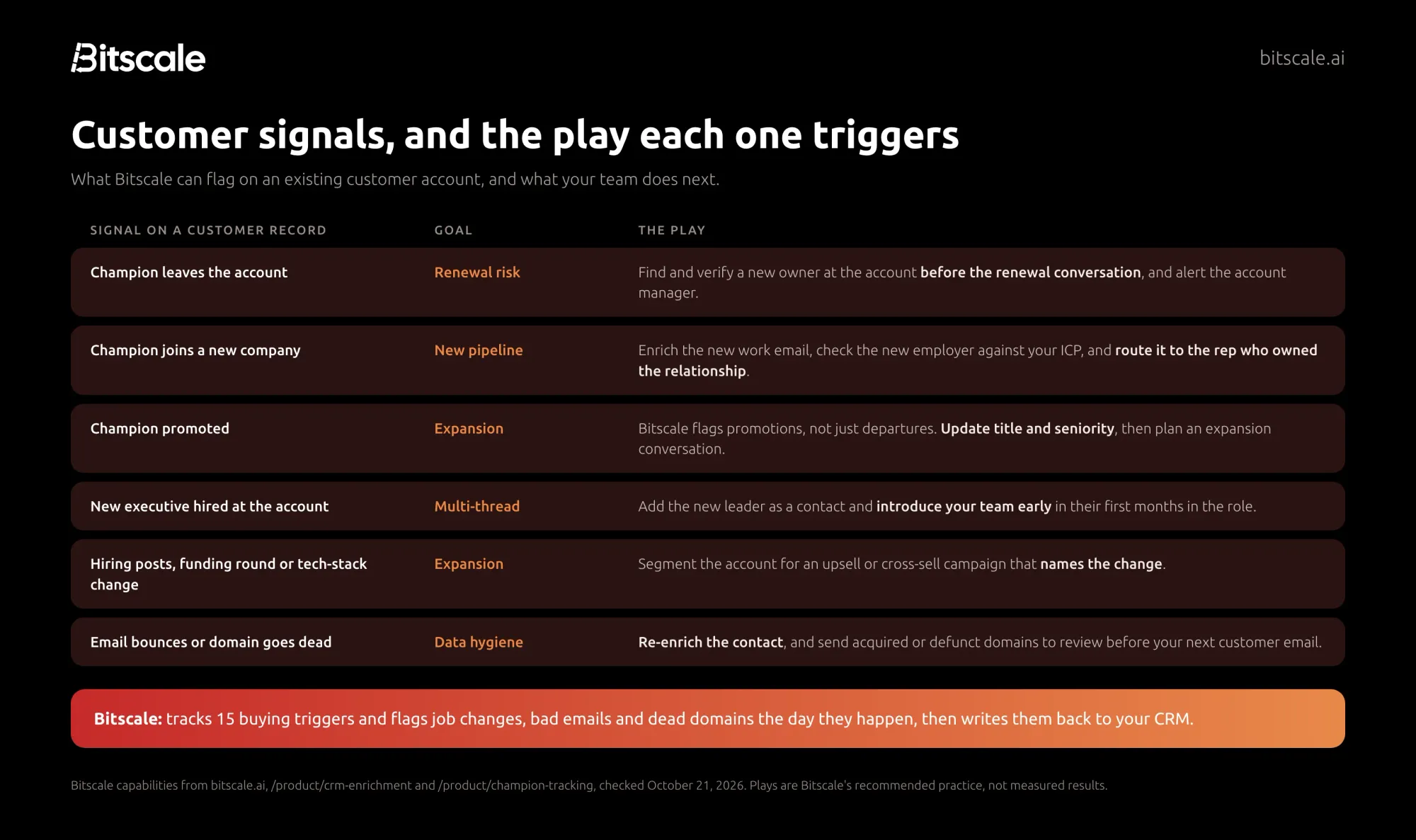
A few rules that make the plays work:
- One owner per signal. Champion departures go to the account manager; new-company moves go to the rep who owned the relationship; hygiene flags go to RevOps.
- Act inside the CRM. Create the task or alert where the owner already works. Bitscale writes signals back to Salesforce or HubSpot rather than to a separate dashboard.
- Name the change. An expansion email that mentions the customer's new team or new funding reads as relevant. Bitscale can draft a personalized re-introduction that references the old relationship when a champion moves.
Privacy and consent: GDPR basics for customer enrichment
This section is general information, not legal advice. Check your lawful basis and notices with your own counsel.
Enriching customer contacts in the EU or UK means processing personal data, even when it's work data. Four principles matter most:
- Lawful basis. Most B2B teams rely on legitimate interests under Article 6(1)(f), which applies unless the person's interests or rights override yours. Recital 47 says a legitimate interest "could exist" where the person "is a client", and that the test takes into account their reasonable expectations based on the relationship. An existing customer relationship helps, but it doesn't remove the need to assess it.
- Purpose and minimization. Article 5 requires data to be collected for specified purposes and limited to what is necessary. Enrich the fields your plays actually use, not everything a provider can return.
- Accuracy. Article 5 also requires personal data to be accurate and, where necessary, kept up to date. Removing departed contacts and fixing outdated titles supports that principle.
- Transparency and objection. Under Article 14, when you obtain data from a source other than the person, you must inform them within a reasonable period, at the latest within one month, or at the latest at your first communication with them. Under Article 21, people can object to direct marketing at any time.
Two situations are specific to customer data:
- A champion's new work email is new data. When a contact moves companies, their relationship was with their old employer's account. Treat the new address as data obtained from a third party, and apply your notice and objection process again.
- Suppression follows the person. If someone objected to marketing, keep the suppression attached to the person as well as the old email address, so a job change doesn't quietly re-add them to campaigns.
Contracts with the enrichment provider (a data processing agreement and subprocessor list) are covered in our data enrichment services guide. Bitscale's security overview lists GDPR and CCPA compliance and a completed SOC 2 Type II examination, data in transit is encrypted with TLS 1.2 or higher, and subprocessor information is available on request. Source attribution on every field Bitscale writes helps you answer the question "where did you get my data?"
How to measure the impact of customer data enrichment
Measure before you switch the workflow on, then again after one or two refresh cycles. Pick a handful of metrics tied to the plays you mapped.
| Metric | How to calculate it | What it tells you |
|---|---|---|
| Contact coverage on customer accounts | Customer contacts with a verified email and current title ÷ all customer contacts | Whether your plays can reach the people they need |
| Bounce rate on customer emails | Bounces ÷ customer emails sent | Whether stale addresses are hurting deliverability |
| Single-threaded accounts | Customer accounts with one active contact ÷ all customer accounts | Renewal exposure if that one person leaves |
| Time to detect a job change | Date the change was flagged − date the person moved (where known) | Whether you hear about departures in days or months |
| Signal-sourced expansion pipeline | Expansion opportunities created from an enrichment signal | Whether the signals lead to revenue |
| Champion pipeline | Opportunities at a champion's new company | Value from job-change tracking |
Keep the signal field and date on each record, so you can attribute pipeline to the signal that created it. For a wider set of data-quality metrics, see contact data quality metrics every RevOps team should track, and for ongoing upkeep, our CRM data hygiene guide.
Bitscale's own figures are 95% email and phone coverage with bounce rates below 0.5%. Test those on a sample of your own customer records before you commit.
How Bitscale helps
Bitscale is the GTM data layer for your CRM. For customer data, that means the enrichment, the change detection and the write-back all happen inside the Salesforce or HubSpot records your teams already use.
- Pull customers in directly. Pull a Salesforce report, a SOQL query or a HubSpot list into a live grid, with no exports.
- One waterfall across 18+ contact-data providers and 100+ data sources overall, with 95% email and phone coverage and bounce rates below 0.5% by Bitscale's figures. You're charged only for the provider that returns a valid result.
- Catch CRM rot the day it happens. Job changes, bounced emails and dead domains are flagged in real time, and promotions are flagged alongside departures.
- Champion tracking. Daily job-change scanning, new-company enrichment, ICP checks on the new employer and routing to the original owner.
- 15 buying triggers for expansion timing, stackable into composite signals, plus an AI research agent that extracts tech stack, funding and hiring data from the web.
- Field-level control and two-way sync that pushes back only changed fields. HubSpot from Growth, Salesforce from Booster.
- Scheduled re-enrichment and ready-made playbooks, including Active Customers SPOC, Champion Job-Change Tracker and HubSpot Contact Re-Enrichment.
- API and MCP access at
https://api.bitscale.ai/mcp, with OAuth and about 50 tools, charged at the same credit rate as the app, so you can bring customer enrichment into your own tools and agents. - Done-for-you setup. Bitscale GTM engineers set up and migrate your workflows, with a dedicated engineer on Enterprise.
Customers describe the result in their own words. Kieran Krohn, Head of Growth at ScaleStation: "Bitscale made our CRM feel alive - and getting in touch with these guys is so easy!" ScaleStation connected HubSpot to Bitscale, enriched about 27,000+ contacts, pushed the data back to HubSpot automatically, and reports a 60% increase in multi-threaded deals. Ronak, Head of Growth at Phyllo: "Bitscale became the place where all our GTM work finally came together." Phyllo has cleaned 43k+ CRM records in Bitscale, and Bitscale's homepage reports that Phyllo keeps its CRM at 94% coverage and saves $30K a year on stale-data tooling. Bitscale is rated 4.8 out of 5 on G2.
| Plan | Price | Credits |
|---|---|---|
| Free | $0 | 200 |
| Growth | $349/mo ($314 billed annually) | 15K/mo |
| Booster | $799/mo ($719 billed annually) | 50K/mo |
| Enterprise | from $15K/yr | Custom |
Pricing is per account, actions are unlimited on paid plans, and unused credits roll over up to 3x. See CRM enrichment in Bitscale for the product details.
Try Bitscale free
pull a sample of your customer accounts from Salesforce or HubSpot, enrich them with 200 free credits, and see which champions have moved and which emails have gone bad. You pay nothing for misses.
Start for freeFrequently asked questions
What is customer data enrichment?
Customer data enrichment adds outside data, such as verified emails, current titles, job changes, firmographics and buying signals, to the customer and account records already in your CRM. B2B teams use it for expansion, retention, segmentation and marketing personalization.
How is customer data enrichment different from lead enrichment?
Lead enrichment fills in records so you can reach a prospect for the first time. Customer data enrichment keeps existing accounts current, with a focus on change detection: who left, who was promoted and what changed at the account, so you can protect renewals and find expansion.
What is marketing data enrichment?
Marketing data enrichment adds the attributes marketing needs, such as title, seniority, industry, headcount and tech stack, to contact and account records for segmentation and personalization. In B2B, much of it is customer data enrichment, since lifecycle campaigns target existing accounts.
How often should customer data be re-enriched?
Re-check active customer records on a schedule and react to events such as bounces and job changes as they happen. Bitscale supports scheduled re-enrichment, and its HubSpot Contact Re-Enrichment playbook refreshes stale HubSpot contacts every week.
Is customer data enrichment GDPR compliant?
It can be, depending on how you do it. You need a lawful basis, often legitimate interests, plus data limited to what you need, notices when data comes from third parties, and a way to honor objections. This is general information, not legal advice.
Can customer data enrichment reduce churn?
It can't fix product or service problems, but it surfaces outside churn signals your own systems miss: a champion who left, an acquired account, a dead domain or a new executive. Bitscale flags these the day they're detected, so your team has time to respond before renewal.
Does Bitscale work with Salesforce and HubSpot customer records?
Yes. Bitscale pulls Salesforce reports, SOQL queries and HubSpot lists into a live grid, enriches them, and writes back only changed fields through two-way sync. HubSpot sync is on the Growth plan and Salesforce on Booster.
Sources
Bitscale
- Homepage (coverage, bounce rate, buying triggers, CRM rot, Phyllo proof point)
- CRM enrichment (report and list sync, field-level control, scheduled re-enrichment, job-change and bounce flags)
- Champion tracking (daily job-change scanning, new-company enrichment, routing)
- Playbooks (Active Customers SPOC, Champion Job-Change Tracker, HubSpot Contact Re-Enrichment)
- Pricing (plans, credits, CRM sync by plan)
- Security overview (GDPR, CCPA, SOC 2 Type II, encryption)
- Case study: ScaleStation
- Case study: Phyllo
Research
- US Bureau of Labor Statistics: Employee Tenure, January 2026 (released September 24, 2026)
- Salesforce: State of Data and Analytics (November 4, 2025)
- Gartner: Lack of AI-ready data puts AI projects at risk (February 26, 2025)
Regulation