AI Sales Assistants: Should Your Revenue Team Use One in 2026?
AI sales assistant basics for 2026: what it does, where it fits vs automation and agents, and the workflows that improve selling time, CRM hygiene, and pipeline.
Revenue teams in 2026 are swimming in data, yet reps still lose roughly 70% of their week to non-selling work, per Salesforce's 2025 State of Sales report. AI sales assistants pitch a simple trade: give the machine the busywork (prospect research, CRM hygiene, meeting prep, lead triage) and give reps their selling time back. The catch is that the market is noisy, the labels are sloppy, and the distance between a demo and day-to-day ops is still bigger than most vendors admit.
This piece gets specific about what a sales AI assistant does in practice, where it stops, and how it differs from adjacent categories like traditional automation, AI lead agents, and fully agentic sales systems. You'll see concrete workflow examples, a clear comparison of approaches, and a decision framework built around RevOps constraints: data quality, process maturity, and risk tolerance.
What Is an AI Sales Assistant, Exactly?
An AI assistant for sales is software that combines large language models with structured data retrieval and workflow triggers to support a human seller across the cycle. It isn't there to replace the rep. It's there to sit next to the rep: summarizing accounts before calls, drafting outreach, flagging deals that are going stale, and pushing enriched data into the CRM without someone playing copy-and-paste roulette.
The word that matters is "assistant." The rep stays on the hook for judgment calls: what to say, what to prioritize, when to push, when to walk. The AI does the legwork: gathering information, cleaning it up, and turning it into something usable. Treat it less like hiring an extra SDR and more like assigning every rep a research analyst who never logs off.
Most tools in this category plug into the stack you already run (CRM, email, calendar, enrichment) and behave like a coordination layer. They pull signals from multiple sources, stitch them together, and surface the output where reps actually work, ideally at the moment a decision needs to be made.
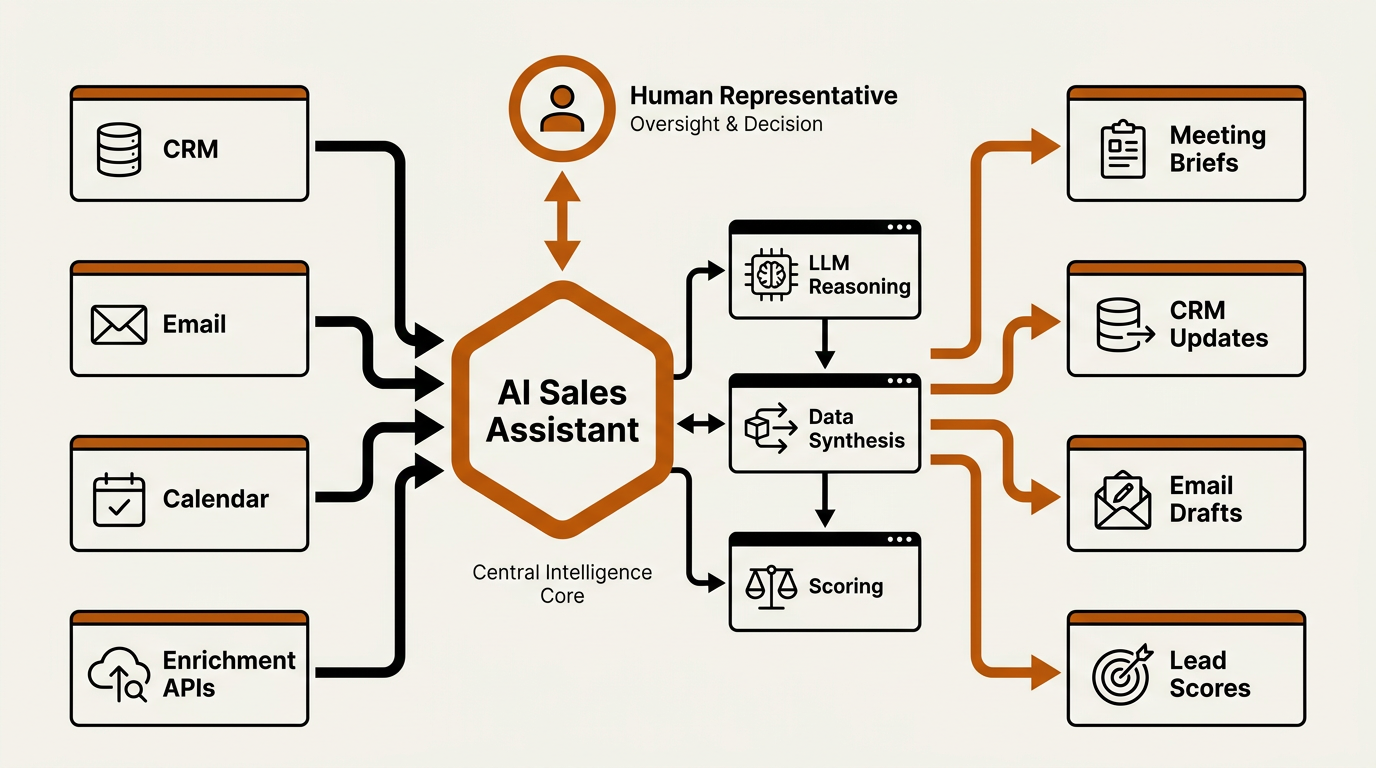
The AI sales assistant acts as a coordination layer — pulling signals from your stack and surfacing decisions where reps actually work.
AI Sales Assistants vs. Traditional Automation vs. Agentic Systems
Most of the confusion here comes down to marketing language. In vendor land, you'll see "AI sales automation," "AI agents," and "AI assistants" thrown around as if they're interchangeable. They're not. Pick the wrong bucket and you end up with the wrong expectations, the wrong rollout plan, and a lot of awkward Slack messages when the tool behaves exactly like it was designed to.
| Dimension | Traditional Sales Automation | AI Sales Assistant | Agentic Sales System |
|---|---|---|---|
| Core logic | Rule-based (if/then triggers) | LLM-powered with human oversight | Autonomous, goal-seeking AI agents |
| Decision authority | None (executes predefined rules) | Recommends; rep approves | Acts independently within guardrails |
| Typical tasks | Drip sequences, field updates, task reminders | Research synthesis, meeting prep, CRM enrichment, draft outreach | End-to-end prospecting, multi-step outreach, deal progression |
| Human involvement | Setup and monitoring | Ongoing collaboration | Exception handling only |
| Risk profile | Low (predictable) | Low to moderate (hallucinations possible) | Higher (unintended actions at scale) |
| Best for | Repeatable, high-volume tasks | Boosting individual rep productivity | Scaling outbound without adding headcount |
| Example tools | HubSpot workflows, Outreach sequences | AI CRM assistants, Bitscale enrichment workflows | Fully autonomous SDR platforms |
| Comparison as of mid-2026. Many platforms blend categories. |
Traditional workflow automation still earns its keep when the process is predictable and rules-driven. Agentic sales systems sit on the other end of the spectrum, running with minimal human involvement. AI sales assistants live in the middle, which is also where most mid-market teams can get real ROI in 2026: faster execution and better context, without handing over the keys to your brand voice and your prospect experience.
Five Practical Use Cases for Sales Productivity AI
It's easy to list "benefits" on a slide. The real test is whether anything changes on a rep's Tuesday morning. These five workflows are where I consistently see measurable lift.
1. Prospect Research Before Outreach
Picture a rep going after a VP of Engineering at a Series C fintech. The old routine looks like this: pull LinkedIn, skim the company blog, check Crunchbase for funding, hunt for recent press, then try to turn all of that into something coherent. That's 15 to 25 minutes before you've written a single line. An AI prospect research workflow can shrink that to under two minutes by assembling firmographics, technographics, hiring patterns, and relevant news into one brief. Platforms like Bitscale run that enrichment across entire account lists, attaching buying signals and verified contact data before a rep even opens the record.
2. CRM Updates and Data Hygiene
Dirty CRM data doesn't just look bad; it breaks forecasting and makes pipeline reviews a debate club. An AI CRM assistant can watch for missing fields, stale titles, and duplicates, then fix them automatically or queue changes for rep approval. After a call, it can pull from notes or transcripts to update stages, next steps, and stakeholder maps without someone babysitting Salesforce. For many teams, this is the "hours back per week" use case all by itself.
3. Meeting Preparation Briefs
Before a discovery call, the assistant can pull recent LinkedIn activity, earnings or funding updates, open support tickets (for expansion), and the history sitting in your email threads. The output is a one-page brief: talking points, likely objections, and the context a rep needs to sound like they did the homework. Prepared reps convert better. Gong's 2025 benchmark data found that reps who referenced company-specific context in the first two minutes of a call saw 34% higher progression rates.
4. Lead Prioritization and Scoring
Static lead scoring built on form fills and page views misses what actually moves deals: intent shifts, tech changes, and recency. An AI-driven intelligence layer can re-rank leads as signals change. When a target account starts hiring for roles that imply a purchase, or when a champion switches companies, the assistant should surface it immediately instead of letting it die in a dashboard. Bitscale's sales intelligence capabilities are designed to feed those signals straight into prioritization workflows.
5. Outbound Message Drafting
AI-assisted outbound is only useful if it produces messages a human would actually send. Done well, the assistant drafts first lines that reference something real: a podcast appearance, a milestone, a shared connection. The rep reviews, edits, and hits send. The goal isn't to crank out spam at scale; it's to make each touch feel researched without burning 30 minutes per prospect. The strongest setups tie personalization to enrichment data so the output stays anchored in facts, not invented details.
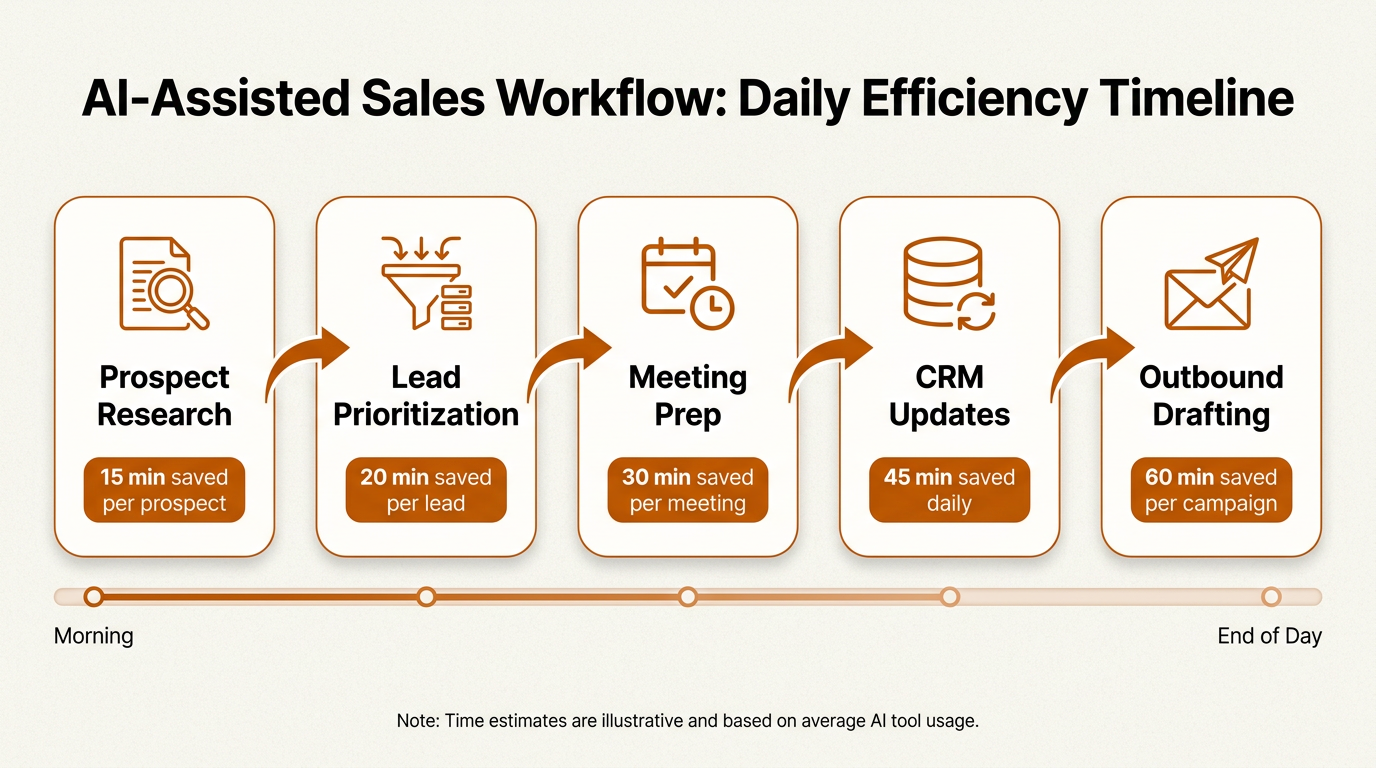
Across five core workflows, an ai sales assistant can reclaim 1–2 hours from a rep's Tuesday morning.
Benefits That Actually Show Up in Pipeline Metrics
RevOps doesn't get graded on feature checklists. It gets graded on numbers. The benefits that matter tend to land in four buckets that map cleanly to metrics your CFO already cares about.
Increased selling time. When admin work shrinks, reps spend more hours in live conversations. Even cutting non-selling activity by 20% can translate into meaningful pipeline lift once you scale it across a team of 10+ reps.
Higher contact and response rates. Outreach that sounds like it was written for one person beats outreach that sounds like it was written for a segment. Lavender's 2025 email benchmarks show reps using AI-assisted personalization reporting 2x to 3x improvements in reply rates.
Improved forecast accuracy. Forecasting gets less mystical when CRM data is current and complete. Accurate stages and real next steps give managers visibility they can act on, instead of gut-feel projections dressed up as a number.
Faster ramp for new hires. A new AE who gets account briefs and suggested talk tracks ramps faster than someone relying on tribal knowledge and a static playbook. Teams that invest in structured sales playbooks tend to see an even bigger payoff when an assistant can operationalize the playbook inside the workflow, not just store it in a doc.
Limitations and What Most Teams Get Wrong
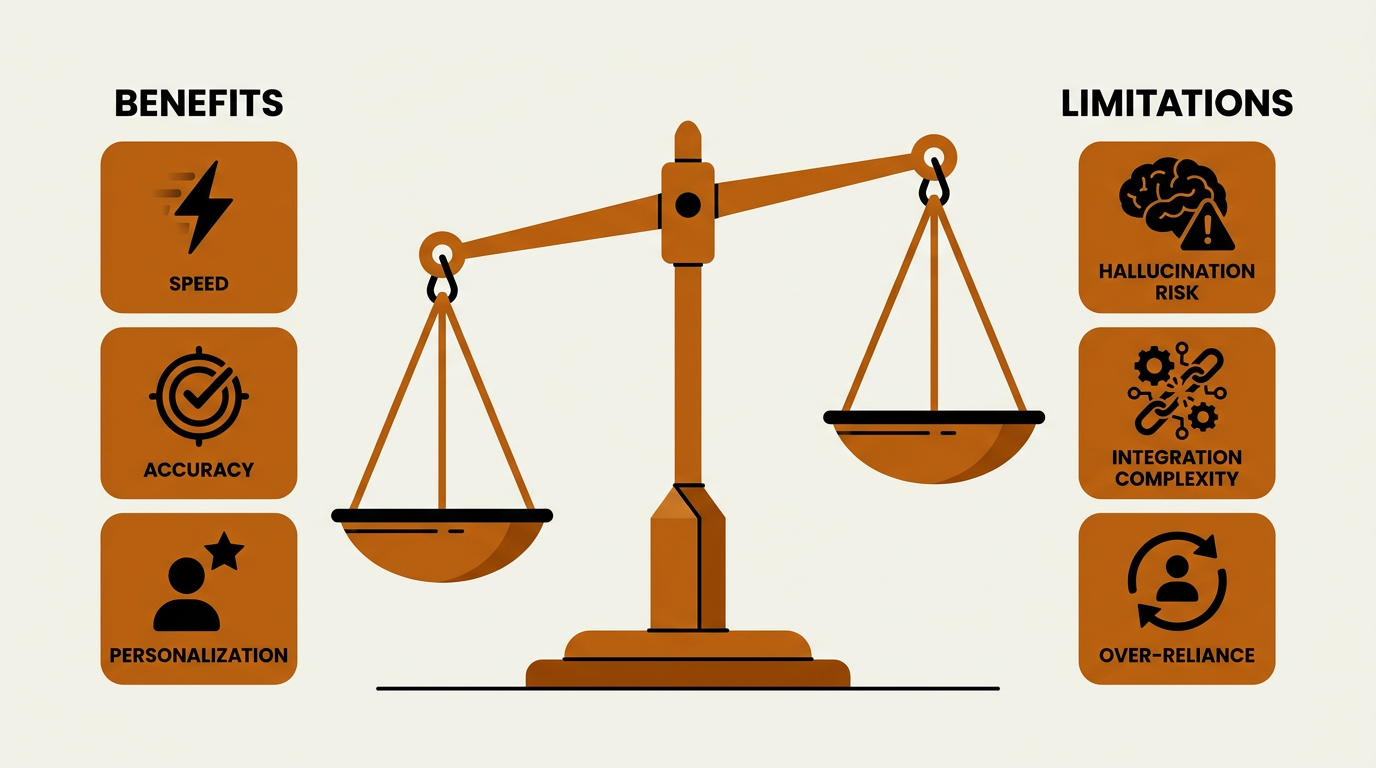
The benefits of an AI sales assistant are real — but so are the failure modes most teams overlook.
AI assistants fail in predictable ways. Most teams don't plan for those failure modes until after the rollout, when they're already cleaning up messes. Here are the big ones.
Hallucinated personalization is worse than no personalization. If the assistant invents a detail about a prospect and a rep sends it unchecked, you don't just lose a reply, you lose credibility. AI-drafted outbound needs a human review step, full stop. Teams that skip review to chase speed usually end up paying for it in brand damage.
Integration debt is real. An assistant that can't reliably read from and write to your CRM, enrichment provider, and sequencing tool doesn't save time; it creates a new layer of work. Map the data flow before you get seduced by feature demos. Bitscale leans on native CRM sync and outbound tool integrations to reduce this friction, but plenty of platforms still leave you with one-way syncs and brittle connectors.
Over-reliance erodes sales skills. When reps outsource all curiosity to the tool, they stop building the pattern recognition that separates good sellers from great ones. Use the assistant to speed up research, not to avoid thinking. Strong managers make this explicit: the AI gives you a head start, but you still need your own point of view on every account.
Data quality in, garbage out. Layering AI on top of a CRM full of stale records just produces confident-sounding wrong answers faster. Tracking contact data quality metrics needs to be part of the plan before you automate anything downstream.
When Should Your Team Adopt an AI Sales Assistant?
Not every team should buy an assistant this quarter. Timing depends less on ambition and more on where your operation sits on the maturity curve.
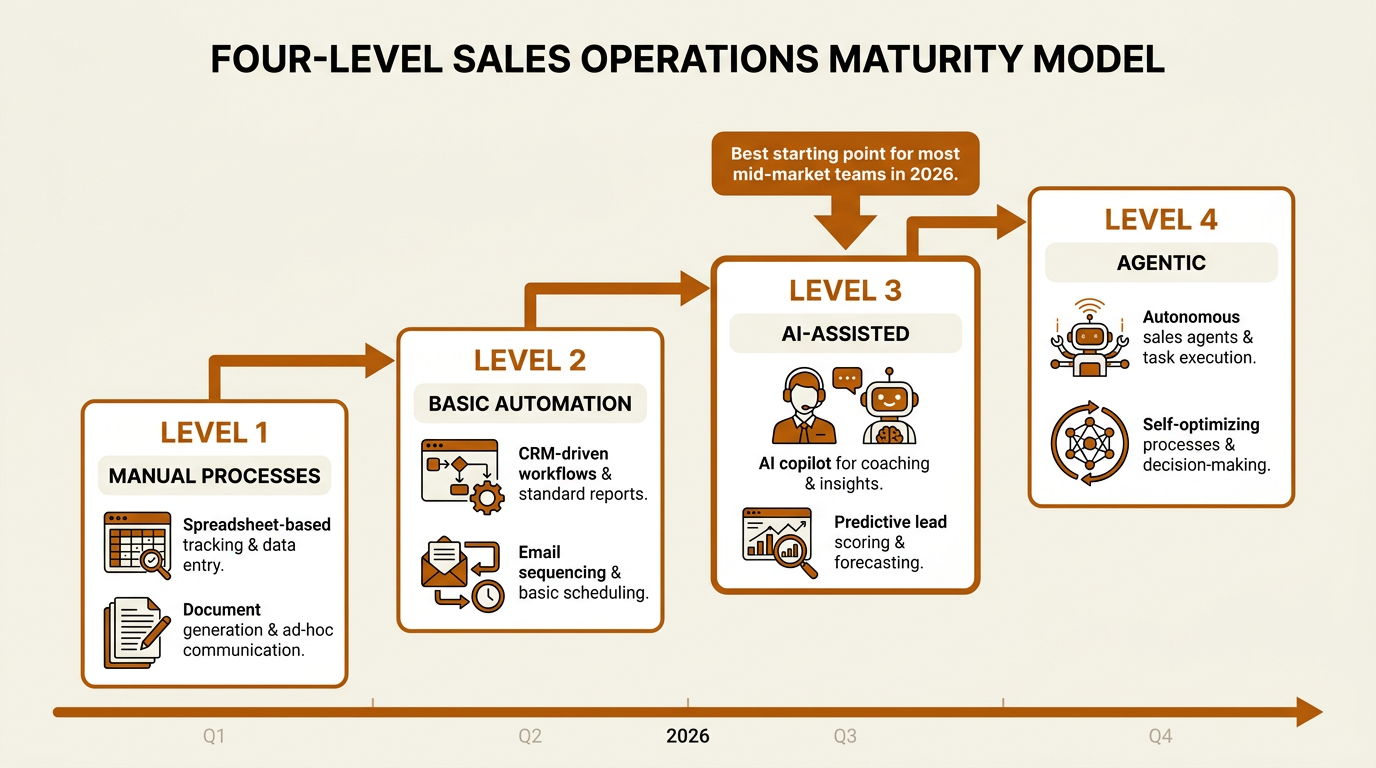
Most mid-market teams should target Level 3 AI-Assisted before moving to fully agentic systems.
Adopt now if: reps are spending more than 30% of the week on research, data entry, or meeting prep. CRM data decay is obvious. Outbound reply rates have flattened even after testing new copy. You know your ICP, but you can't consistently operationalize it across the team.
Wait if: you don't have a CRM in place (or it exists in name only). Your sales process is undefined and changing weekly. You have fewer than three reps and the founder still closes most deals. In those situations, do the foundational work first: define your sales funnel and ICP, then automate.
Skip the assistant tier and go agentic if: you're running a mature, data-rich operation with documented processes, high outbound volume, and the engineering capacity to manage autonomous systems safely. Most teams aren't there yet, and there's nothing wrong with that.
How Bitscale Supports AI-Assisted Sales Workflows
Bitscale isn't positioned as a chatbot or a virtual SDR. It's closer to infrastructure for AI-assisted selling: the enrichment, signals, and workflow automation that make an assistant useful instead of decorative. The platform covers B2B lead and account list building, contact and company enrichment (including verified work emails and phone numbers), intent and buying signal detection, and ready-made sales workflow automation templates.
In a typical stack, Bitscale sits between raw data sources and outbound execution. It takes prospect lists, enriches them with firmographic, technographic, and intent data, then syncs that enrichment into your CRM and sequencing tools. The practical upside is simple: your AI assistant (whether it's inside your CRM or a standalone tool) is working from current, accurate records instead of whatever happened to be in the database last quarter. For teams comparing top AI platforms for B2B sales, Bitscale's edge is the data and workflow layer, not the conversational layer.

Bitscale provides the enrichment and workflow backbone that powers AI-assisted sales operations.
A Decision Framework for RevOps Leaders
Before you sign anything, pressure-test the rollout with these five questions. They tend to reveal readiness gaps that demos and free trials politely ignore.
- What are our top three time sinks per rep per week? If it's research, CRM updates, and meeting prep, an assistant is a direct fit. If it's internal approvals and contract redlining, you're shopping in the wrong aisle.
- How clean is our CRM data today? Run a data quality audit before you layer AI on top. Enrichment platforms like Bitscale can close gaps, but you still need a baseline to measure against.
- Do we have defined workflows or are reps freelancing? Assistants amplify whatever process exists. If the process is missing, the AI has nothing stable to support.
- What is our risk tolerance for AI-generated outbound? If every message requires human approval, design the workflow around that review step. If you want autonomous sending, you're talking about agentic systems, not assistants.
- How will we measure success? Set KPIs before deployment: time saved per rep, CRM field completion rates, outbound reply rates, pipeline generated per rep. Without baselines, "ROI" becomes a vibe.
Key Takeaways
An AI sales assistant doesn't replace skilled sellers. It multiplies them by taking on the information-heavy, repetitive work that keeps reps away from customers. As a category, it sits between traditional automation (rigid, rules-based) and agentic sales systems (autonomous, higher risk), which is why it tends to be the most practical balance of intelligence and control for revenue teams in 2026.
Adoption pays off when you already have a defined process, a CRM worth maintaining, and reps bleeding hours into non-selling tasks. Start where the savings are obvious (prospect research, CRM hygiene, meeting prep), measure the impact, then expand. Platforms like Bitscale supply the enrichment and sales intelligence foundation that makes any assistant more accurate. The tech is ready; the gating factor is whether your workflows are.
Frequently Asked Questions
What's the difference between an AI sales assistant and an AI SDR?
An AI sales assistant supports a human rep with research, CRM updates, and meeting prep while the rep keeps decision authority. An AI SDR (often part of an agentic sales system) runs more autonomously, executing multi-step outbound with minimal oversight. The assistant model is typically lower risk and a better fit for teams that want tight control over brand voice and prospect communications.
How much time does an AI assistant for sales save per rep?
Benchmarks reported by early adopters in 2025 suggest reps reclaim about 5 to 10 hours per week when assistants take on prospect research, CRM entry, and meeting prep. Your mileage depends on process maturity and how strong your underlying data infrastructure is.
Will an AI sales assistant work with my existing CRM?
Most tools in this category integrate with Salesforce, HubSpot, and other major CRMs via native connectors or APIs. Bitscale, for example, offers CRM synchronization that pushes enriched contact and account data into existing records. Validate integration depth before you commit; some vendors only support limited or one-way sync.
Is AI sales software secure enough for enterprise use?
It depends on the vendor. Look for SOC 2 Type II compliance, encryption at rest and in transit, role-based access controls, and clear data retention policies. Enterprise teams should also confirm whether the vendor's LLM provider retains prompt data for model training, since that affects privacy for prospect and customer information.
Should small sales teams (under 5 reps) buy an AI sales assistant?
Small teams tend to get the most value from assistants that bundle enrichment and workflow automation without requiring dedicated RevOps support to configure. If reps are still doing manual prospect research and CRM entry, even a lightweight assistant can pay for itself quickly. See AI tools built for sales and marketing teams for options that fit smaller budgets.