Salesforce Hunter is coming in November: get your CRM data ready first
Salesforce Hunter reaches GA in November 2026. What the outbound agent does, the data it relies on, and a 12-point checklist to get your CRM ready.
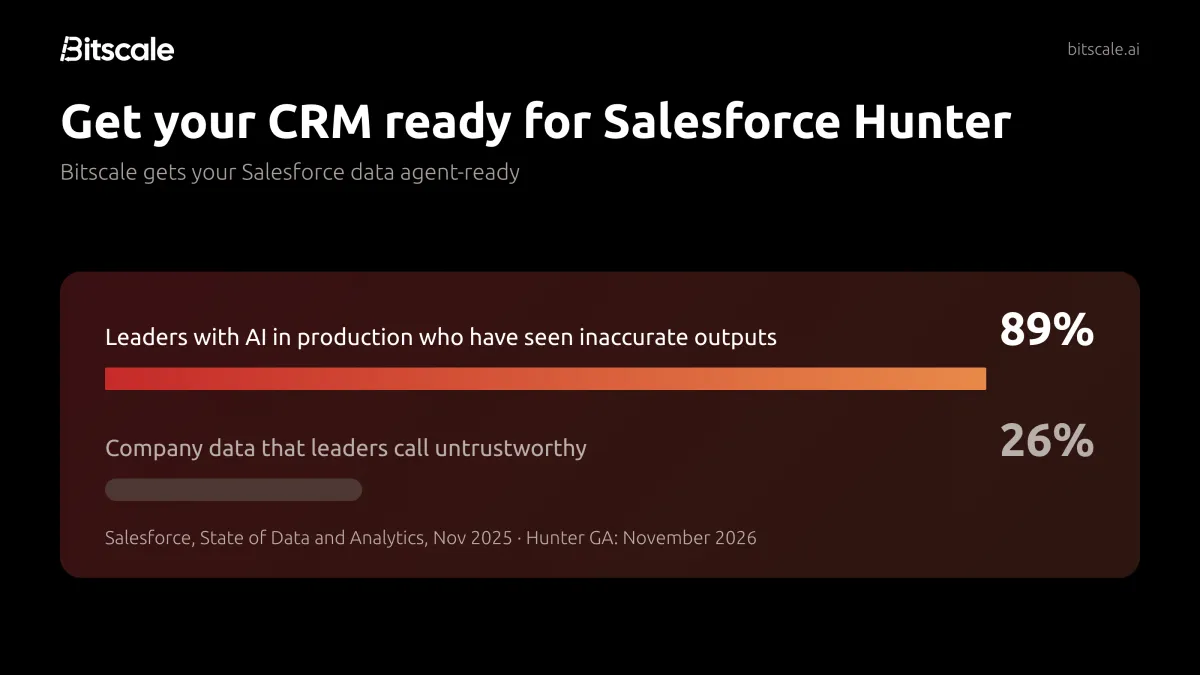
The short answer: Salesforce Hunter is an AI outbound sales agent. It researches and prioritizes prospects, drafts and sends outreach, and moves opportunities forward inside Salesforce. It's in pilot now, and Salesforce lists general availability (GA) for November 2026. Hunter keeps its memory on your Account, Contact and Opportunity records, so the quality of those records decides what it does. Before you switch it on, make sure: - every record has an owner - duplicates are merged - contacts are current and verified - buying signals live in fields the agent can read - permissions, consent and approval rules are set
The 12-point checklist and 30-day plan below cover each step, and Bitscale handles the cleanup and enrichment steps directly in Salesforce.
What is Salesforce Hunter?
Salesforce announced Hunter in September 2026 as one of its "job-ready" agents. In Salesforce's words, Hunter handles "researching and prioritizing prospects, drafting and sending outreach, progressing opportunities in Salesforce, preparing proposals, and supporting pipeline reviews and forecasts."
Hunter is not a chatbot that answers one question and forgets it. It runs on Salesforce's new long-horizon agent runtime, and Salesforce says it carries work out "over weeks and months, right inside Salesforce."
How Hunter works
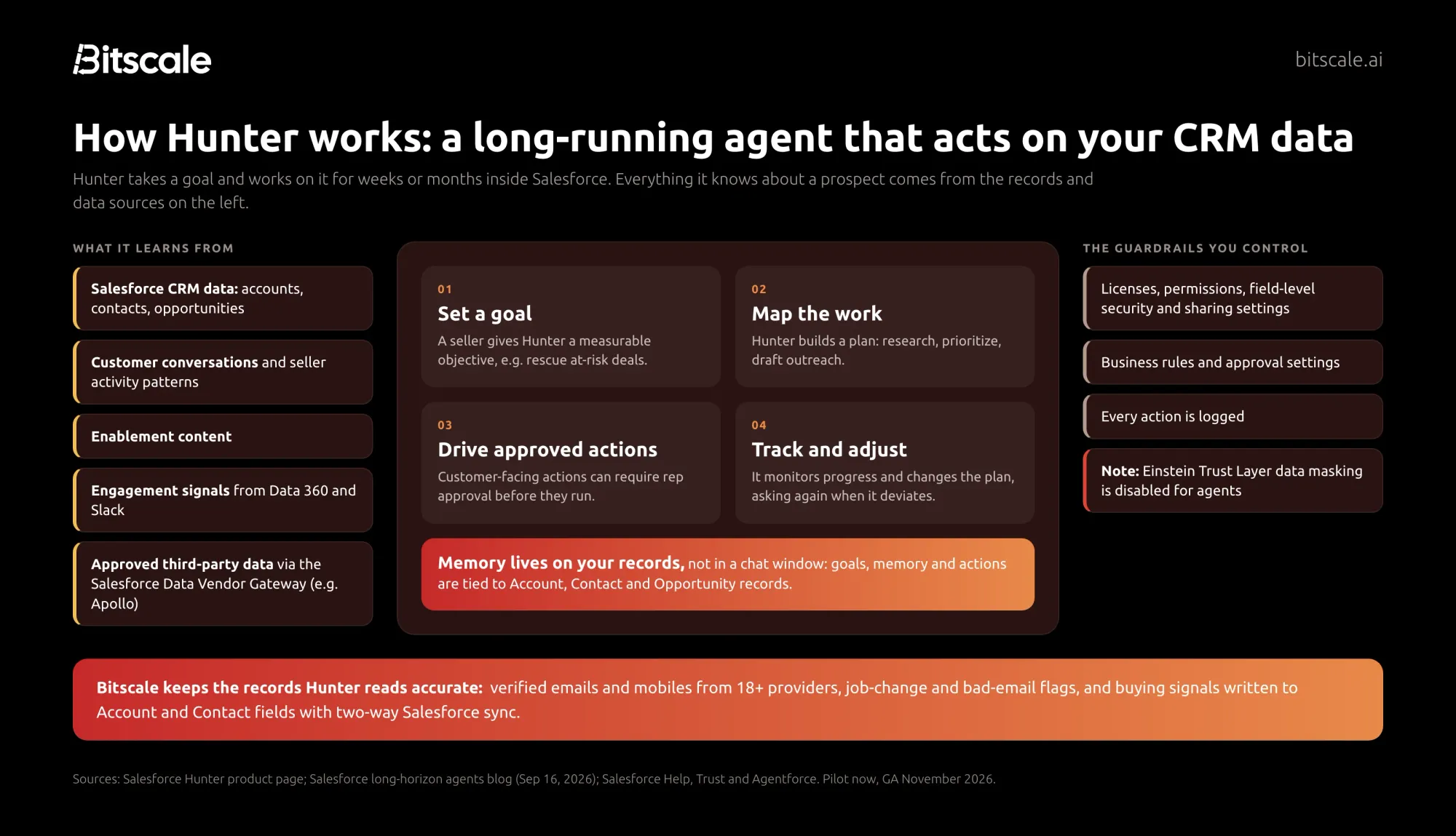
According to Salesforce's product page and its long-horizon agents blog (September 16, 2026):
- A seller sets a goal, such as rescuing at-risk deals. Hunter turns it into a measurable objective.
- Hunter maps the work: research, prioritization and outreach.
- It drives approved actions. Customer-facing actions can require rep approval before they run, and Hunter asks for approval again if it departs from the plan, for example emailing a different person after a bounce.
- It tracks progress and adjusts the plan.
What data Hunter uses
Salesforce says Hunter learns from: - "Salesforce CRM data, customer conversations, enablement content, and seller activity patterns" - engagement signals from Data 360 and Slack - approved third-party data through the Salesforce Data Vendor Gateway, for outside firmographic, intent and contact data
Its memory "lives on accounts, contacts, and opportunities, not in a chat window."
Apollo announced on September 15, 2026 that it is one of the flagship data partners for Hunter. Hunter gets actions for company and person search, enrichment (including mobile phone), news and job postings.
When is Hunter available, and what does it cost?
Salesforce lists Hunter as "Pilot now; GA November '26" in its September 2026 announcement. Salesforce has not published Hunter-specific pricing or license requirements on the pages we reviewed. SalesforceBen reports that the Sales Cloud Max edition ($550 per user per month) bundles Hunter, but confirm packaging with your Salesforce account team.
Why data readiness decides whether Hunter works
Every AI agent has the same weakness: it reasons over the data it's given. A human SDR notices that a contact left the company six months ago. An agent working from a stale record emails them anyway, at scale.
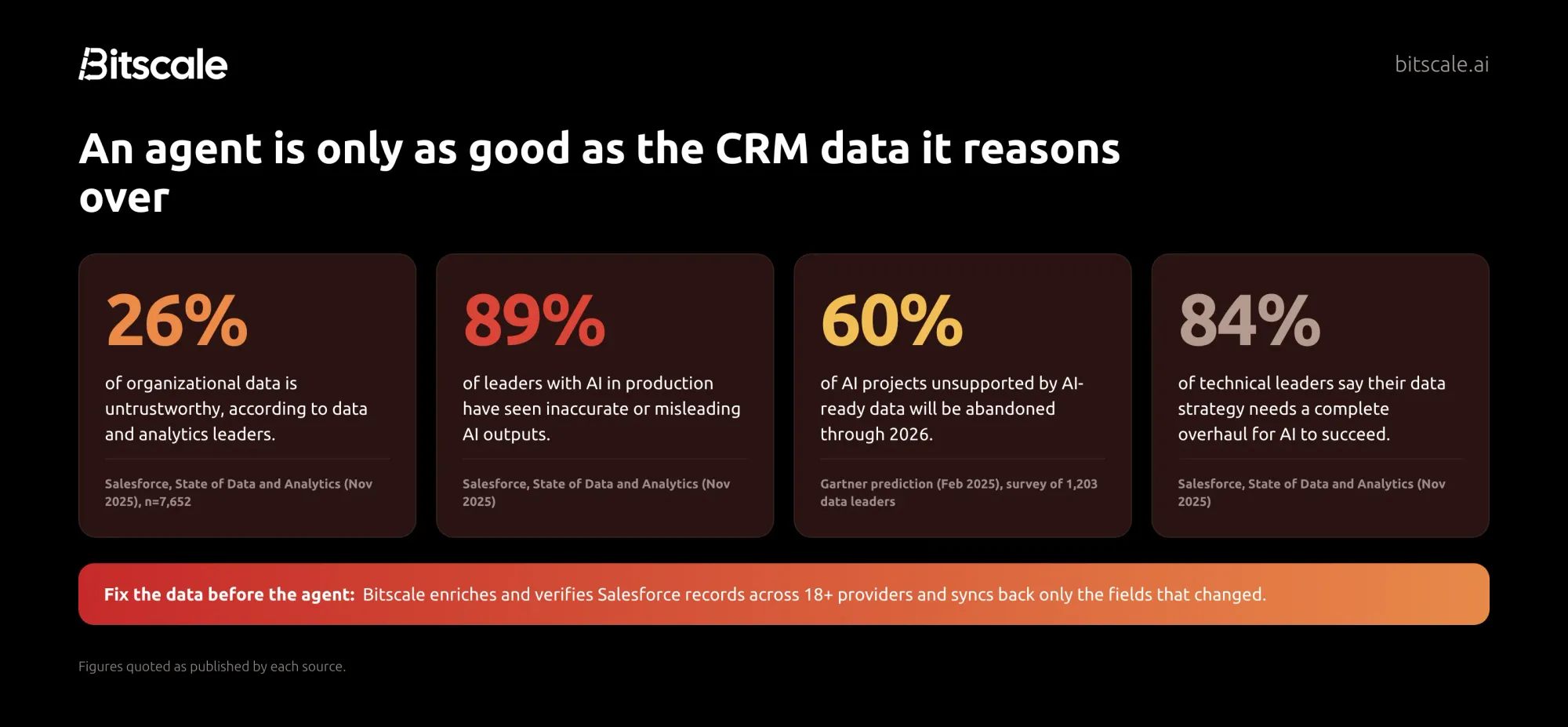
The research is consistent:
- Data and analytics leaders estimate that 26% of their organizational data is untrustworthy. In the same Salesforce survey, 89% of leaders with AI in production had seen inaccurate or misleading AI outputs.
- Gartner predicts organizations will abandon 60% of AI projects unsupported by AI-ready data through 2026.
- In Apollo's Hunter partnership announcement, Salesforce's VP of Product Management, Rohan Punamia, put it simply: "Agents are only as effective as the data they can access."
There's one more reason to clean up first. Salesforce's own documentation states that data masking through the Einstein Trust Layer is disabled for agents, to improve agent performance and accuracy. Whatever sits in your CRM fields is what the model works with.
The 12-point CRM data-readiness checklist
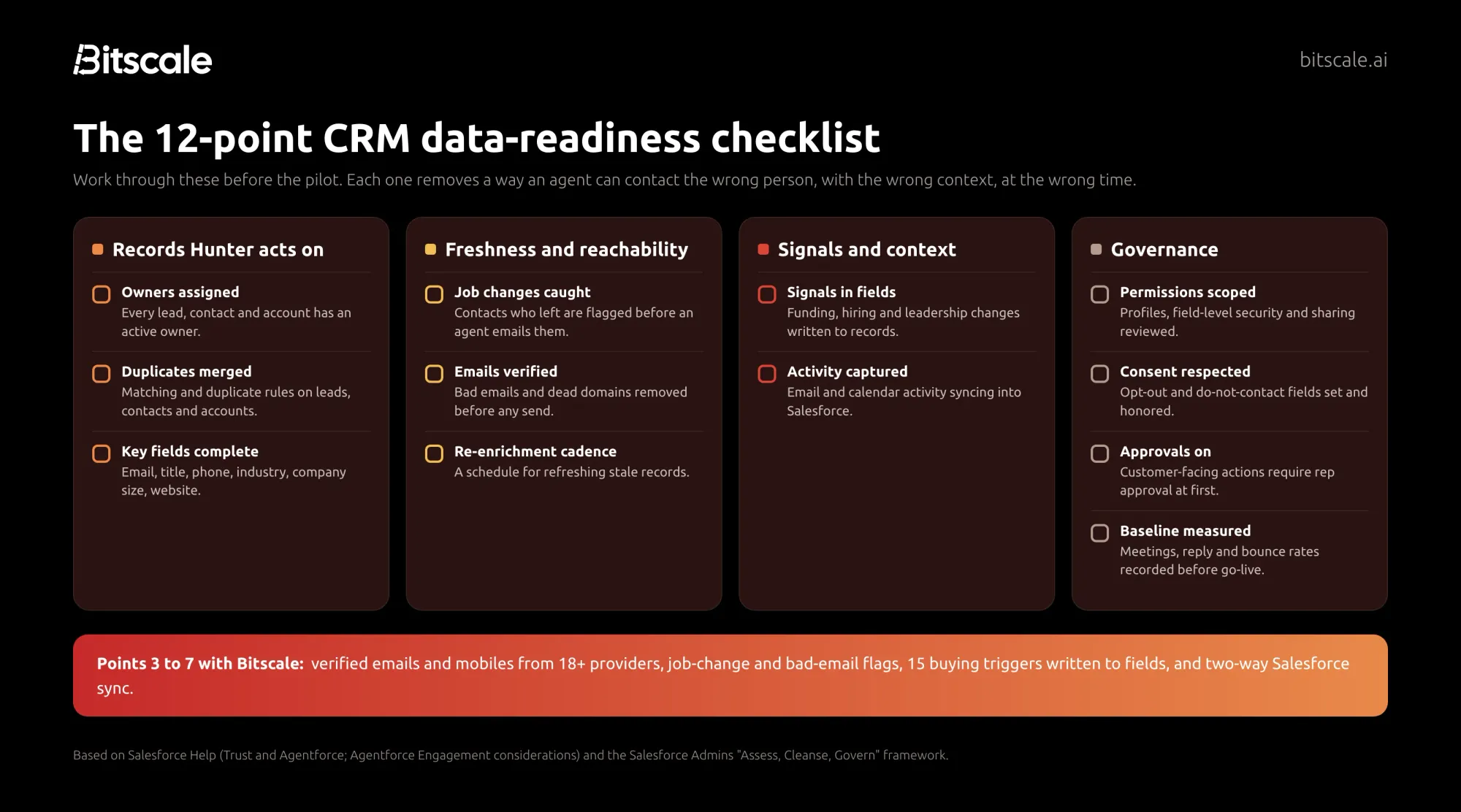
Hunter-specific setup requirements haven't been published yet. This checklist combines Salesforce's documented rules for its existing agents with its admin guidance on preparing data for Agentforce.
Records Hunter acts on
1. Every record has an active owner. Salesforce's existing sales agent, Agentforce Engagement, requires the Owner field to be filled on leads, person accounts and contacts before records are assigned. For contacts, the owner of the related account counts. Expect the same discipline to matter for Hunter, because outreach and approvals route through the record owner. Build a list view of records owned by inactive users and reassign them.
2. Duplicates are merged. The Salesforce Admins team calls uniqueness "a big one!" in its data-readiness framework. Two contact records for the same person means two memories, two histories, and a real risk of the agent contacting someone twice. Turn on matching and duplicate rules for leads, contacts and accounts, and merge what exists today.
3. The fields an agent reasons over are complete. At minimum: - Contacts and leads: work email, title, and a phone number (ideally a mobile). - Accounts: industry, company size and website.
Run a report on each field's fill rate. An agent can't prioritize by company size if half your accounts have none.
Freshness and reachability
4. Job changes are caught. People move. A contact who left the account should be flagged and moved before an agent writes to them. A champion who moved to a new company is often your best new opportunity.
5. Emails are verified before any send. Bad emails and dead domains don't just waste a step. Mailbox providers now penalize them: - Gmail requires bulk senders to keep spam rates below 0.3%. - Microsoft Outlook rejects non-compliant high-volume mail.
An agent sending from your reps' inboxes inherits your domain reputation.
6. Records are refreshed on a schedule. A one-time cleanup decays. Decide how often key records are re-enriched, for example monthly for open-pipeline accounts and quarterly for the rest, and automate it.
Signals and context
7. Buying signals live in fields. Hunter can pull approved third-party signals through the Data Vendor Gateway. Signals you already track belong on the record too: - funding rounds - hiring for relevant roles - leadership changes - technology changes
Write them to fields or related records. Then they're visible to the agent, to reps and to your reports, rather than trapped in a spreadsheet.
8. Activity is captured in Salesforce. Hunter learns from customer conversations and seller activity. For Agentforce Engagement, Salesforce documents that sending as a seller requires the record owner's email to be connected to Inbox and Einstein Activity Capture. If header-only email capture is on, the agent can't read the subject or body to understand intent. Check that your activity capture setup gives an agent the context you'd want a new rep to have.
Governance
9. Permissions, field-level security and sharing are reviewed. Salesforce documents that AI agents respect standard access controls such as licenses, permissions, field-level security and sharing settings. That's a strength only if your access model is right. Review what the agent's running user can see and edit before the pilot.
10. Consent and opt-outs are respected. Make sure opt-out and do-not-contact fields are populated and enforced in your automations. Salesforce's Engagement agent stops nudging when a prospect opts out of emails. Your data has to carry that preference for any agent to honor it.
11. Approvals are on for customer-facing actions. Hunter's customer-facing actions "can require rep approval before they execute, and every action is logged." Start with approvals on, review the log weekly, and loosen controls only where the agent has earned it.
12. A baseline is measured. Record your current meetings booked, reply rate and bounce rate per rep before the pilot. Without a baseline you can't tell whether Hunter is adding pipeline or just adding activity.
A 30-day plan to get agent-ready
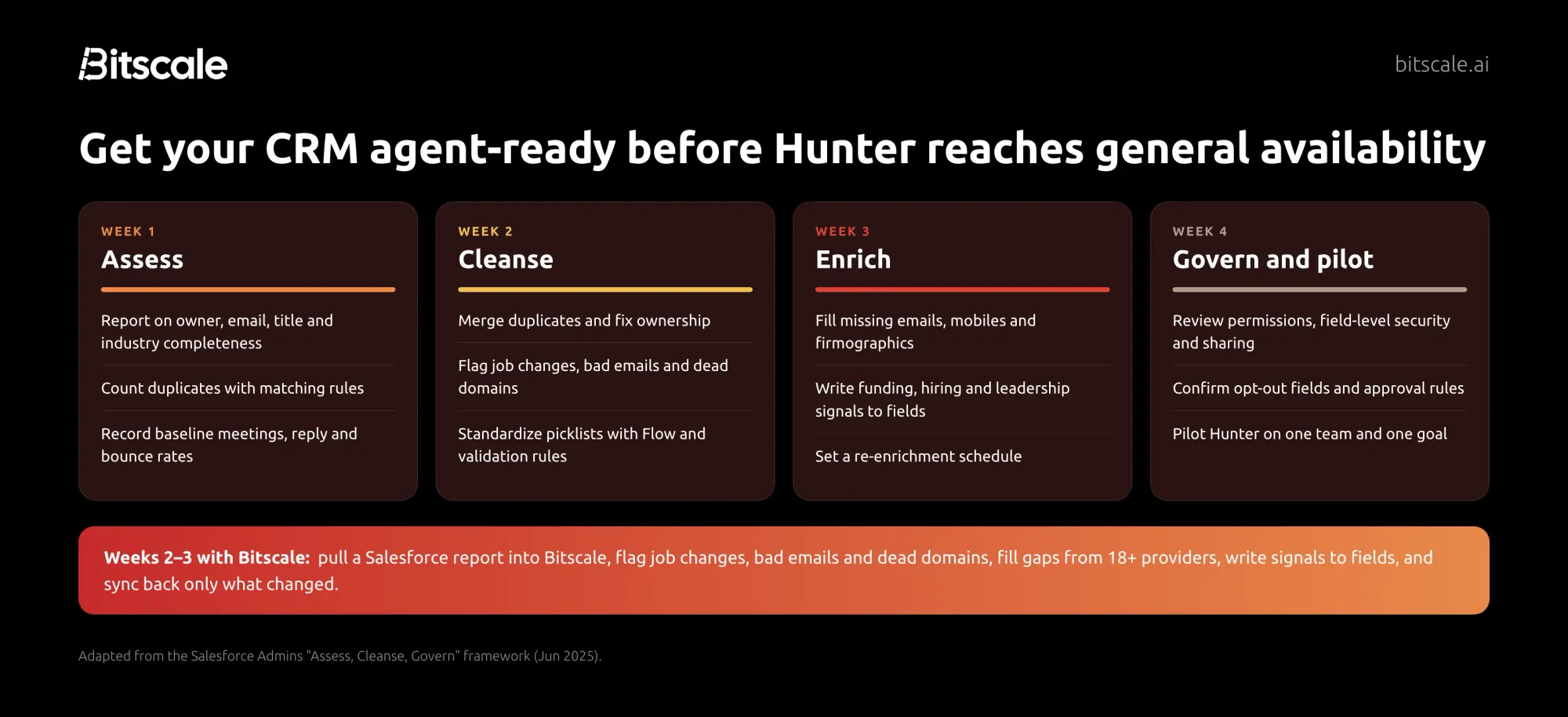
Salesforce's admin team recommends a simple sequence: Assess, Cleanse, Govern. Here's how to fit it, plus enrichment, into the month before Hunter reaches GA:
- Week 1, Assess.
- Report on owner, email, title and industry completeness.
- Count duplicates with matching rules.
- Record your baseline metrics.
- Week 2, Cleanse.
- Merge duplicates and reassign orphaned records.
- Flag job changes, bad emails and dead domains.
- Standardize picklists with Flow and validation rules.
- Week 3, Enrich.
- Fill missing emails, mobiles and firmographics.
- Write funding, hiring and leadership signals into fields.
- Set your re-enrichment schedule.
- Week 4, Govern and pilot.
- Review permissions, field-level security and sharing.
- Confirm opt-out fields and approval rules.
- Pilot Hunter with one team and one clear goal.
How Bitscale gets your Salesforce org agent-ready
Steps 3 to 7 are where most teams stall. Filling and refreshing contact data by hand doesn't scale, and a single data vendor leaves gaps. Bitscale fixes that inside Salesforce:
- Pull, enrich, push back. Pull a Salesforce report or SOQL query into a live Bitscale grid, enrich it, and sync two ways. Bitscale writes back only the fields that changed, and you control which fields it may update.
- Fill the gaps with a waterfall. Bitscale runs one email and phone waterfall across 18+ contact-data providers, delivering 95% email and phone coverage with bounce rates below 0.5%. Every result is verified before it reaches Salesforce.
- Catch CRM decay. Bitscale flags job changes, bad emails and dead domains the day they happen.
- Put signals where agents can read them. Track 15 buying triggers, including exec hires, tech-stack changes, funding and hiring, and write them straight to your records.
Phyllo uses Bitscale to keep Salesforce at 94% coverage and saves $30K a year on stale-data tooling.
The Salesforce integration is available on Bitscale's Booster plan. You can test enrichment on your own records on the free plan first.
Get agent-ready before November: pull your open-pipeline accounts into Bitscale, see what's missing or out of date, and push the fixes back to Salesforce. 200 free credits, no card required. Start for free →
Frequently asked questions
What is Salesforce Hunter?
Salesforce Hunter is an outbound sales agent built into Agentforce Coworker in Sales Cloud. It researches and prioritizes prospects, drafts and sends outreach, progresses opportunities, prepares proposals, and supports pipeline reviews, working toward goals over weeks or months inside Salesforce.
When will Salesforce Hunter be generally available?
Salesforce lists Hunter as in pilot now, with general availability planned for November 2026.
How much does Salesforce Hunter cost?
Salesforce has not published Hunter-specific pricing on the pages we reviewed. SalesforceBen reports that the Sales Cloud Max edition, listed at $550 per user per month, bundles Hunter. Confirm current packaging with Salesforce.
What data does Salesforce Hunter use?
Hunter learns from Salesforce CRM data, customer conversations, enablement content and seller activity patterns, and pulls engagement signals from Data 360 and Slack. For outside firmographic, intent and contact data, it can use approved third-party data through the Salesforce Data Vendor Gateway. Apollo is a confirmed flagship partner.
Is Salesforce Hunter safe to let loose on my CRM?
Hunter operates within the permissions, business rules and approval settings you configure in Salesforce. Customer-facing actions can require rep approval, and every action is logged. Because Einstein Trust Layer data masking is disabled for agents, the accuracy of your CRM data matters even more.
How do I prepare my CRM for Salesforce Hunter?
Assign owners, merge duplicates, complete key contact and account fields, flag job changes and invalid emails, write buying signals into fields, capture activity, and review permissions, consent and approval settings. Measure a baseline before the pilot so you can judge results.
About the author
Abhinay is the co-founder of Bitscale, the GTM data layer for your CRM. Bitscale helps 1,000+ RevOps and GTM leaders enrich, verify and prioritize prospects across 18+ contact-data providers, with two-way Salesforce and HubSpot sync.
Sources
Salesforce: Hunter - Hunter product page ("Hunter by Sales Cloud") - Job-ready agents announcement (September 11, 2026) - Long-horizon agents blog (September 16, 2026) - 21 things announced at Dreamforce 2026 (September 28, 2026)
Salesforce: Agentforce documentation - Help: Trust and Agentforce - Help: Data masking limitations in Agentforce - Help: Considerations for using Agentforce Engagement - Salesforce Admins: Prepare your data for Agentforce (June 9, 2025)
Research - Salesforce: State of Data and Analytics (November 4, 2025) - Gartner: Lack of AI-ready data puts AI projects at risk (February 26, 2025)
Partners and coverage - Apollo: named flagship data partner for Hunter (September 15, 2026) - SalesforceBen: top Sales Cloud announcements at Dreamforce '26 (September 23, 2026)
Email sender rules - Google Workspace email sender guidelines - Microsoft Outlook high-volume sender requirements