The 10 best B2B prospecting tools for 2026, compared
We compared 10 B2B prospecting tools on pricing checked in October 2026, data claims, signals and CRM fit, with real stack costs by team size.
Disclosure: This guide is published by Bitscale, and Bitscale is our top pick. We explain why below and applied the same criteria to every tool. Every price was checked on the vendor's own website on October 7, 2026.
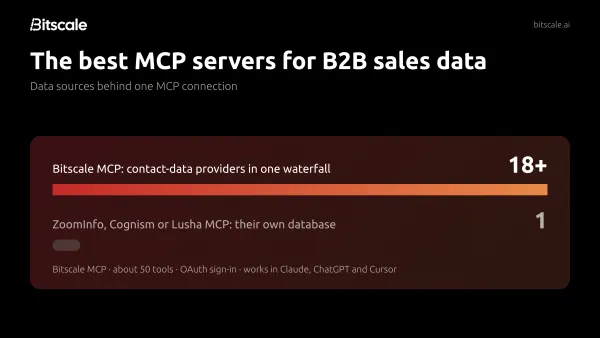
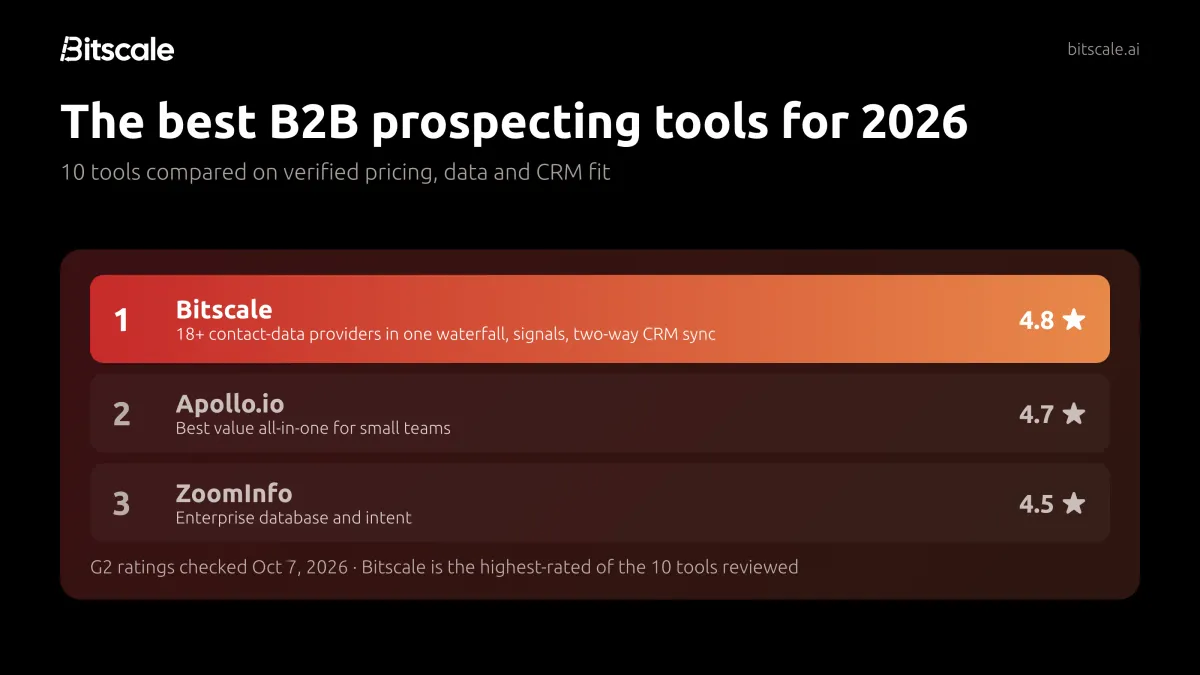
The short answer: the best B2B prospecting tool for most teams in 2026 is Bitscale. It combines 18+ contact-data providers in one waterfall, tracks buying signals, and syncs everything to Salesforce or HubSpot. The others are strong for specific jobs:
- Apollo.io is the best value all-in-one for small teams.
- ZoomInfo has the deepest enterprise database and intent signals.
- LinkedIn Sales Navigator is the best fit for relationship-led selling.
- Clay suits teams with an engineer to build custom enrichment workflows.
- Cognism is the strongest choice for European contact data.
- Hunter is the cheapest way to find and verify work emails.
The rest of this guide shows how we got there, what each tool costs today, and how to combine them into a stack that fits your team.
Quick comparison
| Tool | Best for | Free plan | Cheapest paid plan (annual billing) | G2 rating |
|---|---|---|---|---|
| Bitscale (our pick) | Best overall: multi-provider coverage, signals and CRM sync | Yes, 200 credits | $314/mo (Growth), per account | 4.8 (40 reviews) |
| Apollo.io | All-in-one data + outreach for SMB teams | Yes, 900 credits/seat/yr | $49/seat/mo (Basic) | 4.7 (9,840 reviews) |
| ZoomInfo | Enterprise data depth and intent | No (free trial) | Quote only | 4.5 (9,171 reviews) |
| LinkedIn Sales Navigator | LinkedIn-led, relationship selling | No (free trial) | $89.99/seat/mo (Core, $1,079.88/yr) | 4.4 (2,211 reviews) |
| Clay | Custom multi-provider enrichment workflows | Yes, 100 data credits/mo | $167/mo (Launch) | 4.6 (234 reviews) |
| Cognism | UK and EU contact data, phone-verified mobiles | No (free data sample) | Quote only, 5 seats included | 4.5 (1,372 reviews) |
| Lusha | Quick email and phone lookups on a small budget | Yes, 40 credits/mo | $37.45/mo (Starter) | 4.3 (1,667 reviews) |
| Amplemarket | Mid-market teams consolidating data, sequencing and AI | No (free trial) | $600/mo, 2 users (Startup) | 4.6 (688 reviews) |
| Seamless.AI | High-volume list building | Yes, up to 50 credits | Quote only | 4.4 (5,407 reviews) |
| Hunter | Finding and verifying work emails cheaply | Yes, 50 credits/mo | $34/mo (Starter) | 4.4 (656 reviews) |
Prices are list prices from each vendor's pricing page, checked October 7, 2026, before discounts and taxes. G2 ratings were checked the same day.
Why your choice of prospecting tool matters more in 2026
Prospecting got harder on both sides of the conversation.
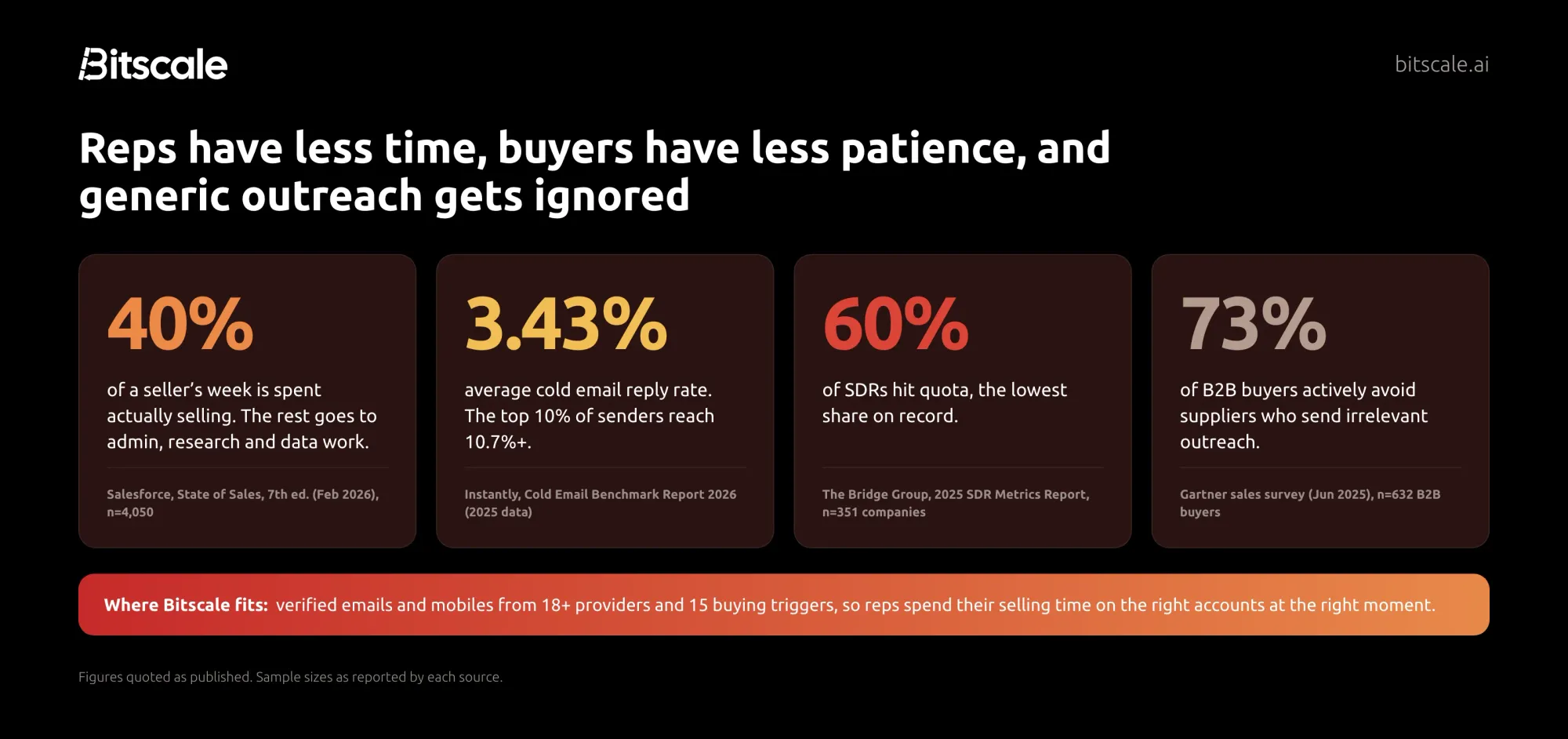
Sellers have less time. Sellers spend only 40% of their time actually selling, according to Salesforce's 2026 State of Sales survey of 4,050 sales professionals. The rest goes to admin, research and data work, and a good prospecting tool should take that off their plate. The same report found that 92% of sellers using AI agents say they help with prospecting.
Buyers have less patience. 61% of B2B buyers prefer a rep-free buying experience, and 73% actively avoid suppliers who send irrelevant outreach (Gartner, 2025). Volume alone doesn't work any more. You need the right people, at the right moment, with a reason to talk.
The numbers are unforgiving. The average cold email reply rate across Instantly's 2025 data was 3.43%, while the top 10% of senders reached 10.7% or more. The Bridge Group's 2025 research found only 60% of SDRs hit quota, the lowest on record. You can't control everything behind those numbers, but you can control the inputs: who is on your list, whether their contact details are right, and whether you reach them at a relevant moment.
That is what a prospecting tool controls.
What a B2B prospecting tool actually does
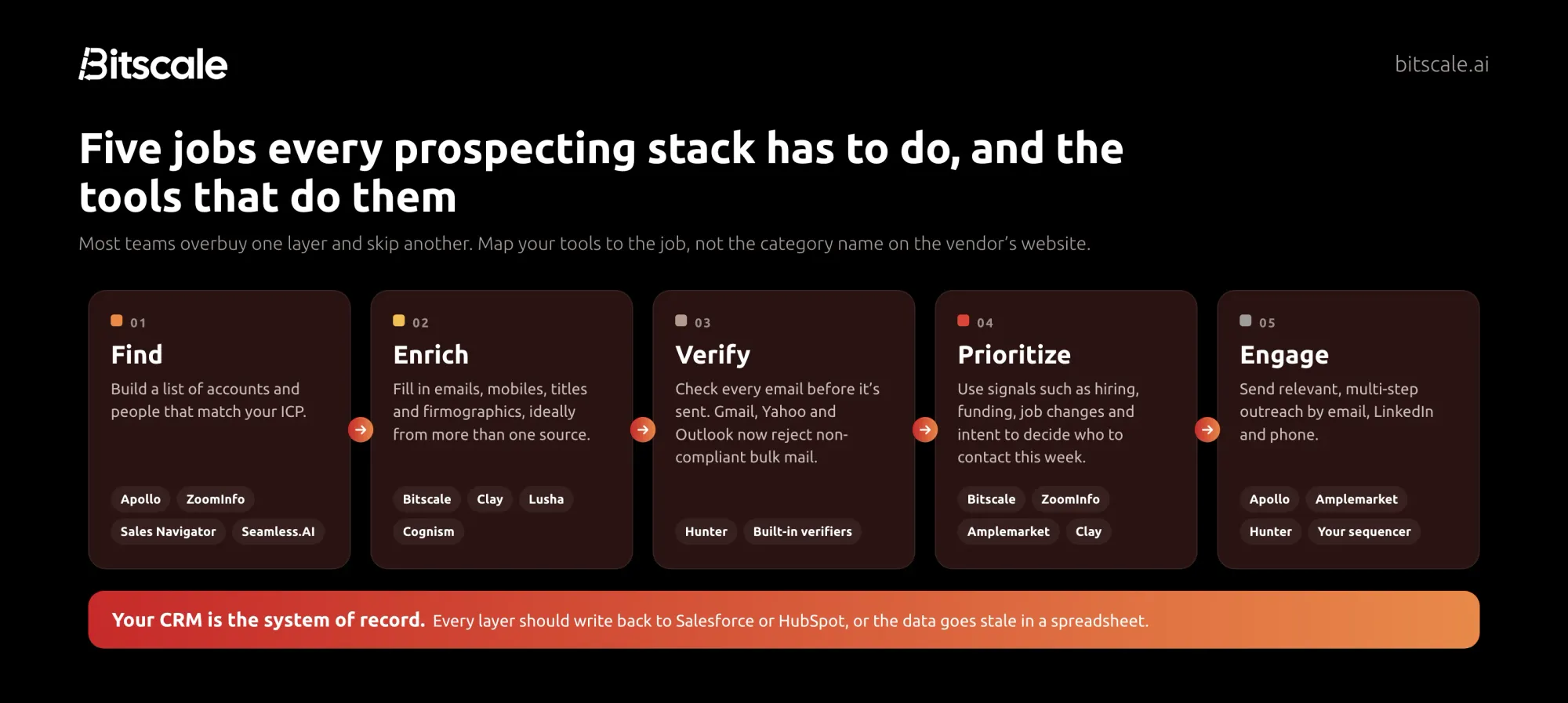
"Prospecting tool" covers very different products. It helps to sort them by the job they do:
- Find. Build a list of accounts and people that match your ideal customer profile. Contact databases (Apollo, ZoomInfo, Seamless.AI) and LinkedIn Sales Navigator live here.
- Enrich. Fill in emails, mobile numbers, titles and company data. No single database has everyone, so enrichment tools like Clay and Bitscale query several providers in turn. This is often called waterfall enrichment.
- Verify. Check that an email address will actually receive mail before you send to it. Since 2024–2025, this is mandatory, not optional (more on that below).
- Prioritize. Decide who to contact this week using signals such as hiring, funding, leadership changes, technology changes and buyer intent.
- Engage. Run relevant, multi-step outreach by email, LinkedIn and phone.
Some tools try to do all five. Others do one job extremely well. Whichever you pick, the results should end up in your CRM. Enriched data that lives in a spreadsheet starts going stale the day it's exported.
How we evaluated these tools
We built this list for B2B sales, RevOps and growth teams choosing or replacing prospecting software. For each tool we checked:
- Pricing and plan limits. We used each vendor's public pricing page on October 7, 2026, including what a credit buys, seat versus account pricing, and what is gated to higher tiers.
- Data claims. We took each vendor's own published figures for database size, coverage and accuracy, and attributed every number to the vendor that makes it.
- Signals and prioritization. We looked for job changes, hiring, funding, intent and website visitors.
- CRM fit. We checked whether data writes back to Salesforce and HubSpot, and on which plan.
- User sentiment. We recorded G2 rating and review count on October 7, 2026.
- Recent changes. We noted pricing overhauls, renames and acquisitions in 2025–2026.
What we did not do: we did not run an independent accuracy test of every database. Contact data accuracy varies a lot by region, industry and seniority, so a single test list rarely transfers to your market. Instead, we give you a simple 100-contact bake-off to run on your own target accounts before you buy.
The 10 best B2B prospecting tools in 2026
1. Bitscale: best overall for B2B prospecting teams
Bitscale is our top pick because it fixes the biggest weakness of single-database prospecting tools: a database only knows what it has indexed. Bitscale runs enrichment waterfalls across 18+ email and phone providers, tracks the buying signals that tell you when to reach out, and writes everything back to Salesforce or HubSpot so your CRM stays the system of record. It's also the highest-rated tool in this guide on G2.
- Pricing:
- Free plan with 200 credits, no card required.
- Growth is $349 per month ($314 billed annually) for 15,000 credits a month.
- Booster is $799 ($719 annually) for 50,000 credits a month.
- Enterprise starts at $15K per year.
- Pricing is per account, not per seat, so adding reps doesn't add seat fees. Paid plans include unlimited actions, and unused credits roll over up to 3x instead of expiring.
- Data: One email and phone waterfall across 18+ contact-data providers, plus 100+ data sources overall. Bitscale delivers 95% email and phone coverage with bounce rates below 0.5%.
- What stands out:
- Coverage a single database can't match. When one provider misses a contact, the waterfall tries the next, and every result is verified before it reaches your CRM.
- Signals that tell you when to reach out. Track 15 buying triggers, including exec hires, tech-stack changes, funding and hiring posts, and stack them, for example Series B + hiring SDRs + new VP Sales.
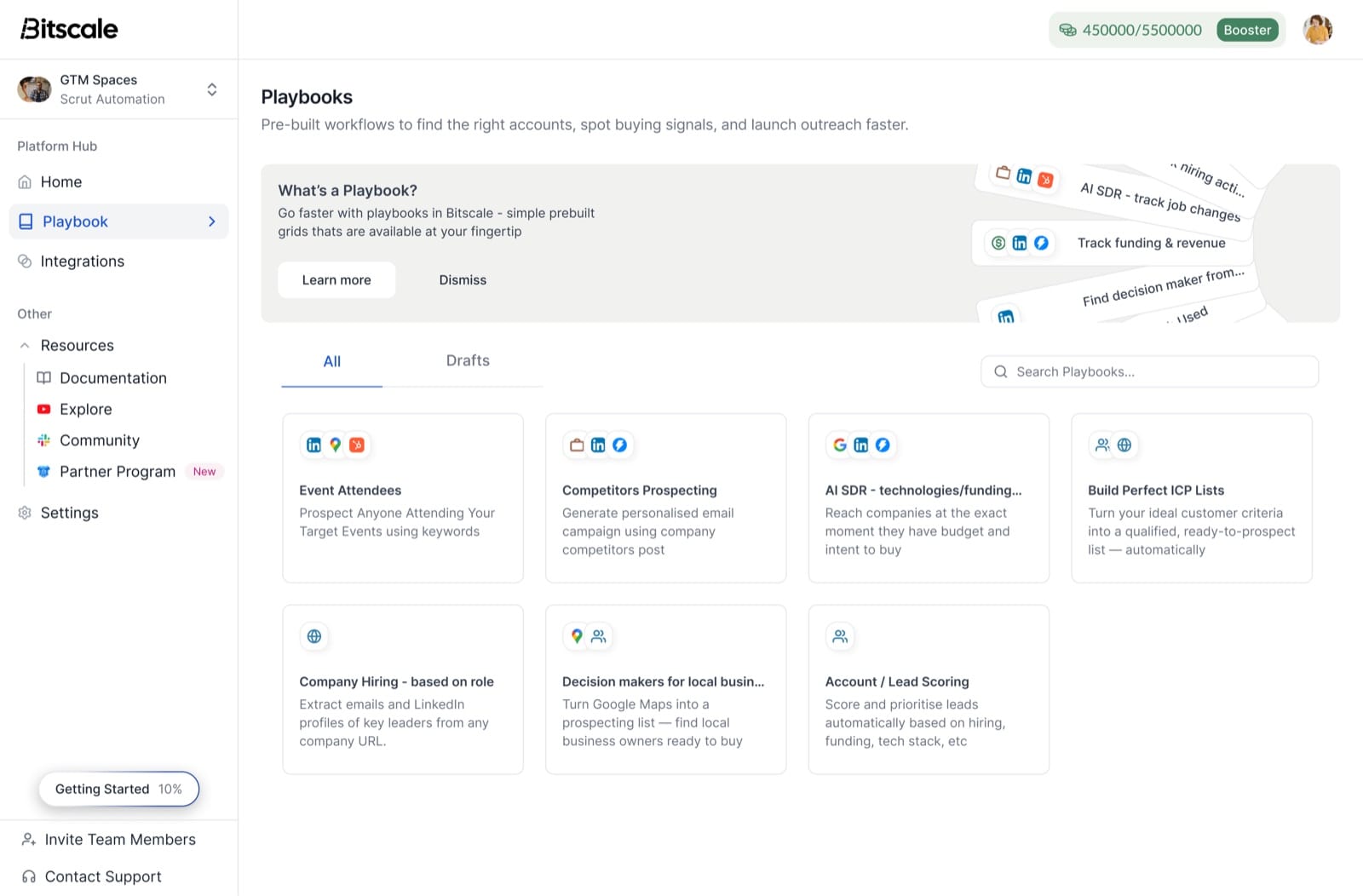
- Ready-made playbooks. Launch workflows for event attendees, competitor prospecting, champion job changes and more in minutes.
- Two-way CRM sync. Pull a Salesforce report or HubSpot list into Bitscale, enrich it, and push back only the fields that changed.
- An AI research agent that scrapes websites and runs Google and Perplexity research to extract company details, tech stacks and funding data.
- Done-for-you setup. Bitscale GTM engineers handle setup and migration.
- Plan notes: two-way HubSpot sync starts on Growth, the Salesforce integration on Booster, and SSO and custom CRM integrations on Enterprise.
- G2: 4.8/5, the highest rating among the ten tools in this guide.
What customers report:
- ScaleStation enriched 27,000+ contacts, saw a 60% increase in multi-threaded deals and saves 120+ hours a week.
- Phyllo keeps Salesforce at 94% coverage and saves $30K a year on stale-data tooling.
- Pazcare scaled from 100 to 300–400 enriched contacts a day.
- Guidebook: "Our email and phone waterfall hits 92% coverage on European ICP. Nothing else we tested came close," says Shannon Jhanji, Growth Operations.
Pensa Systems summed up why teams switch: "From 10 leads, Apollo was returning results only from two or three. With Bitscale, I can look for email details in multiple sources and verify the email that returned — that's the ideal solution."
Choose Bitscale if you want the most complete contact coverage, signals that tell you when to reach out, and data that lands straight in Salesforce or HubSpot, without building the workflows yourself.
Try Bitscale free: 200 credits, no card required. Run the 100-contact test on your own target accounts and see what a multi-provider waterfall finds that a single database misses. Start for free →
2. Apollo.io: best all-in-one for small and mid-sized teams
Apollo combines a large contact database with sequencing, a dialer and CRM sync in one seat. For most teams starting outbound, it's the lowest-cost way to get list building and outreach in one place.
- Pricing:
- Free plan with 900 credits per seat per year.
- Basic is $49 per seat per month billed annually ($65 monthly).
- Professional is $79 ($99 monthly).
- Organization is $119 per seat with a three-seat minimum, annual only.
- Data: Apollo says it covers 240M+ contacts and 30M+ companies.
- What stands out:
- Unlimited sequences on paid plans.
- Built-in waterfall enrichment and intent topics.
- AI research and lead scoring from Professional up.
- A US dialer and website-visitor identification.
- Watch out for:
- Unused credits don't roll over.
- API access sits on custom plans.
- Free plans can connect Gmail accounts only.
- G2: 4.7/5 from 9,840 reviews.
Choose Apollo if you want one affordable tool for finding contacts and sending sequences, and you'd rather start outbound without a large contract.
3. ZoomInfo: best for enterprise data depth and intent
ZoomInfo is the enterprise standard for contact and company data. It has added a broad layer of signals and AI on top: the company renamed its stock ticker to "GTM" in May 2025 and now markets itself as a go-to-market platform.
- Pricing: Quote only. Sales plans are ZoomInfo Professional, Copilot Advanced and Copilot Enterprise. Pricing depends on features, number of licenses and credit usage, and each export costs one credit.
- Data: ZoomInfo cites 500M+ contacts, 100M+ companies and 300+ human researchers verifying records.
- What stands out:
- Buyer intent signals.
- Website-visitor identification.
- Champion and job-change tracking.
- AI-generated buying groups.
- Native exports to Outreach and Salesloft.
- Watch out for:
- No public pricing.
- Many of the most useful signals are gated to the Copilot tiers.
- Credit-based exports need managing at scale.
- G2: 4.5/5 from 9,171 reviews (now listed as "GTM Workspace – Powered by ZoomInfo").
Choose ZoomInfo if you're an enterprise or upper-mid-market team with budget for an annual contract and someone to own the platform.
4. LinkedIn Sales Navigator: best for relationship-led selling
Sales Navigator isn't a contact database in the usual sense. It doesn't hand you emails and phone numbers. It's the best tool for finding the right people on LinkedIn, understanding the account, and using warm paths into it.
- Pricing: No free plan, but a free trial for eligible members.
- Core is US$119.99 per month or US$1,079.88 per year.
- Advanced is US$159.99 per month or US$1,799.88 per year.
- Advanced Plus is custom.
- Data: LinkedIn cites 1+ billion members and 50+ search filters.
- What stands out:
- Account IQ and Lead IQ AI summaries.
- Buyer intent signals.
- TeamLink and Relationship Explorer for warm introductions.
- 50 InMails a month.
- Watch out for:
- Real-time CRM sync is listed under Advanced Plus, which is custom-priced.
- You'll still need a separate tool for emails and mobile numbers.
- G2: 4.4/5 from 2,211 reviews.
Choose Sales Navigator if LinkedIn is your main channel, or if you sell into accounts where a warm introduction beats a cold email. Most teams pair it with an enrichment tool.
5. Clay: best for building custom enrichment workflows
Clay is a spreadsheet-style workspace that pulls data from many providers in sequence and adds AI research on top. It's the most flexible tool here, and it rewards teams who have someone to build and maintain workflows.
- Pricing:
- Free plan with 500 actions and 100 data credits a month, but no phone enrichment.
- Launch starts at $185 per month ($167 billed annually).
- Growth starts at $495 ($446 annually).
- Enterprise is custom.
- Clay overhauled its pricing on March 11, 2026, splitting usage into "Data Credits" and "Actions" and cutting data costs by 50–90%.
- Data: Clay says it connects to 150+ data partners.
- What stands out:
- Multi-provider waterfalls and the Claygent AI agent.
- Job-change tracking.
- Web intent signals.
- A native sequencer.
- Watch out for:
- Actions don't roll over.
- CRM sync and the HTTP API start on Growth.
- There is a real learning curve.
- G2: 4.6/5 from 234 reviews.
Choose Clay if you have a RevOps or GTM engineer who wants full control over enrichment logic and is comfortable building it.
6. Cognism: best for UK and European contact data
Cognism is the strongest option here for teams selling into Europe. Its pitch is compliance and verified mobile numbers, not raw database size.
- Pricing: Quote only. There are Standard and Pro plans, each with five seats included, and a free data sample instead of a trial. One credit equals one revealed contact, and you're not charged again for contacts you've already revealed.
- Data: Cognism says decision-maker data is refreshed every 30 days. It cites do-not-call coverage across Europe and GDPR and CCPA compliance.
- What stands out:
- Phone-verified mobile numbers, verified on demand on Pro.
- Bombora intent data on Pro.
- Hiring, funding and job-change signals.
- Watch out for:
- No public pricing.
- Five-seat packages make it a team purchase rather than a solo one.
- Intent and mobile verification are Pro-only.
- G2: 4.5/5 from 1,372 reviews.
Choose Cognism if a meaningful share of your pipeline is in the UK or EU and you call prospects, not just email them.
7. Lusha: best for quick lookups on a small budget
Lusha is the simplest tool on this list. A browser extension and web app reveal emails and phone numbers for the people you're already looking at.
- Pricing:
- Free plan with 40 credits a month.
- Starter is $37.45 per month billed yearly (4,800 credits a year).
- Pro is $52.45.
- Premium is $299.95.
- An email costs 1 credit and a phone number costs 5.
- Data: Lusha cites 515M+ contacts and 29M+ companies. It claims 98% email accuracy and 86% phone accuracy, which are its own figures.
- What stands out:
- Low entry price.
- 26 buying signals refreshed weekly.
- Lookalike recommendations.
- API and CRM integrations.
- Watch out for:
- Phone numbers use credits five times faster than emails.
- API rate limits are strict on lower tiers.
- G2: 4.3/5 from 1,667 reviews.
Choose Lusha if you're an individual rep or small team who needs a few hundred accurate contacts a month without a big contract.
8. Amplemarket: best AI all-in-one for mid-market teams
Amplemarket bundles data, multichannel sequencing and an AI copilot called Duo. It suits teams that want to replace several point tools with one platform.
- Pricing: No free plan, but a free trial. The Startup plan is $600 per month on an annual term, with 2 users and 27,000 contacts. Growth and Elite are custom.
- What stands out:
- Duo tracks 40+ signal types.
- Multichannel sequences across email, LinkedIn and phone.
- A parallel dialer.
- AI voice and inbox features on higher tiers.
- Watch out for: The annual-only $600 entry point puts it out of reach for solo founders.
- G2: 4.6/5 from 688 reviews.
Choose Amplemarket if you're a mid-market team that wants data, signals and multichannel outreach in one contract.
9. Seamless.AI: best for high-volume list building
Seamless.AI is built for teams that want large lists fast, with AI agents layered on top of its search.
- Pricing: Free for up to 50 credits. Paid plans are quote-only, through a pricing-inquiry form.
- Data: Seamless.AI cites 1.8B+ verified business emails and 414M+ phone numbers.
- What stands out:
- Buyer intent and job-change data.
- AI agents for outbound, inbound and ops work.
- "100% Credit Back Protection" for invalid emails.
- Watch out for: No public pricing, so budget comparisons need a sales call.
- G2: 4.4/5 from 5,407 reviews.
Choose Seamless.AI if you run high-volume outbound into SMB markets and list size matters more than precision targeting.
10. Hunter: best for finding and verifying work emails cheaply
Hunter does one job well: it finds work email addresses and verifies them. It also includes lightweight cold-email sending.
- Pricing:
- Free plan with 50 credits a month.
- Starter is $34 per month billed yearly ($49 monthly).
- Growth is $104 ($149 monthly).
- Scale is $209 ($299 monthly).
- All plans include unlimited users.
- Data: Hunter says it has verified 150M+ email addresses.
- What stands out:
- Domain search.
- Email finder and verifier.
- Auto-verification.
- Integrations with HubSpot, Salesforce and Pipedrive.
- Watch out for: It's email-only, with no mobile numbers. Connected sending accounts are capped per plan.
- G2: 4.4/5 from 656 reviews.
Choose Hunter if you mainly need verified work emails. It's also an inexpensive second verification step behind any database.
What prospecting tools really cost
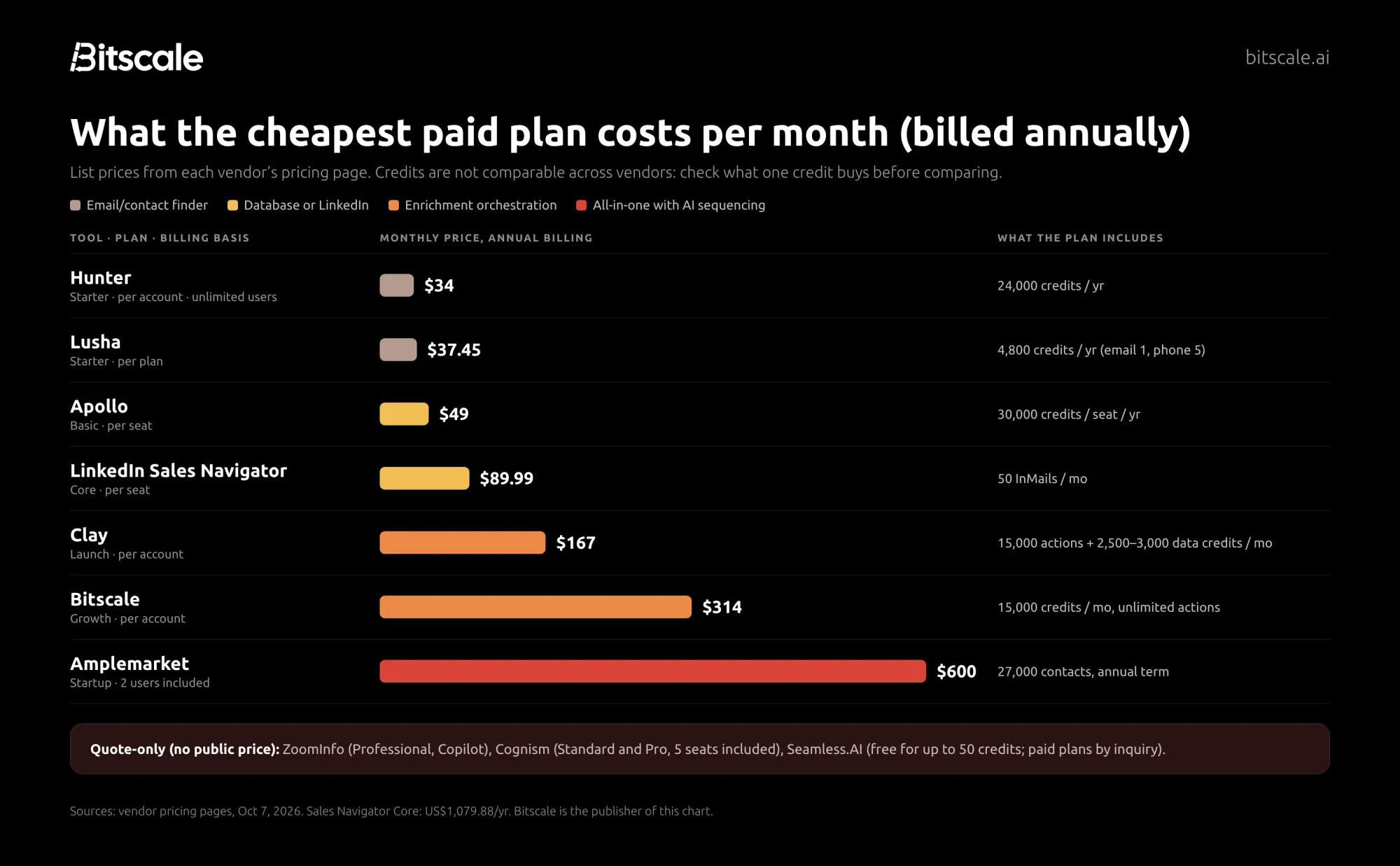
Sticker prices are hard to compare because vendors charge in different units. Some charge per seat, some per account. Some count credits, some count actions, and the same credit can buy very different things.
To compare fairly, work out your cost per usable contact:
Cost per usable contact = plan cost ÷ (credits ÷ credits per contact × share of lookups that return a valid, verified result)
Here is a worked example using Lusha's published numbers:
- The Starter plan costs $37.45 a month billed yearly, or $449.40 a year, for 4,800 credits.
- An email costs 1 credit. That's about $0.09 per email lookup.
- A phone number costs 5 credits. That's about $0.47 per phone lookup.
- Not every lookup returns a usable result. As an illustration only: if 70% of email lookups return a verified address, the real cost is about $0.13 per usable email.
Run the same math for every shortlisted tool, using your own find rate from a trial. Two traps to watch:
- Phone numbers usually cost several times more than emails. If your team calls, model mobiles separately.
- Unused credits often expire. Apollo's credits and Clay's actions don't roll over, so an oversized plan is money lost. Some plans, including Lusha's Pro and Premium, Clay's data credits and Bitscale's, let credits roll over up to a cap.
Verification is no longer optional
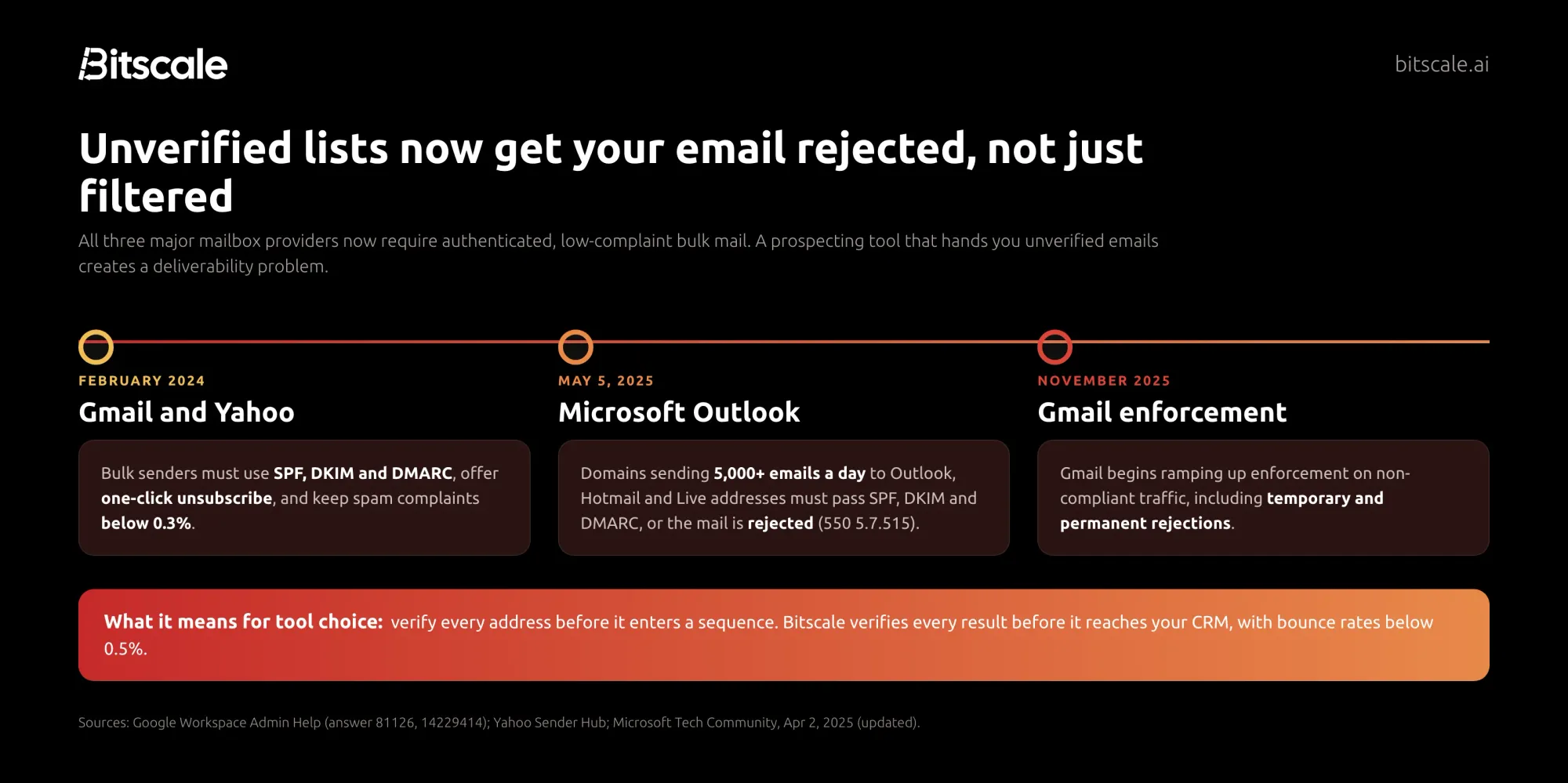
The biggest change to prospecting in the last two years didn't come from a prospecting vendor. It came from the mailbox providers.
- Gmail and Yahoo (February 2024). Bulk senders must authenticate with SPF, DKIM and DMARC, offer one-click unsubscribe, and keep spam complaint rates below 0.3%.
- Microsoft Outlook (May 5, 2025). Domains sending more than 5,000 emails a day to Outlook, Hotmail and Live addresses must meet the same authentication rules, or their mail is rejected.
- Gmail (November 2025). Google began ramping up enforcement on non-compliant traffic, including temporary and permanent rejections.
What this means for choosing a tool: every address should be verified before it enters a sequence, and bounce and complaint rates deserve the same attention as reply rates. Prefer tools that verify automatically. Otherwise, put a verifier like Hunter in front of your sequencer.
Example prospecting stacks by team size
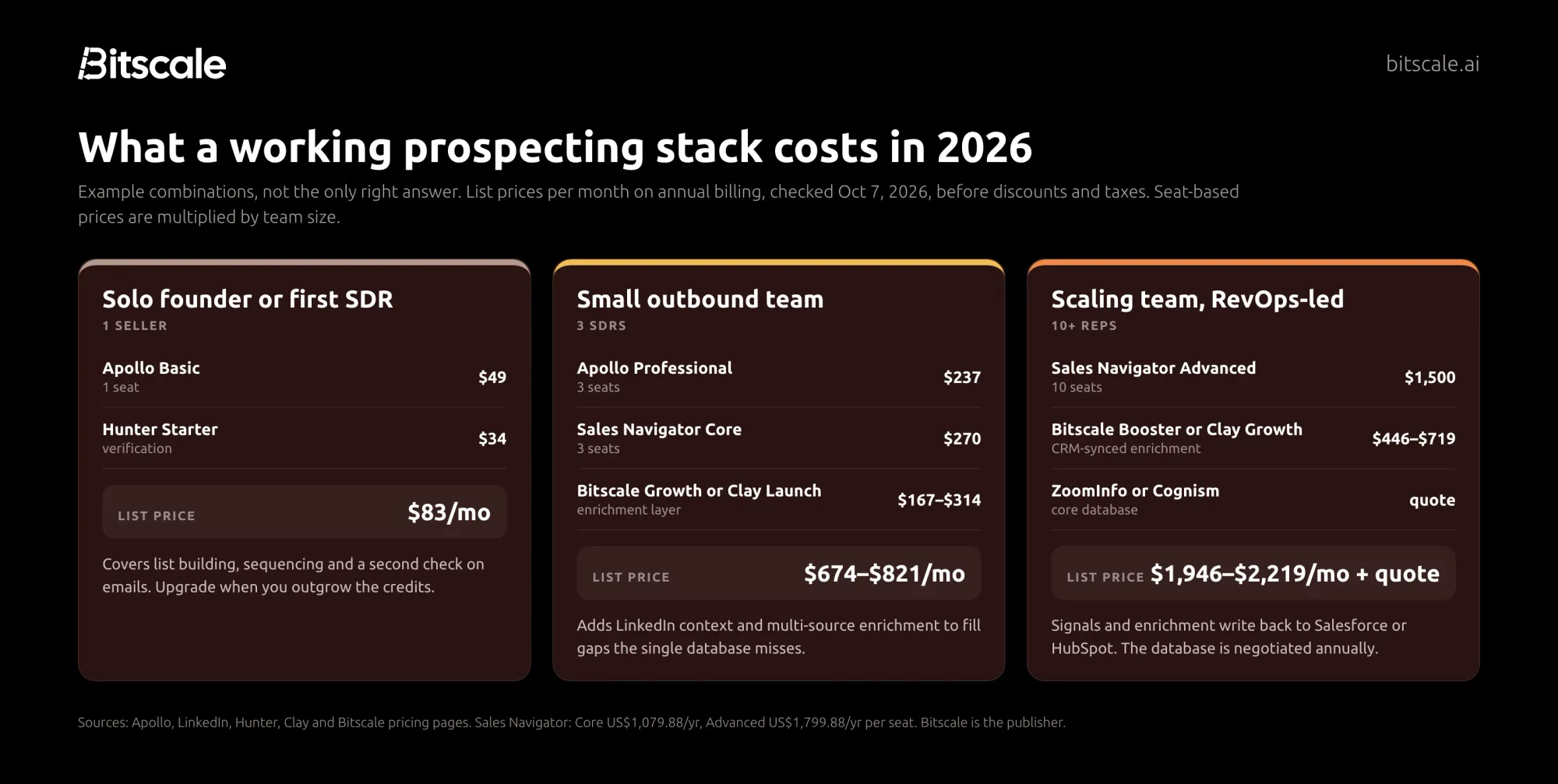
These are starting points, not prescriptions. All prices are list prices per month on annual billing, checked October 7, 2026.
Solo founder or first SDR: about $83/month. (Or start on Bitscale's free plan and add Growth when you're ready to sync with HubSpot.)
- Apollo Basic for one seat ($49) covers list building and sequences.
- Hunter Starter ($34) adds a second verification step and email finding for the gaps.
Small outbound team, three SDRs: about $674–$821/month.
- Apollo Professional for three seats ($237).
- Sales Navigator Core for three seats ($270) for LinkedIn context.
- An enrichment layer to fill what one database misses: Bitscale Growth ($314), or Clay Launch ($167) if you have someone to build the workflows.
Scaling, RevOps-led team of 10+ reps: about $1,946–$2,219/month plus a database contract.
- Sales Navigator Advanced for ten seats (about $1,500).
- CRM-synced enrichment and signals: Bitscale Booster ($719, with the Salesforce integration) or Clay Growth ($446).
- A negotiated core database: ZoomInfo or Cognism, quote only.
- At this size, the CRM write-back matters more than any single feature.
How to choose: run a 100-contact bake-off
Vendor accuracy claims are measured on the vendor's own data, in the vendor's best markets. The only accuracy number that matters is the one from your accounts. Before you sign anything, run this test on two or three shortlisted tools:
- Pick 100 real target contacts. Use people you'd actually prospect, in the regions and seniority levels you sell to. Include some you already have verified emails for, as a control.
- Run the same list through each tool during the free plan or trial.
- Record four numbers per tool:
- Find rate: how many returned an email or phone.
- Verified rate: how many passed email verification.
- Mobile rate: how many returned a mobile number, if you call.
- Credits used.
- Send a small, compliant test sequence to the verified addresses and track the bounce rate.
- Calculate the cost per usable contact with the formula above.
Then answer these six questions:
- Where are your buyers? Data coverage varies by region. For a European-heavy pipeline, test Cognism. For North America, start with the large databases such as ZoomInfo and Apollo.
- Do you call, email or both? Phone-heavy teams should weight mobile coverage and cost per mobile.
- Who will own the tool? Flexible builders like Clay need an owner. All-in-ones like Apollo and Amplemarket need less setup.
- Does it write back to your CRM? If not, budget time to keep two systems in sync.
- How will you prioritize? If you want to reach accounts when something changes (hiring, funding, a new leader), check which signals are on the plan you can afford.
- What's the real cost? Compare cost per usable contact and total stack cost, not entry price.
Frequently asked questions
What is a B2B prospecting tool?
A B2B prospecting tool helps sales teams find, research and contact potential business customers. Depending on the product, it can build lead lists, enrich contacts with emails and phone numbers, verify those emails, surface buying signals, and run outreach sequences that sync back to your CRM.
What is the best free B2B prospecting tool?
Apollo.io has the most generous free plan for combined list building and outreach, with 900 credits per seat per year. Hunter (50 credits a month) is the best free option for finding and verifying emails. Bitscale's free plan (200 credits, no card) is the best way to test multi-provider enrichment on your own accounts. Clay, Lusha and Seamless.AI also offer free tiers.
How much do B2B prospecting tools cost?
At list price, entry-level paid plans range from $34 a month (Hunter Starter, billed yearly) to $600 a month (Amplemarket Startup, annual term). ZoomInfo, Cognism and Seamless.AI are quote-only. A practical stack for a three-SDR team costs roughly $674–$821 a month at list price.
What's the difference between a CRM and a prospecting tool?
A CRM such as Salesforce or HubSpot stores and manages relationships you already have. A prospecting tool finds and enriches new contacts and tells you when to reach out. The best setups connect the two, so enriched data and signals land in the CRM instead of a spreadsheet.
Which prospecting tool has the most accurate contact data?
There is no independent, current, cross-vendor accuracy benchmark, and the accuracy figures vendors publish are measured on their own data. Accuracy also varies by region and seniority. Run a 100-contact test on your own target list and measure find rate, verified rate and bounce rate before you buy.
Is LinkedIn Sales Navigator worth it for prospecting?
Sales Navigator is worth it if LinkedIn is a primary channel or you sell through relationships and warm introductions. It doesn't provide email addresses or phone numbers, so most teams pair it with a database or enrichment tool.
Are B2B prospecting tools GDPR compliant?
Several vendors, including Cognism, publish GDPR and CCPA compliance information, and some offer do-not-call screening. Compliance also depends on how you use the data: your lawful basis, opt-out handling and data processing agreements. Check each vendor's documentation and talk to your legal team before prospecting into the EU or UK.
Sources
Vendor pricing pages (all accessed October 7, 2026)
G2 product review pages, accessed October 7, 2026.
Research and data
- Salesforce, State of Sales, 7th edition (February 2026)
- Gartner, B2B buyer survey (June 2025)
- Instantly, Cold Email Benchmark Report 2026
- The Bridge Group, 2025 SDR Metrics Report
- Clay, pricing change memo (March 2026)
- ZoomInfo, ticker change press release (May 2025)
Email sender rules
About the author
Abhinay is the co-founder of Bitscale, the GTM data layer for your CRM. Bitscale helps 1,000+ RevOps and GTM leaders enrich, verify and prioritize prospects across 18+ contact-data providers.
Ready to see what multi-provider enrichment finds on your own accounts? Bitscale's free plan includes 200 credits with no card required. Run the 100-contact bake-off above with Bitscale as one of your shortlisted tools. Start for free