Sales Process Automation: A Practical Guide for Modern Revenue Teams
Sales process automation roadmap for RevOps: phase rollout, clean CRM data, add signals and scoring, and set governance so reps sell more and admin less.
Sales process automation has outgrown the "CRM workflow" bucket. For a modern revenue team, it covers the whole lifecycle of a deal: from the first time a prospect shows up in your systems to the moment a rep gets a signed contract (over Zoom or otherwise). Industry research consistently shows that a substantial share of routine sales tasks can be automated with current technology, and organizations that adopt automation early tend to see meaningful efficiency gains alongside measurable revenue uplift. McKinsey has highlighted this trend repeatedly, noting that the opportunity grows as AI capabilities mature.
Most teams, though, still bolt automation onto the process like aftermarket parts. One tool captures leads. Another enriches. A third runs sequences. That stack creates fragmentation: fields drift, signals get missed, and reps lose hours to work that should be invisible. This piece lays out what an actually automated sales process looks like, how to roll it out without sidelining the judgment that wins deals, and where implementations tend to go sideways. The same mechanics apply whether you sit in RevOps, sales leadership, or broader GTM strategy.
What Sales Process Automation Actually Means (Beyond CRM Workflows)
The most common mix-up is equating sales automation with CRM automation. A task reminder when an opportunity sits in a stage for seven days is helpful, but it is a narrow fix. Sales process automation is the end-to-end system: AI coordinating connected steps so each one hands clean context to the next. It should behave more like a nervous system than a set of isolated reflexes.
That orchestration spans the full revenue cycle. Lead capture pulls prospects from forms, ad platforms, and intent data providers into one system. AI prospect research adds firmographic, technographic, and behavioral context so reps are not walking into calls cold. CRM enrichment keeps records current without turning sellers into part-time data stewards. Buying signals, including job changes, funding rounds, or product usage spikes, can trigger outreach while the timing is still right. Lead qualification scores and routes prospects based on fit and intent. Pipeline automation highlights stalled deals and suggests next steps. Reporting rolls outcomes up across channels. Governance keeps the whole thing safe: data quality, compliance, and process adherence. IBM's overview of sales automation captures the point: cut repetitive work so sellers can spend time on relationship-driven activities.
Traditional Sales Process vs. AI-Automated Sales Process
The real difference between manual and automated sales is not just throughput. It is decision quality: what gets prioritized, what gets ignored, and how consistently the team acts on the same set of facts. Here is how the core activities of a B2B sales cycle look when you compare the two approaches side by side.
| Activity | Traditional Process | AI-Automated Process |
|---|---|---|
| Lead Capture | Reps build lists manually from LinkedIn, events, and purchased databases | Leads flow in from multiple channels with deduplication and immediate routing |
| Prospect Research | A rep spends significant time per account searching across Google, LinkedIn, and news sites | AI assembles firmographic, technographic, and recent news context in seconds |
| CRM Enrichment | Reps update fields by hand; data goes stale within months | Ongoing enrichment keeps records fresh via automatic syncs from third-party providers |
| Buying Signals | Reps lean on gut feel or occasional alerts | AI tracks job changes, funding events, tech installs, and intent surges in real time |
| Lead Qualification | SDRs score subjectively; criteria vary by person and team | Scoring models apply consistent fit and intent criteria across every lead |
| Pipeline Prioritization | Weekly spreadsheet-heavy pipeline reviews | Priorities refresh daily based on engagement and intent data |
| Outbound Execution | Bulk sends with generic templates | Sequences are personalized using research and signal context |
| Reporting | Dashboards get assembled manually; insights arrive late | Real-time dashboards update automatically and include predictive metrics |
| Governance | Audits happen ad hoc; compliance gaps slip through | Rule-based guardrails are enforced at each workflow step |
| The shift from traditional to automated is less about replacing people and more about upgrading the information they act on. |
Where AI Fits and Where Humans Stay Essential
Automation anxiety is understandable, but the investment trend points to augmentation, not replacement. Analyst firms like Forrester consistently report that a strong majority of B2B automation decision-makers plan to increase their investment in sales automation over the near term (Forrester). The intent is to move human effort up the value chain: less time on admin, more time on the conversations that create revenue.
| AI Handles | Humans Own |
|---|---|
| Data collection, enrichment, and hygiene | Relationship building and trust |
| Pattern recognition across thousands of accounts | Strategic account planning and creative problem-solving |
| Scoring and ranking leads by fit and intent | Final qualification judgment and discovery conversations |
| Triggering workflows based on buying signals | Navigating complex stakeholder dynamics |
| Generating first-draft outreach and summaries | Tailoring messaging to individual buyer psychology |
| Surfacing pipeline risks and anomalies | Negotiation, objection handling, and closing |
| Compliance checks and data governance | Ethical judgment and brand representation |
| The most effective teams treat AI as an intelligence layer, not a replacement for seller expertise. |
The division of labor is pretty consistent across teams: AI brings volume, speed, and consistency; humans bring empathy, strategy, and judgment. The strongest outcomes tend to show up when leadership draws that boundary on purpose. Organizations that report substantial increases in leads and appointments alongside significant cost reductions (Harvard Business Review / McKinsey) are typically the ones using automation to improve decisions and follow-through, not to remove sellers from the loop.
Implementing an Automated Sales Process: A Phased Approach
Automating everything in one shot is how teams end up with expensive chaos and a lot of "why is this firing?" Slack threads. A better pattern is phased rollout: prove each layer works, then stack the next one on top.
Phase 1: Audit Your Current Process and Data Foundation
Before you buy anything, map the current workflow end to end. Capture every handoff, every manual step, and every place data hops between systems. Then look for the time sinks that have nothing to do with selling: data entry, one-off research, internal messages like "does anyone know if this account is already in our CRM?" Those are prime candidates for automation. Just do not skip the unglamorous part: CRM quality. Automation built on dirty data scales bad decisions faster. If your contact records show signs of significant decay (outdated fields, missing values, duplicate entries), fix enrichment and hygiene before you start wiring up more workflows. The principle is straightforward: get the foundation right before you build on top of it.
Phase 2: Automate Lead Capture, Enrichment, and Research
Start where the process starts: the top of the funnel. Route lead sources (website forms, ad platforms, event tools, partner referrals) into a single ingestion path with automatic deduplication. Add CRM enrichment so new records land with firmographic and technographic fields already populated. Then bring in AI prospect research to pull recent news, hiring patterns, and technology stack details per account. Done right, reps open their queue to leads that already have context, not a bare email address and a prayer.
Phase 3: Layer in Signals, Scoring, and Pipeline Automation
Once enriched data is flowing reliably, lead management automation becomes much more trustworthy. Set up AI lead scoring that accounts for fit (company size, industry, tech stack) and intent (website visits, content downloads, and identifying buying signals like funding rounds or leadership changes). Route high-scoring leads to reps immediately, move mid-tier leads into nurture, and disqualify obvious poor fits automatically. On the pipeline side, automation should call out stalled deals, flag missing next steps, and surface forecast risks without forcing managers back into spreadsheet triage.
Phase 4: Activate Outbound Execution and Reporting
The last layer is where intelligence turns into action. Workflow automation can trigger personalized sequences based on the signals and scores from Phase 3, with reps reviewing and approving messages instead of writing every first draft. Reporting should update continuously: conversion rates by stage, rep activity, and revenue attribution without the monthly dashboard scramble. If you are running account-based motions, ABM workflow automation adds coordination across channels so target accounts get a coherent set of touches instead of disconnected campaigns.
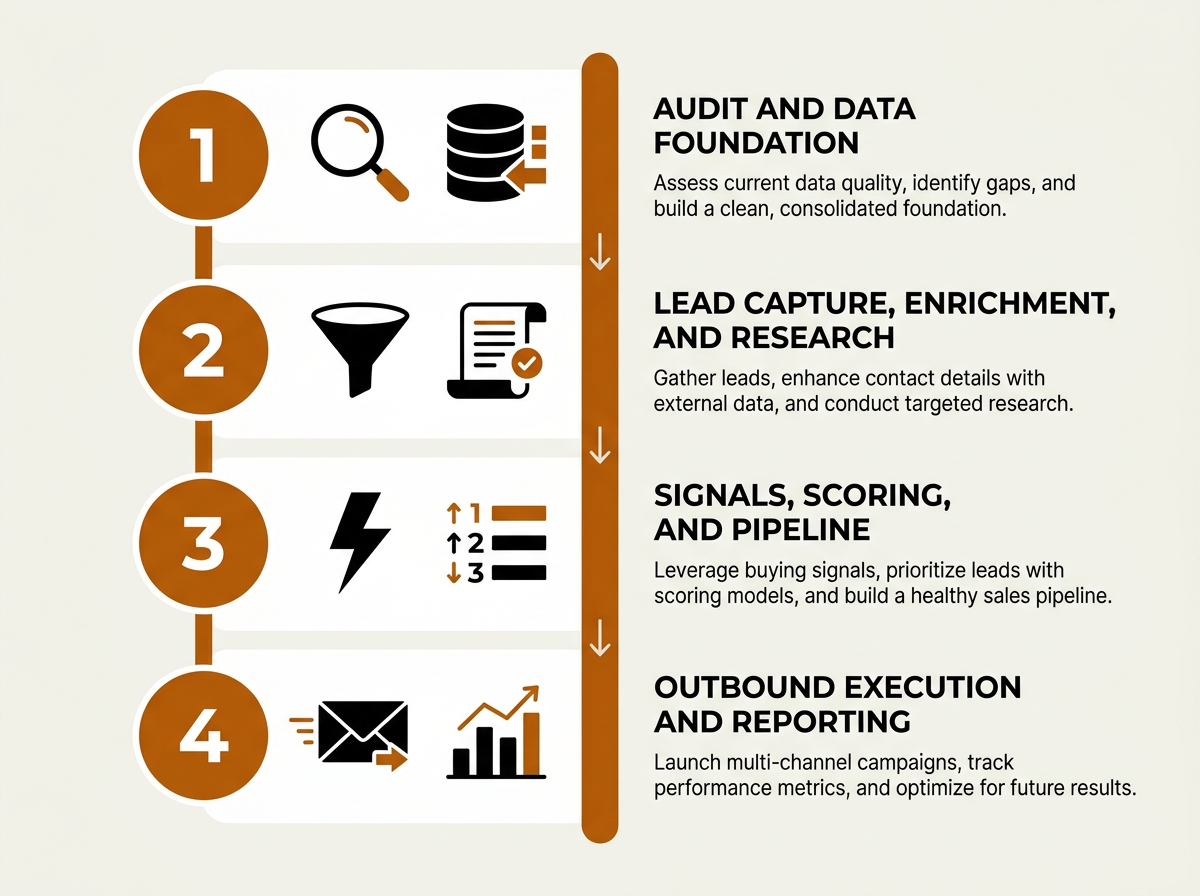
A phased rollout lets revenue teams validate each automation layer before adding complexity.
Common Mistakes That Derail Sales Operations Automation
The same failure modes show up again and again when B2B teams try to modernize sales operations with automation.
Automating before standardizing. If your process changes by region, segment, or rep, automation will faithfully encode that inconsistency. Get agreement on the process first, then automate. The pressure to "just get something running" is exactly why teams skip this step and end up rebuilding later.
Treating CRM as the entire automation layer. CRM automation (task creation, stage reminders, field updates) matters, but it mostly governs internal mechanics. It does not answer the external questions that drive outcomes: who to call, why now, and what to say. An AI sales workflow has to pull from sources well beyond the CRM if you want it to improve prioritization and messaging.
Ignoring governance. Workflows that push outbound messages without human review invite compliance problems and brand damage. Any automation that touches prospects externally needs explicit guardrails: who approved the templates, how opt-outs are handled, and what happens when contacts bounce or unsubscribe. The state of RevOps increasingly makes governance a first-class requirement, not a "we'll clean it up later" item.
Over-indexing on tool count. A bigger stack is not the same thing as better automation. Every new vendor adds integration work, data sync lag, and operational overhead. Digital channels now represent a dominant share of all B2B sales engagements (Kixie), which means your systems are already processing a firehose of activity. Fewer, more capable platforms reduce friction and keep the data model coherent. That is where unified GTM platforms like Bitscale can earn their keep: when AI prospect research, buying signals, CRM enrichment, workflow automation, and outbound execution live in one environment, you avoid the integration tax that breaks so many "best-of-breed" stacks.
Automation Capabilities and Their Business Impact
Not all automation is created equal. This table ties specific capabilities to the outcomes they tend to drive, so RevOps leaders can prioritize based on where time and revenue leak out of the current process.
| Capability | What It Automates | Primary Business Impact |
|---|---|---|
| Lead Capture Automation | Ingestion across channels, deduplication, and routing | Faster speed-to-lead and fewer dropped prospects |
| AI Prospect Research | Per-account aggregation of firmographic, technographic, and news context | More personalization and less time spent researching |
| CRM Enrichment | Ongoing refresh of contact and company fields from third-party sources | Lower data decay and cleaner segmentation |
| Buying Signal Detection | Monitoring job changes, funding, tech installs, and intent surges | Outreach that lines up with buyer timing |
| AI Lead Scoring | Fit + intent scoring with models that update dynamically | Reps spend time on the highest-probability opportunities |
| Pipeline Automation | Alerts for stage movement, stale deals, and forecast changes | Better forecast accuracy and less pipeline leakage |
| Outbound Sequence Automation | Signal-triggered, personalized multi-step sequences | Higher reply rates and a consistent follow-up cadence |
| Automated Reporting | Real-time dashboards, attribution, and anomaly detection | Faster decisions and less manual reporting work |
| Governance Automation | Compliance checks, opt-out enforcement, and access controls | Lower regulatory risk and stronger brand protection |
| Prioritize capabilities based on where your team currently loses the most time or revenue. |
Advanced Considerations: What Separates Good from Great
After the basics are stable, the teams that pull ahead tend to invest in three areas that are easy to ignore because they are less "set it and forget it" than tool deployment.
Feedback loops between sales and automation. Strong systems do not just score and route; they learn. If reps regularly override a lead score, that behavior should feed back into the scoring model. If an outreach template consistently underperforms in a segment, the system should surface that pattern and prompt a change. Without feedback loops, automation hardens around assumptions that might have been wrong on day one. Tools like AI sales assistants are increasingly built to capture this input as part of the workflow.
Cross-functional orchestration. Automation that stops at the sales team boundary leaves a lot of signal on the table. Marketing engagement (content, webinars, ads) should flow into scoring and routing. Customer success signals (usage drops, support tickets, renewal timelines) should kick off expansion or save plays. RevOps is usually the connective tissue here, and the top AI software for revenue teams is designed to bridge the silos that make this hard.
Scenario modeling for pipeline risk. More advanced pipeline automation does more than label deals as stale. It helps leaders run the "what if" math: what happens to the quarter if the three biggest deals slip two weeks, or if win rate in enterprise drops five points? That kind of modeling supports proactive decisions instead of reactive scramble. It also depends on clean, continuously enriched data, which is why the early phases matter more than most teams want to admit.
Best Practices for Sustainable Sales Automation
- Start with one segment or region. Pilot the automated process with a single team before you roll it out everywhere. You limit the blast radius and get real operating learnings.
- Define human checkpoints explicitly. For each workflow, write down where a human reviews, approves, or overrides. That is quality control, not red tape.
- Measure leading indicators, not just lagging ones. Track speed-to-lead, enrichment coverage, signal-to-outreach latency, and scoring accuracy alongside pipeline and revenue.
- Invest in outbound sales automation training. The tooling only works as well as the people configuring and supervising it. Budget for enablement, not just licenses.
- Review and prune automations on a regular cadence. Workflows pile up, and old triggers keep firing long after the criteria stopped making sense. Many teams find that a quarterly or biannual audit works well. Put reviews on the calendar and retire what no longer serves the process.
- Keep your sales intelligence tools consolidated. Each extra vendor adds integration and data risk. Before you add another point solution, pressure-test whether a unified platform can replace multiple tools.
Key Takeaways
Sales process automation works when it clears space for the work humans are uniquely good at. That means pulling reps out of low-value busywork and giving them better information: captured leads, enriched records, surfaced buying signals, consistent scoring, and workflows that keep follow-up from slipping through the cracks. Teams that treat automation as an intelligence layer tend to outperform teams that bolt together disconnected tools and hope the gaps do not matter.
Start with an honest audit of process and data quality, then implement in phases so each layer is stable before you add the next. Draw a bright line between what AI runs and what humans own, and put governance in from day one. Finally, keep an eye on stack sprawl. Platforms like Bitscale that unify prospect research, enrichment, signals, and execution can reduce tab-switching and integration overhead so the team spends more time selling and less time babysitting systems.
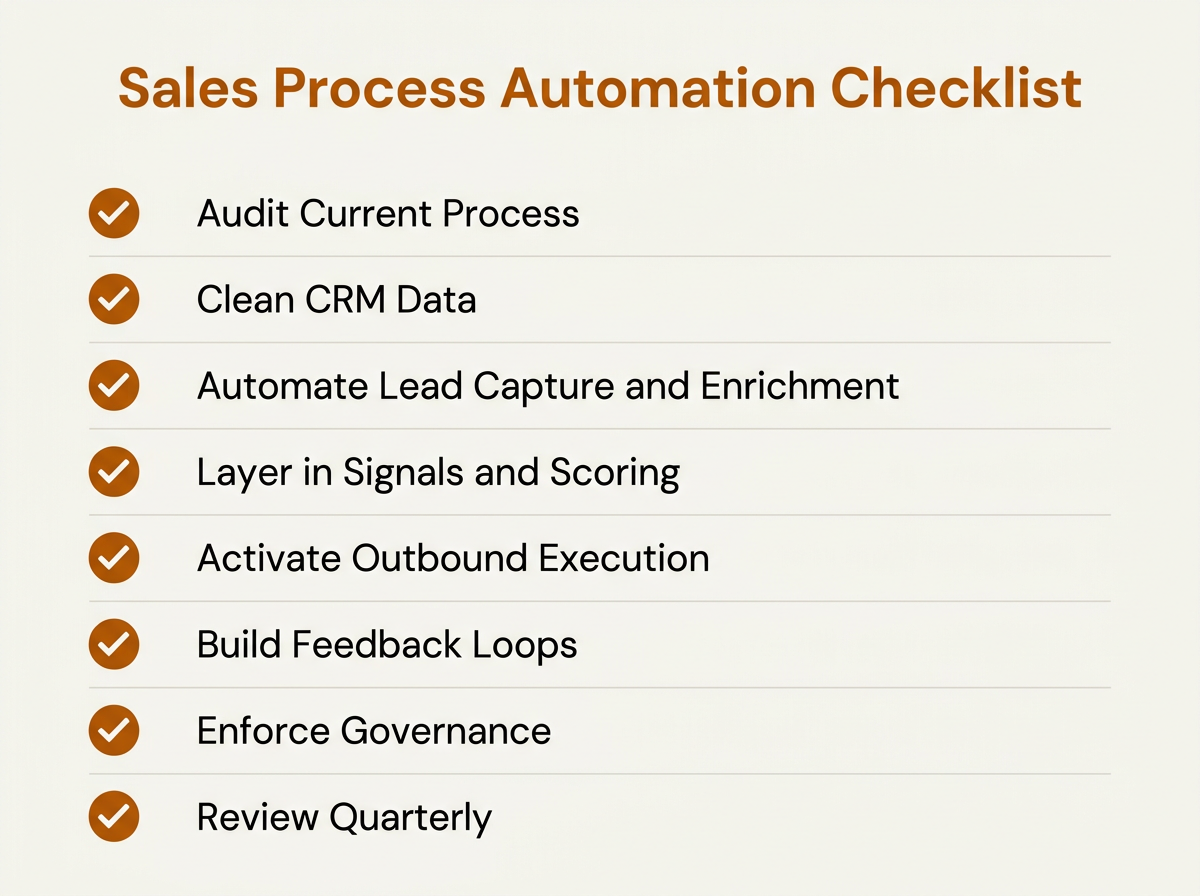
A quick-reference checklist for teams beginning their sales automation journey.
Frequently Asked Questions
What is the difference between sales process automation and CRM automation?
CRM automation stays inside the CRM: tasks, field updates, stage reminders, and basic workflow triggers. Sales process automation is the larger system. It coordinates the full revenue cycle, including lead capture, prospect research, enrichment, buying-signal detection, lead scoring, outbound execution, reporting, and governance. In other words, CRM automation is a piece of the puzzle, not the whole puzzle.
Does sales automation replace sales reps?
No. AI is well-suited for repetitive, data-heavy work like research, enrichment, and scoring. People are still required for relationship building, discovery, strategic account planning, negotiation, and closing. The point is to reduce non-selling work so reps can spend more time on judgment- and empathy-driven conversations.
How long does it take to implement sales process automation?
Implementation timelines vary based on organizational readiness, data quality, existing integrations, and process maturity. A useful way to think about rollout is in three stages. The Foundation phase covers auditing the current process, cleaning CRM data, and automating lead capture and enrichment. The Optimization phase layers in scoring, buying signals, and pipeline automation. The Scale phase activates outbound execution, cross-functional orchestration, and feedback loops. Some teams move through Foundation quickly if their data is already in good shape, while others spend more time there. The key variable is your starting point, not a fixed calendar.
What tools do I need for an AI sales workflow?
At minimum, you need lead capture, data enrichment, buying-signal detection, lead scoring, outbound sequencing, and reporting. You can stitch those together from point solutions, but unified platforms like Bitscale combine AI prospect research, CRM enrichment, buying signals, workflow automation, and outbound execution in one environment, which reduces integration complexity. For a broader view, see this list of top AI software for revenue teams.
How do I measure the success of sales automation?
Use a mix of leading and lagging indicators. Leading indicators include speed-to-lead, enrichment coverage, signal-to-outreach latency, and lead scoring accuracy (measured against real conversion outcomes). Lagging indicators include pipeline velocity, win rate changes, revenue per rep, and forecast accuracy. Review metrics regularly, then revisit automation rules and workflows on a cadence that fits your organization's pace of change.