Sales Pipeline Automation: A Buyer's Guide for Modern B2B Teams
Sales pipeline automation for B2B teams: compare vendors, AI qualification, CRM enrichment, governance, and forecasting so your pipeline data stays reliable.
Sales pipeline automation has outgrown the "nice-to-have" checkbox inside a CRM. In practice, it's a web of systems that touches every revenue-critical moment, from the first time a prospect hits your database to the point a deal closes (or quietly dies). Most buying advice still treats this as a workflow-in-the-CRM problem. That misses where pipeline value is actually created or destroyed: research quality, data accuracy, signal detection, and cross-functional orchestration.
This is for RevOps leaders, sales managers, and GTM operators who are evaluating sales pipeline automation software for B2B teams. The goal is to cover what a modern automated pipeline looks like end to end, how AI is changing qualification and forecasting, what to press vendors on, and where human judgment still matters. Research consistently shows a meaningful revenue growth gap between companies with a formal, enforced sales process and those without one. Automation is what turns that process into something you can run consistently at scale.
What Sales Pipeline Automation Actually Means Today
Pipeline automation often gets reduced to "CRM automation": auto-creating deals, nudging stages forward, and firing off reminders. That's the visible part, but it's not the whole machine. A real pipeline management automation strategy spans the full revenue lifecycle, linking your data sources, your go-to-market playbooks, and your forecasting logic so they stop drifting out of sync.
IBM defines a sales pipeline as a visual representation of the sales cycle that helps teams organize, track, and forecast. Automation sits above that visual and makes each stage more trustworthy, because the system is doing the repetitive enforcement work humans are bad at. Here's what that automation layer typically covers:
- Lead capture and routing: Automatically ingesting leads from forms, intent platforms, events, and enrichment tools, then routing them to the right rep or sequence based on territory, ICP fit, or engagement score.
- AI prospect research: Pulling firmographic, technographic, and contextual data about accounts and contacts without manual research. Bitscale, for example, combines AI prospect research with enrichment in a single workflow.
- CRM enrichment: Keeping contact and account records accurate with fresh data (job titles, company size, tech stack, funding events). Poor CRM hygiene is the top reason pipelines produce unreliable forecasts.
- Buying signals: Detecting job changes, funding rounds, product launches, hiring surges, and content engagement that indicate purchase readiness. Learn more about detecting buying signals and how they feed qualification.
- Lead qualification and opportunity scoring: Applying rules or AI models to rank leads by likelihood to convert, then surfacing the highest-value opportunities for reps.
- Workflow automation: Triggering multi-step sequences (emails, tasks, Slack alerts, CRM updates) based on pipeline events.
- Pipeline forecasting: Using historical conversion rates, deal velocity, and engagement data to project revenue outcomes.
- Governance: Enforcing data standards, stage definitions, and process compliance across the entire pipeline.
If a platform can credibly cover these layers, you're looking at a sales automation platform. If it only shuffles fields and stages inside the CRM, it's an add-on.
Manual vs. AI-Powered Pipeline Management
The difference between manual work and AI sales pipeline automation isn't just speed. It's whether your process holds up on a Tuesday afternoon when reps are busy, deals are messy, and the CRM is already behind. AI-driven systems are built to apply the same rules, across the same data, every time. The table below lays out what that looks like across the core pipeline motions.
| Pipeline Activity | Manual Approach | AI-Powered Approach |
|---|---|---|
| Lead capture | Reps manually import spreadsheets or add contacts one by one | Leads auto-ingested from forms, intent tools, and enrichment APIs |
| Prospect research | Reps spend significant time per account on LinkedIn and Google | AI compiles firmographic, technographic, and news data in seconds |
| CRM enrichment | Periodic bulk uploads; data decays between updates | Continuous enrichment triggered by CRM events or time-based rules |
| Qualification | Subjective rep judgment; inconsistent criteria | Scoring models apply uniform criteria across every lead |
| Opportunity management | Reps update deal stages manually (often late or inaccurate) | Stage transitions triggered by engagement signals and milestones |
| Forecasting | Spreadsheet roll-ups based on rep gut feel | Pipeline forecasting models weigh velocity, engagement, and historical patterns |
| Governance | Periodic audits catch problems after the fact | Real-time alerts flag missing fields, stalled deals, and process violations |
| Manual pipeline management relies on rep discipline; AI-powered automation enforces consistency at scale. |
Organizations that adopt AI early in their sales operations consistently report substantial improvements in lead generation volume, cost efficiency, and rep productivity. As AI models continue to mature, the operational case for pipeline automation grows stronger with each generation of tooling.
Where AI Belongs (and Where Humans Still Win)
A common failure mode with sales workflow automation is treating AI like a substitute for judgment. That's not what it is, and it's not what teams should design for. Industry analysts, including Gartner, consistently project that the majority of B2B sales organizations will adopt AI-guided selling to augment representative activity within the next few years. That word, augment, is doing the work here.
| Responsibility | Best Handled By AI | Best Handled By Humans |
|---|---|---|
| Data collection and enrichment | Yes | No (too slow, error-prone) |
| Lead scoring and prioritization | Yes (pattern recognition at scale) | Humans review edge cases and override scores |
| Personalized outreach messaging | AI drafts; humans refine tone and context | Final approval and relationship nuance |
| Deal negotiation | No | Yes (empathy, creative deal structuring) |
| Pipeline health monitoring | Yes (anomaly detection, alerts) | Humans interpret root causes and act |
| Forecasting | AI generates probability-weighted projections | Leaders apply market context and judgment |
| Governance and compliance | AI enforces rules automatically | Humans define the rules and handle exceptions |
| Effective revenue pipeline management pairs AI speed with human judgment. |
Analyst firms also project that a growing share of B2B seller work will be executed through conversational AI interfaces in the coming years. That doesn't imply sellers vanish; it implies the work shifts. Strategy, relationship building, and complex problem-solving become a larger share of the job, because those are the areas automation still struggles to replicate. AI sales assistants take on the repetitive groundwork so reps can spend their time where it actually moves deals.
Evaluating Sales Pipeline Automation Vendors: What to Look For
Vendor selection is where RevOps teams either compound good decisions or inherit a new category of operational debt. The market spans point solutions (Clay, Lusha, Cognism), broader outbound platforms (Apollo.io, Instantly.ai), and unified GTM platforms like Bitscale that bring prospect research, enrichment, buying signals, and workflow automation into a single environment. The right choice depends less on logo recognition and more on how well the product fits your data model, governance needs, and operating cadence.
Integrations
Your pipeline automation tool has to plug into the systems you already run: your CRM (Salesforce, HubSpot, Pipedrive), outbound sequencing, the data warehouse, and the channels reps actually live in. Press vendors on the boring details: How many pre-built integrations exist? Is there an open API? Can enriched data be written back to the CRM in real time, or only via batch jobs? Bitscale, for example, includes CRM sync and outbound sales automation integrations as part of its core platform.
AI Capabilities
"AI" is now a label vendors paste on everything from if/then rules to serious modeling. You need to separate automation theater from capabilities you can operationalize. Some products lean on rule-based logic; others use large language models for research, natural language processing for signal detection, and machine learning for opportunity scoring. Ask for specifics: Which models drive scoring? What changes as the system sees more of your outcomes? Where can you customize criteria, and where are you locked into the vendor's defaults?
Data Quality, Scalability, and Security
Data quality is what every pipeline metric rests on, whether you acknowledge it or not. If an enrichment source delivers inaccurate work emails at a meaningful rate, your outbound performance takes a hit and your pipeline reporting becomes fiction. Require clarity on freshness, coverage by geography and industry, and how records are verified. For scalability, don't just validate today's volume; validate a significant multiple of your current volume and watch for performance cliffs. Security is table stakes for enterprise buyers: SOC 2, GDPR, and data residency aren't optional line items. CRM data enrichment quality is the difference between a CRM you can trust and one you constantly explain away.
Governance and Analytics
Governance is the unsexy work that keeps a pipeline usable: stage definitions that mean something, required fields that get filled, and process compliance that doesn't depend on rep memory. Without it, the pipeline turns into a graveyard of stalled deals and inconsistent records. Analytics should match that seriousness. Skip the vanity dashboards and look for cohort analysis, conversion trends by segment, deal velocity tracking, and pipeline coverage ratios. The platforms worth paying for don't just visualize data; they surface issues you can act on.
Platform Capabilities and Business Impact
Feature checklists are easy; tying features to outcomes is where evaluation gets real. When you review a sales automation platform, translate each capability into the specific pipeline failure it addresses and the metric it should move. The table below connects the dots.
| Platform Capability | Pipeline Problem Solved | Business Impact |
|---|---|---|
| AI prospect research | Reps waste hours on manual research | More selling time, higher activity volume |
| Buying signal detection | Reps contact accounts with no purchase intent | Higher connect and conversion rates |
| CRM enrichment | Stale data leads to bounced emails and wrong contacts | Improved deliverability and pipeline accuracy |
| Opportunity scoring | Reps chase low-probability deals | Better resource allocation, shorter sales cycles |
| Workflow automation | Manual handoffs create delays and dropped leads | Faster speed-to-lead, fewer process gaps |
| Pipeline forecasting | Forecasts based on gut feel miss targets | More predictable revenue planning |
| Governance enforcement | Inconsistent data entry undermines reporting | Trustworthy pipeline metrics for leadership |
| Each automation capability should map to a measurable pipeline improvement. |
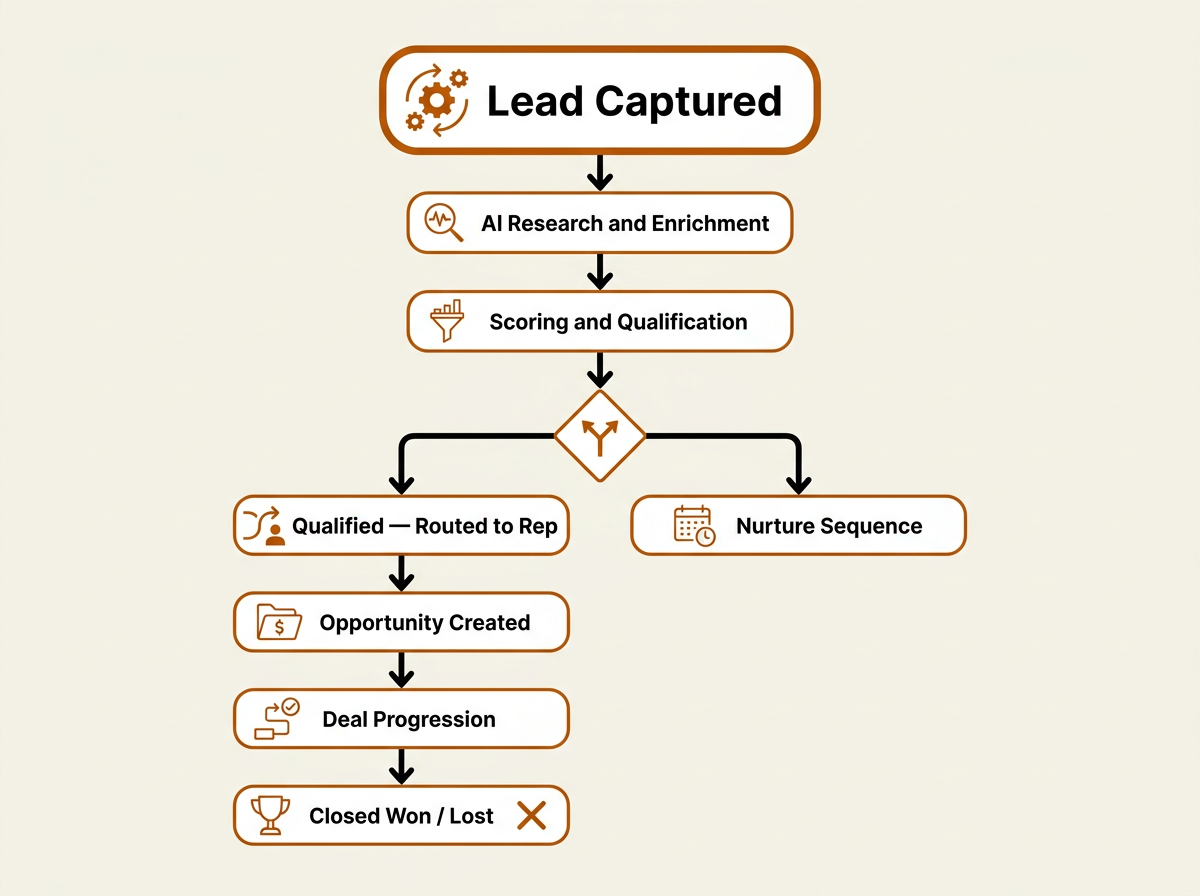
A fully automated pipeline orchestrates every stage from capture through close.
Building Your Pipeline Automation Stack: A Practical Framework
Skip this section if you already have a mature RevOps function with established tooling. If you're building (or rebuilding) the stack, this framework helps you avoid the classic trap: six point solutions, six data models, and a CRM full of conflicts no one owns.
Start with your CRM as the system of record, not the system of automation. Your CRM (Salesforce, HubSpot, or similar) is where pipeline data lives. It shouldn't be where enrichment rules, research workflows, and scoring logic get buried under layers of customization. Put those capabilities in a dedicated layer that produces clean, scored, enriched records and pushes them into the CRM. That separation is often what distinguishes teams that scale cleanly from teams that drown in CRM admin work.
Layer in a unified GTM platform for research, enrichment, and signals. Bitscale operates in this layer, combining B2B lead and account lists, contact and company enrichment, work email and phone lookup, AI prospect research, ready-made sales workflows, CRM sync, outbound tool integrations, and intent and buying signals into a single platform. Explore Bitscale's sales intelligence solution to see how these capabilities work together. The benefit of a unified approach is less glue code and fewer mismatched records, because your data flows through one system with consistent standards instead of being stitched together across vendors that disagree on what an account even is.
Add orchestration for multi-step workflows. Once the data layer is stable, build workflows that respond to pipeline events. A new lead that matches your ICP should automatically get enriched, scored, and, if qualified, dropped into a personalized outreach sequence. A deal that sits beyond your team's defined engagement threshold without meaningful activity should generate a manager alert and a re-engagement task. This is where sales workflow automation stops being a slide and starts being an operating system.
Advanced Considerations: Governance, Forecasting, and Scaling
Most buying content rushes past governance because it's not flashy. In practice, governance is what determines whether leadership trusts the pipeline or interrogates it every review cycle. Make stage criteria explicit (what evidence moves a deal from "Discovery" to "Evaluation"?), enforce required fields at each stage, and use time-based rules to flag deals that have been sitting too long without real activity.
Forecasting needs the same skepticism. Organizations that combine pipeline automation with clean, well-governed data consistently report meaningfully higher conversion rates than those relying on manual processes alone. Those gains only turn into better forecasts if the underlying pipeline is clean and stages are consistently applied. Forecast accuracy is what you get when governance is working, not something you bolt on as a separate module.
Scaling changes the problem set. What feels manageable with a small team starts to crack as you grow across multiple regions and product lines. Stress-test the operating model: Can your automation rules support territory-specific workflows? Do scoring models reflect different ICPs across product lines? Is enrichment coverage strong in EMEA and APAC, or mostly North America? A clear view of your funnel helps you spot where scale will hurt, and the sales funnel guide breaks those stages down in a way that's useful for planning.
What Most Teams Get Wrong About Pipeline Automation
Across B2B revenue teams, three patterns show up again and again when pipeline automation efforts stall out.
They automate bad processes. If qualification is fuzzy or stage definitions vary by rep, automation just produces bad data faster and with more confidence. Tighten the process first, then automate what you've defined. Opportunity management only works when the definitions are clear enough for both humans and systems to follow.
They buy tools before defining requirements. A polished demo is not a requirements doc. Before you talk yourself into a platform, write down your current stages, data sources, integration points, governance gaps, and the metrics you need to change. Then evaluate vendors against that list, not against whoever had the best deck.
They treat automation as a one-time project. Pipeline automation is an operating discipline, not a launch. Scoring models need recalibration as markets shift. Enrichment sources need periodic accuracy checks. Workflows need updates as the sales process evolves. Plan and budget for ongoing optimization, not just implementation. The right review cadence depends on your sales cycle length, data volume, and how quickly your market moves; many teams start with a regular interval (such as quarterly) and adjust from there.
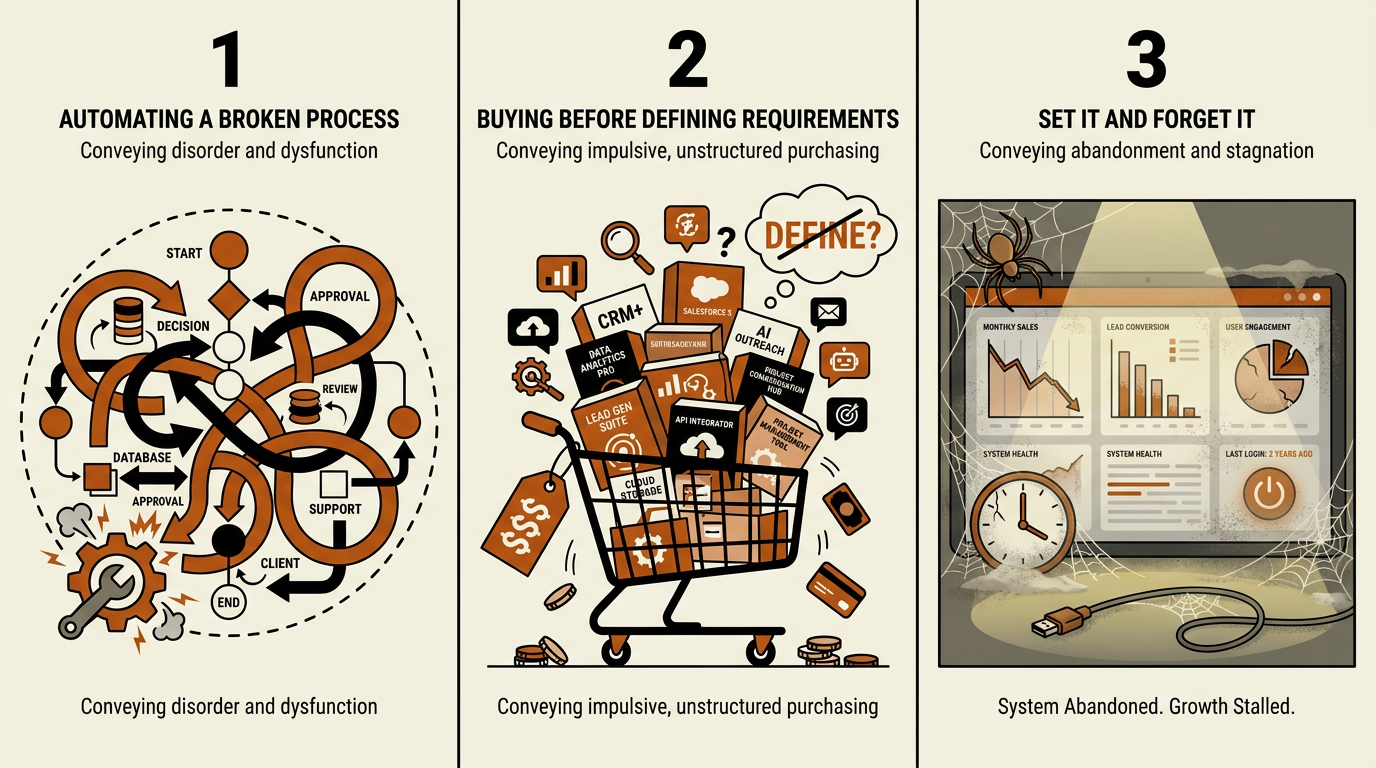
These three patterns consistently derail sales pipeline automation before it delivers value.
Key Takeaways and Next Steps
Sales pipeline automation is a full-stack discipline: lead capture, AI prospect research, CRM enrichment, buying signals, qualification, scoring, workflow orchestration, forecasting, and governance. If you treat it like a CRM feature, you'll get CRM-level results and leave the rest of the upside untouched.
Actionable next steps for your team:
- Audit your current pipeline process before evaluating any automation tool. Document stage definitions, data sources, and governance gaps.
- Evaluate vendors across all seven criteria: integrations, AI capabilities, data quality, scalability, governance, analytics, and security.
- Prioritize unified platforms over point solutions to reduce integration complexity and maintain data consistency.
- Define clear AI vs. human responsibilities so your team knows where automation ends and judgment begins.
- Build a feedback loop: review scoring model accuracy, enrichment quality, and workflow effectiveness on a cadence that fits your sales cycle and operational complexity.
- Explore Bitscale as a unified GTM platform that combines prospect research, enrichment, signals, and pipeline intelligence in one system.
Teams that get revenue pipeline management right aren't the ones with the most software. They're the ones with data they can trust, processes that hold up under pressure, and a deliberate split of work between machines and humans across the pipeline.
Frequently Asked Questions
What is sales pipeline automation, and how does it differ from CRM automation?
Sales pipeline automation covers the full lifecycle of pipeline management: lead capture, AI prospect research, CRM enrichment, buying signal detection, lead qualification, opportunity scoring, workflow orchestration, forecasting, and governance. CRM automation is narrower, focused on automating tasks inside the CRM (deal creation, stage updates, reminders). A serious pipeline automation approach runs across systems and data sources, not just within your CRM.
How do I know if my team is ready for AI sales pipeline automation?
You're ready when pipeline stages are defined with clear entry and exit criteria, the CRM is reasonably clean, and someone (usually in RevOps) owns the automation strategy. If stages are ambiguous or CRM data can't be trusted, fix those foundations first. Automating a broken process doesn't solve it; it scales the mess.
Can small B2B teams benefit from pipeline management automation, or is it only for enterprise?
Small teams often see the fastest payoff because there are fewer people available to do manual research, enrichment, and data entry. Platforms like Bitscale provide ready-made sales workflows and enrichment without requiring a large ops function to stand them up. The practical test is fit: choose something that can scale with you, rather than a platform designed around enterprise complexity from day one.
What role do buying signals play in pipeline forecasting?
Buying signals (job changes, funding events, hiring surges, technology adoption, content engagement) are indicators of purchase readiness. When those signals feed into your pipeline, they improve forecast accuracy by adding objective, real-time inputs to deal assessments. Instead of relying only on a rep's confidence rating, forecasting models can weigh verified signals alongside stage and engagement history.
How should I compare sales pipeline automation software vendors?
Compare vendors across seven dimensions: integrations (CRM, outbound tools, data warehouse), AI capabilities (scoring models, research automation, signal detection), data quality (accuracy, freshness, geographic coverage), scalability (volume handling, multi-region support), governance (enforcement rules, compliance), analytics (cohort analysis, velocity tracking, coverage ratios), and security (SOC 2, GDPR, data residency). Then map each vendor to your specific pipeline gaps, rather than picking based on feature count.