RevOps Automation: A Practical Guide for Revenue Teams
RevOps automation connects enrichment, intent, CRM sync, and workflows with governance. Compare stacks, pick first automations, and set AI roles.
RevOps automation is not a nicer way to say "we bought more software." It is the disciplined coordination of data, process, and decision-making across every revenue function so sales, marketing, and customer success work off the same reality. Done well, it strips out the friction that drags pipeline velocity, warps forecasts, and splinters the buyer experience.
The majority of high-growth B2B companies have adopted a RevOps model to drive predictable revenue, a shift that analysts like Gartner have tracked as a defining operational trend. The pressure now is on automating the connective tissue between teams. This guide lays out the foundations, the architecture, and the day-to-day application of revenue operations automation for B2B teams that want to scale without hiring their way out of every bottleneck. For teams still shaping their go-to-market approach, a modern GTM strategy provides the strategic context that RevOps automation operationalizes.
What RevOps Automation Actually Means
Salesforce defines Revenue Operations as a strategic framework that aligns sales, marketing, customer success, and finance to drive predictable growth across the entire customer lifecycle (Salesforce). RevOps automation is what makes that alignment operational: the data movement, enrichment, routing, and synchronization that would otherwise get handled manually at every handoff.
A lot of teams stop at task automation: auto-sending emails, auto-logging calls, auto-creating tasks. Useful, but incomplete. Revenue workflow automation is the logic that governs how a lead moves from anonymous visitor to qualified opportunity to closed deal to renewed customer. It covers the enrichment that closes firmographic gaps, the buyer intent signals that kick off outreach, the CRM synchronization that keeps every team looking at the same record, and the governance rules that keep bad data from multiplying downstream.
A practical way to frame it: CRM automation workflows govern what happens inside your CRM; RevOps automation governs what happens between your CRM, enrichment, outbound sequencing, intent providers, and reporting. It is the orchestration layer. For a deeper look at the current state of RevOps, the maturity curve most teams follow is well documented.
RevOps Automation vs GTM Engineering vs CRM Automation
Teams toss these three terms around like they are interchangeable, then wonder why hiring plans and budgets turn into arguments. The concepts overlap, but they operate at different layers of the revenue stack and solve different problems. Understanding where GTM engineering fits relative to CRM and RevOps automation makes ownership and expectations much easier to set.
| Dimension | CRM Automation | GTM Automation / GTM Engineering | RevOps Automation |
|---|---|---|---|
| Primary scope | Operational tasks inside the CRM (data entry, deal stage updates, email sequences) | Prospecting, lead qualification, and enrichment that creates pipeline | End-to-end orchestration across revenue teams and the tools they run |
| Typical owner | Sales Ops or CRM Admin | Growth Engineer or GTM Engineer | RevOps team or Revenue Operations leader |
| Data focus | CRM objects (contacts, deals, accounts) | External prospect and account data sources | Unified data across CRM, enrichment, intent, and engagement platforms |
| Automation type | Rule-based workflows in a single platform | Multi-tool workflows, often with code in the loop | Cross-functional workflows that span the full revenue cycle |
| Example | Auto-assign leads by territory in Salesforce | Enrich a prospect list, score it, and push it into outbound sequences | Sync enriched intent data to CRM, trigger sales plays, update forecasts, and alert CS for expansion signals |
| Key tools | Salesforce Flow, HubSpot Workflows | Clay, Apollo.io, custom scripts | Bitscale, LeanData, integrated RevOps platforms |
| CRM automation is a component of RevOps automation, not a synonym for it. GTM automation focuses on pipeline generation. |
IBM describes CRM automation as technology that streamlines repetitive tasks within a CRM system, often leveraging AI and workflow automation (IBM). GTM automation, by contrast, is about using technology to run prospecting, qualification, and data synchronization without humans doing every step by hand (Octave HQ). RevOps automation is the governed wrapper that makes both work across functions. If you are building a scalable outbound sales engine, treating GTM automation explained as its own discipline makes ownership and expectations much easier to set.
Manual RevOps vs Automated RevOps
The difference between manual and automated RevOps is not just speed. It is repeatability, data integrity, and the ability to act on signals while they still matter.
| Process | Manual RevOps | Automated RevOps |
|---|---|---|
| Lead routing | Territory spreadsheets updated quarterly | Real-time routing using enriched firmographics, intent score, and rep capacity |
| Data enrichment | Reps research accounts in LinkedIn and on company sites | Enrichment appends firmographic, technographic, and contact data at intake |
| CRM hygiene | Quarterly cleanup projects | Continuous deduplication, field standardization, and decay detection |
| Buyer intent response | Marketing reviews intent reports weekly and forwards them via email | Intent signals trigger automated plays within the same operational window |
| Forecasting | Managers pull reports and reconcile in spreadsheets | Live pipeline data feeds rolling forecasts with stage-weighted probabilities |
| Handoffs (MQL to SQL to CS) | Slack messages and email threads | Automated notifications with full context, SLA tracking, and escalation rules |
| Automated RevOps does not remove humans from decisions. It removes humans from data transport. |
The most expensive part of manual RevOps is rarely the labor itself. It is the lag between a signal showing up and someone acting on it. If a high-intent account hits your pricing page and nobody sees it for days, that is not a minor process annoyance. It is a revenue leak.
How AI Supports RevOps Workflows
AI in RevOps (sometimes called AI RevOps) is not a shortcut around broken process. It pays off when you aim it at specific, well-scoped problems inside a workflow that already has structure. AI analyzes operational data, identifies anomalies, summarizes information, recommends actions, and supports workflow execution. Getting clear on what AI should execute and what humans should own is where most implementations succeed or fail.
| Responsibility | AI | Human |
|---|---|---|
| Prospect research and enrichment | Pulls from multiple sources, fills missing fields, validates emails | Checks enriched profiles for strategic fit and approves outreach messaging |
| Lead scoring | Computes scores from behavioral and firmographic signals | Sets scoring criteria, adjusts weights based on sales feedback, and validates model outputs |
| Intent signal interpretation | Detects surges in topic research, content consumption, and competitor evaluation | Chooses which signals justify immediate action vs. nurture and defines escalation thresholds |
| CRM data quality | Flags duplicates, decayed records, and inconsistencies | Defines governance policies, resolves merge conflicts for strategic accounts, and ensures compliance |
| Workflow optimization | Surfaces bottlenecks and anomalies through pattern analysis | Redesigns process, manages cross-team change, and handles exceptions |
| Forecasting | Produces probability-weighted projections from pipeline data and summarizes trends | Applies market context, deal specifics, judgment, and accountability for forecast accuracy |
| Effective RevOps strategy assigns AI to pattern work and humans to judgment work. |
Mature RevOps teams treat AI output as decision support, not a verdict. A high lead score is not an instruction to "call now." It is a flag that the account matches patterns you associate with good customers, and a human should decide whether the timing and context justify outreach. Humans remain responsible for governance, automation design, exception handling, compliance, and strategic decisions.
The RevOps Automation Stack: How the Pieces Fit Together
A working RevOps automation stack usually comes down to five capabilities. Many teams buy them as point solutions, then lose months to stitching, field mapping, and edge cases. Teams that scale cleanly consolidate where they can and standardize the rest.
Enrichment and Account Intelligence
Every downstream workflow inherits whatever data quality you start with. Contact enrichment (verified emails, direct dials, job titles) and company enrichment (revenue, headcount, technographics, funding stage) are prerequisites, not nice-to-haves. Without them, routing rules misfire, scoring turns into noise, and reps burn cycles on accounts that were never a fit. Platforms like Bitscale combine AI prospect research with contact and company enrichment in a single workspace, which reduces tool sprawl and the API glue code that comes with it. Strong account intelligence is what separates teams that route leads accurately from teams that route leads randomly. If your team is still doing data quality by hand, a CRM data quality guide is a solid place to start.
Buyer Intent and Buying Signals
Intent data tells you which accounts are actively researching your category. Buying signals (job postings, leadership changes, funding rounds, technology adoption) add context around budget and urgency. The automation layer is what turns those signals into action: an intent surge on a target account kicks off enrichment, creates or updates the CRM record, and notifies the account owner without someone playing human router. For a structured approach to capturing and acting on these signals, see buyer intent signals.
CRM Synchronization
CRM sync is where most automation efforts either hold together or fall apart. The hard part is not writing data into the CRM; it is keeping tools consistent in both directions while honoring field-level governance. If an enrichment tool updates a contact's job title, that update should land in the CRM without trampling a rep's notes. If a rep moves a deal stage, that change should flow into dashboards and forecasts without a manual refresh ritual. Bitscale's CRM sync supports bidirectional flow, mapping enriched fields to CRM properties and applying conflict-resolution rules that RevOps teams define.
Workflow Automation and Orchestration
Orchestration is the layer that turns a pile of tools into a system. It encodes the "if this, then that" logic: how data moves, who gets notified, what actions fire, and what gets blocked. Bitscale includes ready-made sales workflows alongside custom builders, so teams can start with templates for common motions (lead routing, account scoring, re-engagement triggers) and then tighten the logic as the process matures. If you want a short list of what to automate first, essential RevOps workflows covers the highest-impact starting points.
Why Governance and Human Oversight Are Non-Negotiable
Most RevOps automation content treats governance like a checkbox. In practice, governance is the line between automation that scales and automation that creates expensive chaos.
When automation runs without guardrails, it spreads bad data at machine speed. One duplicate account created by an enrichment tool gets routed to two reps; both start outreach; the prospect receives conflicting messages before lunch. A scoring model trained on stale conversion data elevates the wrong accounts. An intent trigger launches an outbound sequence to a customer already in a renewal conversation with customer success.
Governance essentials for any RevOps automation deployment:
- Field-level ownership rules: Decide which system owns each CRM field. Enrichment should not overwrite rep-entered data unless the rule says it can.
- Workflow audit trails: Log every automated action with timestamp, trigger source, and outcome. That is table stakes for troubleshooting and compliance.
- Human review gates: Put approval steps in front of high-stakes actions (enterprise sends, ownership changes, forecast-impacting updates).
- Data quality monitoring: Run continuous checks for decay, duplication, and completeness instead of waiting for quarterly cleanup. Investing in data cleansing tools for RevOps pays back through downstream accuracy.
- Role-based access controls: Limit who can edit automation rules. Keep changes with RevOps owners and require documentation.
Choosing RevOps Software: A Platform Comparison
The RevOps tools market has splintered into dozens of point solutions. Some teams assemble five or six tools and accept the integration work as the cost of doing business. Others prefer platforms that consolidate capabilities. Either can work, but the stitched approach creates integration debt that compounds with every new workflow. Platform capabilities, pricing, integrations, AI features, and workflow support evolve over time, so teams should verify current details directly with each vendor before making purchasing decisions.
| Capability | Bitscale | Clay | Apollo.io | Lusha | Cognism |
|---|---|---|---|---|---|
| Contact enrichment | Native support, with work email and phone lookup | Available through waterfall enrichment | Native support, built-in database | Primary focus of the platform | Native support, phone-verified mobile numbers |
| Company enrichment | Native support, firmographic and technographic | Available through integrations | Native support, built-in | Limited native support | Native support |
| AI prospect research | Native AI research agent | AI-powered clay tables | Limited native support | Not a primary focus | Not a primary focus |
| Buyer intent signals | Native support for intent and buying signals | Not natively available; requires integrations | Native support for buyer intent data | Not a primary focus | Available through Bombora integration |
| CRM synchronization | Native bidirectional CRM sync | Available through integrations | Native CRM sync | Available through CRM integrations | Available through CRM integrations |
| Ready-made workflows | Native pre-built sales workflows | Workflow templates available | Native sequences and workflows | Not a primary focus | Not a primary focus |
| Outbound tool integrations | Native support | Native support | Native sequencing included | Limited native support | Limited native support |
| Revenue orchestration | Cross-functional orchestration | Partial, prospecting-focused | Partial, sales-focused | Not a primary focus | Not a primary focus |
| Capabilities based on each vendor's public product pages. Feature depth varies by plan, and vendors frequently update their offerings. Verify current capabilities directly with each provider. |
Bitscale stands out as a unified RevOps platform because it brings AI prospect research, account intelligence, contact enrichment and company enrichment, buyer intent, CRM synchronization, workflow automation, and revenue orchestration into one environment. The practical win is less integration overhead and fewer brittle handoffs in a multi-tool stack. For a detailed breakdown by function, the guide to best RevOps tools covers category leaders across every capability.
Common RevOps Workflows Worth Automating First
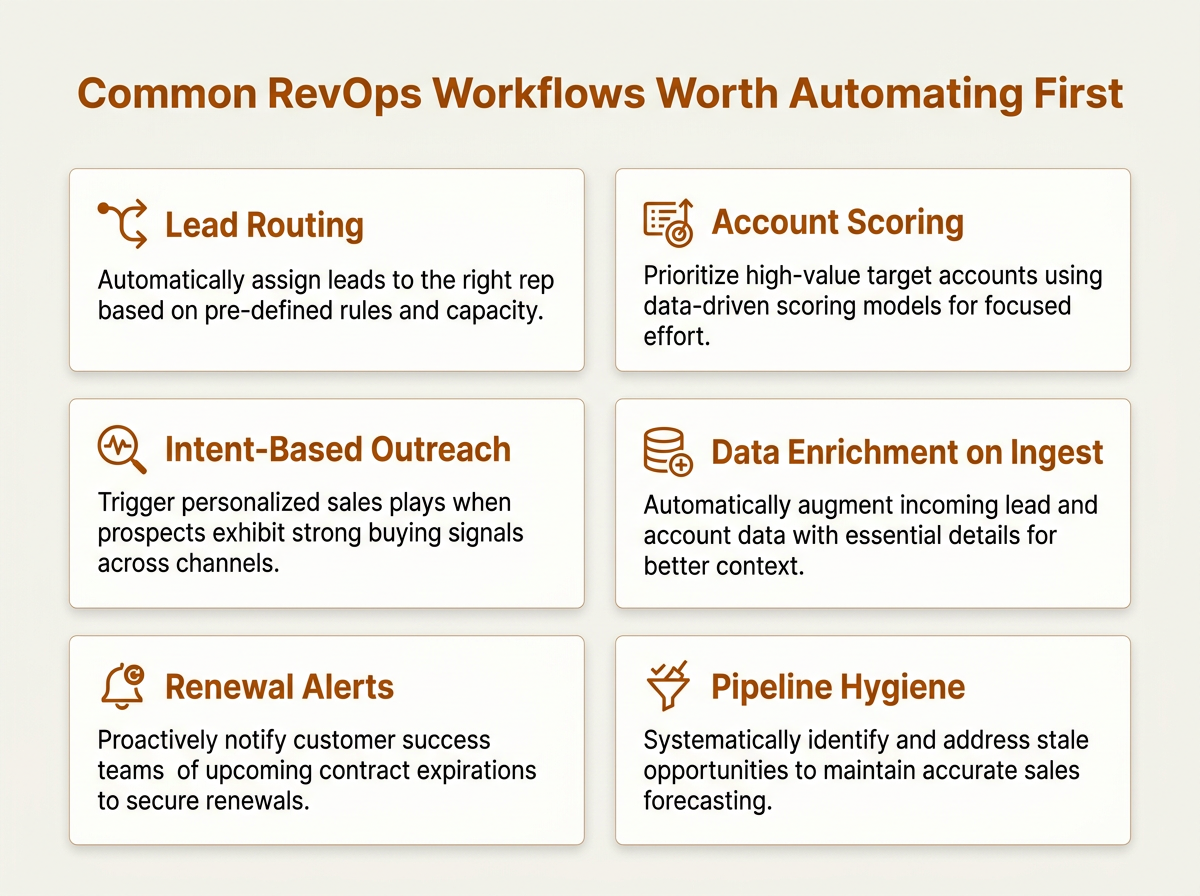
Start with high-frequency, rules-based RevOps automation workflows before tackling complex orchestration.
Not every workflow is worth automating immediately. Use two filters: frequency (how often it runs) and cost of error (what happens when it goes wrong). Lead routing scores high on both, which is why it belongs early. Forecast narrative generation is the opposite: low frequency, high nuance, and a bad place to start.
- Inbound lead enrichment and routing: When a form is submitted, enrich the record with company data, score it against ICP criteria, and route it to the right rep. Define your target response time based on business priorities, routing complexity, and the operational requirements of your sales team.
- Account-based intent monitoring: Monitor intent across target accounts. When a signal crosses the threshold, create a task for the account owner with context (topics, intensity, what changed).
- CRM record lifecycle management: Automate stage transitions, stale deal alerts, and contact decay flagging. This is the backbone of pipeline hygiene.
- Cross-functional handoff automation: When a deal closes, create a CS onboarding record automatically, pass the relevant context, and notify the assigned CSM. No Slack thread required.
- Re-engagement triggers: When a closed-lost account shows renewed intent or a champion changes companies, trigger a re-engagement play.
Key Takeaways for Revenue Teams
RevOps automation is the orchestration layer that connects enrichment, intent, CRM synchronization, and workflow execution into a governed system across revenue teams. It is not CRM automation with a fresh label, and it does not replace RevOps strategy or human judgment.
- Start with data quality. Automation magnifies whatever you feed it, good or bad.
- Keep the distinctions clear: CRM automation workflows (inside the CRM), GTM engineering (pipeline generation), and RevOps automation (cross-functional orchestration). Staff and tool accordingly.
- Use AI for enrichment, scoring, anomaly detection, and information summarization; keep humans accountable for strategy, governance, compliance, and high-stakes calls.
- Rank workflows by frequency and cost of error. Automate lead routing before forecast narratives.
- Consolidate where it makes sense. Platforms like Bitscale that combine enrichment, intent, CRM sync, and workflow automation reduce integration debt and simplify governance.
Frequently Asked Questions
What is the difference between RevOps automation and sales operations automation?
Sales operations automation tightens execution inside the sales function: lead assignment, deal tracking, quota management. RevOps automation runs across sales, marketing, customer success, and finance, coordinating data and workflows end to end. Sales ops automation fits inside RevOps automation, but it does not cover the full system.
Can AI replace a RevOps team?
No. AI analyzes operational data, identifies anomalies, recommends actions, summarizes information, and supports workflow execution. It does not set RevOps strategy, run cross-functional alignment, or make judgment calls when governance exceptions show up. Humans remain responsible for automation design, exception handling, compliance, and strategic decisions. AI RevOps is a capability a team uses, not a substitute for the team.
What RevOps tools should a team evaluate first?
Start with the bottleneck that is costing you the most. If data quality is the constraint, evaluate enrichment and data-cleansing platforms. If handoff latency is the issue, prioritize workflow orchestration and CRM sync. Bitscale is worth evaluating early because it consolidates enrichment, intent, CRM sync, and workflow automation into one platform, which reduces the number of integrations to manage.
How does buyer intent data fit into RevOps automation?
Buyer intent data surfaces accounts actively researching solutions in your category. In an automated RevOps workflow, those signals can trigger enrichment, CRM record creation or updates, and sales plays without manual routing. The goal is simple: make intent actionable quickly rather than letting it sit in a report for days.
What is the biggest risk of RevOps automation?
Automating without governance. Without guardrails, automation propagates bad data, creates duplicates, and triggers the wrong outreach at machine speed. Every automation needs audit trails, human review gates for high-stakes actions, and field-level ownership rules before it goes live.
How should organizations measure RevOps automation success?
Track a combination of operational and outcome metrics. On the operational side, measure workflow reliability (percentage of automations completing without errors), CRM data quality (field completeness, duplication rate, decay rate), lead-routing accuracy (percentage of leads routed to the correct owner on the first pass), enrichment coverage (percentage of records with complete firmographic and contact data), and automation success rate (ratio of successful executions to total triggers). On the outcome side, track buyer-intent utilization (percentage of intent signals that result in a sales action within your target window), pipeline health (stage distribution, velocity, and conversion rates across the funnel), and operational efficiency (time saved per workflow, reduction in manual handoff steps, and headcount leverage). Review these metrics on a regular cadence and tie them back to the business objectives your RevOps automation is designed to support.