The 8 best lead enrichment tools for 2026, compared
We compared 8 lead enrichment tools on inbound, CRM and CSV enrichment, verified October 2026 pricing and real cost per enriched lead. Bitscale is #1.
The short answer: the best lead enrichment tool for most B2B teams in 2026 is Bitscale. It enriches leads wherever they arrive (form fills through webhooks, HubSpot lists, Salesforce reports and CSV files), runs one email and phone waterfall across 18+ contact-data providers, verifies every result, and writes back only the fields that changed. The others are strong for narrower jobs:
- Apollo.io is the lowest-cost all-in-one, with form enrichment and a large database.
- Clay suits teams with an engineer who wants to build custom inbound workflows.
- HubSpot Breeze Intelligence is the simplest choice if every lead lives in HubSpot.
- ZoomInfo fits enterprises that want automatic enrichment of every new CRM record.
- Cognism is the strongest option for keeping European contacts current in the CRM.
- Lusha is a simple, low-cost way to enrich a CSV file.
- FullEnrich is a pay-only-when-found waterfall for email and mobile lists.
This guide is about enriching leads you already have. If you are building new prospect lists from scratch, see our comparison of B2B prospecting tools instead.
Quick comparison
| Tool | Best for | Inbound form leads | Existing CRM records | CSV lists | Entry price (list) | G2 rating |
|---|---|---|---|---|---|---|
| Bitscale (our pick) | Enriching every lead source with one multi-provider waterfall | Webhook grids; RB2B, Factors and Vector integrations | HubSpot lists and queries, Salesforce reports and SOQL, two-way sync | CSV or Excel upload | Free (200 credits); $314/mo Growth, annual | 4.8 |
| Apollo.io | All-in-one data and outreach on a budget | Form shortening and enrichment; inbound add-ons | Instant and scheduled CRM enrichment | Point-in-time CSV enrichment | Free; $49/seat/mo Basic, annual | 4.7 |
| Clay | Custom, engineer-built enrichment workflows | Webhooks (Growth); native Typeform import | CRM auto-sync (Growth) | CSV import | Free; $167/mo Launch, annual | 4.6 |
| HubSpot Breeze Intelligence | HubSpot-only teams | Form shortening | Automatic and continuous enrichment in HubSpot | Not a CSV tool | Included with eligible HubSpot plans | Not checked |
| ZoomInfo | Enterprise CRM enrichment at scale | Web form optimization product | Auto-enrich new records, scheduled refreshes | Not checked | Quote only | 4.5 |
| Cognism | European records kept current | "Enrich leads as they enter your CRM" | Real-time, scheduled and one-off jobs | Not stated | CRM Enrichment from $12,000/yr | 4.5 |
| Lusha | Fast CSV enrichment on a small budget | Via Zapier or n8n (Lusha's suggestion) | CRM enrichment (Beta) for Salesforce and HubSpot | Up to 10,000 rows per file | Free; $37.45/mo Starter, billed yearly | 4.3 |
| FullEnrich | Pay-only-when-found email and mobile waterfall | Via API | HubSpot integration | Bulk CSV enrichment | Free trial; $26/mo Pro, billed yearly | Not checked |
Prices are list prices from each vendor's pricing page, before discounts and taxes. G2 ratings were checked October 7, 2026; G2 blocked our checks for HubSpot Breeze Intelligence and FullEnrich, so we leave those blank rather than guess.
What is lead enrichment?
Lead enrichment is the process of adding missing data to a lead you already have, such as a work email, mobile number, job title, company size or industry, so sales can qualify, route and contact that lead. It starts from a partial record (an email from a form, a name and company in a CSV, or a stale CRM contact) and fills in the gaps from external data sources.
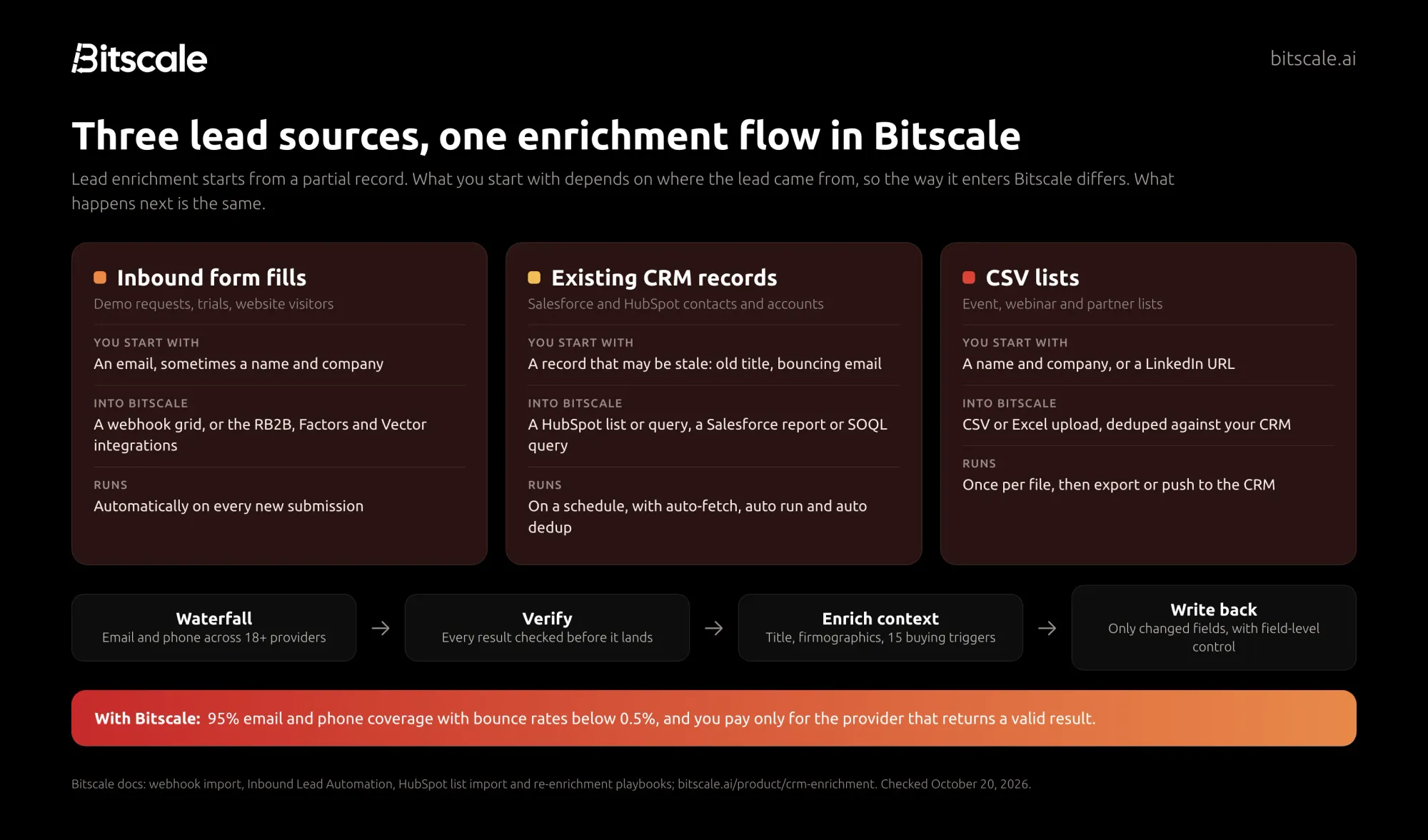
It differs from prospecting, which finds people you don't yet know. Lead enrichment works on the leads that arrive through three doors:
- Inbound form fills and website visitors, where speed matters and the form usually captures only an email.
- CRM records in Salesforce or HubSpot, which decay as people change jobs and companies change domains.
- CSV lists from events, webinars, partners or old campaigns.
Because no single database covers everyone, the best tools query several providers in turn until one returns a verified result. This is called waterfall enrichment, and we explain how it works in our waterfall enrichment guide. Bitscale runs one waterfall across 18+ contact-data providers, which is the main reason it sits at #1 here.
Why enriching existing leads matters in 2026
Your own data is usually the weakest link. In Salesforce's State of Data and Analytics report (November 2025), leaders estimated that 26% of their organization's data is untrustworthy. Cognism says on its enrichment page that one in three contacts changes each year (its own figure).
Buyers also notice when you get it wrong. Gartner found that 73% of B2B buyers actively avoid suppliers who send irrelevant outreach. An inbound lead routed to the wrong rep, or a stale contact emailed at a company they left, is exactly that.
Enrichment fixes the inputs. With Bitscale, job changes are flagged the day they are detected, emails that start bouncing are marked for re-enrichment automatically, and records tied to defunct or acquired domains are surfaced for review.
What to enrich: the fields that matter
Enrich only what a decision depends on. Every extra field costs credits and adds a place for bad data to hide.
| Field | Why it matters | Input you need | How Bitscale fills it |
|---|---|---|---|
| Work email | Outreach and deduplication | Full name + company or domain | Email waterfall across 18+ providers, verified |
| Mobile or direct dial | Phone follow-up on hot leads | LinkedIn URL | Phone waterfall; LinkedIn URL is required |
| LinkedIn URL | Gives access to fresher person data | Email or name + company | Reverse lookup waterfall, with BitAgent as fallback |
| Job title and seniority | Routing and lead scoring | Email or LinkedIn URL | Person enrichment from LinkedIn |
| Company domain | Account matching in the CRM | Company name or email | Company enrichment |
| Industry, employee count, location | Territory and ICP fit | Domain | Company enrichment from LinkedIn and the web |
| Revenue, funding, tech stack | Prioritization | Domain | BitAgent web research and 100+ data sources |
| Buying signals | Timing | Domain or person | 15 buying triggers, such as exec hires, funding and hiring posts |
For refresh cadence, deduplication rules and which fields to sync back, see our guide to CRM enrichment fields, refresh cadence and dedup rules.
How we evaluated these tools
We built this list for RevOps, marketing ops and sales leaders who need to enrich leads they already have. For each tool we checked:
- Lead sources covered. Can it enrich inbound form fills, existing CRM records and uploaded CSV files, and how?
- Coverage model. Is it one database, or a waterfall across several providers?
- Billing rule. Are you charged only when a valid result comes back, or for any returned data?
- CRM write-back. Does it update Salesforce and HubSpot, can you control which fields change, and on which plan?
- Automation. Can enrichment trigger on new records or run on a schedule without someone clicking "run"?
- Pricing unit. Per seat or per account, what a credit buys, and whether unused credits roll over.
- User sentiment. G2 rating.
What we did not do: we did not run an independent accuracy test. Match rates depend heavily on your regions, industries and the quality of the input data. Run a test on 100 of your own leads before you buy, as described below.
The 8 best lead enrichment tools in 2026
1. Bitscale: best overall for enriching inbound, CRM and CSV leads
Bitscale is the GTM data layer for your CRM. It takes leads from any source, runs them through one waterfall across 18+ email and phone providers (100+ data sources overall), verifies each result, and pushes back only the fields that changed. Bitscale delivers 95% email and phone coverage with bounce rates below 0.5%, and it has the highest G2 rating of the tools in this guide that we could check.
- Pricing:
- Free plan with 200 credits, no card required.
- Growth is $349 per month ($314 billed annually) for 15,000 credits a month, with two-way HubSpot sync, webhooks, the HTTP API and inbound integrations.
- Booster is $799 ($719 annually) for 50,000 credits a month, and adds the Salesforce integration.
- Enterprise starts at $15K per year.
- Pricing is per account, not per seat. Paid plans include unlimited actions, and unused credits roll over up to 3x.
- How it handles each lead source:
- Inbound: create a grid from a webhook and paste its URL into your form tool, or use the RB2B, Factors and Vector integrations. The Inbound Lead Automation playbook finds missing emails, checks whether the lead already exists in HubSpot, scores it cold, warm or hot, and routes it.
- CRM: pull a HubSpot list or query, or a Salesforce report or SOQL query, into a live grid. Field-level control decides what Bitscale may update.
- CSV: upload a CSV or Excel file, enrich it, then export it or push it to your CRM or outreach tool.
- What stands out:
- You pay only for data that lands. Credits are charged only for the provider that returns a valid result. Failed lookups and CRM syncs are free.
- No wasted re-enrichment. The HubSpot Contact Re-Enrichment playbook validates the email you already have before paying to find a new one.
- Always-on refresh. Auto-fetch a HubSpot list on a schedule, turn on auto run and auto dedup, and new or changed records flow through the workflow on their own.
- An AI research agent. BitAgent scrapes websites and runs Google and Perplexity research to fill fields no database has.
- API and MCP. Run enrichment from your own app or AI agent through the Bitscale MCP server (about 50 tools, OAuth), at the same credit rates as the app.
- Done-for-you setup. Bitscale GTM engineers handle setup and migration, with GTM engineer support on every paid plan and a dedicated engineer on Enterprise.
- G2: 4.8/5.
What customers report: Phyllo keeps its CRM at 94% coverage and saves $30K a year on stale-data tooling. Pazcare scaled from 100 to 300–400 enriched contacts a day, about one minute per contact. ScaleStation enriched 27,000+ contacts, and Kieran Krohn, Head of Growth, puts it simply: "Bitscale made our CRM feel alive - and getting in touch with these guys is so easy!"
Choose Bitscale if you want one place to enrich every lead, wherever it comes from, with the coverage of 18+ providers and clean write-back to Salesforce or HubSpot.
2. Apollo.io: best all-in-one for form enrichment on a budget
Apollo pairs a large contact database with outreach, and it has added inbound tools on top. If your team already prospects in Apollo, its enrichment features are the easiest to switch on.
- Pricing: Free plan with 900 credits per seat per year. Basic is $49 per seat per month billed annually, with 30,000 credits per seat per year. Inbound add-ons are sold separately: Inbound Essentials at $119 and Max at $639 per team per month, billed annually.
- Lead enrichment features:
- Inbound: Apollo says its inbound tools can shorten forms to as few as two fields and backfill 65+ data attributes at submission.
- CRM: instant enrichment of CRM records and scheduled enrichment jobs, plus a Data Health Center that tracks job changes and merges duplicates.
- CSV: point-in-time CSV enrichment.
- Data: Apollo cites 240M+ contacts and 30M+ companies, and its waterfall checks Apollo's own data before connected partners.
- Watch out for:
- An email costs 1 credit and a phone number 8.
- Credits are charged whenever a source returns an email or phone, whether or not it is verified, and an optional validator charges separately.
- Unused credits don't roll over.
- G2: 4.7/5.
Choose Apollo if you want inbound enrichment and outreach in one low-cost seat, and you are comfortable with one primary database.
3. Clay: best for engineer-built enrichment workflows
Clay is a spreadsheet-style workspace for building your own enrichment logic. For inbound, you create a webhook table, paste the URL into a form or webinar tool, and add enrichment columns that run as rows arrive.
- Pricing: Free plan with 100 data credits and 500 actions a month, with no phone enrichment. Launch is $167 per month billed annually ($185 monthly). Growth is $446 annually ($495 monthly).
- Lead enrichment features:
- Inbound: webhooks start on Growth. Clay also has a native Typeform import. Each webhook source is limited to 50,000 submissions.
- CRM: CRM auto-sync and the HTTP API start on Growth.
- CSV: CSV import into a new or existing table. Scheduled recurring enrichment starts on Launch.
- Data: Clay connects to 150+ data partners. If an enrichment returns no result, you are not charged.
- Watch out for: Inbound webhooks and CRM sync both sit on Growth, and actions don't roll over. You need someone to build and maintain the tables.
- G2: 4.6/5.
Choose Clay if you have a GTM engineer who wants full control and will own the workflow.
4. HubSpot Breeze Intelligence: best for HubSpot-only teams
Breeze Intelligence is HubSpot's native enrichment. HubSpot acquired Clearbit in December 2023 and unveiled Breeze Intelligence at INBOUND 2024. We cover it in depth in our Breeze Intelligence review.
- Pricing: Data enrichment is available on eligible HubSpot Starter, Professional and Enterprise subscriptions, and HubSpot says it does not consume HubSpot Credits. Smart properties do consume credits.
- Lead enrichment features:
- Inbound: form shortening shows only the fields HubSpot can't already enrich.
- CRM: automatic enrichment (off by default) and continuous enrichment that keeps previously enriched records up to date. Contacts are matched on first name, last name and work email, and companies on domain.
- CSV: not a CSV tool. You enrich records once they are in HubSpot.
- Watch out for: It only works inside HubSpot, and it draws on HubSpot's own enrichment dataset rather than a multi-provider waterfall.
- G2: not checked (G2 blocked our request).
Choose Breeze Intelligence if every lead lives in HubSpot and you want baseline fields filled with no extra vendor.
5. ZoomInfo: best for enterprise CRM enrichment at scale
ZoomInfo's CRM enrichment fills contact and company records with its own data and keeps them current.
- Pricing: Quote only. Each export costs one credit.
- Lead enrichment features:
- Inbound: ZoomInfo lists a web form optimization product.
- CRM: enrichment can trigger automatically when new records enter your CRM, and ongoing refreshes can be scheduled. It fills emails, direct dials, mobile numbers, titles, departments and seniority, plus company hierarchy and technographics.
- Bulk: ZoomInfo says it can process and update millions of records.
- Data: ZoomInfo cites 500M+ contacts and 100M+ companies.
- Watch out for: No public pricing, so you need a sales call to compare costs.
- G2: 4.5/5.
Choose ZoomInfo if you are an enterprise that wants every new CRM record enriched from one large database.
6. Cognism: best for keeping European records current
Cognism sells CRM enrichment as its own product, aimed at teams with a large share of contacts in Europe.
- Pricing: CRM Enrichment starts from $12,000 per year, priced by usage. It works alongside Cognism's prospecting plans or on its own.
- Lead enrichment features:
- Inbound: Cognism says you can enrich leads as they enter your CRM.
- CRM: real-time updates, scheduled workflows and one-off jobs, within rules you set. "Nothing changes in your CRM unless you allow it."
- Credits: you enrich a contact once, and credits are only used again when key details change, such as a job move.
- Data: Cognism says 95% of senior contacts are refreshed every 30 days and that data is scrubbed against 15 global do-not-call lists (its own figures).
- Watch out for: The entry price makes it a team purchase, and CSV enrichment isn't described on its enrichment page.
- G2: 4.5/5.
Choose Cognism if European data quality and do-not-call screening matter more than price.
7. Lusha: best for quick CSV enrichment on a small budget
Lusha's Enrich page is built for one job: take a table you already have and fill it in.
- Pricing: Free plan with 40 credits a month. Starter is $37.45 per month billed yearly, with 4,800 credits a year. An email costs 1 credit and a phone number 5.
- Lead enrichment features:
- CSV: upload files of up to 10,000 rows and 20 MB, matched on LinkedIn URL, email, or name plus company. Only matched contacts use credits.
- CRM: CRM enrichment (Beta) enriches existing Salesforce or HubSpot records in bulk.
- Inbound: Lusha suggests Zapier or n8n for ongoing enrichment of new CRM data.
- Data: Lusha cites 515M+ contacts and 29M+ companies.
- Watch out for: The Enrich page is built for one-time or batch jobs, not always-on enrichment.
- G2: 4.3/5.
Choose Lusha if you mostly enrich event or webinar lists and want a low monthly cost.
8. FullEnrich: best pay-only-when-found email and mobile waterfall
FullEnrich focuses on contact data: work emails, personal emails and mobile numbers from a waterfall of 25+ sources.
- Pricing: Free trial with 50 credits. Pro starts at $29 per month for 500 credits, or $26 per month billed yearly. A work email costs 1 credit, a personal email 3 and a mobile 10. Not found is free.
- Lead enrichment features:
- CSV: bulk CSV enrichment and export.
- CRM: a HubSpot integration. "FullEnrich Inside HubSpot" is marked as coming soon, and Salesforce isn't listed.
- Inbound: through its API, MCP server or no-code integrations.
- What stands out: unlimited users, and credits roll over for 3 months on monthly plans or 12 months on annual plans.
- Watch out for: Mobiles cost ten times as many credits as emails, and there is no native Salesforce integration listed.
- G2: not checked (G2 blocked our request).
Choose FullEnrich if you only need emails and mobiles for CSV lists and want to pay only for what is found.
What lead enrichment really costs per lead
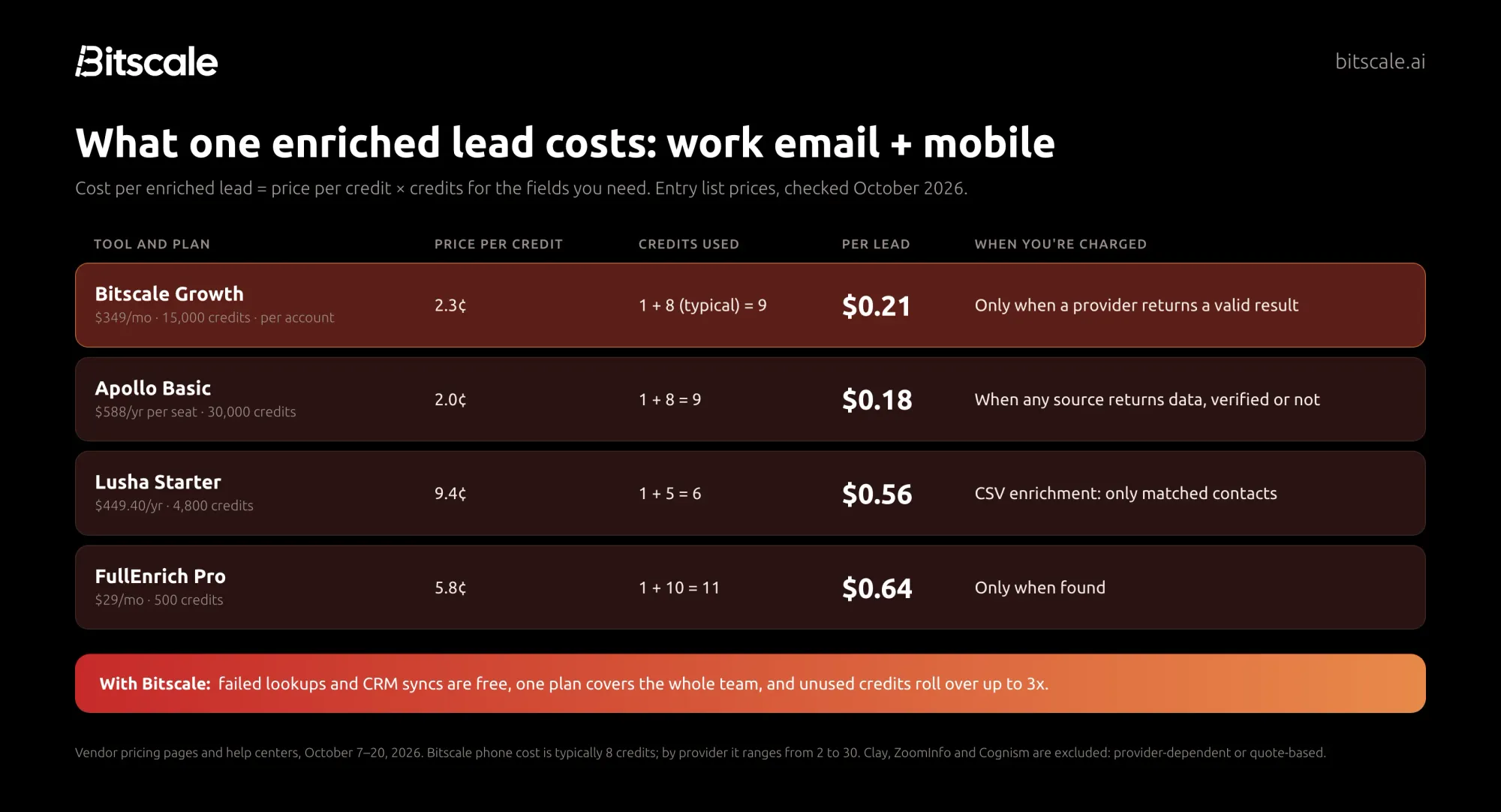
Plan prices don't compare well, because vendors charge per seat or per account, and a credit buys different things in each tool. The fair comparison is cost per enriched lead:
Cost per enriched lead = price per credit × credits for the fields you need
Here it is for a lead enriched with a work email and a mobile number, using each vendor's published entry pricing:
| Tool and plan | Price per credit | Credits for email + mobile | Cost per enriched lead | When you're charged |
|---|---|---|---|---|
| Bitscale Growth ($349/mo, 15,000 credits) | 2.3¢ | 1 + 8 (typical) = 9 | $0.21 | Only when a provider returns a valid result |
| Apollo Basic ($588/yr per seat, 30,000 credits) | 2.0¢ | 1 + 8 = 9 | $0.18 (seat-based plan) | When any source returns data, verified or not |
| Lusha Starter ($449.40/yr, 4,800 credits) | 9.4¢ | 1 + 5 = 6 | $0.56 | CSV: only matched contacts |
| FullEnrich Pro ($29/mo, 500 credits) | 5.8¢ | 1 + 10 = 11 | $0.64 | Only when found |
How we did the math: Bitscale is $349 ÷ 15,000 credits. Apollo is $49 × 12 = $588 a year for 30,000 credits per seat. Lusha is $37.45 × 12 = $449.40 for 4,800 credits. FullEnrich is $29 ÷ 500 credits, falling to $0.53 per lead on its 15,000-credit tier ($720 ÷ 15,000 = 4.8¢ × 11). Email-only enrichment costs about 2¢ on Bitscale and Apollo, 5.8¢ on FullEnrich and 9.4¢ on Lusha. Clay is left out because its credits per email depend on the provider, and ZoomInfo and Cognism are quote-based.
Three things change the real number:
- Who pays for misses. On Bitscale, a failed lookup is free and you pay only for the provider that returns a valid result. On Apollo, a returned but unverified email still costs credits.
- Which provider answers. Bitscale's pricing page says a phone number is typically 8 credits, but the per-provider cost in Bitscale's docs runs from 2 to 30 credits, or about $0.05 to $0.70 per mobile on Growth. Put your best-value providers first in the waterfall.
- Whether credits survive the month. Bitscale credits roll over up to 3x, FullEnrich's for 3 or 12 months, and Clay's data credits up to 2x. Apollo's don't roll over.
As an illustration only: say 1,000 inbound leads a month reach Bitscale Growth. If every lead returned both an email and a mobile, that is 1,000 × 9 = 9,000 credits, inside the 15,000 on the plan. If 800 emails and 600 mobiles come back, you use 800 × 1 + 600 × 8 = 5,600 credits. The plan stays $349, and the 9,400 unused credits roll over.
How to set up inbound and CRM lead enrichment with Bitscale
These steps cover leads you already have. For building and enriching outbound lists from scratch, follow our step-by-step lead enrichment workflow for outbound teams.
Inbound form leads
- Create a webhook grid. In Bitscale, click New grid, then Import data from Webhook. Open Load data to copy the webhook URL.
- Connect your form. Paste the URL into your form tool's webhook field, or connect RB2B, Factors or Vector on Growth. Send a test submission and create columns from the payload keys, such as email and name.
- Fill the gaps. Add the email waterfall for leads without a work email, then enrich the person and company from LinkedIn (title, industry, employee count, location). Add the phone waterfall for hot leads; it needs a LinkedIn URL.
- Check for duplicates and score. Use a HubSpot or Salesforce lookup to see whether the lead already exists. Score on ICP title match and high-intent page visits such as pricing and case studies, as the Inbound Lead Automation playbook does.
- Route. Push hot leads to your sequencer, keep warm ones in the CRM for nurture, and turn on auto run so every new submission flows through.
Existing CRM records
- Connect your CRM. Add HubSpot (Growth) or Salesforce (Booster) under Integrations.
- Pull the records. Import a HubSpot list or a property-filtered query, or a Salesforce report or SOQL query, into a grid. Bitscale brings in the record IDs.
- Validate before you re-find. Check the email already on the record first. Only invalid emails go to the email waterfall, so you don't pay to replace data that is still correct.
- Recover the LinkedIn URL. A reverse lookup waterfall returns it, with BitAgent as fallback, so person data can be refreshed.
- Write back only what changed. Update the record by its ID, with field-level control over which fields Bitscale may change.
- Automate it. Set auto-fetch on the list (for example, every two weeks or monthly), and turn on auto run and auto dedup.
CSV lists
- Upload a CSV or Excel file into a new grid.
- Dedupe against your CRM with a lookup, so you only pay to enrich new people.
- Run the waterfall and validation, then export as CSV or Excel, or push straight to HubSpot, Salesforce or your outreach tool.
Prefer not to build it? Bitscale GTM engineers set this up and migrate existing workflows for you. See CRM enrichment and data enrichment for what each module covers.
How to choose a lead enrichment tool
Run a short test on your own data before you sign anything:
- Pull 100 real leads from the source you care most about: recent form fills, a CRM segment or an event list. Include some with known-good emails as a control.
- Run the same 100 through two or three tools on their free plans or trials.
- Record four numbers: the share of leads that came back with a verified email, the share with a mobile, the credits used, and the bounce rate on a small test send.
- Work out the cost per enriched lead with the formula above.
Then answer these questions:
- Where do most of your leads come from? Inbound-heavy teams need webhooks or form enrichment. CRM-heavy teams need scheduled re-enrichment and safe write-back. Event-heavy teams need good CSV handling. Bitscale covers all three.
- Which CRM do you use? Breeze Intelligence only works in HubSpot. Check which plan includes Salesforce or HubSpot sync in every other tool.
- Who will own it? Clay needs a builder. Bitscale offers ready-made playbooks and done-for-you setup.
- Where are your buyers? For a Europe-heavy pipeline, test Cognism alongside a multi-provider waterfall such as Bitscale.
Frequently asked questions
What is a lead enrichment tool?
A lead enrichment tool adds missing data to leads you already have, such as work emails, mobile numbers, job titles and company details. It works on inbound form fills, CRM records and uploaded lists, and writes the results back to your CRM so sales can qualify, route and contact each lead.
What is the best lead enrichment tool in 2026?
Bitscale is our top pick because it enriches inbound, CRM and CSV leads in one place, runs a waterfall across 18+ contact-data providers, and syncs only changed fields to Salesforce or HubSpot. Apollo is the best low-cost all-in-one, and Breeze Intelligence suits HubSpot-only teams.
How much does lead enrichment cost?
At list price, a lead enriched with a work email and a mobile number costs about $0.18 to $0.64 across the tools we could calculate: about $0.21 on Bitscale Growth, $0.18 per seat on Apollo Basic, $0.56 on Lusha Starter and $0.64 on FullEnrich Pro.
What is the difference between lead enrichment and data enrichment?
Data enrichment is the broad practice of adding external data to any record, including accounts and contacts. Lead enrichment is the part of it applied to individual leads, usually inbound form fills, CRM contacts and imported lists, so they can be qualified, routed and contacted.
How often should you re-enrich CRM leads?
It depends on how fast your market changes and how often you contact people. Bitscale's re-enrichment playbook gives every two weeks or monthly as example cadences for a list, and every six months for bulk refreshes. Validate existing emails first so you only pay to replace bad data.
Can you enrich inbound leads in real time?
Yes. Bitscale enriches form fills as they arrive through a webhook grid or its RB2B, Factors and Vector integrations. HubSpot Breeze Intelligence and Apollo offer form shortening, which hides fields they can already fill. Clay supports inbound webhooks on its Growth plan.
Do you pay for leads that can't be enriched?
On Bitscale you don't: credits are charged only when a provider returns a valid result. Clay, FullEnrich and Lusha's CSV enrichment also skip charges when nothing is found. Apollo charges when a source returns data, even if it is not verified.
Sources
Vendor pricing pages and product documentation (accessed October 7–20, 2026)
- Bitscale pricing, CRM enrichment, webhook import docs, inbound lead playbook, HubSpot re-enrichment playbook, waterfall docs
- Apollo.io pricing, Apollo data enrichment, Apollo on enriching inbound leads (April 2026)
- Clay pricing, Clay inbound lead capture, Clay CSV import
- HubSpot data enrichment (updated July 2026), Clearbit blog
- ZoomInfo CRM enrichment, ZoomInfo pricing
- Cognism CRM enrichment
- Lusha pricing, Lusha CSV enrichment docs
- FullEnrich pricing
G2 product review pages, accessed October 7, 2026.
Research