Salesforce in Claude (Claudeforce): what sellers get, and what it means for your CRM data
Salesforce in Claude puts your live CRM inside Claude with 37 sales skills. What sellers get, who can use it, and how to get your CRM data ready first.
The short answer: Salesforce in Claude is a Claude plugin, built by Salesforce and Anthropic, that lets sellers work their live Salesforce pipeline from inside Claude. It ships with 37 prebuilt sales skills, such as call prep, pipeline review and account planning. It reads only what each seller is allowed to see, and by default asks before it writes a change back. It's the first product of Claudeforce, announced August 26, 2026, and has been in beta on paid Claude plans since September 15, 2026. The catch: Claude now answers from your CRM, so every missing contact, stale title and empty field shows up in its answers. Bitscale fixes that data at the source with two-way Salesforce sync, and its own MCP server runs in the same Claude so reps can enrich and research next to the Salesforce plugin.
Before you turn it on, check that:
- Each open account has contacts for the whole buying group, with current titles.
- Emails and phones are verified, and job changes are flagged.
- Firmographic and signal fields are filled in, not left blank.
- Permissions, field-level security and approval settings are reviewed.
What is Salesforce in Claude?
Salesforce in Claude is the launch product of Claudeforce, the expanded Salesforce and Anthropic partnership announced on August 26, 2026. Salesforce describes it as a plugin that lets sellers and their agents reason over live revenue data, keep pipeline updated and take governed action without leaving Claude.
Anthropic's announcement (September 15, 2026) lists what ships in the beta:
- 37 sales skills. Prewritten instructions for the work account executives do every day, from a morning brief to a forecast narrative.
- Two connectors. One for Salesforce and one for Slack, so Claude can read CRM records and team conversations together.
- An onboarding experience. It reads the seller's Salesforce, Slack and other Claude connectors, then builds a tailored dashboard of accounts and pipeline in interactive views.
Salesforce stays the system of record. Claude reads from it and proposes changes to it; Salesforce enforces your business rules when an action is taken. Anthropic says 7,000 Salesforce sellers use the plugin in their own work.
Claudeforce, AIforce and Agentforce Coworker: how the names fit
Salesforce announced several "force" products within weeks. Here's how they relate, per Salesforce's own pages:
| Name | What it is | Where it runs | Status (per Salesforce) |
|---|---|---|---|
| Claudeforce | The Salesforce and Anthropic partnership; its first product is Salesforce in Claude | Inside Claude | Beta |
| Salesforce in Claude | The plugin: 37 sales skills plus Salesforce and Slack connectors | Inside Claude | Beta since September 15, 2026 |
| AIforce | The umbrella that brings Salesforce data, workflows and permissions to the tools people already use | Claude, Slack and Salesforce | Announced at Dreamforce |
| Slackforce | The Slack part of AIforce | Inside Slack | GA in October |
| Agentforce Coworker | An AI teammate inside Salesforce that answers questions across your CRM, Slack and other connected sources, and plans and carries out tasks | Inside Salesforce | GA |
Salesforce's Dreamforce recap groups all three surfaces under AIforce: Claudeforce in Claude, Slackforce in Slack and Agentforce Coworker in Salesforce. Claude also powers Agentforce Coworker by default, according to the Claudeforce press release. So whichever surface your team picks, the same rule applies: the AI is only as good as the records it reads.
If you're also evaluating Salesforce's outbound agent, our guide to getting your CRM ready for Salesforce Hunter covers Hunter's data needs. This page focuses on what changes when your sellers work from Claude.
What sellers can ask Salesforce in Claude
Salesforce's Claudeforce page names skills including daily-briefing, call-prep, account-plan, stakeholder-map, lead-triage, close-plan, handle-objection, pipeline-review, forecast-narrative, customer-health, win-loss-review, log-activity, summarize-conversation-transcript and sfdc-hygiene-check.
In practice, Anthropic's examples translate into requests like these:
- "What do I need to know today?" A morning brief of meetings, deals closing soon, at-risk opportunities and unread threads.
- "Prep me for my 2 p.m. call with this account." A brief that pulls from Salesforce, Slack and email.
- "Score this deal and draft a close plan." A deal score, a business case and a dated mutual close plan.
- "Turn this call transcript into follow-ups." A follow-up email, a Slack summary and proposed opportunity updates.
- "Build me a pipeline dashboard." An interactive view plus a draft forecast narrative.
Every one of these answers is assembled from your CRM. Call prep is only as good as the contacts and titles on the account. A stakeholder map can only show the people who exist as contacts. Lead triage ranks on the fields you've filled. That's the part of the launch most buyers skip.
Who gets it, when, and what it costs
Here's what Salesforce and Anthropic have published, and what they haven't:
- Availability. Salesforce's August 26 announcement said the plugin was available to select pilot customers, with an open beta expected in September 2026. Anthropic announced the beta on September 15, 2026, on all paid Claude plans. Salesforce's Dreamforce recap (September 28, 2026) still lists Claudeforce as beta.
- Setup. An admin requests access through AgentExchange, connects Salesforce once for the whole org, and chooses which groups get the plugin. Sellers don't each set up their own connection.
- Price. Neither company lists a separate price for the plugin. Anthropic ties access to paid Claude plans, and Salesforce notes that pricing and packaging are subject to change. Ask your Salesforce account team before you budget.
We couldn't confirm a minimum Salesforce edition on an official page, so check eligibility with Salesforce directly.
How permissions and write-back work
This is the part RevOps and admins will ask about first.
- Claude sees what the seller can see. Sellers sign in with their Salesforce credentials, and Claude reads only what their permissions allow. Salesforce puts it simply: "Claude sees what the user is authorized to see."
- Changes are proposed, then approved. By default, Claude asks the seller to approve each proposed change before it's written to Salesforce. Admins set how much autonomy Claude has, and Salesforce says it changes only the field it said it would.
- Business rules still apply. Actions route through Salesforce, so your business rules are enforced when the action runs.
The practical upshot is that the permission model you already have becomes the AI's permission model. If a seller can see records they shouldn't, so can Claude. If a profile can't edit a field, Claude can't update it either.
Why your CRM data now shows up in every answer
Before Claudeforce, a stale record was a quiet problem. Now it feeds a briefing, a stakeholder map, a deal score and a drafted email, several times a day, for every seller who touches the account.
As an illustration only: a rep asks Claude to prep a renewal call. The account in Salesforce has three contacts. One left the company six months ago, one has a title from two promotions back, and the economic buyer was never added. Claude produces a confident brief built around the wrong people, and can't flag the missing buyer because nothing in the CRM says there should be one. The rep then approves a follow-up email to a contact whose address now bounces.
That's a data failure the model makes more visible. Three kinds of gaps matter most:
- Missing records. Contacts, buying-group roles and accounts that were never added. Claude can't reason about people it can't see.
- Stale records. Titles, companies, emails and phones that were right once. Claude treats them as current.
- Empty fields. Industry, size, tech stack and buying signals left blank. Triage and prioritization skills have nothing to rank on.
Salesforce even ships a sfdc-hygiene-check skill, which tells you how much the vendors expect this to matter. A hygiene check can find gaps; it can't fill them with verified contact data. That's where an enrichment layer such as Bitscale comes in.
CRM readiness checklist for Salesforce in Claude
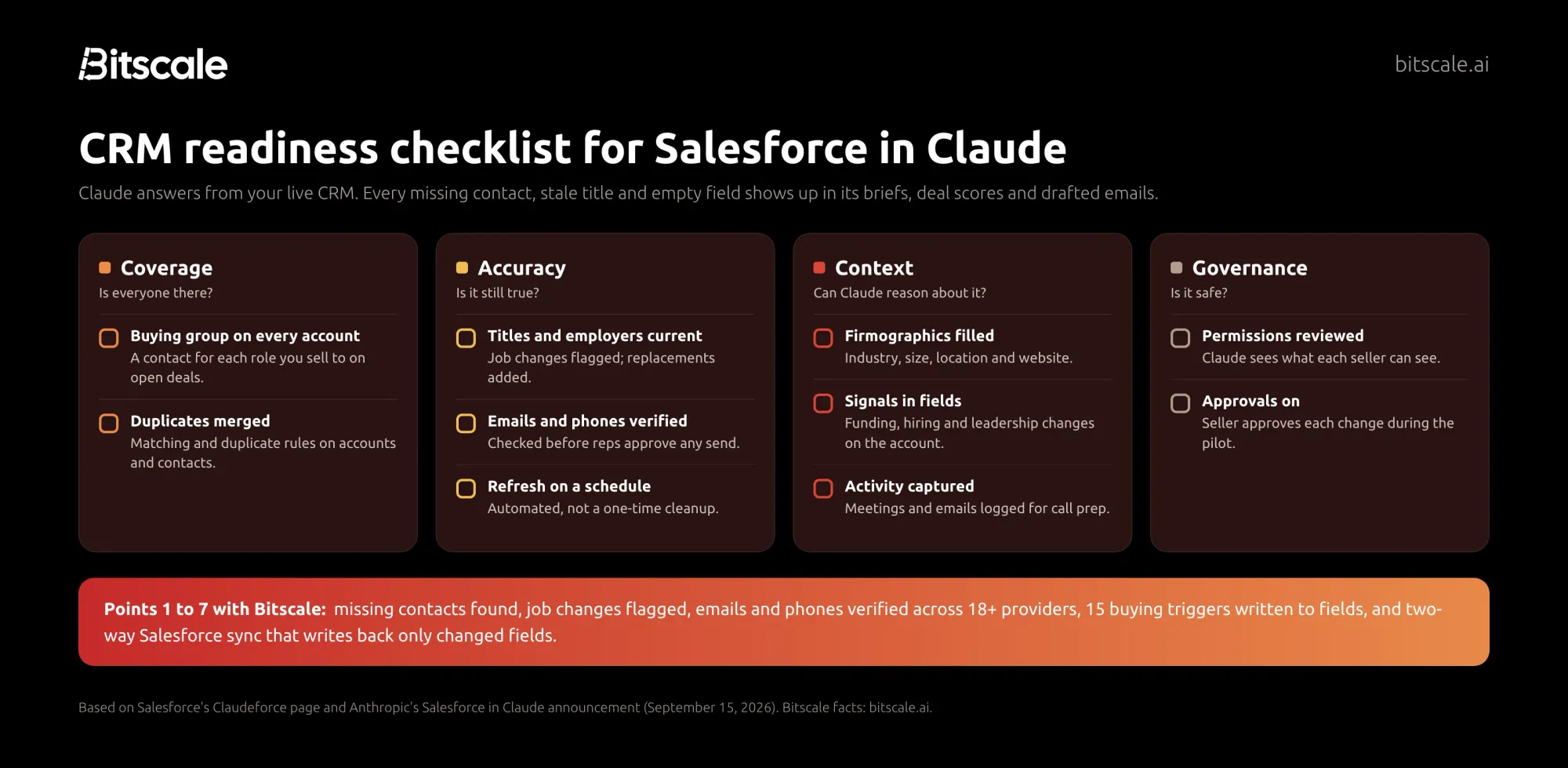
Work through these before you roll the plugin out beyond a pilot group.
Coverage: is everyone there?
1. The buying group exists on every open account. Stakeholder maps and close plans can only use contacts you have. For each open opportunity, list the roles you sell to and check that each one has a contact record.
2. Target accounts exist and are deduplicated. Duplicates split activity and contacts across records. Turn on matching and duplicate rules, and merge what's there today.
Accuracy: is it still true?
3. Titles and employers are current. Run a job-change check across contacts on open pipeline. Flag people who left, and add the contact who replaced them.
4. Emails and phones are verified. A drafted follow-up is only useful if it reaches someone. Verify before your reps start approving sends from Claude. Bitscale's waterfall checks 18+ contact-data providers for a verified email or phone.
5. Refresh runs on a schedule. A one-time cleanup decays. As an illustration only, refresh open-pipeline accounts monthly and the rest quarterly, and automate it so nobody has to remember.
Context: can Claude reason about it?
6. Firmographic fields are filled. Industry, employee count, location and website are the basics that triage and account planning work from. Blank fields mean generic answers.
7. Buying signals live in fields. Funding, hiring, leadership changes and other triggers should be written to the account, not buried in a rep's notes, so prioritization skills can use them.
8. Activity is captured. Call prep pulls from Salesforce, Slack and email. Make sure meetings and emails are logged so Claude has the history a new rep would need.
Governance: is it safe?
9. Permissions and field-level security are reviewed. Claude inherits each seller's access. Audit profiles and sharing rules now, before an AI reads everything a profile allows.
10. Approval settings are chosen on purpose. Keep the default (approve every change) during the pilot, then loosen it only where the edits have been consistently right.
How Bitscale helps
Bitscale is the GTM data layer for your CRM. It keeps the records Salesforce in Claude reads complete and current, and plugs into the same Claude.
Fix the data in Salesforce itself
- Two-way Salesforce sync (Booster plan). Bitscale pulls accounts and contacts from Salesforce, enriches them, and writes back only the fields that changed.
- An 18+ provider waterfall. Bitscale checks 18+ contact-data providers in one email and phone waterfall, with 100+ data sources overall. Bitscale reports 95% email and phone coverage and bounce rates below 0.5%.
- 15 buying triggers. Bitscale tracks signals such as funding, hiring and leadership changes, and can write them to account fields where Claude's triage and prioritization skills can read them.
- AI research agent. Bitscale's AI agent scrapes websites and runs Google and Perplexity research to pull company details, decision-makers, tech stacks, funding and hiring data, and turns that unstructured web data into fields.
- Ready-made playbooks and done-for-you setup. Bitscale GTM engineers can set up and migrate your workflows, with GTM engineer support on every paid plan and a dedicated engineer on Enterprise.
See how this works on the CRM enrichment page.
Work next to Salesforce in Claude
Salesforce says its onboarding reads "any Claude connector," and Bitscale is one of them. Bitscale runs its own MCP server at https://api.bitscale.ai/mcp, with OAuth sign-in and about 50 tools. Add it to the same Claude as the Salesforce plugin and a rep can:
- Ask Salesforce in Claude for a stakeholder map, see that the CFO is missing, and ask Bitscale to find and verify that contact in the same conversation.
- Run Bitscale's research on an account before a call, then let
call-preppull it together with the CRM history. - Check a list for job changes and bad emails before approving any outreach Claude drafted.
MCP tools use Bitscale credits at the same rate as the app, and waterfalls charge only for the provider that returns a valid result. The Bitscale MCP guide walks through setup, and our roundup of the best MCP servers for sales shows how it compares. If your team also uses Claude Code, see Claude Code for B2B sales.
What it costs
| Plan | Price | Credits | Salesforce sync |
|---|---|---|---|
| Free | $0 | 200 | No |
| Growth | $349/mo ($314 annually) | 15K/mo | No (two-way HubSpot) |
| Booster | $799/mo ($719 annually) | 50K/mo | Yes, two-way |
| Enterprise | from $15K/yr | Custom CRM integration |
Pricing is per account, actions are unlimited on paid plans, and credits roll over up to 3x. Bitscale holds a G2 rating of 4.8/5. Full details are on the pricing page.
Frequently asked questions
What is Salesforce in Claude?
Salesforce in Claude is a Claude plugin built by Salesforce and Anthropic. It connects Claude to your live Salesforce and Slack data and adds 37 sales skills, such as call prep, pipeline review and close plans, so sellers can work their pipeline from Claude.
What is Claudeforce?
Claudeforce is the expanded Salesforce and Anthropic partnership announced on August 26, 2026. Salesforce in Claude is its first product. Salesforce groups Claudeforce with Slackforce and Agentforce Coworker under its AIforce umbrella.
How do I get Salesforce in Claude?
Anthropic released it in beta on September 15, 2026, on all paid Claude plans. A Salesforce admin requests access through AgentExchange, connects the org once, and picks which groups of sellers get the plugin.
Can Claude change my Salesforce records?
Yes, but by default Claude asks the seller to approve each proposed change before it's written. Claude also sees and edits only what the seller's Salesforce permissions allow, and admins decide how much autonomy it gets.
What's the difference between Salesforce in Claude and Agentforce Coworker?
Salesforce in Claude runs inside Claude. Agentforce Coworker runs inside Salesforce and answers questions across your CRM, Slack and connected sources. Salesforce lists Coworker as generally available, and Claude powers it by default.
Do I need to clean my CRM before using Salesforce in Claude?
You don't have to, but every answer comes from your records. Missing contacts, stale titles and empty fields show up in briefs and drafts. Bitscale fills and refreshes them through two-way Salesforce sync before your reps rely on Claude.
Sources
Salesforce
- Salesforce and Anthropic Announce Claudeforce (press release, August 26, 2026)
- Claudeforce product page (opened October 22, 2026)
- 21 things announced at Dreamforce 2026 (September 28, 2026)
Anthropic
Bitscale