How to Use LinkedIn for B2B Sales: A Modern Prospecting Playbook for 2026
How to use LinkedIn for B2B sales in 2026: Sales Navigator workflows, personalized outreach, enrichment, CRM sync, and AI research to build pipeline.
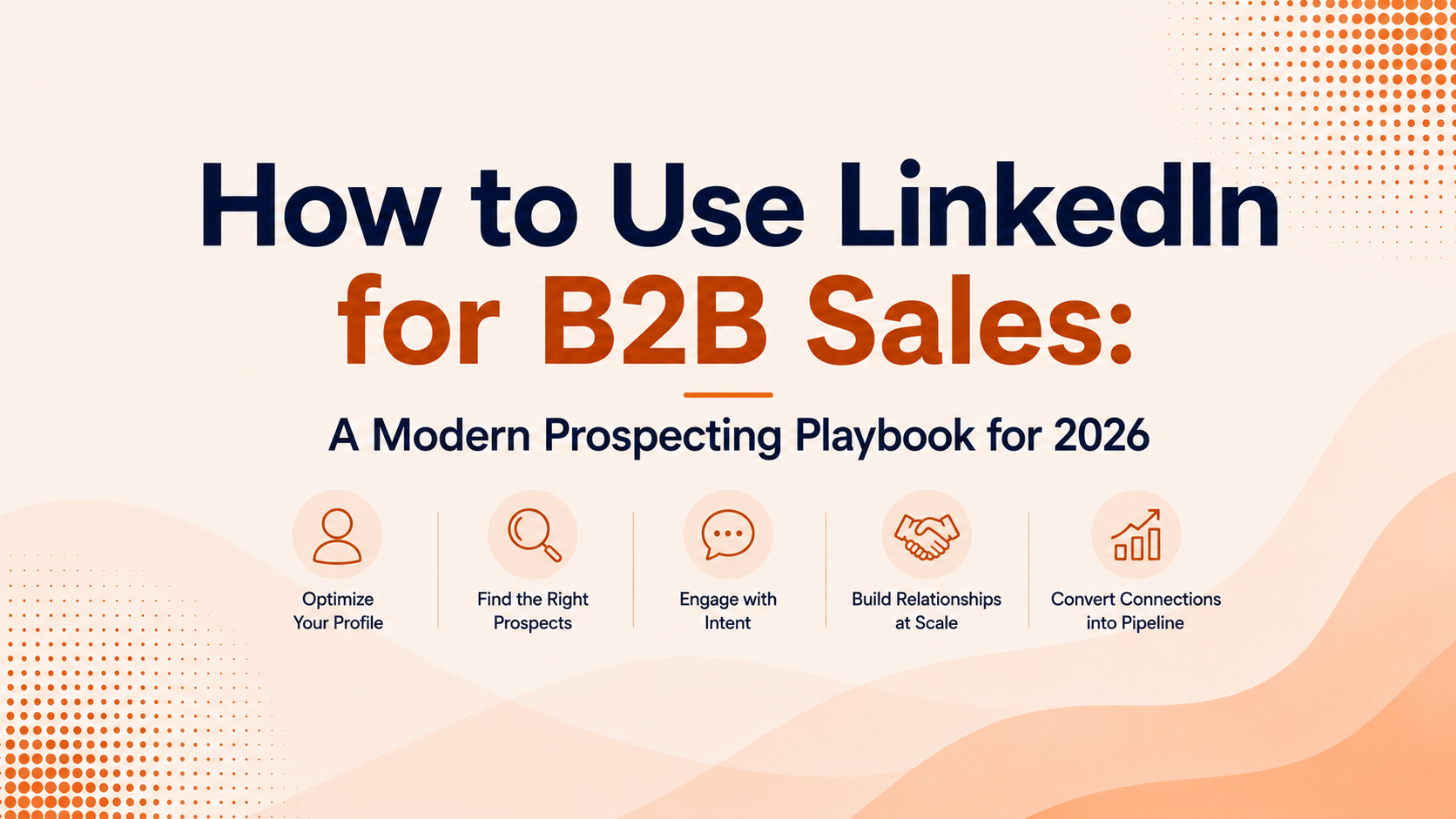
LinkedIn isn't a nice-to-have networking app anymore. For B2B sales teams in 2026, it's still the most reliable digital channel for finding, vetting, and starting conversations with the people who actually approve spend. Martal Group (2026) reports that 80% of B2B leads generated from social media originate on LinkedIn. No other platform comes close to that density of professional intent.
Still, "using LinkedIn" can't just mean firing off connection requests. The playbook has moved on. Modern revenue teams pair LinkedIn with sales intelligence, CRM enrichment, buying-signal tracking, and AI-driven workflows. The goal is simple: help SDRs, AEs, and founders turn LinkedIn activity into qualified pipeline, not a bigger follower count.
Why LinkedIn Still Dominates B2B Prospecting
Plenty of channels can generate attention; very few can match LinkedIn's data. It's a self-reported, constantly refreshed directory of who people are at work, what they do, and where they do it. Four out of five LinkedIn members drive business decisions inside their organizations (LinkedIn, 2023). In practice, that means the buyers you need are already on-platform and routinely publishing the details sellers usually have to chase down.
LinkedIn also converts. Its visitor-to-lead conversion rate is 2.74%, compared with Facebook's 0.77% and Twitter's 0.69% (LigoSocial, 2025). On the marketing side, 89% of B2B marketers use LinkedIn for lead generation, and 40% call it the single most effective channel for high-quality leads (Sprout Social, 2026). If you're doing B2B prospecting, LinkedIn isn't a side quest; it's table stakes.
None of that makes LinkedIn a complete system. Emails and direct dials are often missing or locked down. Outreach volume is throttled. Native search is fine for light use, but it doesn't have the filtering depth of dedicated sales intelligence tools. Teams that build pipeline consistently are the ones that work within those constraints instead of pretending they don't exist.
Profile Optimization: Your Prospect-Facing Landing Page
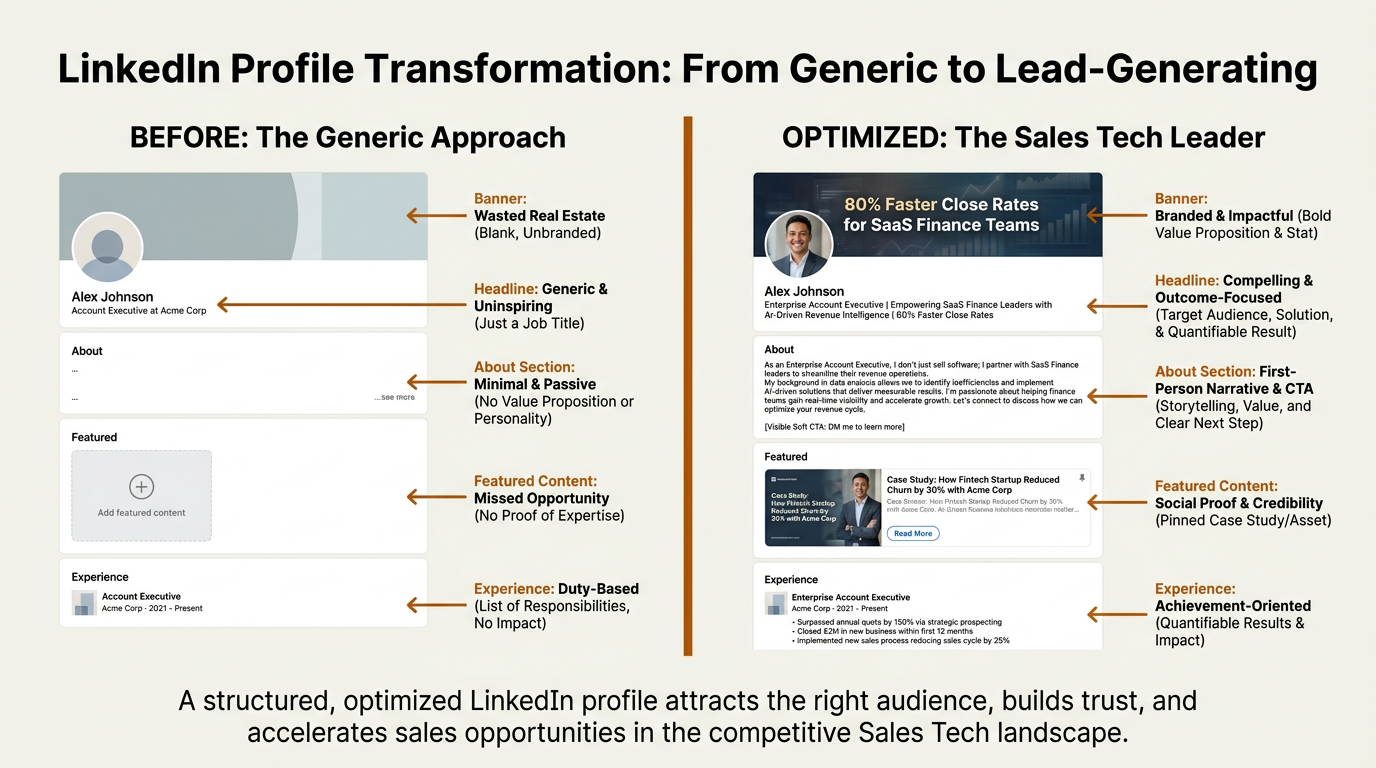
An optimized LinkedIn profile turns every profile view into a prospecting opportunity.
Most SDRs still treat their LinkedIn profile like a resume. That's the wrong mental model. Your profile is what prospects see right after you view their page, comment on a post, or send a connection request. It has to earn the next click by answering, fast: "Why should I talk to this person?"
Key elements to get right:
- Headline: Don't default to your job title. Write a clear value statement. "Helping SaaS finance teams cut month-end close from 10 days to 3" will beat "Account Executive at Acme Corp" every time.
- Banner image: Use it to back up your positioning with your company's value proposition or a relevant stat. Most sellers leave this blank, which is a missed opportunity.
- About section: Write in first person and start with the problems you solve, not your career timeline. Add a soft CTA ("If your team is dealing with X, I'd welcome a conversation").
- Featured content: Pin a case study, a short video, or a strong post. Give prospects something to react to before you ever DM them.
- Experience section: Describe outcomes and impact, not a list of responsibilities.
Finding Decision-Makers with Sales Navigator
LinkedIn Sales Navigator is LinkedIn's paid product built for prospecting. Free search tops out quickly and doesn't give you the controls you need to target consistently. Sales Navigator opens up lead and account filters (seniority, function, company headcount, growth rate, technologies used) so you're building lists with intent instead of guessing.
Where Sales Navigator really earns its keep is saved searches and lead alerts. When a VP of Engineering at a target account changes jobs, gets promoted, or posts about a relevant challenge, Navigator surfaces that activity as a prompt to act. LinkedIn reports that sales leaders with a high Social Selling Index generate 45% more opportunities and are 51% more likely to hit quota (LinkedIn, 2022). A big part of that advantage comes from moving quickly on these triggers rather than working from stale lists.
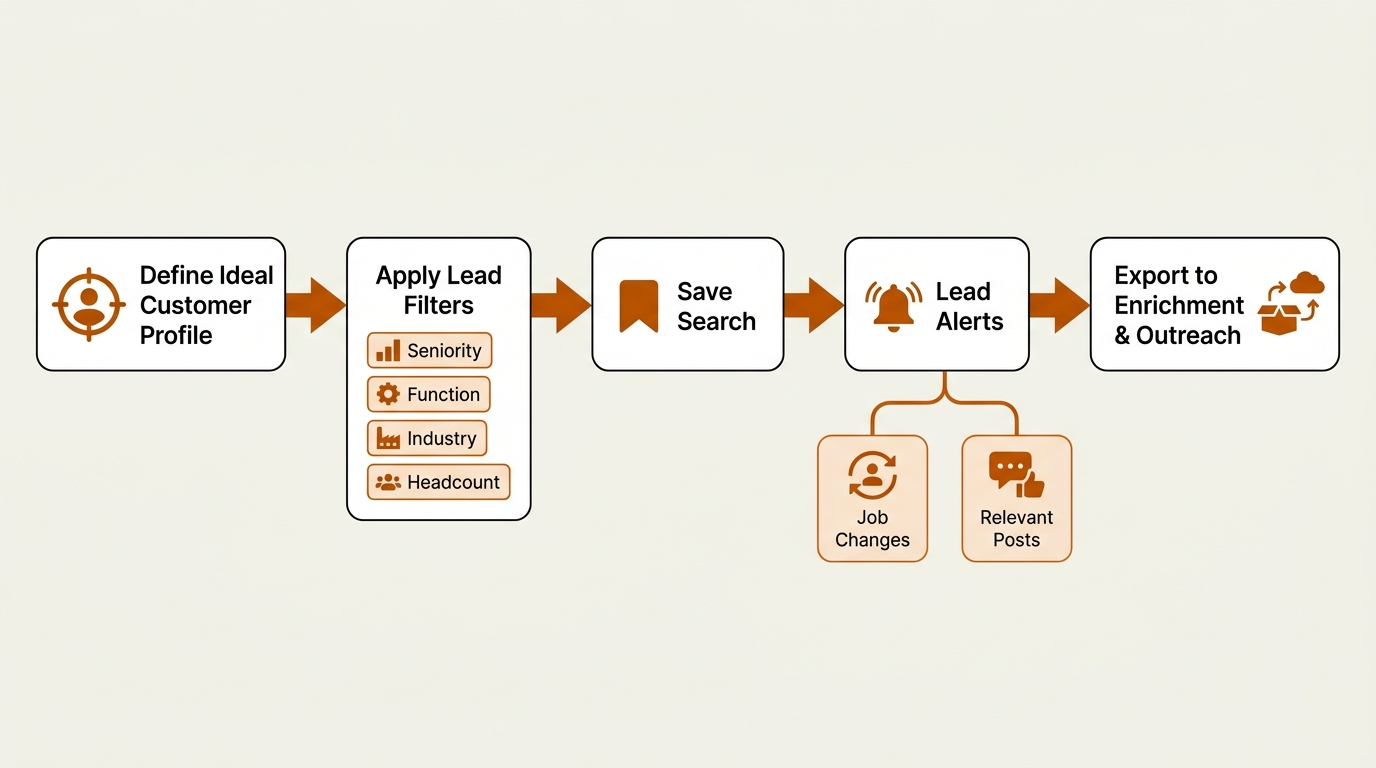
A structured Sales Navigator workflow turns filters and alerts into qualified outreach opportunities.
Sales Navigator best practices worth adopting:
- Build account lists first, then layer lead filters on top. Getting the company set right shrinks the search space before you ever pick a person.
- Use Boolean search in the keyword field for precision. Combining terms like ("data engineering" OR "data infrastructure") AND NOT "intern" cuts out a lot of noise.
- Save searches and check new results weekly. Lists decay quickly; fresher leads tend to convert better.
- Tag leads with custom labels (e.g., "Tier 1 ICP," "Warm intro possible") so follow-up doesn't depend on memory.
- Cross-check Navigator data with enrichment tools to pull verified emails and phone numbers LinkedIn doesn't expose.
Prospect Research: Going Beyond the Profile
A LinkedIn profile is curated. Real research happens when you pair it with outside context: company financials, tech stack, recent funding, hiring patterns, and intent signals. That's exactly where AI prospect research starts to matter.
Instead of burning time reading 30 profiles and company pages before writing a first message, modern GTM teams use AI to pull together a single brief: the prospect's recent activity, their company's 10-K highlights, relevant news mentions, and technographic data. That brief becomes the raw material for personalization. Done manually, this takes 15 to 20 minutes per prospect. With automated research workflows, it's measured in seconds.
Platforms like Bitscale blend contact and company enrichment with AI-driven research so reps get something they can actually use. Start with a LinkedIn URL or a company domain and you get verified work emails, phone numbers, firmographic details, and suggested talking points based on buying signals like job changes, funding rounds, or technology adoption.
Personalized LinkedIn Outreach That Gets Replies
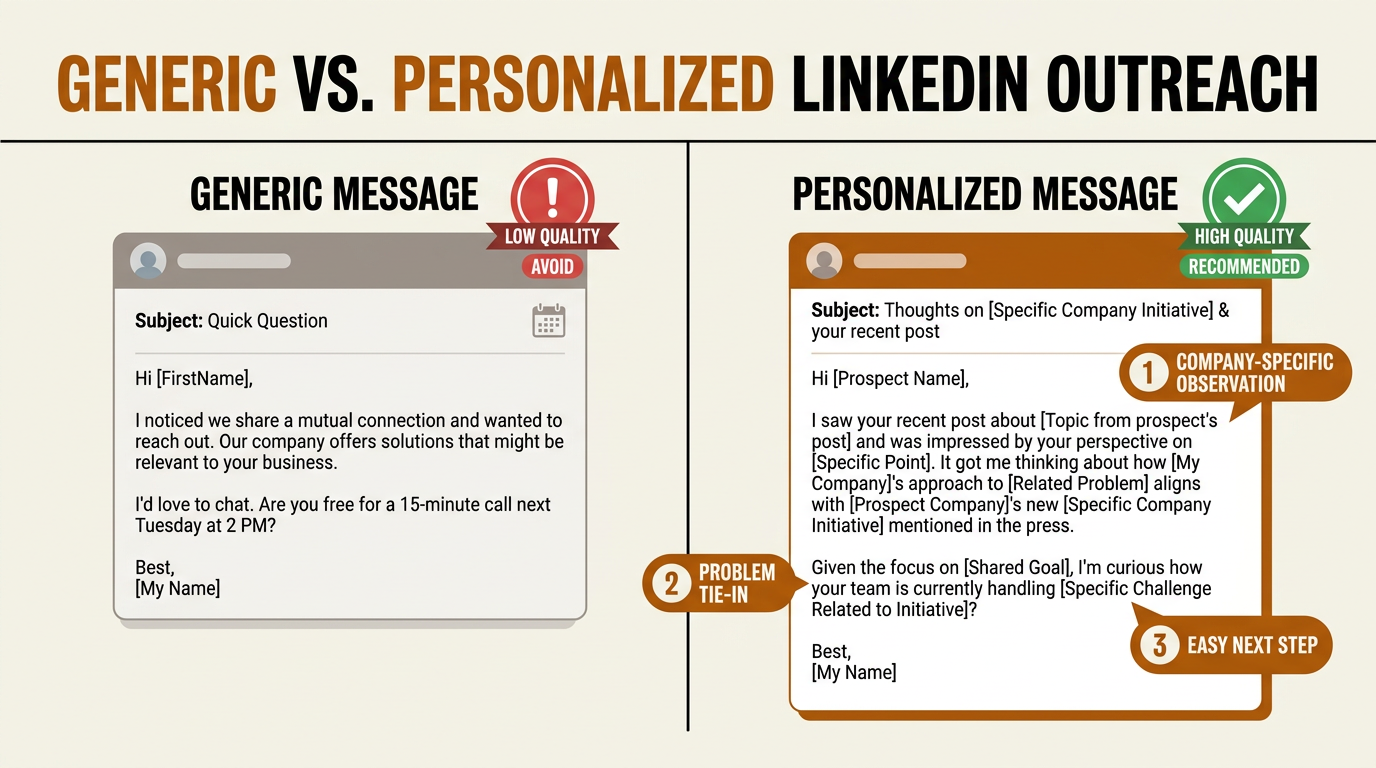
Three callout elements separate a reply-worthy message from one that gets archived.
LinkedIn outreach falls apart the moment it sounds like a mail merge. "I noticed we share a mutual connection" isn't personalization; it's a placeholder. Real personalization references something that happened: a post about migrating to a new ERP, a new warehouse opening, a hiring push for a specific team. Buyers spot templates instantly now, and they treat them accordingly.
Good outreach follows a straightforward arc: open with a specific observation about the prospect, tie it to a problem you help solve, then end with an easy next step. "Would it make sense to share how [similar company] handled this?" usually beats "Can I get 15 minutes on your calendar?" because it offers a concrete exchange before it asks for time.
Relevance beats volume. A hundred generic connection requests a week will underperform 20 messages that show you did the work. LinkedIn's own framing of social selling is relationship-building through relevant interactions over time, not blasting InMails (LinkedIn Sales Solutions, 2023). Practically, that looks like commenting on a prospect's post before you DM them, sharing something they can use, and engaging with the people around them.
Building Relationships Before the Ask
The sellers who win on LinkedIn rarely start with a pitch. They show up consistently in a prospect's feed: leaving comments that add something (not "Great post!"), sharing real points of view about the prospect's space, and occasionally publishing short posts that signal competence. By the time a direct message lands, the name isn't unfamiliar.
One tactic most teams overlook: engage with the content your prospect's colleagues publish. When a CTO sees you've been thoughtfully interacting with posts from their VP of Product and Head of Data, you borrow credibility from the network. It's especially effective in enterprise deals where multiple stakeholders shape the decision.
Relationship-building on LinkedIn takes time. It won't replace outbound sequences, but it makes each touch in those sequences land better. Treat LinkedIn engagement as air cover for your direct outreach, not a substitute for it.
Moving Prospects from LinkedIn into Your CRM
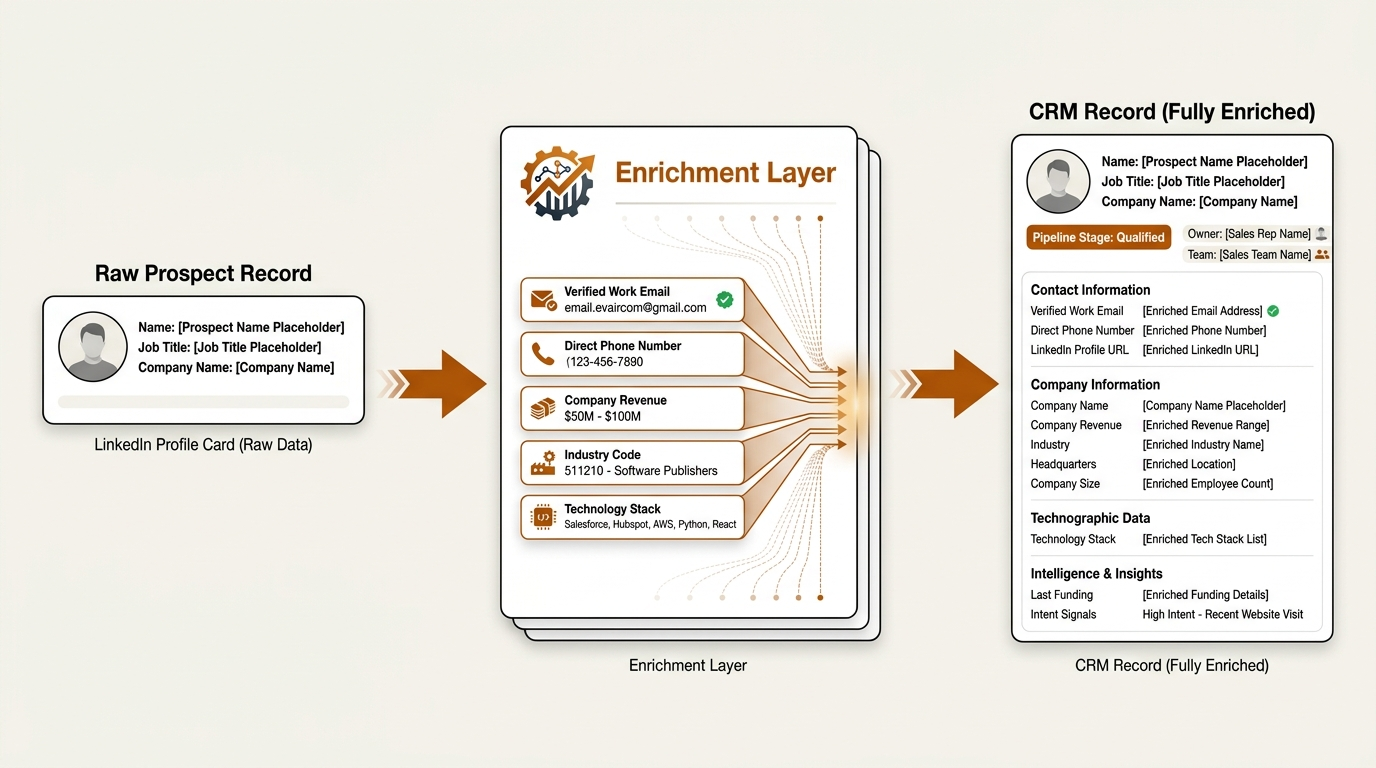
Enrichment bridges the gap between a LinkedIn profile and a CRM-ready lead record.
LinkedIn is where you find people; it isn't where you manage a pipeline. As soon as a prospect signals interest (accepts a connection, replies, engages with your content), their details need to land in your system of record. The catch is that LinkedIn profiles usually don't include verified emails, direct dials, or the firmographic fields your CRM needs for routing, scoring, and segmentation.
That's why CRM enrichment matters. Tools like Bitscale take a LinkedIn URL and return verified work emails, phone numbers, company size, revenue, industry codes, and technology stack data. From there, the enriched record syncs into your CRM (Salesforce, HubSpot, or others) so reps aren't hand-keying fields. Bitscale's ready-made sales workflows automate the full chain: spot a prospect on LinkedIn, enrich the record, then push it into the CRM with the right tags and ownership.
Skip enrichment and LinkedIn prospecting turns into a leaky funnel. Reps find strong targets, then they disappear because nobody logged them, routed them, or followed up in a structured way. For more on assembling the full workflow, see how to build a prospecting stack in 2026.
Integrating LinkedIn with Sales Intelligence, Enrichment, and AI Workflows
LinkedIn works best as one input to a broader prospecting system. The top revenue teams in 2026 use it as a signal source and a communication channel, not the entire workflow. They blend LinkedIn data with intent signals elsewhere, enrich contacts with verified information, and use AI to prioritize and personalize without turning outreach into spam.
| Capability | LinkedIn (Free + Sales Navigator) | Enrichment Platform (e.g., Bitscale) |
|---|---|---|
| Contact discovery | Name, title, company, mutual connections | Verified work email, direct phone, social profiles |
| Company data | Employee count, industry, recent posts | Revenue, funding, tech stack, hiring trends |
| Buying signals | Job changes, post engagement, profile views | Intent data, technology adoption, funding events |
| Search and filtering | Boolean search, saved leads, account lists | Multi-source lead lists, AI-scored ICP fit |
| CRM integration | Limited (Sales Navigator CRM Sync for select CRMs) | Direct sync to Salesforce, HubSpot, and others |
| Outreach automation | InMail, connection requests (volume-capped) | Multi-channel sequences (email, phone, LinkedIn) |
| AI research | None | Automated prospect briefs, personalized talking points |
| LinkedIn provides the relationship layer; enrichment platforms fill the data and automation gaps. |
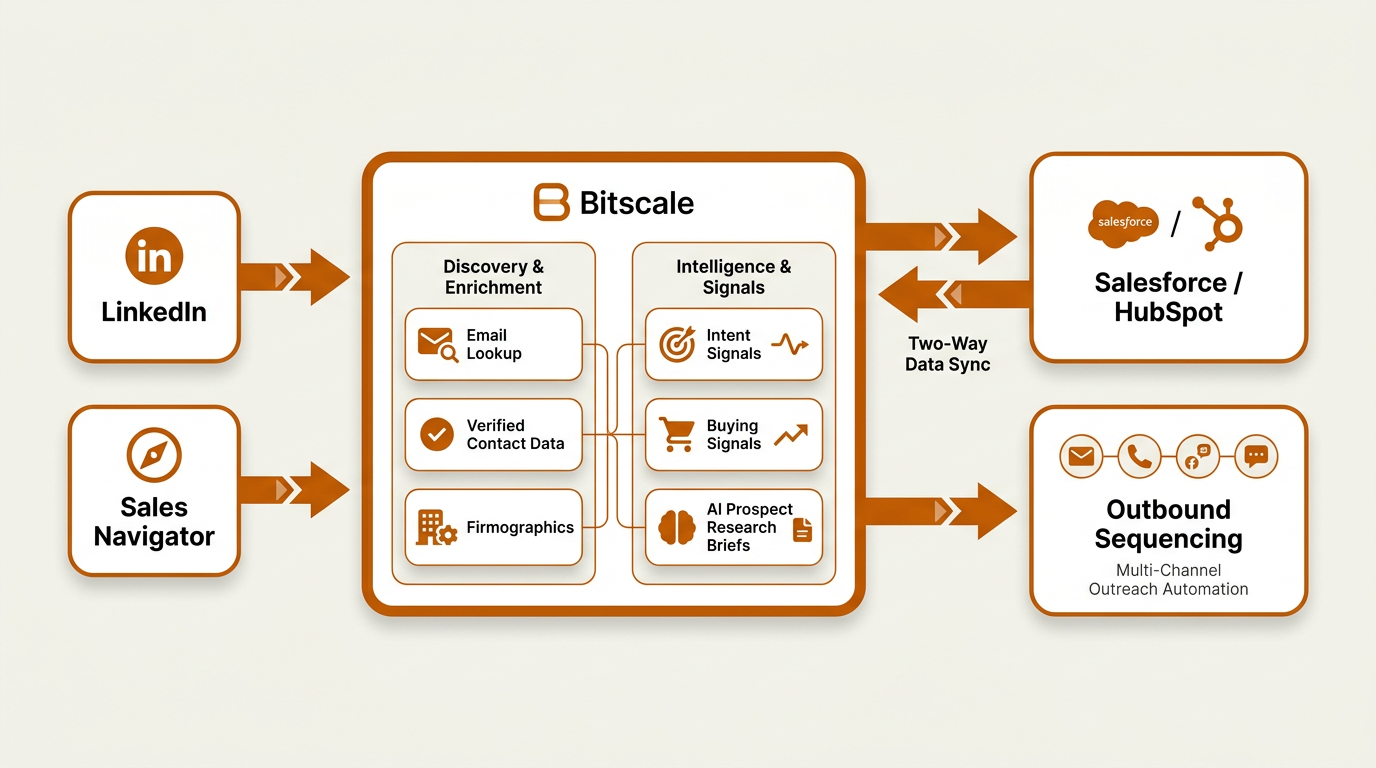
LinkedIn feeds the discovery layer, but Bitscale connects enrichment, intent signals, and CRM into one unified prospecting system.
Bitscale is positioned in the middle of that stack. It pulls prospect data from LinkedIn and other sources, enriches it with verified contact information and firmographics, adds intent and buying signals, and sends complete records into your CRM. Its AI prospect research generates per-prospect briefs that plug into outreach templates, so reps spend more time selling and less time assembling context.
Comparing LinkedIn Prospecting Approaches: Manual vs. AI-Augmented
| Dimension | Manual LinkedIn Prospecting | AI-Augmented Prospecting (LinkedIn + Bitscale) |
|---|---|---|
| Time per prospect | 15-20 minutes (research, find email, log in CRM) | Under 2 minutes (automated enrichment and research) |
| Data accuracy | Relies on profile self-reporting | Cross-referenced across multiple data sources |
| Personalization depth | Surface-level (headline, mutual connections) | Deep (company news, tech stack, intent signals, AI-generated briefs) |
| CRM hygiene | Manual entry, prone to gaps and errors | Auto-synced, standardized fields, deduplication |
| Scalability | Capped by rep hours and LinkedIn limits | Scales with workflow automation and multi-channel sequences |
| Signal tracking | Reactive (notice a job change by chance) | Proactive (alerts on funding, hiring, tech adoption) |
| AI-augmented workflows multiply the impact of every hour spent on LinkedIn. |
What Most Teams Get Wrong About LinkedIn Prospecting
The most common miss is treating LinkedIn like a complete motion. Teams buy Sales Navigator, hand reps a script, and then get surprised when pipeline stays flat. The breakdown is usually downstream: prospects found on LinkedIn never get enriched, never hit the CRM, and never enter a consistent follow-up cadence. LinkedIn can start the conversation; your stack has to carry it through.
The other mistake is automating the wrong parts. Over-automated connection requests and InMails are exactly what LinkedIn is trying to suppress, and accounts that push volume with low-personalization messages get restricted. Even when you avoid restrictions, prospects learn to ignore anything that smells templated. Use automation for enrichment, CRM sync, and research. Keep the actual messaging human.
Key Takeaways
- LinkedIn is still the highest-converting social channel for B2B lead gen, but it performs best as one layer in a broader prospecting stack.
- Tune your profile for prospects, not recruiters. Your headline and About section should make your value obvious in seconds.
- Use Sales Navigator filters and saved searches to find decision-makers systematically instead of relying on one-off searches.
- Do the research before you reach out. AI compresses manual work and gives you more specific angles for personalization.
- Enrich every serious LinkedIn prospect with verified contact data and sync them into your CRM automatically.
- Pair LinkedIn engagement (comments, content, relationship-building) with direct outreach to lift response rates.
- Bitscale connects LinkedIn discovery to execution by handling enrichment, AI research, signal tracking, and CRM sync in one place.
Frequently Asked Questions
Is LinkedIn Sales Navigator worth the cost for small sales teams?
If your team is running outbound with any consistency, usually yes. The filters, saved searches, and lead alerts start paying for themselves once you're working more than a small handful of accounts. Pair it with an enrichment tool like Bitscale so the leads you find can actually move into your pipeline.
How many LinkedIn connection requests can I send per week without getting restricted?
LinkedIn doesn't publish a fixed number, but many practitioners report staying under roughly 80 to 100 connection requests per week (with a personalized note) to keep accounts out of trouble. Acceptance rate matters: accounts that get more yeses tend to run into fewer restrictions.
What is social selling, and how does it differ from cold outreach?
Social selling is using social networks to build relationships with prospects as part of the sales process (Wikipedia). Cold outreach typically starts with a pitch to someone who doesn't know you. Social selling earns attention first by engaging with a prospect's content, sharing relevant insights, and building credibility before making a direct ask. LinkedIn's Social Selling Index (SSI) is its way of scoring how well you're doing that.
How do I get verified email addresses for LinkedIn prospects?
LinkedIn doesn't provide most users' email addresses, so you need an enrichment tool. Bitscale, for example, can take a LinkedIn profile URL and return a verified work email, direct phone number, and company data, then sync the record into your CRM. That's the standard workflow for most modern sales teams.
Can I automate LinkedIn outreach safely?
Automating connection requests and messages is where the risk lives. LinkedIn detects and penalizes bot-like behavior. A safer model is to automate the work around LinkedIn (research, data enrichment, CRM logging, follow-up email sequences) while keeping LinkedIn interactions manual or semi-manual so your account and your messaging stay credible.