Company Databases: A Practical Guide for Modern GTM Teams
Company database basics for GTM teams: firmographics, technographics, intent, enrichment, governance, and a practical checklist for evaluating vendors.
A company database is not a static spreadsheet of names and addresses anymore. For modern revenue teams, it functions more like infrastructure: it decides which accounts even make it into the pipeline, how reps stack-rank their day, and whether marketing dollars land anywhere near the right buyers. Poor data quality creates enormous operational costs, reduces sales productivity, and directly undermines revenue intelligence efforts. IBM has cited data quality issues as costing U.S. businesses trillions of dollars, and a significant share of that waste starts with incomplete or stale company records getting piped into CRMs, enrichment jobs, and outbound tools.
This piece lays out the fundamentals, the higher-leverage use cases, and the buying criteria RevOps leaders, founders, SDR managers, and marketing ops teams need when selecting and operationalizing a B2B company database. The flow is deliberate: start with definitions, build up the intelligence layers, then get practical about workflows and governance, and close with a framework for vendor evaluation. Here is the roadmap.
What a Company Database Actually Is
A company database is a structured, continuously updated set of organization records, where each record maps to a distinct business entity and includes attributes that describe what that company is, what it does, and how it operates. In practice, it becomes the profile layer behind every account your GTM team might target. A well-run database goes well beyond basic firmographics (industry, headcount, revenue, headquarters location) to include technographics (the software and infrastructure a company runs), corporate hierarchy (parent/subsidiary relationships), and increasingly, signals like hiring velocity and funding events.
The difference between a company information database and a phone book or government registry is intent and usability. Public registries like the SEC's EDGAR Company Database exist for regulatory transparency. A modern B2B company database is built to drive decisions and automation: segmenting TAM, scoring accounts, enriching CRM records, and kicking off outreach sequences when the data says timing is right.
Company Database vs. Contact Database vs. Business Directory
Vendors love to blur these terms, but they are not interchangeable. Mixing them up is how teams end up buying the wrong system, or worse, designing account-based workflows on top of tooling that only understands people or listings. Understanding the distinction is especially important when building a B2B contact database alongside your account intelligence layer.
| Dimension | Company Database | Contact Database | Business Directory |
|---|---|---|---|
| Primary record | Organization (account) | Individual person | Business listing |
| Core attributes | Firmographics, technographics, hierarchy, signals | Name, title, email, phone, social profiles | Name, address, phone, category |
| Update cadence | Continuously updated or regularly refreshed | Periodic verification | Annual or user-submitted |
| Typical use case | Account selection, ICP scoring, territory planning | Prospecting, outreach personalization | Local search, supplier lookup |
| Data depth per record | High (dozens of structured fields) | Moderate (contact-level fields) | Low (basic listing info) |
| Examples | Dedicated B2B intelligence platforms | Email finder tools, sales engagement databases | Yellow Pages, Google Business Profiles |
| Understanding the structural differences helps teams avoid mismatched tooling. |
Here is the operational distinction that matters: a contact database helps you find who to reach. A company database helps you decide which organizations are worth reaching and why. Strong GTM stacks use both, but they start with account intelligence so reps qualify and prioritize before they ever worry about personalization tokens.
Layers of Company Intelligence: Firmographics, Technographics, Intent, and Enrichment
A raw company record is the entry ticket, not the payoff. The value shows up when you layer intelligence onto those records in a way that maps to fit and buying motion. Here is what each layer does for a modern GTM team.
Firmographic Data
Firmographic data captures the shape of a business: industry classification, employee count, annual revenue, founding year, and geographic footprint. It is the B2B equivalent of demographics, and it is the backbone of ICP definition ("We sell to Series B+ SaaS companies with 200 to 2,000 employees in North America") and territory design. When firmographics are wrong or missing, every downstream filter, routing rule, and score starts lying. Accurate firmographics are also the starting point for effective lead list building, since every list is only as good as the account data behind it.
Technographic Data and Buyer Intent
Technographics tell you what a company runs: its CRM, marketing automation platform, cloud provider, security stack, and the rest of the tooling that hints at budget, maturity, and constraints. Seeing a competitor in the stack (or a recent removal) is often more actionable than a generic "industry" tag. Buyer intent signals add the timing layer by capturing research behavior, content consumption patterns, and third-party review activity that suggest an account is actively evaluating options. When you combine firmographic fit, technographic context, and behavioral signals, account prioritization stops being a vibe check. Reps can focus on accounts that match the ICP and look meaningfully in-market.
Company Enrichment
Company enrichment is the work of appending, correcting, and keeping fields up to date on the accounts you already have. A CRM account that contains only a company name and domain is dead weight for routing, scoring, or segmentation. Enrichment fills in revenue ranges, tech stacks, social links, and hiring data so the record becomes usable in workflows. For a deeper breakdown, see this data enrichment guide. In practice, the gap between a static list and a real company database often comes down to whether enrichment is a one-time cleanup or an always-on process. Pairing company enrichment with contact enrichment ensures both the account and the people within it are fully actionable.
| Attribute | Static Company List | Modern Company Database |
|---|---|---|
| Data freshness | Snapshot at time of export | Continuously refreshed |
| Enrichment | Manual or none | Automated, multi-source |
| Intent signals | Absent | Integrated or available via API |
| CRM sync | CSV import | Bi-directional, scheduled |
| Segmentation | Basic filters | Multi-layered scoring and tagging |
| Scalability | Degrades with size | Designed to scale across growing datasets |
| Static lists decay rapidly; modern databases are designed for continuous operational use. |
How GTM Engineering Turns Company Data into Pipeline
GTM Engineering is the practice of building automated, data-driven workflows that connect account research to revenue outcomes. It lives in the overlap between RevOps, sales development, and marketing ops. The ROI shows up when you move from "hand reps a list" to "deliver qualified, enriched, scored accounts directly into sequenced workflows" without breaking CRM hygiene along the way. Effective pipeline generation depends on this kind of systematic, data-first approach.
A typical workflow looks like this: (1) define ICP criteria using firmographic and technographic filters, (2) pull matching accounts from a company database, (3) enrich each record with intent signals and missing fields, (4) score and rank accounts, (5) sync qualified accounts to the CRM, (6) trigger outbound sequences with personalized messaging. Platforms like Bitscale aim to keep that chain in one place by combining company intelligence, buyer intent, company enrichment, contact enrichment, AI prospect research, CRM synchronization, and workflow automation, instead of forcing teams to stitch together five or six point solutions and then babysit the integrations.
AI Prospect Research and Workflow Automation
Manual company research is where outbound time goes to die. If an SDR spends significant time on each account bouncing between LinkedIn, Crunchbase, and G2 before sending a first email, that is hours lost to repetitive lookup work that compounds across every rep on the team. AI prospect research tools can parse websites, job postings, press releases, and financial filings to produce account summaries, surface likely pain points, and draft personalized openers. The human job does not disappear; it shifts up the stack to judgment: sanity-checking the output, dialing tone, and handling the objections and edge cases that automation still cannot.
| Task | AI Handles | Human Handles |
|---|---|---|
| Account discovery and filtering | Scanning millions of records against ICP criteria | Defining and refining ICP parameters |
| Data enrichment | Appending firmographic, technographic, and intent fields | Validating strategic accounts, resolving edge cases |
| Prospect research | Summarizing company news, tech stack, hiring trends | Interpreting context, crafting nuanced positioning |
| Outreach sequencing | Generating draft emails, scheduling sends | Reviewing tone, approving messaging, handling replies |
| CRM hygiene | Deduplication, field normalization, decay detection | Setting governance rules, auditing exceptions |
| Pipeline forecasting | Pattern recognition across deal stages | Applying deal-specific judgment, managing relationships |
| Effective GTM teams treat AI as infrastructure, not a replacement for strategic thinking. |
Getting the GTM data stack right is less glamorous than writing sequences, but it is where performance is won or lost. When teams bolt together disconnected tools, they tend to inherit sync failures, duplicate accounts, and enrichment gaps that quietly erase the quality advantages a modern business intelligence database is supposed to deliver.
Governance, Compliance, and Continuous Data Maintenance
Most write-ups rush past governance. That shortcut shows up later as routing chaos, duplicate accounts, and a CRM nobody trusts. A company database without governance becomes a liability. Here is what mature RevOps teams treat as non-optional.
Data decay is relentless. Companies rebrand, merge, go bankrupt, change addresses, swap tech stacks, and hire or lay off hundreds of people every quarter. Company information changes continuously because organizations grow, restructure, adopt new technologies, and update leadership. Industry estimates suggest that a significant portion of B2B data becomes inaccurate within a single year. If you do not run automated decay detection and re-enrichment cycles, your CRM turns into a museum of outdated records. A solid CRM data quality guide should be required reading for any team managing more than a few thousand accounts.
Compliance is non-negotiable. GDPR, CCPA, and newer frameworks like the EU AI Act constrain how company and contact data is collected, stored, and used. Firmographic data about organizations is generally less regulated than personal contact data, but the line gets fuzzy fast once records include individual decision-makers. Your provider should be able to explain sourcing, support opt-out workflows, and offer clear data processing agreements.
Ownership and accountability. Put a named data steward in place (often in RevOps) to own field definitions, enrichment cadence, deduplication rules, and integration health checks. Without a clear owner, data quality degrades through a thousand well-intentioned manual edits spread across sales, marketing, and customer success.
Evaluating Company Database Platforms
The B2B company database market spans dedicated data providers (Apollo.io, Cognism, Lusha), enrichment-first platforms (Clay), outbound automation tools with embedded data (Instantly.ai), and unified GTM platforms like Bitscale that combine company intelligence, enrichment, AI research, CRM sync, and workflow automation. The right choice depends on what your team needs to run day-to-day, not what looks impressive on a slide. For a broader comparison, review this roundup of company database providers.
| Criterion | What to Assess | Why It Matters |
|---|---|---|
| Data coverage | Geographic, industry, and company-size breadth | Coverage gaps create blind spots in TAM analysis |
| Data freshness | Update frequency, decay detection, re-verification cadence | Stale records waste outreach and can damage sender reputation |
| Enrichment depth | Number of firmographic, technographic, and intent fields available | Thin enrichment caps scoring and personalization |
| Integration ecosystem | Native CRM sync, outbound tool connectors, API flexibility | Disconnected systems create sync failures and duplicate records |
| AI capabilities | Prospect research, account summarization, workflow generation | Manual research breaks once you move past a few hundred accounts |
| Compliance posture | GDPR/CCPA readiness, data sourcing transparency, opt-out support | Regulatory risk escalates quickly and reaches the board |
| Pricing model | Per-seat, per-record, credit-based, or flat-rate | Misaligned pricing penalizes growth or discourages testing |
| Workflow automation | Built-in sequencing, triggers, and conditional logic | Less handoff friction between data and action |
| Weight each criterion based on your team's maturity, deal size, and outbound volume. |
One of the most common buying mistakes is treating database size as the headline metric. A vendor claiming a massive record count is irrelevant if a large share of those records are missing revenue data, carry outdated tech stacks, or point to defunct entities. Buyers should prioritize data accuracy, freshness, completeness, enrichment depth, CRM integration quality, and governance over raw database size. Optimize for these dimensions before you get impressed by record counts.
Platform capabilities, AI functionality, integrations, pricing, data coverage, workflow automation, and compliance features evolve over time. Verify current information directly with each vendor before making purchasing decisions.
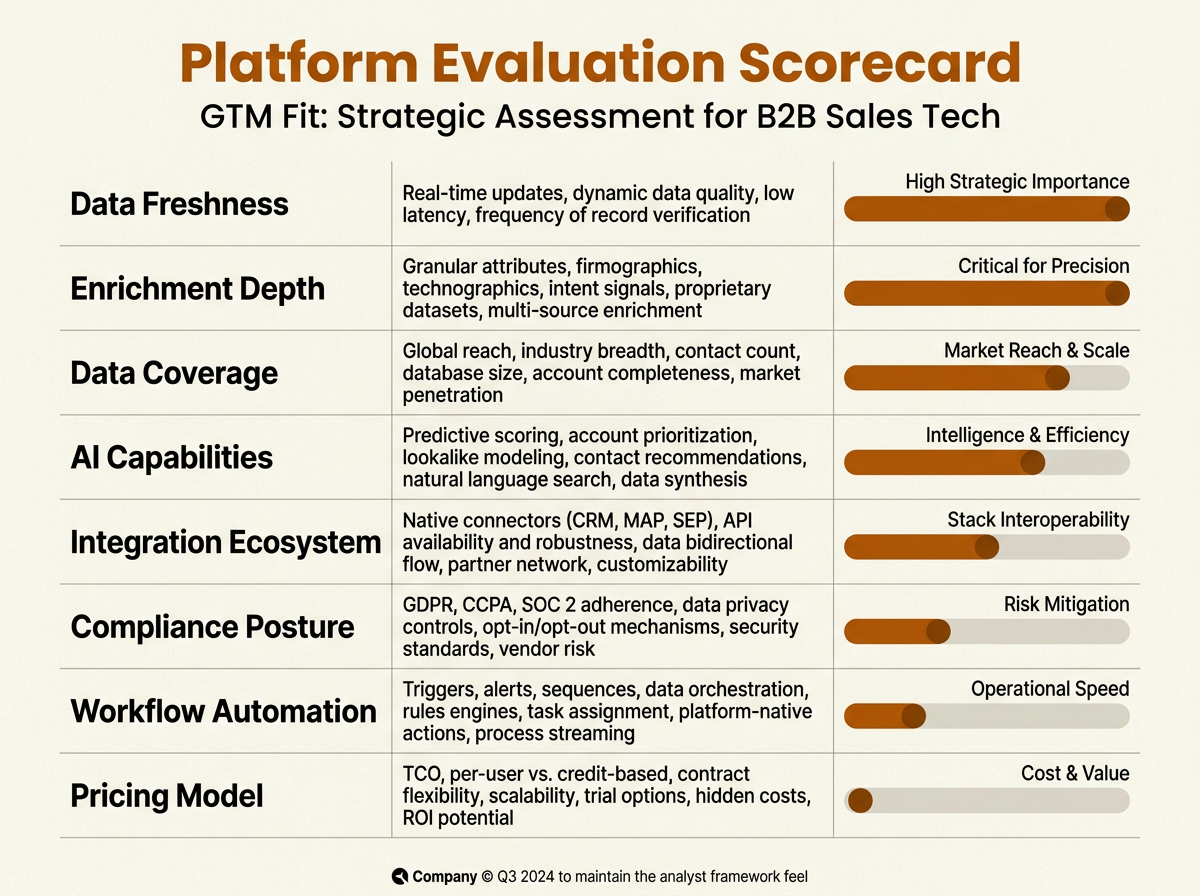
Prioritize data freshness and enrichment depth — they carry the most weight in any rigorous company database evaluation.
Key Takeaways and Next Steps
A company database underpins every account-based GTM motion. It is not a directory, not a contact list, and not a static CSV you import once and forget. The teams generating the most pipeline today treat company data as a living system: enriched continuously, governed deliberately, and wired into every downstream workflow from ICP scoring to AI-assisted outreach. A well-maintained company database is the foundation of modern company intelligence, GTM execution, CRM enrichment, and account prioritization. Building a modern GTM strategy without this foundation is like running outbound without knowing who you are selling to.
Actionable next steps for your team:
- Audit your current company data: how many CRM account records are missing revenue, industry, or tech stack fields? That gap is your starting point.
- Define your ICP in measurable firmographic and technographic terms before shopping for a new platform.
- Evaluate whether your current stack supports continuous enrichment and CRM sync, or if you are relying on one-time imports that decay within months.
- Assign a data steward in RevOps to own field definitions, enrichment cadence, and compliance workflows.
- Test a unified GTM platform like Bitscale that combines company intelligence, enrichment, AI prospect research, and workflow automation to reduce tool sprawl and integration risk.
Frequently Asked Questions
What is the difference between a company database and a CRM?
A CRM (Customer Relationship Management system) is where your team tracks interactions, deals, and pipeline for accounts you already touch. A company database is an external intelligence source with millions of organizations you have not engaged yet. Used together, the database feeds qualified accounts into the CRM, and CRM outcomes tell you which segments to pursue next.
How often should company data be refreshed?
Refresh frequency should reflect your outbound activity, market dynamics, and organizational requirements. For accounts in active pipeline, more frequent enrichment is essential. For broader TAM lists, less frequent re-verification is acceptable as a baseline. If your platform supports continuous enrichment, you can keep records current with far less manual work. Because company information changes continuously as organizations grow, restructure, and adopt new technologies, infrequent refreshes leave too much of your database untrustworthy.
Can a company database replace manual prospect research?
It can take over the repetitive collection work: firmographics, tech stack, funding history, and hiring trends. What it does not replace is interpretation and positioning, especially when deal context or relationships matter. AI prospect research speeds up the workflow, but it still benefits from a human pass before anything goes out the door.
What compliance considerations apply to company databases?
Firmographic data about organizations is usually less restricted than personal data, but many providers bundle individual contact information, which falls under GDPR, CCPA, and similar rules. Ask your vendor to document sourcing, support data subject access requests, and provide opt-out mechanisms for individuals.
How do I evaluate whether a company database has good data quality?
Ask for a sample export in a segment you can verify, such as your existing customers, and compare it against your internal truth. Look at completeness (revenue, industry, tech stack), accuracy of firmographics, recency of updates, and how well the provider handles deduplication. If a vendor cannot produce a clean sample where you already know the answers, expect worse performance on net-new accounts.