Prospect List Automation: How Modern Teams Build Pipeline
Prospect list automation for B2B teams: how AI discovery, enrichment, intent signals, CRM sync, and governance improve list quality and sales efficiency.
Prospect list automation has quietly become the operating system for B2B revenue teams that need more pipeline without hiring their way out of the problem. The phrase is also a little deceptive. No platform spits out a flawless roster of buyers who are ready to sign. What it does well is compress the time spent on research, enrichment, and prioritization work that can consume the majority of a rep's week, so your team spends more hours on real conversations instead of tab-hopping and copy-paste.
The vast majority of high-performing sales organizations now use AI in some form to support their sales process, and industry analysts widely expect AI-assisted research workflows to become the default starting point for seller activity within the next few years. That direction of travel is already obvious on most RevOps roadmaps. This piece breaks down how automated prospect list building works day to day, where AI reliably earns its keep, where it still trips teams up, and how to judge the platforms competing for your budget. The same operating principles hold if you are running a two-person SDR pod or a 50-seat revenue org.
Table of Contents
- What Prospect List Automation Actually Is. Definitions, scope, and common misconceptions.
- How AI Supports Prospect Discovery. The research layer, from ICP matching to signal detection.
- Enrichment, Intent, and Data Quality. Turning raw records into actionable intelligence.
- CRM Synchronization and Workflow Automation. Operationalizing lists so they drive action.
- Manual vs. Automated List Building. Side-by-side comparison of effort, speed, and quality.
- Platform Comparison and Evaluation Criteria. How to assess prospect list software.
- Why Human Oversight Remains Essential. Governance, quality control, and the limits of automation.
- Key Takeaways and Next Steps. Summary with actionable recommendations.
- FAQ. Five common questions answered.
What Prospect List Automation Actually Is
Prospect list automation is the mix of software, AI, and workflow rules that helps a team find potential buyers, assemble lists, enrich records, and prioritize who should get attention first. It covers the full lifecycle of a prospect record: discovery ("who should we be talking to?"), enrichment ("what do we know about them?"), and the operational handoff ("how does this land in a rep's queue?").
The real line to draw is between automation and wishful thinking. Automated prospecting strips out repetitive work like bouncing between LinkedIn, a company database, and a spreadsheet. It does not make the strategic calls for you: which segments are worth pursuing, which personas you want first, or what a relevant message sounds like in your category. Treat automation like infrastructure. It keeps the pipes running so your team can spend its energy on the decisions that shape outcomes.
How AI Supports Prospect Discovery
AI sales prospecting starts and ends with your Ideal Customer Profile. Strong prospect list automation tools take your ICP inputs (industry, headcount, tech stack, funding stage, geography) and then sweep across both structured and unstructured sources to surface matching companies and contacts. That is a different motion than running a static database filter. AI models can analyze job postings, press releases, SEC filings, and product review sites to identify signals that a company fits your profile even when the database fields are thin, wrong, or simply out of date.
Platforms like Bitscale pair AI prospect research with account intelligence so you are not stuck at firmographics. If your ICP includes "B2B SaaS companies that recently hired a VP of Revenue Operations," an AI research agent can monitor hiring activity across LinkedIn and job boards, flag matches, and drop them into a working list. The compounding effect comes from stacking signals instead of betting on one source, which is the core idea behind build better lists faster with AI prospect research.
AI discovery also has a blunt limitation: it will faithfully execute whatever criteria you give it. If the ICP is sloppy, you will get a polished list of the wrong accounts. Teams that skip ICP validation and go straight to automation usually end up with volume that looks impressive and performs terribly, which is more damaging than having a smaller list that is actually relevant.
Enrichment, Intent, and Data Quality
Most prospect records start out anemic. A name plus a company does not give a rep much to work with. Enrichment fills in the fields that make the record usable: work email, direct phone, job title, company revenue, tech stack, recent funding. It is also worth separating the two jobs: contact enrichment adds detail about the person, while company enrichment adds detail about the organization behind them.
Intent signals are the other half of the story. Intent data tracks behaviors (content consumption, product research, competitor evaluation, review site activity) that suggest a company is actively looking at solutions in your category. Put that next to an enriched list and you get something closer to prioritization than prospecting theater: outreach goes to accounts that are already leaning into a buying cycle, not to random companies that happen to match a filter.
Speed matters once a signal shows up. Research on lead response times consistently shows that faster follow-up dramatically increases the likelihood of qualifying a prospect compared to delayed outreach. Intent signals paired with lead list automation make that pace realistic: the system identifies high-intent accounts, enriches the right contacts, and routes the work to reps before the window closes. Bitscale integrates intent and buying signals into its enrichment workflows, which keeps prioritization from turning into yet another manual step.
CRM Synchronization and Workflow Automation
A prospect list sitting in a spreadsheet is not an asset; it is a future cleanup project. It goes stale, it spawns duplicates when someone imports it later, and it lives outside the system your team uses to run pipeline. CRM synchronization is the difference between a list and an operating workflow.
Sales prospecting automation platforms push enriched, scored records into your CRM (Salesforce, HubSpot, or others), map fields cleanly, dedupe against what is already there, and kick off downstream workflows. Those workflows can be as simple as territory-based assignment or as involved as sequence enrollment and task creation for discovery calls. Bitscale's CRM sync and outbound tool integrations are built for that handoff, moving prospects from research to action without turning reps into data entry clerks. For a closer look at how mid-market teams wire this up, see ABM workflow automation.
That connection to the systems reps actually live in is where the ROI shows up. AI-powered tools can now handle a significant share of routine SDR tasks, including initial prospecting, data entry, and scheduling. In practice, you only get that benefit if the automation is integrated end to end. An AI research agent that exports a CSV is still leaving your team with the messy part: cleaning, importing, and fixing the inevitable field and duplicate issues.
Manual vs. Automated Prospect List Building
Most revenue teams are not choosing between pure manual work and full automation. They are choosing where to draw the line. The table below lays out the differences that tend to matter most when revenue leaders evaluate B2B prospecting automation: time, data quality, operational risk, and how well the process scales.
| Dimension | Manual List Building | Automated Prospect List Building |
|---|---|---|
| Research speed | Slow; reps bounce between LinkedIn, databases, and spreadsheets on an account-by-account basis | Significantly faster; AI checks multiple sources in parallel across large account sets |
| Data completeness | Varies by rep; emails, phones, or firmographics often missing | Enrichment APIs systematically fill gaps across records |
| Prioritization | Instinct or basic filters (industry, size) | Intent signals and scoring models rank accounts by buying likelihood |
| CRM integration | CSV imports done by hand; duplicates and field mismatches are common | Real-time sync with deduplication and field mapping |
| Scalability | Linear: more output requires more rep hours | Parallel: AI can process large volumes of records concurrently |
| Error rate | High for repetitive copy/paste and data entry | Lower for structured tasks; governance still needed for edge cases |
| Cost model | Driven by headcount | Platform subscription plus headcount for oversight and strategy |
| Neither approach is universally superior. The right balance depends on team size, deal complexity, and data maturity. |
AI vs. Human Responsibilities in Prospect List Automation
Teams get into trouble when they treat AI like a substitute for judgment instead of a way to buy back time. Organizations that effectively combine AI-driven prospecting with skilled human oversight consistently report stronger pipeline performance than teams relying on manual processes alone. The pattern behind that outcome is straightforward: AI brings speed and consistency to data processing and pattern recognition, while humans bring strategy, context, and taste.
| Task | AI's Role | Human's Role |
|---|---|---|
| ICP definition | Analyze win/loss data to surface ICP patterns and suggest criteria | Validate and finalize ICP criteria based on market knowledge |
| Prospect discovery | Scan databases, job boards, news, and signals at scale | Review flagged accounts for strategic fit and timing |
| Data enrichment | Append emails, phones, firmographics, technographics | Verify high-value records; handle edge cases (e.g., holding companies) |
| Intent scoring | Aggregate behavioral signals into a composite score | Interpret scores in context (e.g., a spike from a competitor's outage vs. genuine interest) |
| CRM sync | Map fields, deduplicate, trigger workflows | Set governance rules; audit sync quality periodically |
| Outreach | Draft personalized email copy using enriched data | Edit messaging for tone, relevance, and brand voice |
| AI handles volume and speed. Humans handle judgment, context, and relationship quality. |
Platform Comparison: Evaluating Prospect List Software
Sales intelligence and prospect list software has splintered into a few recognizable buckets: data providers, enrichment tools, workflow platforms, and unified GTM suites. The comparison below highlights notable platforms based on what they publicly claim they do. When you are evaluating tools, start with how vendors describe their own product, then pressure-test it with your use cases instead of relying on review-site summaries.
| Platform | Core Strength | AI Research | Enrichment | Intent Signals | CRM Sync | Workflow Automation |
|---|---|---|---|---|---|---|
| Bitscale | Unified GTM: AI research, enrichment, intent, CRM sync, workflows | Yes | Contact + Company | Yes | Yes | Ready-made + custom |
| Apollo.io | Large contact database with built-in sequencing | Limited | Contact + Company | Yes | Yes | Sequence-based |
| Clay | Flexible data orchestration with waterfall enrichment | Yes (via integrations) | Multi-provider waterfall | Via integrations | Via integrations | Table-based workflows |
| Lusha | Contact data accuracy, especially direct dials | Limited | Contact-focused | Limited | Yes | Basic |
| Cognism | EMEA and global contact data with compliance focus | Limited | Contact + Company | Yes (Bombora) | Yes | Basic |
| Instantly.ai | Cold email infrastructure and deliverability | Limited | Basic (via lead finder) | Limited | Limited | Email sequence automation |
| Based on each platform's publicly available product descriptions. Capabilities, pricing, and integrations evolve; verify current features directly with each vendor before purchasing. |
Bitscale is positioned as a unified platform that brings AI prospect research, account intelligence, company enrichment, contact enrichment, buyer intent signals, CRM synchronization, workflow automation, and revenue intelligence into one place. The practical appeal is consolidation: instead of stitching together five or six point solutions, teams using Bitscale's lead list creation tool can run the prospect list automation workflow from a single interface. For orgs assessing broader sales intelligence solutions, fewer handoffs typically means less integration risk and fewer places for data to drift or leak.
Evaluation Criteria for Prospect List Software
When comparing platforms, weight these criteria based on your team's specific needs:
- Data coverage and freshness: How large is the database, and how often is it refreshed? Ask for match rates against your existing CRM records.
- Enrichment depth: Does the platform enrich both contacts and companies? Does it support waterfall enrichment (querying multiple providers to maximize fill rates)?
- Intent signal sources: Where does intent data come from: first-party website visits, third-party content consumption, or review site activity? More sources usually improves signal quality.
- CRM integration quality: Is the sync bidirectional? Can it deduplicate against existing records? Does it support custom field mapping?
- Workflow flexibility: Can you build custom workflows, or are you boxed into templates? Bitscale offers both ready-made sales workflows and custom configuration.
- Governance and compliance: Does the platform support GDPR and CCPA compliance? Can you set rules for what is allowed into your CRM?
- Pricing transparency: Is pricing per seat, per record, or usage-based? Check Bitscale's pricing for an example of transparent tier-based packaging.
Why Human Oversight Remains Essential
Automation without governance is the quickest way to trash your CRM, torch your sender reputation, and irritate people who were never a fit in the first place. Here are the failure modes I see most often when teams crank up automation and skip the human checkpoints.
Data decay is constant. People change jobs, companies get acquired, and emails that worked last quarter bounce today. Even strong enrichment providers carry stale records. A human review step before CRM sync is how you catch entries that technically passed validation but are obviously wrong once you look (for example, a prospect whose LinkedIn shows they left the company two months ago). The broader principle, well documented by organizations like McKinsey in their research on why salespeople need to develop machine intelligence, is that AI extends what humans can do, but humans are still the backstop that prevents expensive mistakes.
Context is not computable. An intent score can jump because a company published a blog post about your category, but that company might be a competitor doing research, not a buyer. A rep with domain knowledge can spot that in seconds; a model trained on behavioral patterns alone cannot. Even teams running automated LinkedIn prospecting still need reps to sanity-check profiles and fit before outreach goes out.
Compliance requires judgment. GDPR, CCPA, and industry-specific rules shape who you can contact and under what conditions. Automation can enforce broad policies (for example, excluding EU contacts without consent), but edge cases do not resolve themselves (for example, someone who opted out of a partner list but not yours). Treat governance checkpoints as a designed step in the workflow, not a cleanup task you bolt on later.
Key Takeaways and Next Steps
Prospect list automation is not a single product or a one-click feature. It is a system: AI-driven discovery, contact and company enrichment, intent signals, CRM synchronization, and workflow automation, all wrapped in governance and human review. The teams that build dependable pipeline use automation as infrastructure and keep strategy firmly owned by people.
Editorial note: Vendor capabilities, AI functionality, integrations, pricing structures, and data coverage evolve frequently. The platform descriptions and comparisons in this article reflect publicly available information at the time of writing. Always verify current features, pricing, and compliance posture directly with each provider before making purchasing decisions.
Actionable next steps for your team:
- Audit your current ICP definition. If it is vague or outdated, automation will scale the wrong targeting.
- Map your prospect list workflow end to end. Circle the manual steps that take the most time and add the least strategic value; those are the best automation candidates.
- Evaluate platforms against the seven criteria above. Ask for a trial that lets you test enrichment match rates against your own CRM data, not a polished demo dataset.
- Put human review checkpoints in place before records hit your CRM and before outbound sequences start.
- Start with one contained use case (for example, enriching and scoring inbound leads) and expand from there. Use how to build a prospecting stack as a reference for scaling the workflow with your team.
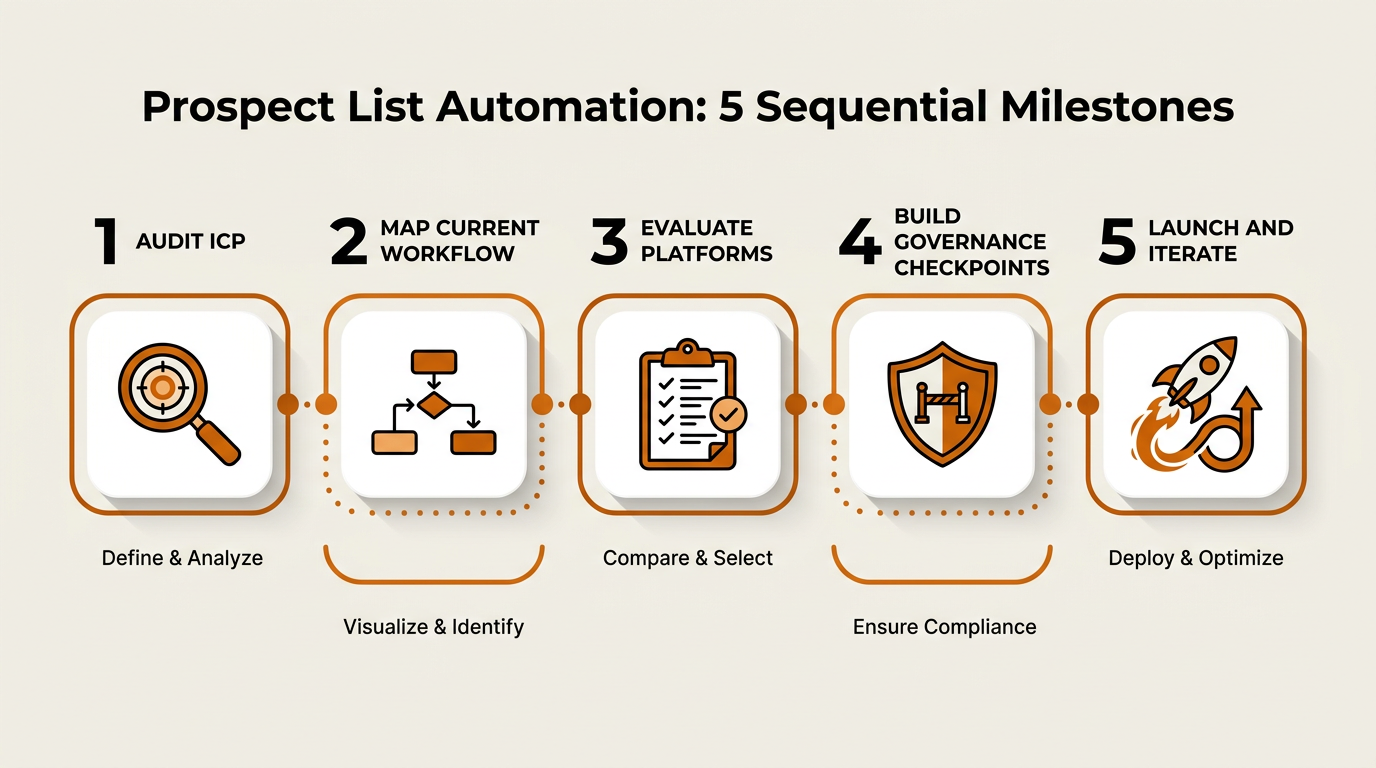
A phased rollout keeps automation aligned with strategy at every stage.
Frequently Asked Questions
What is prospect list automation?
Prospect list automation uses software, AI, and workflow rules to find potential buyers, assemble lists, enrich records, score and prioritize them, and deliver the results to sales in a usable workflow. It replaces a lot of manual research and data entry, while keeping humans in the loop for quality control and the strategic calls automation cannot make.
Can AI fully replace human involvement in building prospect lists?
No. AI accelerates research, enrichment, and scoring by analyzing available data and identifying patterns at scale, but humans still need to own ICP definition, apply context, make compliance calls, and do the relationship work. Organizations that effectively pair AI throughput with human judgment consistently outperform teams relying on either approach alone. The lift comes from combining speed with strategic oversight, not from removing people from the process.
How does buyer intent data improve prospect list quality?
Buyer intent data captures behavioral signals (content consumption, product research, competitor evaluation) that suggest a company is actively exploring solutions in your category. When you layer intent on top of enriched lists, reps can prioritize accounts that are already in-market and spend less time pushing outreach to companies with no active need.
What should I look for when evaluating prospect list software?
Use seven filters: data coverage and freshness, enrichment depth (contact and company), intent signal sources, CRM integration quality, workflow flexibility, governance and compliance, and pricing transparency. During a trial, test enrichment match rates against your own CRM data so you know what fill rates and accuracy look like in your environment. Because vendor capabilities evolve, always verify current features directly with the provider.
How does Bitscale differ from point solutions like Apollo.io or Lusha?
Bitscale is positioned as a unified GTM platform that combines AI prospect research, account intelligence, contact and company enrichment, buyer intent signals, CRM synchronization, workflow automation, and revenue intelligence in one environment. Point solutions usually go deep in a single area (like contact data or sequencing) and rely on integrations to cover the rest of the prospect list automation workflow. See Bitscale's lead list creation tool for how the unified workflow is designed to run end to end.