HubSpot data enrichment: what to fill, what to protect, and how to set it up
HubSpot data enrichment, set up right: what Breeze Intelligence fills and skips, which fields matter, how to avoid overwrites, refresh cadence and credit math.

The most common mistake I see in HubSpot enrichment is treating it as a switch. Turn on Breeze Intelligence, watch the company fields fill up, call it done. Then a rep opens a contact and there's no phone number, the title is two jobs old, and the email bounces. The switch worked. It just wasn't the part of the problem the rep cared about.
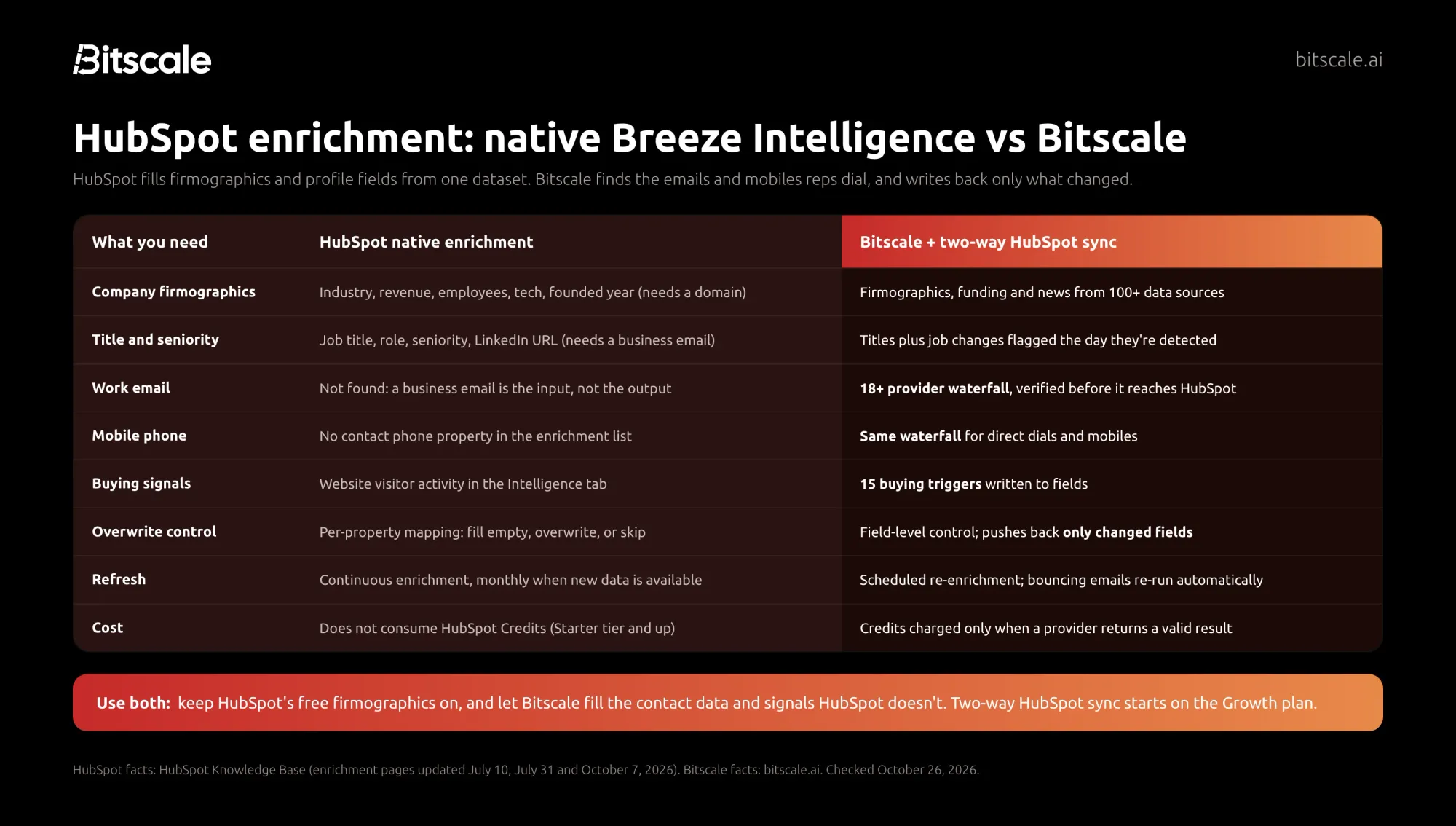
The short answer: HubSpot data enrichment means filling and refreshing contact and company properties from outside data. HubSpot's native enrichment (Breeze Intelligence) is a strong, free-to-run base for firmographics, titles and seniority, but it needs a business email to enrich a contact and doesn't find emails or contact phone numbers. My take: keep HubSpot's native enrichment on for company data, and use Bitscale for the contact data reps act on. Bitscale connects to HubSpot with two-way sync on the Growth plan, runs an 18+ provider email and phone waterfall, adds 15 buying triggers, and writes back only the fields that changed.
What a good setup looks like:
- Every property has one owner: HubSpot, Bitscale or the rep.
- Fields your team edits by hand are protected from overwrites.
- Emails and phones are verified before they land in HubSpot.
- Refresh runs on a schedule, with job changes caught as they happen.
What HubSpot's native enrichment does (and doesn't)
HubSpot's native enrichment is the product many people still call Breeze Intelligence. I reviewed it in full in our Breeze Intelligence review, so here I'll stick to what matters for setting it up. Everything below is from HubSpot's Knowledge Base as of October 26, 2026.
What it fills. On contacts, HubSpot enriches properties such as job title, employment role, sub-role and seniority, LinkedIn URL, city, state and country. On companies, the list is longer: industry, annual revenue, number of employees, employee range, description, web technologies, total money raised, year founded, phone number, address and social pages, among others (HubSpot's property list, updated October 7, 2026).
What it needs. For contacts, HubSpot uses first name, last name and work email. For companies, it uses the company domain. HubSpot says plainly that personal addresses such as Gmail or Yahoo won't be enriched, and companies must have a domain.
How it runs. You can enrich manually (one record, or up to 100 records at a time from an index page) or automatically. Automatic enrichment is off by default for both contacts and companies. You can turn on enrichment for new records, and continuous enrichment, which updates previously enriched records monthly when new data becomes available.
What it costs. HubSpot states that data enrichment does not consume HubSpot Credits. Smart properties do. Enrichment is listed for Starter, Professional and Enterprise tiers of Marketing, Sales, Service, Data and Content Hub.
Where it stops. Here's the gap that matters for sales teams. The contact enrichment list has no email address and no phone number property. A business email is the input, not the output. So native enrichment can tell you a contact is a VP of Finance in Austin, but it can't give you the direct dial or mobile to reach her, and it can't find the email for a contact who arrived without one.
That's a scope choice, not a flaw. But it's why I think "turn on Breeze" and "enrich HubSpot" are different decisions.
Which HubSpot fields are worth enriching
What most teams get wrong is enriching everything they can, instead of the fields someone uses. Every extra property is one more thing to keep fresh. Here's the set I'd focus on, and who I'd let own each one.
| Field | Why it matters | Who should fill it |
|---|---|---|
| Work email (verified) | Sequences and lead routing break without it | Bitscale waterfall |
| Mobile or direct dial | The highest-value field for reps who call | Bitscale waterfall, only for contacts you'll call |
| Job title and seniority | Routing, lead scoring and persona-based messaging | HubSpot native, with Bitscale flagging job changes |
| LinkedIn URL | Identity matching and research | HubSpot native, or Bitscale reverse lookup when missing |
| Company domain | The key everything else hangs on | Rep or form, checked by Bitscale for dead domains |
| Industry, employees, revenue | Segmentation, territories, ICP fit | HubSpot native |
| Web technologies | Fit and competitive targeting | HubSpot native |
| Buying signals (funding, hiring, leadership changes) | Tells reps who to call this week | Bitscale's 15 buying triggers, written to fields |
For the CRM-agnostic version, our guide to CRM enrichment at scale covers field selection and dedup rules. For HubSpot, the point is simpler: let HubSpot fill company fields for free, and spend your effort on contact reachability and signals.
How to avoid overwriting good data
This is where enrichment does the most damage. A rep fixes a title by hand, enrichment runs, and the old value comes back.
HubSpot gives you real controls here, and they're worth learning before you switch anything on:
- Per-property mapping. For each enriched property you choose: fill empty values only; fill empty values and overwrite existing values; or do not fill any values, which excludes that property.
- Overwrite incorrect values. This setting can replace previously enriched values with null when the source data is inaccurate. It requires continuous enrichment. HubSpot says values set manually, by workflows or by integrations won't be overwritten by it.
- Mapping changes aren't retroactive. HubSpot notes that changes to mapping settings apply to future enrichment only.
- Two exceptions. Conversational enrichment and the workflow "Enrich record" action can overwrite properties regardless of your mapping rules. If you build enrichment into workflows, test on a small list first.
- Admin access. Super Admin permissions are required to configure enrichment settings.
My rule of thumb: set "fill empty values only" on every field a human edits (title, phone, lifecycle-related fields), and allow overwrites only on fields nobody touches by hand, such as employee range or web technologies.
Bitscale follows the same principle on its side. You choose, field by field, what Bitscale may update, and its two-way HubSpot sync pushes back only the fields that changed. Every value carries its source, so when a rep asks "where did this number come from?", there's an answer.
How often to refresh HubSpot data
HubSpot's continuous enrichment updates previously enriched records monthly when new data becomes available. For firmographics, I think monthly is fine. Company size and industry don't change week to week.
Contact data is different. People change jobs and email addresses start bouncing on their own schedule, not yours. Here's what I'd do:
- Firmographics: leave them on HubSpot's monthly continuous enrichment.
- Contacts on open deals and target accounts: re-enrich on a short schedule. In Bitscale, a HubSpot list can auto-fetch on a cadence you set, such as every two weeks or monthly, and new records are run and deduplicated automatically.
- Job changes and bounces: treat them as events. Bitscale flags a job change the day it's detected, and marks emails that start bouncing for re-enrichment automatically.
- The long tail: a bulk pass a couple of times a year is enough for cold records nobody is working.
Credits and cost math
HubSpot's native enrichment doesn't consume HubSpot Credits, so the firmographic layer costs nothing beyond your subscription.
Bitscale's pricing page lists typical credit costs: an email lookup is about 1 credit, a phone number 8, AI personalization 2 and deep web research 3. Credits are spent only when a data provider returns a valid result. Failed lookups, formula columns and CRM syncs are free.
As an illustration only, take a HubSpot portal where:
- 2,000 contacts have no email or an invalid one: up to 2,000 credits.
- 1,500 contacts on open deals need a mobile: up to 12,000 credits (1,500 × 8).
- 300 target accounts get a deep research pass: up to 900 credits (300 × 3).
That's at most 14,900 credits in the month, inside Bitscale Growth's 15K monthly credits, and less in practice because misses aren't charged. The lesson I'd take from the math: phones are where credits go, so enrich phones for the contacts reps will actually call, not the whole database.
Step-by-step: set up HubSpot data enrichment
Here's the setup I'd run, combining HubSpot's native enrichment with Bitscale.
- Audit what's empty. Check fill rates on the fields above so you have a baseline.
- Assign an owner to every field: HubSpot native, Bitscale or the rep.
- Configure HubSpot's native enrichment. As a Super Admin, set the property mapping (fill empty only for human-edited fields), then turn on enrichment for new records and continuous enrichment for both contacts and companies.
- Connect HubSpot to Bitscale. In Bitscale, go to Integrations, add HubSpot, and import companies, contacts or a HubSpot list. Use AND/OR property filters to pull only the records you care about. The list becomes the feeder, and each record keeps its HubSpot record ID.
- Validate before you re-find. Check existing emails first and re-find only the invalid ones.
- Fill the gaps with the waterfall. Run Bitscale's 18+ provider waterfall for missing emails and phones. Where a LinkedIn URL is missing, Bitscale's reverse lookup waterfall finds it, with the AI research agent as a fallback.
- Add signals. Turn on the buying triggers that matter to your team, such as funding, hiring and leadership changes, and map them to HubSpot properties so workflows and lead scores can use them.
- Push back and schedule. Write results to HubSpot by record ID, with only changed fields updated, then set the list to auto-fetch on your chosen cadence.
Mistakes I'd avoid
- Assuming Breeze covers contact data. It enriches people you can already email. Check whether your team needs emails and phones before deciding native is enough.
- Leaving overwrite on for human-edited fields, or running "Enrich record" in workflows untested. One run can undo months of rep corrections.
- Enriching personal emails and hoping. HubSpot won't enrich Gmail or Yahoo addresses, so inbound leads with personal emails need a different route to a work email.
- Buying phones for the whole database. Spend on contacts reps will call.
- One-time cleanups. Data decays. A cleanup without a schedule is a project you'll repeat next year.
- Two tools writing the same field. The last writer wins and nobody trusts the value.
How Bitscale helps
I built Bitscale to be the GTM data layer that sits on top of your CRM, and HubSpot enrichment is the core of what it does.
- Two-way HubSpot sync on Growth. Pull a HubSpot list into a live grid, enrich it, and push back only the changed fields, with field-level control over what Bitscale may update. Read more on the CRM enrichment page.
- An 18+ provider email and phone waterfall. Bitscale checks 18+ contact-data providers in sequence, with 100+ data sources overall. Bitscale reports 95% email and phone coverage and bounce rates below 0.5%. If you're new to the idea, here's how waterfall enrichment works.
- Verification and hygiene. Every result is verified before it reaches HubSpot. Job changes, bouncing emails and records tied to dead or acquired domains are flagged.
- 15 buying triggers. Funding, hiring, executive hires, tech-stack changes and more, stackable and written to fields your workflows can use.
- AI research agent. It scrapes websites and runs Google and Perplexity research, then turns that unstructured web data into HubSpot fields no database has.
- Playbooks. Ready-made workflows, including HubSpot Contact Re-Enrichment and Champion Job-Change Tracker. Browse them on the playbooks page.
- People to set it up. GTM engineer support on every paid plan, with a dedicated engineer on Enterprise. Bitscale's GTM engineers can set up and migrate your workflows for you.
ScaleStation, a London B2B growth and sales consultancy, runs its HubSpot enrichment on Bitscale. The team enriched 27,000+ contacts and saw a 60% increase in multi-threaded deals. As Kieran Krohn, Head of Growth at ScaleStation, put it: "Bitscale made our CRM feel alive - and getting in touch with these guys is so easy!"
Pricing
| Plan | Price | Credits | HubSpot sync |
|---|---|---|---|
| Free | $0 | 200 | No |
| Growth | $349/mo ($314 annually) | 15K/mo | Yes, two-way |
| Booster | $799/mo ($719 annually) | 50K/mo | Yes, two-way (plus Salesforce) |
| Enterprise | from $15K/yr | Custom CRM integration |
Pricing is per account, actions are unlimited on paid plans, and credits roll over up to 3x. Bitscale's G2 rating: 4.8/5. Full details are on the pricing page. For the bigger picture beyond HubSpot, see our guides to CRM data enrichment and customer data enrichment.
Frequently asked questions
Does HubSpot have built-in data enrichment?
Yes. HubSpot's native enrichment, known as Breeze Intelligence, fills contact and company properties such as job title, seniority, industry, employee count and revenue. It's available on Starter, Professional and Enterprise tiers of most hubs.
Is HubSpot data enrichment free?
HubSpot states that data enrichment does not consume HubSpot Credits, so it runs within an eligible subscription at no extra credit cost. Smart properties do consume HubSpot Credits.
Does HubSpot enrichment find email addresses and phone numbers?
Not for contacts. HubSpot needs a business email to enrich a contact, and its contact property list has no email or phone field. Company records can get a phone number. Bitscale's 18+ provider waterfall fills contact emails and mobiles.
Will HubSpot enrichment overwrite my existing data?
Only if you allow it. Per-property mapping lets you fill empty values only, overwrite, or skip a property. The workflow Enrich record action and conversational enrichment can overwrite regardless of those rules, so test them first.
How often does HubSpot refresh enriched data?
With continuous enrichment turned on, HubSpot updates previously enriched records monthly when new data becomes available. Automatic enrichment is off by default for both contacts and companies.
Can I use Bitscale and HubSpot enrichment together?
Yes, and I'd recommend it. Let HubSpot fill firmographics, and use Bitscale for verified emails, phones, job changes and buying signals. Bitscale's two-way HubSpot sync on Growth writes back only changed fields.
Sources
HubSpot
- Get started with data enrichment (HubSpot Knowledge Base, updated July 10, 2026)
- Manage data enrichment settings (HubSpot Knowledge Base, updated July 31, 2026)
- Enrich your contact and company data (HubSpot Knowledge Base, updated October 7, 2026)
Bitscale