How to find the decision-makers in a company: a 2026 playbook
A practical playbook to find the decision-makers in a company: map the buying committee, search LinkedIn and filings, verify people and get verified contacts.

Most teams that ask "how do I find the decision-maker?" have already made the mistake that costs them the deal. They picture one person with one title, search for the most senior name they can find, and send the CEO a cold email. In a B2B purchase there is rarely one decision-maker. There is a group of people, each of whom can say no, and the most senior one is usually the last to get involved.
The short answer: start from the deal, not the org chart. Decide which roles take part in buying what you sell, then find the names for those roles at each target account using the company website, LinkedIn search, press releases, job posts and public filings. Confirm each person is current and in scope before you look for contact details, then get verified emails and phone numbers. Doing this by hand works for a few named accounts. For a full account list, Bitscale maps every account to the right people by title, department and seniority, finds verified contact details through one waterfall across 18+ providers, and syncs the result to HubSpot or Salesforce.
- Map the roles for your deal type before you search for a single name.
- Use at least two sources for every person you add.
- Verify that someone is current and in scope before you spend credits on their email.
If you want the background on how buying groups form and behave, our guide to buying committees covers it. This page is the practical part: finding the actual people.
Who the decision-makers actually are in a B2B purchase
I think "decision-maker" is a misleading word. In practice a B2B purchase is made by a buying committee: one person feels the problem, another owns the budget, someone checks whether the product fits the tech stack, and someone else reviews the contract. Any of them can stall the deal.
The roles below show up in most deals. At a small company one person often plays three of them. What matters is that you look for each role on purpose.
| Role | What they care about | How to find them |
|---|---|---|
| Economic buyer (owns the budget) | Return on the spend, risk, and timing against other priorities | Leadership page; LinkedIn title search at VP or C-level in the function; proxy statements and annual reports for public companies |
| Champion (feels the problem) | Fixing a problem they deal with every week, and looking good for doing it | Director and manager titles in the function; people who post or comment about the problem; the hiring manager on related job posts |
| End users | Whether the product makes their day easier or adds work | LinkedIn search by department and seniority; team pages; job posts that describe the team |
| Technical evaluator (IT, security, ops, data) | Integrations, security review, admin effort | Job posts that list the tech stack; titles such as RevOps, IT, security or data engineering; engineering blog authors |
| Procurement, legal and finance | Terms, compliance, vendor risk, payment schedule | Usually appear late; ask your champion who signs off; LinkedIn titles in procurement or legal |
| Executive sponsor | Whether the purchase supports the company's priorities | Press releases, investor pages, leadership page, conference talks |
Map the buying committee by deal type before you search
Here's what I'd do before opening LinkedIn: write down which roles take part at each deal size. The committee for a one-team tool is not the committee for a platform that touches several departments.
- Single-team tool, smaller company: the team lead is often both champion and budget owner. Find that person and one or two users.
- Department-wide purchase: the department head owns the budget, a manager-level champion runs the evaluation, an ops or admin person will run the tool, and finance signs off.
- Cross-functional platform: an executive sponsor, a budget owner in each affected function, IT or security, procurement and legal.
- Regulated industries: add security, compliance and legal at the start, not at the end. They will appear either way.
As an illustration only: if you sell a data enrichment tool to a mid-size software company, your list for each account might be the VP of Sales or CRO (budget), a RevOps manager (champion and technical evaluator), an SDR manager (user lead), and someone in IT or security who reviews the CRM integration.
Turn this into a persona list of title keywords, departments and seniority levels. It is your search spec for the methods below, and the same input Bitscale uses to map people to accounts at scale.
Manual methods: where to find the names
No single source has everyone. Each method below is good at finding some roles and weak at others, so combine them.
The company website
Start with the leadership or team page, then check the pages most teams skip: customer stories, blog bylines, and webinar or event speaker pages. A post by a "Head of Revenue Operations" tells you the person exists and what they work on.
LinkedIn search: how to find decision makers on LinkedIn
LinkedIn is where most of the names will come from. Search for people at the target company using the title keywords from your persona list. LinkedIn's help center says you can type a Boolean string directly into the main search bar and use AND, OR and NOT, quotation marks for exact phrases, and parentheses to group terms. For example:
("VP" OR "Head" OR "Director") AND ("Revenue Operations" OR "RevOps")
My take: LinkedIn is the best source for names and the weakest for verification, because titles are self-reported and profiles go stale. Someone who posts about the problem you solve is a better first contact than a senior name who never posts. For getting from a LinkedIn profile to an email address, our guide on how to find someone's email on LinkedIn covers the methods.
Press releases and news
Announcements of executive hires, funding rounds and acquisitions name the people involved and tell you something changed. In my view a new leader is one of the best reasons to reach out. Bitscale tracks exec hires and funding as buying signals, so you don't have to read the news for every account.
Job posts
Job posts are underrated. They often say who the role reports to, list the team's tools, and describe the problems the new hire will own.
Public filings: SEC and Companies House
For US public companies, the SEC's EDGAR full-text search lets you search filings since 2001 by company name, form type and date. Under Regulation S-K Item 401, companies must list the names and ages of their directors and executive officers and describe each person's business experience over the past five years. In the UK, Companies House lets you look up a company's current and resigned officers for free.
Filings only cover the top of the company. Use them to confirm the economic buyer or executive sponsor and the legal structure (parent, subsidiary, region), not to find the champion.
How to verify you have the right person
This is the step most teams skip, and I think it's where most wasted outreach comes from. A matching title is not a match. Before you look up contact details, check:
- They still work there. Check the start date in the role, recent activity and the company website.
- They own the right scope. A "Director of Sales" may run one region or product line. Make sure it's yours.
- They're in the right entity. At groups with subsidiaries, confirm the business unit that would buy.
- Two sources agree. A LinkedIn profile plus a team page, press release, job post or filing.
- They're an employee. Agency staff and contractors often list the client's name in their title.
Verification is not a one-time task, because people change jobs. Bitscale flags job changes, bad emails and dead domains on records in your CRM, and the HubSpot Contact Re-Enrichment playbook updates titles and flags people who have left.
How to get verified contact details
Once you have the right names, you need emails and, for some roles, phone numbers. You can guess the email pattern and verify it (cheap, but weak on mixed patterns and catch-all domains), use one contact database (limited to one vendor's coverage), or use a waterfall that queries several providers in order and verifies the first valid result.
What most teams get wrong is judging providers on results returned rather than verified results that reach the inbox. Bitscale's waterfall sequences 18+ contact-data providers, from 100+ data sources overall, in the order you choose, and verifies each result before it reaches your CRM. Bitscale reports 95% email and phone coverage with bounce rates below 0.5%. The email waterfall needs a name plus a company or company URL, and the phone waterfall needs a LinkedIn URL, so the research in the earlier steps is exactly the input it needs. For a comparison of enrichment options, see our guide to lead enrichment tools.
How to scale it across a list of target accounts
Everything above works for a handful of named accounts, not for a full territory. By the time you finish a long list by hand, the first accounts are out of date. Scaling it means turning the method into a repeatable workflow: the persona list becomes saved filters, the sources become enrichments that run on every account, verification becomes a waterfall, and the output lands in your CRM instead of a spreadsheet. This is the gap we built Bitscale to close. If you're still building the account list itself, our guide to list building services and tools covers that step, and our B2B prospecting tools guide compares the tools.
The step-by-step checklist
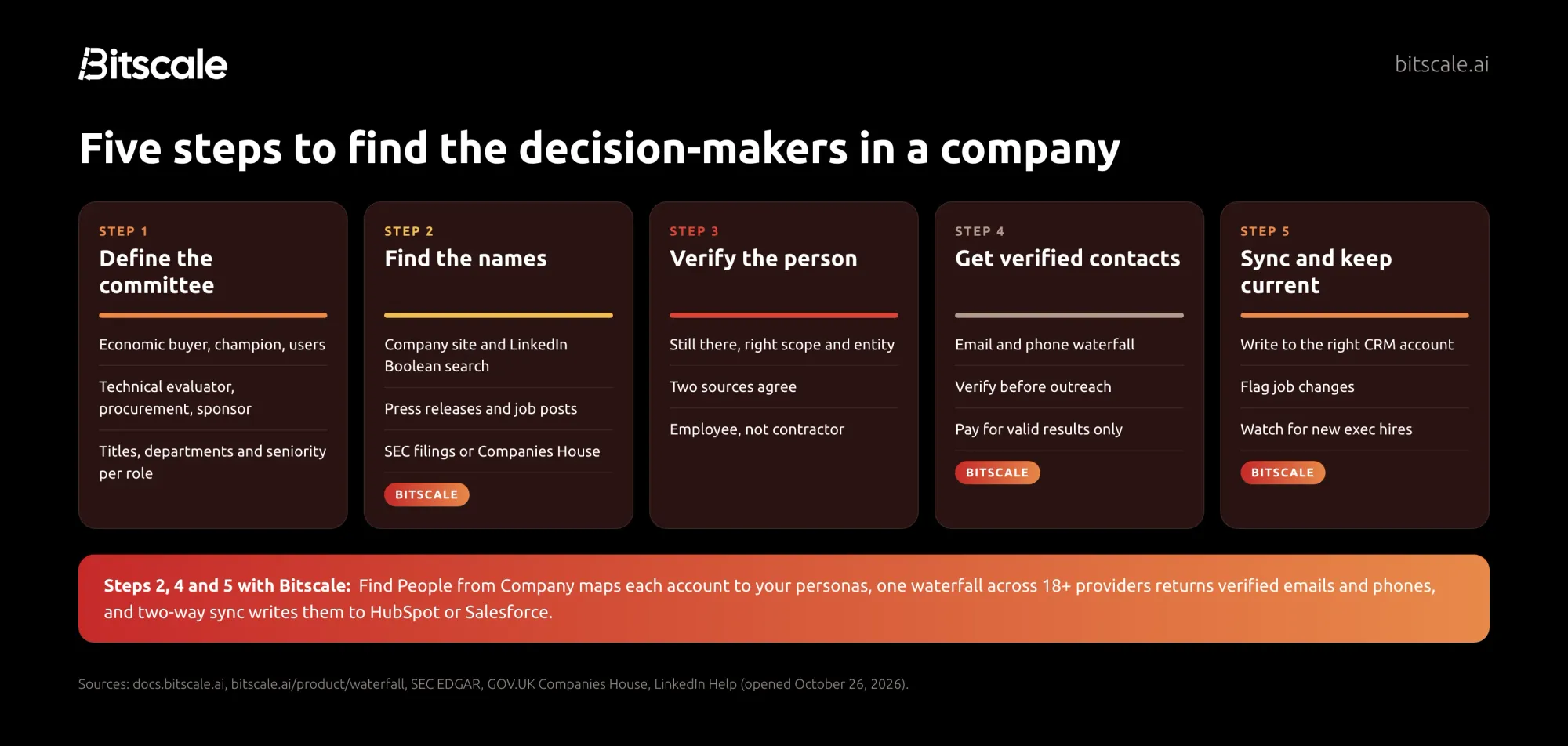
- Define the committee for your deal type.
- List the roles: economic buyer, champion, users, technical evaluator, procurement and legal, executive sponsor.
- Turn each role into title keywords, departments and seniority levels.
- Find the names at each account.
- Company website, LinkedIn Boolean search, press releases, job posts, filings.
- In Bitscale, run Find People from Company on the account list.
- Verify each person.
- Current role, right scope, right entity, two sources, employee not contractor.
- Get verified contact details.
- Email and phone through a multi-provider waterfall, verified before use.
- Sync and keep it current.
- Write contacts to your CRM against the right account and role.
- Re-check for job changes on a schedule.
How Bitscale helps you find decision-makers at scale
Bitscale is the GTM data layer for your CRM. Here's how it maps to the playbook.
Map every account to the right people. The Find People from Company enrichment takes your account list (mapped to the company website) and returns the people at each company who fit your persona. You can search by specific job titles, or by a combination of departments and seniority, and narrow by location, time in current company and total experience. Export Leads then turns those results into a contact-level grid with one person per row, carrying account fields such as company revenue with them.
Research what databases don't hold. The AI research agent scrapes websites and runs Google and Perplexity research inside Bitscale to pull out company details, decision-makers, tech stacks, funding and hiring data, and turns that into structured rows.
Get verified emails and phones from 18+ providers. Each contact runs through one email and phone waterfall across 18+ contact-data providers. If one provider misses, the next one tries, and you pay only for the provider that returns a valid result. Guidebook's Shannon Jhanji, Growth Operations, put it this way: "Our email and phone waterfall hits 92% coverage on European ICP. Nothing else we tested came close."
Know when the committee changes. Bitscale tracks 15 buying signals, including exec hires, job changes and champion moves, and decision-maker tiers (C-level, decision maker, champion). Signals are available from the Growth plan. Ready-made playbooks cover related jobs, such as Active Customers SPOC for stakeholders in existing customer accounts and Champion Job-Change Tracker for champions who move.
Keep it in your CRM. Two-way sync with HubSpot (Growth plan) and Salesforce (Booster plan) writes back only the fields that changed, so the buying committee you mapped stays attached to the right account.
Get help setting it up. Paid plans include GTM engineer support, with a dedicated engineer on Enterprise, and Bitscale GTM engineers handle setup and migration.
Pricing: Free with 200 credits. Growth is $349 a month ($314 annually) for 15K credits, Booster is $799 a month ($719 annually) for 50K credits, and Enterprise starts at $15K a year. Pricing is per account, actions are unlimited on paid plans, and credits roll over up to 3x. Bitscale is rated 4.8/5 on G2.
Frequently asked questions
Who is the decision-maker in a B2B company?
Usually a group: an economic buyer who owns the budget, a champion who feels the problem, users, a technical evaluator, and often procurement, legal and an executive sponsor.
How do I find decision makers on LinkedIn?
Search people at the target company with title keywords for each role, using Boolean operators such as AND, OR, NOT and quotation marks. Then check the start date in the current role and recent activity before you reach out.
How do I find decision-makers at a company without LinkedIn?
Use the company website (leadership and team pages, blog bylines, customer stories), press releases, job posts, and public filings such as SEC filings for US public companies or Companies House for UK companies.
How do I know I have the right person?
Confirm they still work there, own the right region or product line, work in the entity that would buy, and appear in at least two sources. Check that they are an employee rather than a contractor or agency.
Should I contact the CEO first?
Rarely. Senior executives approve purchases but seldom run the evaluation. Start with the champion and the budget owner in the relevant function, and bring in executives once there is a clear case.
How do I find decision-makers for hundreds of accounts?
Turn the method into a workflow. In Bitscale, Find People from Company maps each account to your personas, a waterfall across 18+ providers finds verified emails and phones, and two-way sync writes them to HubSpot or Salesforce.
Sources
Public records and platforms (opened October 26, 2026)
- SEC: EDGAR Full Text Search
- Regulation S-K Item 401, 17 CFR 229.401 (Cornell LII)
- GOV.UK: Get information about a company (Companies House)
- LinkedIn Help: Boolean search on LinkedIn
Bitscale
- Bitscale docs: Finding People from a Company (opened October 26, 2026)
- Bitscale docs: Bitscale for SDRs (opened October 26, 2026)
- Bitscale playbooks (opened October 26, 2026)
- Bitscale intent and signals
- Bitscale waterfall
- Bitscale pricing