CRM Data Quality: How to Fix Incomplete, Duplicate, and Stale Records
Fix CRM data quality fast: audit gaps, backfill key fields, prevent duplicates, refresh stale records, and keep routing and reporting reliable.
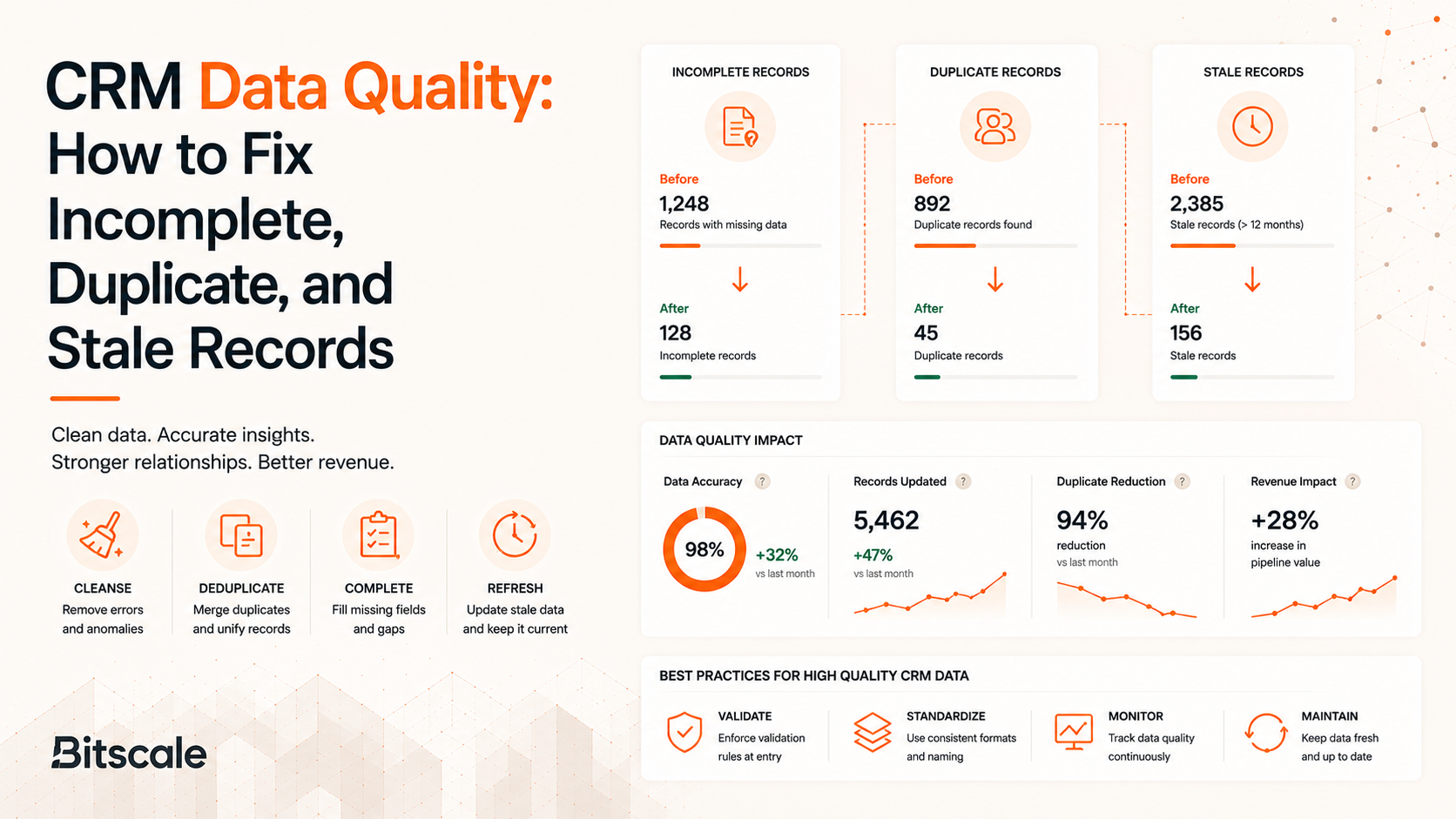
Your CRM is not a database. It's the revenue operating system behind lead routing, outbound sequences, pipeline forecasting, and territory management. When records are incomplete, duplicated, or stale, the damage compounds silently: SDRs burn hours researching prospects that should already be enriched, AEs chase deals routed to the wrong owner, and RevOps delivers reports nobody trusts.
The numbers are ugly. Poor data quality costs organizations an average of $12.9 million annually, a widely cited estimate attributed to Gartner (2021). The original Gartner publication is not publicly accessible, so this figure should be treated as directional unless your team has access to the source. Poor CRM data quality creates substantial productivity costs for sales teams through manual research, duplicate outreach, routing errors, and inaccurate reporting.
If you're in RevOps, sales ops, SDR management, or a founder-led GTM motion, this piece walks through how to diagnose the three core failure modes, fix them without breaking attribution or automation, and build ongoing hygiene so you stop paying the cleanup tax every quarter.
CRM Data Quality, Explained Like You're About to Bet Your Pipeline on It
Every CRM data quality problem lands in one of three buckets.
- Incomplete records are missing fields that block action: no work email, no domain, no ICP firmographics.
- Duplicate records split activity history across multiple versions of the same person or company, confusing ownership and inflating counts.
- Stale records look complete but contain outdated information, like a prospect who changed jobs six months ago, a company that rebranded, or a phone number that now bounces.
Many organizations struggle with data quality issues ranging from incomplete records to inaccurate and outdated information. Even small errors can compound across routing, reporting, forecasting, and customer engagement workflows.
Accuracy alone isn't the right lens. A useful CRM record passes three tests:
- Reachable: valid email or phone
- Routable: correct owner, territory, segment
- Reportable: lifecycle stage, source, and timestamps that make conversion analysis possible
A record that fails any one of those is costing you something, even if every field is technically populated.
Foundation: Deciding What Matters (and to Whom)
CRM data management starts with defining a minimum viable record for each object.
- Lead: verified email, company domain, lead source
- Contact: lead fields plus role, seniority, and an account association
- Account: domain, employee count, industry, HQ region
- Opportunity: stage, close date, amount
Different objects, different rules. The goal is to make the record usable for the workflows that depend on it, not to make it "complete" on paper.
Map each field to the workflow it serves. Domain powers routing and account matching. Employee count drives segmentation. Lifecycle stage gates sequences and reporting.
Then assign a single system of truth per attribute. Domain comes from the website, employee count from enrichment, owner from CRM assignment rules. This kills the "who's right?" conflicts that plague teams juggling multiple data sources.
For a detailed breakdown of which fields to prioritize, see CRM data enrichment explained.
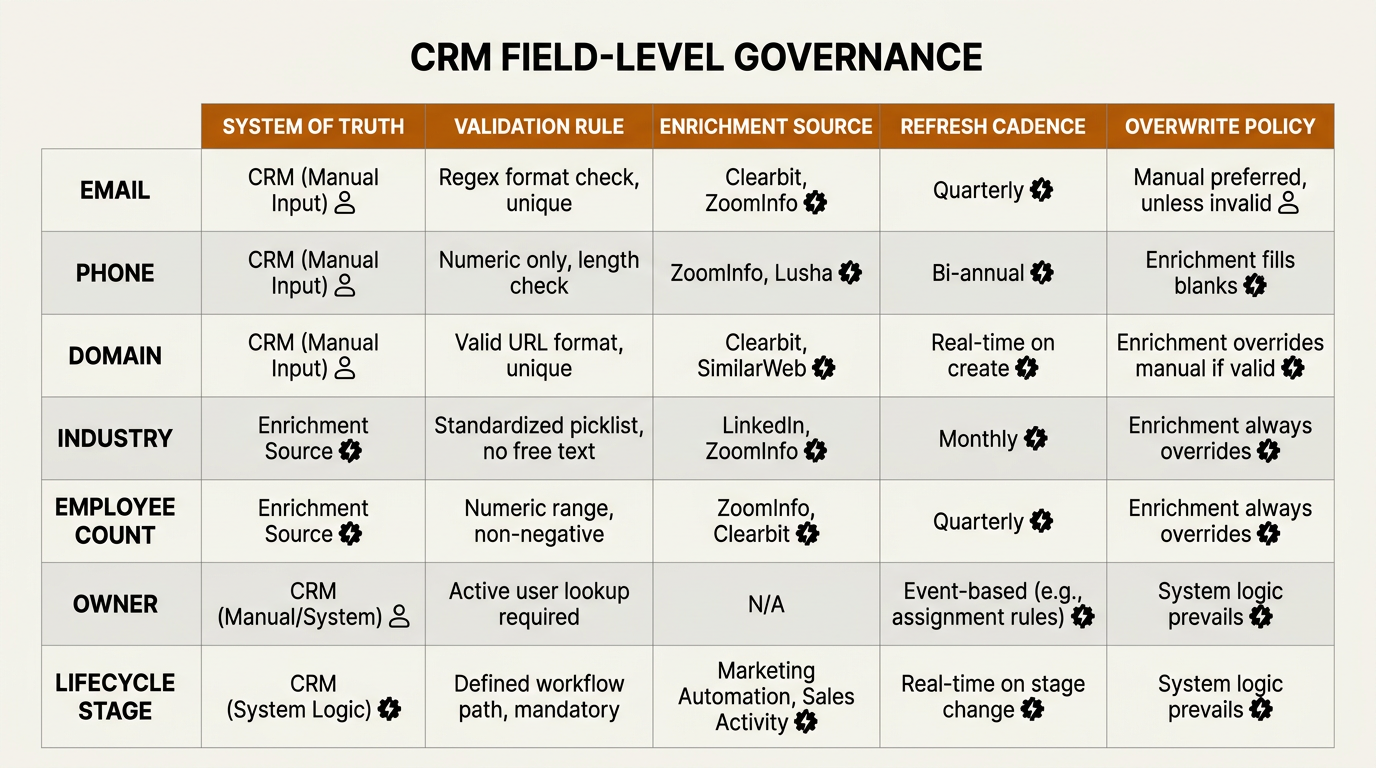
Field-level governance defines ownership, source, and refresh cadence for every critical CRM attribute.
The 30-Minute Audit Before You Touch Anything
Before fixing anything, quantify the damage. Pull three reports from your CRM:
- Missing critical fields: Filter Leads and Contacts where work email, domain, or lifecycle stage is blank. Break this down by lifecycle stage so you can see how much of your active motion is blocked.
- Duplicates by email or domain: Group Contacts by email and Accounts by root domain. Any group with more than one record is a duplicate cluster. Sample a few clusters to understand the cause (forms, imports, integrations, enrichment writes).
- Stale records: Filter for records where "Last Activity Date" or "Last Modified Date" is older than 90 days. B2B contact data naturally becomes outdated over time as people change jobs, companies evolve, and contact information changes. Flagging records with no recent activity is the fastest way to surface this decay.
Now translate those numbers into business impact:
- What percentage of leads can't be routed today?
- What is your outbound email bounce rate by segment?
- How many prospects are being sequenced twice because activity is split across duplicates?
- How often do AEs report "wrong account" or "wrong owner" during handoffs?
Set clear thresholds for "fix now" versus "fix later." Then decide what you'll deliberately ignore for this cycle, so the team doesn't get stuck polishing low-impact records while routing, deliverability, and attribution keep breaking.
Incomplete Records: The Quiet Killer
Incompleteness creeps in from everywhere: short forms that capture email but skip company size, reps who blow past optional fields, CSV imports with mismatched columns, integrations that sync some fields but not others.
One distinction matters here: "missing" (you never captured it) versus "unknown" (you looked and it doesn't exist). Your CRM should store these differently, because a blank field and a deliberately null field demand different follow-up actions.
Fix the fields that unblock action first:
- Verified work email
- Direct dial (where available)
- Company domain
- ICP firmographics (industry, employee count, HQ region)
- Record owner
- Lifecycle stage
Everything else is secondary.
When cleaning, follow a "do no harm" rule: never overwrite a human-entered, high-confidence field without tracking provenance. Use validation rules and picklists sparingly. Too much strictness creates shadow systems where reps track real data in spreadsheets and Slack instead of the CRM.
For more on improving B2B contact data accuracy, prioritize batch backfills for historical gaps and enforce field requirements going forward only at the lifecycle stage where they're actually needed.
CRM Data Enrichment: Backfill What Matters, Not Everything
The enrichment targets that actually move pipeline:
- Verified work email
- Direct dial (when available)
- Role and seniority
- Company size
- Industry
- Tech stack
- HQ region
These fields power routing, segmentation, personalization, and compliance. Everything else (social profiles, funding round, traffic ranks) is nice-to-have until it directly gates a workflow.
If you want a practical way to choose fields, start with the filters your team uses in routing rules, sequence audiences, and reporting, then enrich only what those filters require.
Match logic deserves real attention.
- For Accounts, match on domain first.
- For Contacts, match on email first.
- Always handle free email domains (gmail.com, yahoo.com) separately, because matching a Contact to an Account via a personal email creates garbage associations.
Bitscale supports enrichment and conditional sync logic so you can backfill missing fields and keep key attributes fresh across your CRM and outbound workflows. If you're running enrichment from multiple providers, how waterfall enrichment improves data accuracy is worth understanding. No single vendor covers every record.
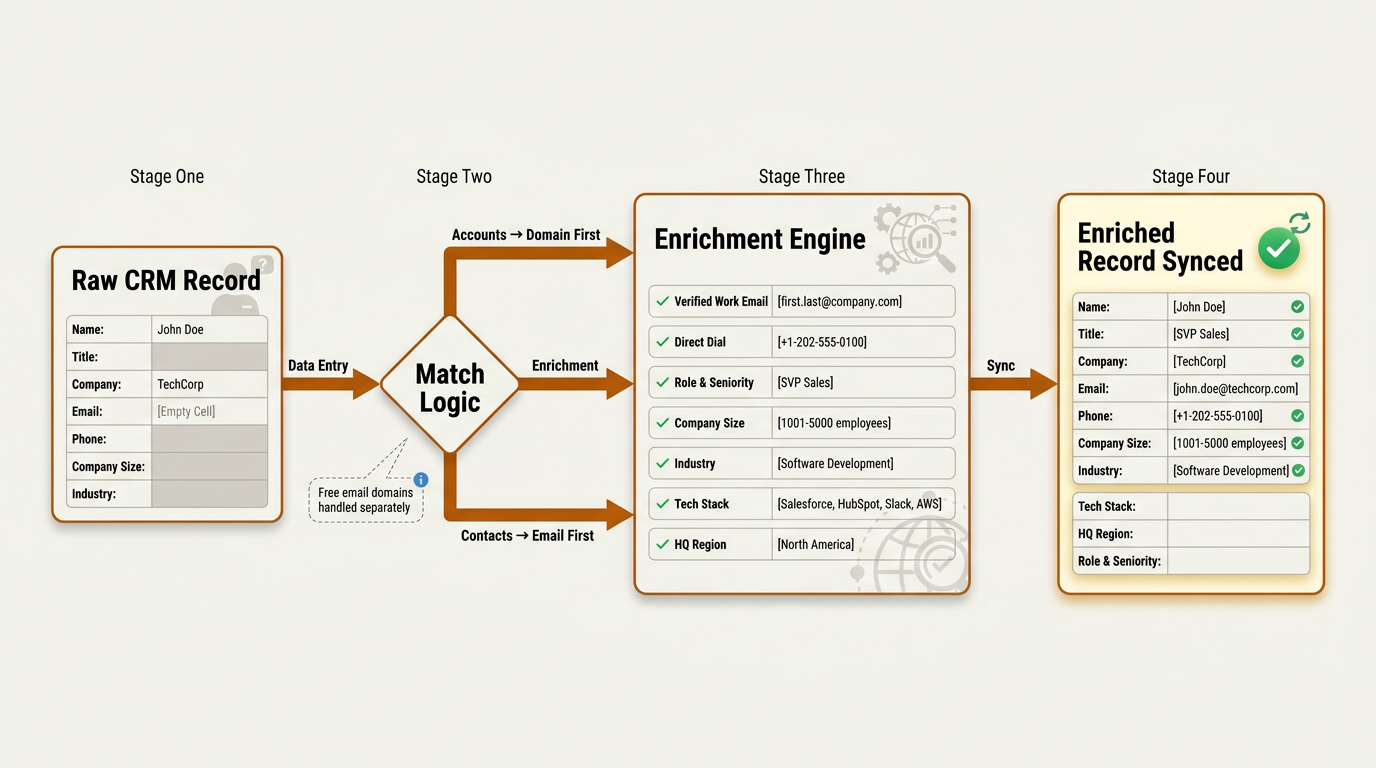
Match logic routes accounts by domain and contacts by email, preventing garbage associations before enrichment runs.
CRM Deduplication: Prevention Over Merging
Duplicates happen because of multiple inbound sources, SDR imports, enrichment tools creating new records, and "create if not found" integration logic. The real fix isn't merging after the fact. It's preventing re-creation.
Define uniqueness rules by object:
- Contacts are unique by email.
- Accounts are unique by normalized domain.
- Leads are unique by email plus source.
When you do merge, follow a rubric. The winner record should have the most recent activity, the most complete fields, the correct domain, and the correct lifecycle stage.
Action checklist for safe merges:
- Always preserve source fields (original lead source, first touch date, created date) so you don't nuke attribution.
- Keep the record that owns the most meaningful activity history (meetings, opportunities, tasks).
- Log every merge so you can audit downstream issues.
Then layer in prevention: real-time duplicate checks on form submissions, import validations, and enrichment sync rules that update existing records instead of creating new ones.
For a deeper playbook on scaling these rules, read about CRM enrichment and deduplication at scale.
Stale Records: Technically Complete, Practically Wrong
The fix is treating freshness as a first-class field. Track three separate dates:
- Last verified email date
- Last enriched date
- Last activity date
These are different signals. A record enriched yesterday but untouched for six months tells a very different story than one with recent activity but stale firmographics.
Set a refresh cadence by segment.
- High-intent accounts and active pipeline records should refresh weekly.
- Working sequences should be verified before launch.
- Long-tail or nurture segments can refresh quarterly.
Automating this through scheduled enrichment runs (on create, on stage change, and on a recurring cadence) is the only way to keep pace with natural data decay. Because contact data steadily loses accuracy as people move roles and companies change, refresh frequency should be driven by how critical each segment is to your active pipeline, not by arbitrary timelines.
What Most Teams Get Wrong About CRM Record Management
Three patterns I see on repeat.
- Teams try to standardize everything and end up with a CRM nobody wants to use. Reps build workarounds, and the "clean" system becomes a fiction.
- Teams confuse more fields with better data quality. The real win is fewer, higher-confidence fields tied to specific actions.
- Teams run one big cleanup, celebrate, and then keep the same broken inputs (imports, forms, integrations) that caused the mess. Two quarters later, they're right back where they started.
The before and after is stark.
- Before cleanup: high bounce rates, duplicate sequences, territory misroutes, and inflated lead volume masking real conversion problems.
- After implementing dedup rules, enrichment backfill, freshness timestamps, and automated refresh: fewer records, but higher connect rates, cleaner reporting, and dramatically less SDR time wasted on manual research.
For foundational context on why enrichment is central to all of this, The Complete B2B Guide to Data Enrichment covers the full landscape.
Advanced Edge Cases Nobody Warns You About
Merges break things. Merging records can orphan tasks, break active sequences, and scramble engagement history. Always test merges in a sandbox first and document merge behavior for every tool in your stack.
Multi-source conflicts are equally dangerous. When enrichment data disagrees with a rep's manual edit, you need field-level provenance and confidence scoring to decide which value wins. Without this, you'll either overwrite good data or ignore better data.
Compliance and consent deserve their own attention. Store phone and email verification dates, opt-out status, and regional consent flags (GDPR, CCPA, PECR). A clean record that violates consent rules is worse than a missing one.
Don't overlook internationalization: name parsing, address formats, and non-Latin characters are real problems. Avoid normalization that destroys truth, like stripping accents from names or forcing US address formats on international records.
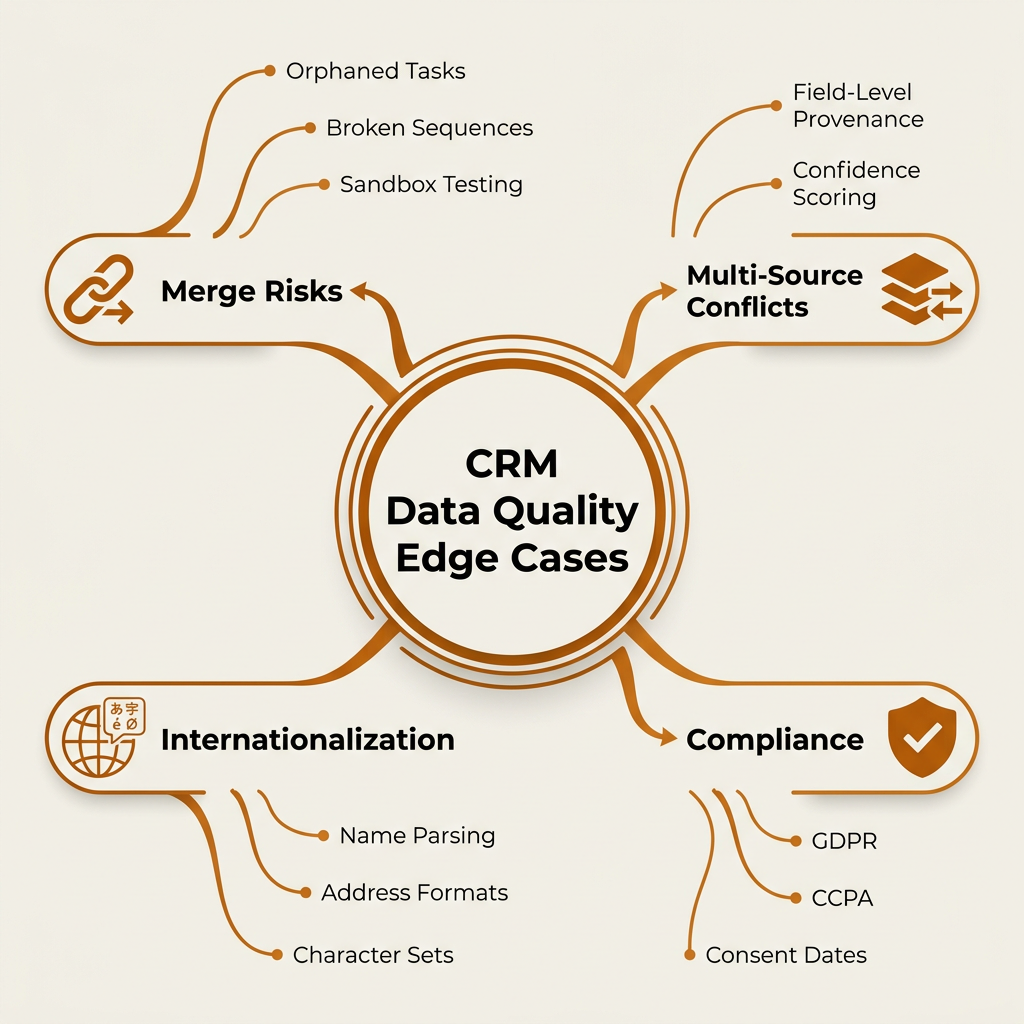
Advanced CRM data quality requires handling merge risks, consent compliance, and internationalization edge cases.
Frequently Asked Questions
What are the best metrics to track CRM data quality over time?
Track five metrics monthly: percentage of records missing critical fields (email, domain, lifecycle stage), duplicate rate by email and domain, record staleness (percentage not updated in 90+ days), email bounce rate from outbound, and lead-to-opportunity conversion rate. That last one is your business-impact proxy. If conversion improves as data quality scores improve, you're fixing the right things.
How often should I run CRM deduplication and enrichment?
Run deduplication checks in real time on form submissions and imports, with a full database scan monthly. For enrichment, trigger on record creation and stage changes. Active pipeline should refresh weekly; long-tail segments can go quarterly. For a detailed cadence framework, see CRM enrichment and deduplication at scale.
Should we delete bad CRM records or try to fix them?
Fix first, delete only as a last resort. Deleting records destroys activity history, attribution data, and reporting baselines. Archive truly unrecoverable records (invalid domains, no email, no activity in 12+ months) to a separate segment rather than hard-deleting them.
How do we prevent duplicates when multiple tools sync into the CRM?
Set every integration to "update if exists, create only if not found" using a consistent match key (email for Contacts, domain for Accounts). Disable "create new" defaults in enrichment and outbound tools. Add a real-time duplicate check layer that fires before any record is written.
What's the safest way to enrich CRM data without overwriting good manual entries?
Use a "fill if empty" rule as the default: enrichment only writes to blank fields. For fields where enrichment data might be more current (like job title or company size), use field-level provenance. Tag each value with its source and last-verified date, and let the most recent, highest-confidence source win. Bitscale's Data Enrichment supports this kind of conditional sync logic.
The Fastest Path to Better CRM Data Quality This Week
Audit first. Fix incomplete records, then deduplicate, then address staleness, in that order. Each step makes the next one easier (you can't reliably deduplicate records that are missing their match keys).
Operational checklist you can run this week:
- Define minimum viable records per object, then enforce requirements only where they unblock a workflow.
- Add duplicate checks to forms and imports.
- Configure integrations to update rather than create.
- Add freshness timestamps (verified, enriched, activity) and a refresh cadence by segment.
- Assign clear ownership: RevOps owns field governance and automation rules, SDRs own record accuracy for their active accounts, marketing ops owns inbound data quality at the form and integration layer.
Your next moves: define minimum viable records for each CRM object, set enrichment and refresh rules by segment priority, and build a clean total addressable market list as the foundation for outbound.
CRM data quality isn't a one-time project. It's ongoing infrastructure. Teams that treat it that way consistently outperform on connect rates, pipeline accuracy, and revenue per rep.
Fix your CRM data now. Explore Bitscale's enrichment, dedup, and CRM sync workflows.