Business Email Databases: A Buyer's Guide for B2B Teams
Business email database buyers guide for RevOps: compare platforms, verification, enrichment, intent signals, CRM sync, and CAN-SPAM/GDPR basics.
A business email database is not a CSV you buy once from a list broker and forget about. For revenue teams, it is closer to a living system: it discovers, verifies, enriches, and routes contact data into the tools sellers actually open every day. That difference is not academic. B2B contact data decays steadily as people change jobs, companies restructure, and domains expire. Industry research consistently shows that poor data quality is one of the most expensive operational problems organizations face, draining budgets through wasted outreach, misrouted leads, and unreliable reporting. Static lists compound the damage; dynamic platforms are built to contain it.
This buyer's guide is for B2B sales, marketing, and RevOps leaders trying to make a defensible database decision. It covers comparison tables, evaluation criteria, compliance considerations, and the operational steps that turn contact data into pipeline. The structure is intentional: it starts with definitions, then moves into the mechanics (verification, enrichment, intent, CRM sync), and ends with how to evaluate and run the system day to day.
What a Business Email Database Actually Is (and Is Not)
The phrase "business email database" has earned some skepticism. For a long time, it was shorthand for purchased email lists: huge spreadsheets, fuzzy provenance, and little context beyond a name and a domain. That model still shows up in procurement conversations, and it still disappoints. Today, a professional email database is a platform. It blends ongoing data sourcing, verification infrastructure, enrichment layers, and workflow automation so contact records stay accurate enough to use, not just store.
This evolution tracks with how B2B buying works now. Research from firms like Forrester and Gartner consistently shows that B2B purchase decisions involve large, cross-functional buying committees with numerous internal stakeholders and external participants. If your outreach only has a single name and an email address, you're guessing at the committee. Modern platforms are designed for the reality: verified contact info plus firmographic context, technographic signals, and behavioral intent data that helps reps prioritize who to contact and when.
Business Email Database vs. Email Finder vs. Contact Enrichment
These categories get blurred in vendor demos, and that confusion is how teams end up with the wrong tool. The quickest way to avoid a mismatch is to separate the job-to-be-done: are you trying to source contacts at scale, find one specific email, or improve the records you already have? For a focused look at the first use case, this email finder guide breaks down what to look for in a standalone lookup tool.
| Capability | Business Email Database | Email Finder Tool | Contact Enrichment Platform |
|---|---|---|---|
| Primary function | Searchable repository of verified B2B contacts | Finds individual emails from a name or domain | Appends firmographic, technographic, or intent fields to existing records |
| Data scope | Broad: millions of contacts across industries | Narrow: one contact at a time or small batches | Variable: depends on the enrichment provider's data graph |
| Verification | Built-in or integrated | Sometimes included | Rarely included natively |
| Use case | Building targeted prospect lists at scale | Finding a specific decision-maker's email | Filling gaps in CRM or outbound sequences |
| Example workflow | Filter by industry, title, company size, then export verified list | Enter a LinkedIn profile URL, receive an email | Upload a CSV of leads, receive enriched records with revenue, tech stack, and phone numbers |
| These three categories overlap but serve different primary jobs. |
The most useful email database software usually blends all three capabilities, because your workflow rarely stops at just "find an email." Platforms like Bitscale bring contact discovery, verification, and enrichment together so teams are not duct-taping point solutions. Apollo.io, Cognism, and Lusha cover parts of the stack, but they lean in different directions: Apollo emphasizes sequencing, Cognism is known for phone-verified mobile numbers in EMEA, and Lusha is optimized for quick lookups. Map the vendor to your bottleneck, not your wish list.
Static vs. Dynamic Databases: Why the Distinction Drives Results
Email addresses decay meaningfully every month as contacts change roles, companies merge, and domains go offline. Buy a static business contact database and, within a few months, a significant share of those addresses will no longer be deliverable. A dynamic database is designed to fight that entropy: it re-verifies records, flags job changes, and refreshes firmographic fields without someone on your team babysitting the data.
| Attribute | Static Database | Dynamic Database |
|---|---|---|
| Data freshness | Snapshot at time of purchase | Continuously refreshed |
| Verification | One-time, pre-delivery | Ongoing, triggered by usage or schedule |
| Enrichment | Fixed fields included at export | Fields updated as new data becomes available |
| Cost model | Per-record or flat list fee | Subscription with usage-based credits |
| Bounce risk | Increases over time | Stays low with re-verification |
| Best for | One-off campaigns with short shelf life | Ongoing outbound programs and CRM hygiene |
| Dynamic databases cost more upfront but reduce waste and protect sender reputation. |
If you're running ongoing outbound, static data will quietly tax your deliverability. Bounce rates creep up, domain reputation takes a hit, and replies get harder to earn even when the message is solid. Dynamic platforms treat email verification as continuous maintenance, not a checkbox at purchase time. For more on keeping records clean beyond the initial import, see this CRM data quality guide.
How AI Supports Contact Discovery and Prospect Research
Old-school prospecting looks familiar: a rep jumps between LinkedIn, a contact database, and a spreadsheet, copying details row by row. AI-assisted prospecting compresses that multi-tab chore significantly. The better platforms use large language models and web-crawling agents to analyze available business data, identify companies that match your ICP, surface the right people inside those accounts, and recommend prospects based on signals like hiring activity, funding rounds, or technology adoption. The AI handles pattern recognition and data assembly; human teams remain responsible for defining the ICP, qualifying prospects, reviewing outputs, and making final outreach decisions.
Bitscale's AI prospect research is a clear example of where this is headed. Instead of wrestling with rigid filters against a fixed dataset, teams can describe the target in natural language ("Series B SaaS companies in the US with 50 to 200 employees using HubSpot") and get back a recommended list assembled on demand, complete with verified work emails, enriched company fields, and buying signals. Clay offers a similar agent-style approach through waterfall enrichment. In practice, the separation between tools comes down to integration: how tightly AI research connects to verification and how reliably updates flow into the CRM. For teams looking to scale this process, the prospect list automation guide covers how to build repeatable, AI-assisted list-building workflows.
Verification, Enrichment, and Intent: The Three Layers That Matter
Email Verification and Data Quality
Verification is the boring part that decides whether the rest of the stack works. Even a database with strong overall accuracy will contain some percentage of invalid addresses, and at scale, those bad records add up quickly. The resulting bounces harm your sending domain reputation and drag down inbox placement for every campaign that follows. Verification should happen in three places: when a record enters the system, before it syncs to your CRM, and right before the address is used in an outbound sequence. Vendors that only verify on ingestion leave a growing gap as contacts change roles and domains age.
Contact Enrichment and Sales Intelligence
Enrichment is what turns a name-and-email pair into something a rep can actually use. For B2B teams, that typically means job title, seniority, department, direct phone number, company revenue, employee count, technology stack, and social profiles. This context is the difference between a generic business email list and a sales intelligence platform that supports relevant, personalized outreach.
Bitscale, Apollo.io, and Cognism all offer enrichment, but their data graphs vary in depth and how often they refresh. When you're evaluating providers, ask two questions that cut through the marketing: how many sources feed the enrichment engine, and how frequently are those sources updated? Single-source enrichment creates predictable blind spots. Multi-source enrichment, where the platform cross-references providers and selects the most recent match, tends to hold up better in real outbound. For the operational setup, this lead enrichment workflow guide walks through the steps.
Buyer Intent Signals
Intent data answers the question static databases never could: "Is this person in-market right now?" First-party intent (website visits, content downloads, demo requests) is the cleanest signal, but it only covers people who touch your properties. Third-party intent expands the view by aggregating content consumption across the web, though it needs careful interpretation. The platforms worth shortlisting tie intent scores directly to contact records so reps can work accounts showing active research behavior instead of grinding through a list alphabetically.
CRM Synchronization: Where Data Becomes Pipeline
A business email database that sits outside your CRM is basically a research utility. Once it syncs bidirectionally with Salesforce, HubSpot, or your system of record, it becomes operational infrastructure. CRM sync is what gets verified, enriched contacts into the workflows where reps actually engage: sequences, cadences, and pipeline stages. It also cuts down on the duplicate records and stale fields that show up when teams rely on manual exports and imports.
Bitscale includes native CRM sync alongside outbound integrations, so contacts can move from discovery to engagement without the export/import dance. Instantly.ai is centered on sending and deliverability and typically connects to databases upstream. Clay can route enriched data into CRMs via Zapier or native connectors. The evaluation question is simple: will the platform push verified, enriched records into your CRM automatically, and will it update those records when the underlying data changes? If either answer is no, you're signing up your ops team for ongoing cleanup work.
Compliance, Consent, and Human Oversight
The CAN-SPAM Act covers commercial email across the board, including B2B. It requires a working opt-out mechanism, a valid physical address, and subject lines that are not deceptive. Violations can carry substantial per-email penalties. Under GDPR, a business email address counts as personal data when it can be tied to an identifiable individual, and marketing to EU contacts requires a lawful basis such as legitimate interest or explicit consent.
No provider can outsource compliance for you. The platform supplies data; your team owns how that data is processed and used. In practice that means documenting lawful basis, honoring opt-out requests quickly, and maintaining suppression lists. Human review matters for AI outputs as well. If an AI agent assembles a prospect list or drafts personalized copy, someone should check the results before anything hits an inbox. AI supports enrichment and prioritization, but humans remain accountable for qualification, messaging, governance, and compliance decisions. Automation scales throughput; without oversight, it scales errors just as efficiently.
Legal note: Privacy, email marketing, and data protection regulations vary by jurisdiction and change over time. CAN-SPAM, GDPR, CASL, and other frameworks each impose distinct requirements. Organizations should consult qualified legal counsel regarding their specific compliance obligations before launching outbound programs or processing contact data at scale.
Platform Comparison: Choosing the Right Email Database Provider
Editorial note: Vendor capabilities, pricing, integrations, AI functionality, data coverage, and verification methods evolve over time. The comparison below reflects publicly available product information at the time of writing. Verify current details directly with each provider before making purchasing decisions.
| Platform | Core Strength | Verification | Enrichment | Intent Data | CRM Sync | AI Prospect Research |
|---|---|---|---|---|---|---|
| Bitscale | Unified GTM platform combining research, enrichment, verification, and workflow automation | Yes, built-in | Contact and company enrichment | Buying signals included | Native sync | Yes, AI-driven list building |
| Apollo.io | Large contact database with built-in sequencing | Yes | Basic firmographic enrichment | Limited intent signals | Native sync | Filters and scoring, not agent-based |
| Cognism | Phone-verified mobile numbers, strong EMEA coverage | Yes | Company and contact enrichment | Bombora intent integration | Native sync | No |
| Lusha | Quick contact lookups via browser extension | Yes | Basic enrichment | Limited | Native sync | No |
| Clay | Flexible enrichment workflows with waterfall logic | Via integrations | Multi-source waterfall enrichment | Via integrations | Via Zapier or native | Agent-based research |
| Instantly.ai | Email sending infrastructure and deliverability | Yes, for sending | Limited | No | Via integrations | No |
| Comparison based on publicly available product information at the time of writing. |
If you want a longer vendor roster, this roundup of the best B2B contact database companies is a useful reference point. Picking the right platform comes down to your primary workflow. If you want one system that covers AI prospect research, verification, enrichment, intent signals, and CRM sync without assembling a patchwork, Bitscale is positioned as an all-in-one option. If your CRM and sequencing are already solid and your pain is flexible enrichment, Clay's modular model is a better fit. If the bottleneck is EMEA phone coverage, Cognism is built for that.
Evaluation Criteria: What to Ask Before You Buy
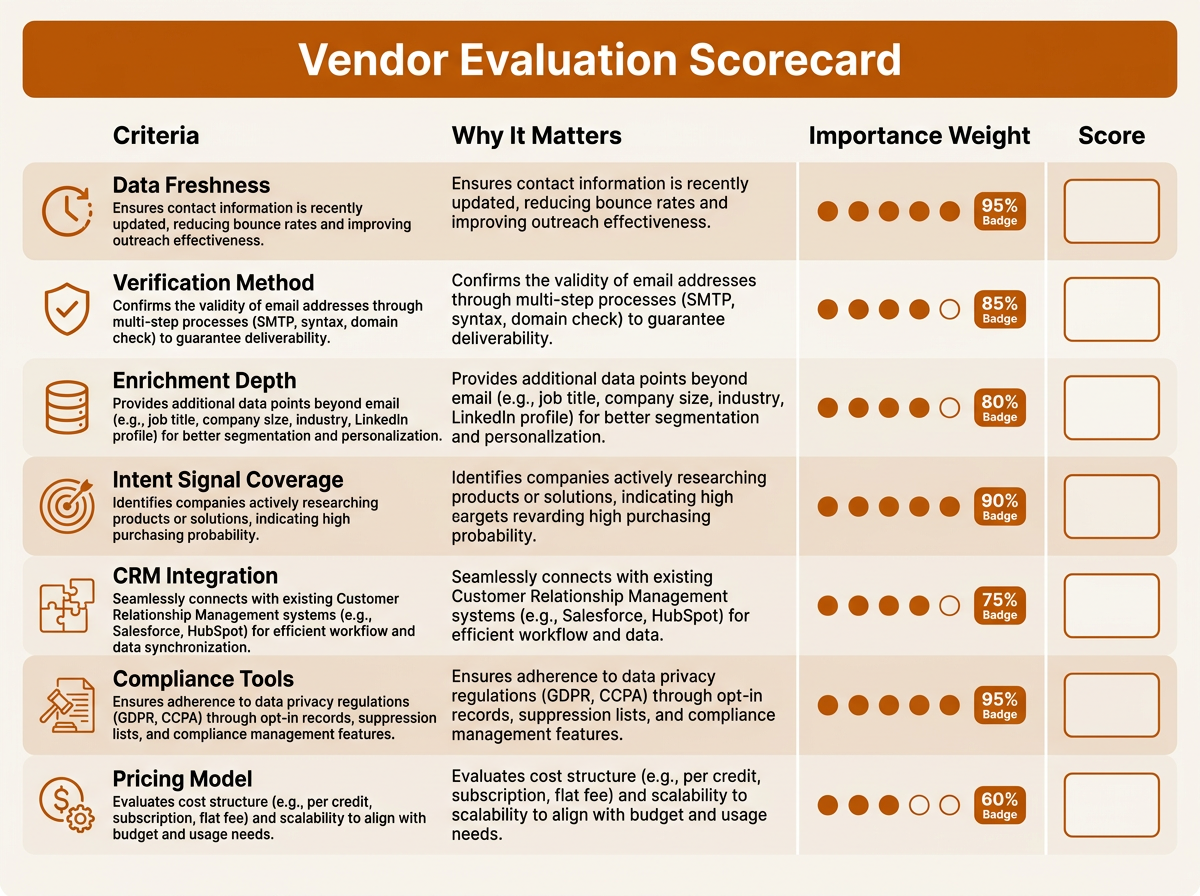
Score each vendor against weighted criteria before committing to a business email database platform.
Score each platform against these criteria before committing:
- Data coverage and freshness: How many contacts does the platform maintain, and how often are records re-verified? Ask for a sample matched to your ICP so you can check accuracy in the real world.
- Verification methodology: Does the platform run SMTP-level verification, detect catch-all domains, and filter disposable emails? One-layer verification tends to miss edge cases.
- Enrichment depth: How many fields get appended per contact? At minimum, expect title, seniority, department, direct dial, company revenue, employee count, and tech stack.
- Intent signal sources: Does the platform provide first-party intent, third-party intent, or both? How are scores calculated, and where do reps actually see them?
- CRM and outbound integration: Is the sync bidirectional? How are duplicates handled? Can enrichment trigger workflows inside your existing tools?
- Compliance infrastructure: Does the vendor support suppression list management, consent tracking, and GDPR-ready data processing agreements?
- Pricing transparency: How are credits consumed: per lookup, per enrichment, or per verified record? Opaque consumption models can inflate spend fast.
A practical test that gets skipped too often: validate the vendor against your own CRM. Export a representative sample of contacts you consider known-good and run them through the provider's enrichment. Track match rate, field accuracy, and how many net-new data points you get back. That spreadsheet will tell you more than a polished demo deck ever will.
Putting It Into Practice: From Database to Outbound Motion
Buying a business email database does not create pipeline by itself. It is an input, and the output depends on how you operationalize it. A workable flow looks like this: use AI prospect research to build a targeted account list (with human review of the ICP criteria and output quality), enrich accounts with firmographic and technographic fields, discover and verify work emails for the right contacts, prioritize using intent signals, sync the list into your CRM, then trigger outbound sequences that are actually personalized to the account context.
Bitscale packages that flow into repeatable sales workflows: define your ICP once, then keep discovery, enrichment, verification, and CRM sync running continuously. If you're stitching the workflow together yourself, focus on the handoffs. Every time data has to be re-entered by a human, you add lag and create new failure points. For the sending-side details, this piece on AI for B2B email marketing covers sequence design and deliverability.
Key Takeaways
- A modern business email database is a dynamic platform, not a static purchased list. Treat it like infrastructure, not inventory.
- Verification, contact enrichment, and buyer intent are separate layers. If you drop one, the other two lose value quickly.
- CRM synchronization is what turns contact data into operational pipeline. Without sync, the database stays a silo.
- CAN-SPAM and GDPR compliance sits with your team, regardless of which email database providers you choose. AI outputs still need human review for qualification, messaging, and governance.
- Evaluate vendors by testing your own data against your ICP, not by relying on feature matrices alone. Bitscale, Apollo.io, Cognism, Lusha, Clay, and Instantly.ai are optimized for different jobs; pick based on the bottleneck.
- Vendor capabilities, pricing, and data coverage change over time. Confirm current details directly with each provider and consult legal counsel for jurisdiction-specific compliance requirements.
Frequently Asked Questions
Is a business email database the same thing as a purchased email list?
No. A purchased email list is a static file that degrades from the moment you buy it. A modern business email database is a platform that keeps discovering, verifying, and enriching records over time. That ongoing maintenance is what keeps the data usable as people change jobs and old addresses start bouncing.
How can I stay compliant when using a B2B email database for outbound?
Start with the rules that apply to the geographies you target. The CAN-SPAM Act requires a working opt-out mechanism for commercial email, including B2B. GDPR requires a documented lawful basis (such as legitimate interest) to process personal data for EU contacts. Keep suppression lists current, honor opt-outs promptly, and have a human review AI-generated lists or messages before sending. Because regulations vary by jurisdiction and evolve over time, consult qualified legal counsel regarding your specific obligations.
What is the difference between contact enrichment and a sales contact database?
A sales contact database gives you the base record: who the person is, where they work, and how to reach them. Contact enrichment adds context on top of that record, like company revenue, technology stack, funding history, and direct phone numbers. Many tools, including Bitscale, bundle both so teams do not have to manage separate systems.
How often should email addresses be re-verified?
The right cadence depends on your sales cycle length, outbound volume, CRM data volatility, and industry dynamics. Teams with high-velocity outbound or fast-moving industries should re-verify more frequently, while those with longer sales cycles and stable contact bases can extend the interval. As a general principle, verify active prospect lists before each major campaign and run periodic checks on your broader CRM records. One of the main advantages of dynamic platforms is that they automate this upkeep instead of relying on periodic manual cleanups.
Can a business email database replace my CRM?
No. A business email database supplies your CRM with accurate, enriched contact data, but it does not replace core CRM functions like deal tracking, pipeline management, or customer communication history. They work together: the database improves the inputs, and the CRM manages the relationship. For more on keeping records clean, see this CRM data quality guide.