UpLead Review: Data Accuracy, Pricing and Fit for Prospecting Teams
UpLead review covering 95% accuracy, pricing, CRM integration limits, and when teams should switch to a broader GTM platform like Bitscale.

This UpLead review evaluates the platform as a B2B contact database and prospecting tool, examining its data accuracy promise, pricing structure, CRM integration options, and the practical boundaries teams encounter as they scale. UpLead sells itself on a headline promise: a published data-accuracy guarantee backed by real-time email verification (UpLead, Our Data). Pair that with transparent self-serve pricing and a clean UI, and the product has earned consistent praise on review platforms like G2.
Verdict up front: UpLead is a dependable, low-friction email finder and prospecting database for individual users and small operations that need verified contact data and want to start quickly. If your motion depends on multi-provider data waterfalls, AI-driven research, buying signals across every plan, or multistep GTM workflow automation, you will encounter plan-gated limitations or outright gaps. In those cases, platforms like Bitscale that serve as a GTM data layer for your CRM, combining data waterfalls, AI-assisted research, buying signals, enrichment workflows, and CRM sync, tend to be the stronger long-term investment. Below is the full breakdown.
What UpLead Is (and What It Isn't)
UpLead is a B2B contact database and lead-generation tool built around search. You can filter prospects using over 50 criteria, including job title, industry, company size, revenue, tech stack, and location (UpLead homepage). It returns verified work emails and, when available, direct-dial numbers, running real-time email verification when you unlock a record. A Chrome extension pulls contact data from LinkedIn profiles and company sites. CRM integrations cover Salesforce, HubSpot, Zoho, Pipedrive, and others, with the depth of integration varying by plan (UpLead CRM integration docs).
UpLead is not a full-cycle GTM platform. It does not include a native multistep workflow builder, built-in sales sequencing, or multi-provider waterfall enrichment. Buyer intent data and advanced CRM sync features are reserved for the Professional tier. The product supports APIs, Zapier, CRM connections, and sales-tool integrations for teams that want to connect it into a broader stack, but the orchestration layer itself lives outside UpLead. That focused scope is the appeal, and it is also the constraint.
Getting Started with UpLead
Account creation is quick. UpLead offers a seven-day free trial with five credits (UpLead trial and billing), enough to check the UI and validate a handful of records, but not enough to pressure-test coverage for a specific ICP. Once inside, the dashboard feels immediately familiar: no onboarding wizard, no forced tour, just filters and results. Filters respond fast, and results show company context, contact fields, and technology data in a straightforward table.
Setting up CRM integrations is similarly painless for the platforms UpLead supports. Salesforce and HubSpot connect through a standard OAuth flow (UpLead CRM integration docs). On the self-serve Essentials and Plus plans, the integration is largely a one-way export into your CRM. UpLead advertises bidirectional CRM sync on the Professional plan, and its help documentation specifically identifies Salesforce as supporting bidirectional sync. If your requirement is ongoing, automated enrichment that keeps CRM data clean over time across every plan, you will need to evaluate whether Professional's capabilities meet that bar or whether a dedicated enrichment platform is a better fit.
Feature Breakdown: Where UpLead Delivers and Where It Doesn't
UpLead Data Accuracy and Email Verification
UpLead publishes a data-accuracy guarantee and verifies emails in real time at the moment you unlock them, so you are less likely to burn credits on addresses that will bounce (UpLead, Our Data). When a record turns out to be inaccurate, UpLead states it will credit you back. This real-time verification model is a genuine differentiator compared with databases that verify in batches and risk serving stale records. On G2, data quality is one of the most frequently praised aspects of the product.
The trade-off shows up when you need more than clean emails. Direct-dial availability varies by contact and region. Company attributes like revenue, employee count, and tech stack are available but may not always reflect the most recent data. UpLead also does not run multi-provider waterfall enrichment the way a platform like Bitscale does, where, according to Bitscale, multiple data providers are queried in sequence to improve coverage and recency (Bitscale Waterfall Enrichment).
Prospector Search and Filtering
UpLead's prospector is the core product. With over 50 filters, you can build lists using job function, seniority, revenue bands, employee headcount, industry (including SIC and NAICS codes), geography, and technologies in use (UpLead homepage). The technographics filter is especially useful if your positioning assumes a certain stack. Selling into accounts that run Salesforce, HubSpot, or Marketo is easier when you can filter for those systems directly. Note that technographics and some advanced filters are gated to Plus and above on the pricing page (UpLead pricing).
The missing layer on self-serve plans is intent. UpLead is effective at finding companies that fit your ICP, but on Essentials and Plus it does not help you separate "fits" from "actively shopping." Buyer intent data is available on the Professional plan (UpLead pricing). That distinction matters for SDR prioritization: tools that incorporate buying signals, such as job postings, funding events, or content consumption patterns, give teams a way to focus on accounts with momentum instead of working through an undifferentiated list.
Data Enrichment and CRM Integration
UpLead includes data enrichment starting on the Plus plan (UpLead pricing). One supported workflow is manual batch enrichment: upload a CSV of contacts or companies, append fields like email, phone, title, and company attributes, then download the output. API access and higher-tier CRM functionality are available on Professional, which opens the door to more programmatic enrichment. That said, UpLead does not offer a native multistep workflow builder that automatically enriches records on CRM entry, branches logic based on enrichment results, or schedules periodic refreshes across your entire database.
For sales intelligence platforms for teams that need CRM data to stay accurate month after month, this is where UpLead's plan-gated architecture becomes a consideration. Bitscale, according to its product documentation, offers automated enrichment pipelines with native CRM sync (HubSpot on the Growth plan, Salesforce on Booster) so new records can be enriched on entry and existing records refreshed on a schedule (Bitscale Data Enrichment). Teams that rely on ongoing CRM hygiene should evaluate whether UpLead Professional's capabilities or a dedicated enrichment layer better fits their workflow.
Chrome Extension
UpLead's Chrome extension does what you expect: pull contact and company data while you are on LinkedIn or browsing a company site. Click the icon on a LinkedIn profile and it returns a verified email and, if available, a phone number, consuming one credit per lookup (UpLead credit explanation). Compared with extensions from Apollo.io or Lusha, it feels more utilitarian. You do not get one-click sequence enrollment or robust list management inside the extension. For reps who spend their day in LinkedIn, it is helpful, just not a standout.
UpLead Pricing: Plans, Credits, and Value Analysis
UpLead uses a credit-based model. Unlocking a contact costs one credit (UpLead credit explanation). Essentials and Plus are single-user plans. Professional is the team-oriented tier with custom pricing and annual billing. Here is the current breakdown (UpLead pricing):
| Plan | Monthly Price | Effective Monthly Price When Billed Annually | Credits | Key Features |
|---|---|---|---|---|
| Free Trial | $0 | $0 | 5 (7-day trial) | Basic search, real-time email verification |
| Essentials (single user) | $99 | $74 | 170 | Verified emails, CRM export, Chrome extension |
| Plus (single user) | $199 | $149 | 400 | Data enrichment, email-pattern intelligence, technographics, advanced filters, suppression lists |
| Professional (team plan) | Custom (annual billing) | Custom (annual billing) | Custom | Buyer intent data, full API access, team management, bidirectional CRM sync (Salesforce documented), dedicated support |
| Pricing sourced from UpLead's pricing page. Pricing and feature availability were checked on July 25, 2026. Confirm current details with UpLead before purchasing. |
On Essentials with monthly billing, the per-contact cost is roughly $0.58 per unlocked contact, which is reasonable for an individual user who needs a modest volume of verified emails. The per-contact cost improves on Plus. One caution: individual reviewers on Trustpilot have reported billing and cancellation friction, including unexpected charges after trial periods. These are individual reports, not confirmed universal behavior, but it is worth reading the cancellation terms closely before entering payment details.
The bigger pricing question is structural. Essentials and Plus are single-user plans, so a multi-rep SDR team would either need multiple subscriptions or the custom-priced Professional tier. Teams should also consider whether a standalone credit-based database still makes sense when broader GTM platforms bundle prospecting, enrichment, AI agents, and CRM automation under one subscription. If your workflow is "export to CRM and work the list," UpLead's self-serve plans pencil out for an individual user. If you also need automation, intent, and ongoing enrichment, evaluate the total cost of UpLead plus supplementary tools against a unified platform.
Pros and Cons
Pros
- Published data-accuracy guarantee with real-time email verification
- Clean, intuitive UI that requires minimal onboarding
- 50+ filters, including technographics (on Plus and above), for tighter ICP targeting
- Transparent, predictable self-serve pricing on Essentials and Plus
- Chrome extension is reliable for LinkedIn-based lookups
- Strong reputation for data quality on G2 (G2 reviews)
- Data enrichment available starting on Plus; buyer intent and full API on Professional
- Supports APIs, Zapier, and CRM connections for integration into broader stacks
Cons
- Buyer intent data is only available on the Professional tier, not on self-serve plans
- CRM integration depth varies by plan; bidirectional sync is documented only for Salesforce on Professional
- No native multistep GTM workflow builder or built-in sales sequencing
- No multi-provider waterfall enrichment model
- Essentials and Plus are single-user plans, limiting multi-rep team use without Professional
- Individual reviewers on Trustpilot have reported billing and cancellation friction
UpLead vs Bitscale: When a Contact Database Isn't Enough
The UpLead vs Bitscale comparison is less about database size and more about what your team needs to do after a contact is found. UpLead gets you a name, a verified email, and basic firmographics, with enrichment and intent available at higher tiers. Bitscale, according to its product pages, serves as a GTM data layer for your CRM: it combines multi-source waterfall enrichment to improve coverage (Bitscale Waterfall), AI-assisted prospect research (Bitscale AI Agent), buying signals, enrichment workflows (Bitscale Data Enrichment), and CRM sync so records stay current. Bitscale can enrich, research, qualify, and sync records before passing them to a CRM or outbound platform. It is not positioned as a native cold-email sender; the orchestration happens upstream of your sequencing tool.
| Capability | UpLead | Bitscale |
|---|---|---|
| B2B Contact Database | Yes, 50+ filters | Yes, plus enrichment layers |
| Email Verification | Real-time, accuracy guarantee | Multi-source verification |
| Data Enrichment | Available on Plus; API on Professional | Automated enrichment pipelines |
| CRM Sync | One-way on self-serve; bidirectional on Professional (Salesforce documented) | Native CRM sync (HubSpot on Growth, Salesforce on Booster) |
| Buying Signals / Intent | Professional tier only | Built-in across plans (according to Bitscale) |
| AI Research Agents | No | AI-powered prospect research |
| Workflow Automation | APIs, Zapier, CRM connections (no native workflow builder) | Ready-made GTM workflows |
| Data Waterfalls | Single source | Multi-provider waterfall enrichment |
| Outbound Tool Integrations | CRM push, Zapier, API | Native integrations with outbound tools |
| Comparison based on publicly available product documentation from UpLead and Bitscale. CRM availability on Bitscale varies by plan (Bitscale pricing). |
For prospecting for sales teams that are moving past basic list-building, the difference becomes operational. You may end up chaining UpLead for contacts, another product for waterfall enrichment, a third for intent, and something else for workflow automation. Every handoff adds friction, creates data-loss risk, and becomes one more integration to maintain. A unified GTM data layer reduces that sprawl.
Who Should (and Shouldn't) Use UpLead
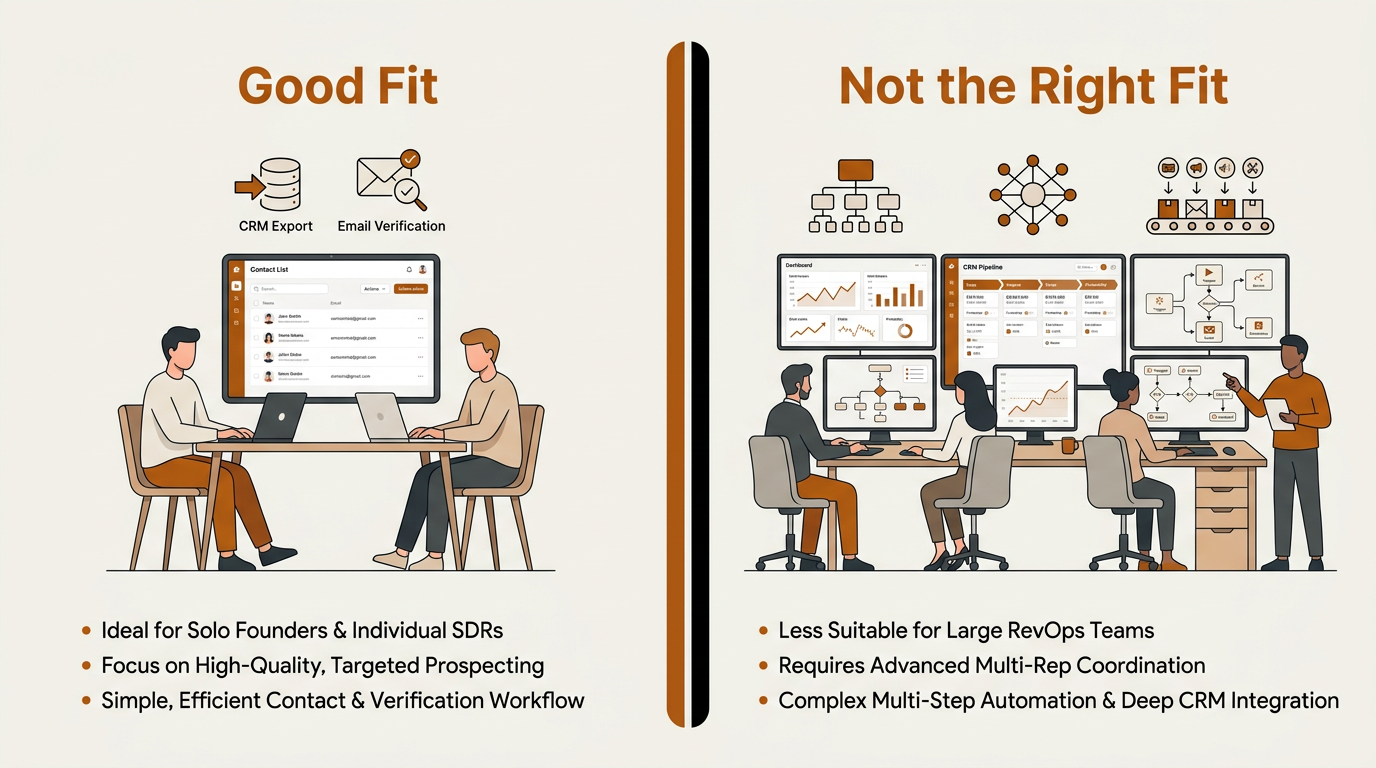
UpLead suits solo SDRs and individual operators better than complex, multi-rep RevOps teams.
UpLead is a good fit for: Solo founders and individual SDRs who want a reliable email finder, need verified data, and mostly live in a simple flow of exporting contacts into a CRM for manual follow-up. Essentials and Plus are single-user plans (UpLead pricing), so they suit individual operators well. UpLead can also work as a secondary data source if you already run a primary GTM platform and want another verification layer.
UpLead is not the right choice for: Multi-rep SDR teams that need shared seats on a self-serve budget (Professional's custom pricing is the only team option), RevOps teams building automated prospecting pipelines with multistep workflow logic, organizations that need CRM records enriched and refreshed without manual intervention across every plan, or outbound programs that depend on intent signals for account prioritization at the self-serve tier. If your motion includes AI-driven research, multi-channel sequences, or workflow orchestration, UpLead becomes one tool among several. B2B lead generation tools have evolved beyond static databases, and modern GTM teams tend to buy accordingly.
UpLead Alternatives Worth Considering
UpLead sits in a crowded category, and the alternatives split into two camps: direct databases and broader GTM systems. Apollo.io pairs a larger database with built-in sequencing. Cognism is often evaluated for European coverage and compliance. Lusha leans into a Chrome-extension-first workflow. Clay is closer to workflow automation, with data waterfall logic. The right pick depends on whether you want a focused database or a platform that carries the work from prospecting through enrichment and into the CRM.
Bitscale is positioned differently. According to Bitscale, it bundles lead and account list building, contact and company enrichment, AI prospect research, buying signals, and CRM sync in one platform (Bitscale homepage). CRM availability varies by plan: HubSpot integration is available on Growth, while Salesforce integration is listed on Booster (Bitscale pricing). If you are evaluating UpLead and already noticing the feature boundaries on self-serve plans, Bitscale is a logical upgrade path because it aims to replace not only the database, but also the enrichment, intent, and automation tools you would otherwise bolt on.
Verdict: A Reliable Database with a Clear Ceiling
This UpLead review comes down to scope. For narrow needs, UpLead performs. The accuracy guarantee is credible based on the verification model and consistent reviewer praise. The product is easy to use, and the self-serve pricing is transparent. Individual users doing targeted outbound with straightforward workflows can run this tool without much overhead.
The ceiling is equally clear. On self-serve plans, UpLead does not extend into buyer intent, advanced CRM sync, or full API access. It does not offer a native multistep workflow builder, built-in sequencing, or multi-provider waterfall enrichment on any plan. Once your prospecting motion requires more than clean contact lists and basic enrichment, you start adding tools around it, and the simplicity that made UpLead appealing can turn into a bottleneck. If you already see that growth curve coming, evaluating a GTM data layer like Bitscale that combines prospecting, enrichment, signals, and CRM automation is worth the time. It can reduce both tooling sprawl and the migration headaches that come later.
Frequently Asked Questions
Is UpLead's data accuracy guarantee real?
UpLead publishes a data-accuracy guarantee and verifies emails in real time when you unlock them. If a record is inaccurate, UpLead states it will credit you back (UpLead, Our Data). Reviewers on G2 consistently praise data quality as a strength (G2 reviews).
How does UpLead pricing compare to other B2B contact databases?
Essentials starts at $99 per month (or $74 per month on annual billing) for 170 credits. Both Essentials and Plus are single-user plans. Professional, the team-oriented tier, uses custom pricing with annual billing. The comparison shifts if you also need enrichment, intent, and automation, because you may need additional tools alongside UpLead or a unified platform (UpLead pricing).
Can UpLead replace a full sales intelligence platform?
Not on its own. UpLead is primarily a contact database and email finder. Buyer intent data, full API access, and advanced CRM sync are reserved for the Professional tier. It does not include a native multistep workflow builder, built-in sequencing, or multi-provider waterfall enrichment. If you need a complete GTM data layer, evaluate platforms like Bitscale that combine prospecting, enrichment, signals, and CRM sync (Bitscale homepage).
What are the most common complaints about UpLead?
Individual reviewers on Trustpilot have reported billing and cancellation friction, including unexpected charges after trial periods (Trustpilot). Some users also note that Essentials and Plus are single-user plans, which limits multi-rep team use without upgrading to Professional.