Automated LinkedIn Prospecting: Smarter Workflows for Modern B2B Sales Teams
Automated LinkedIn prospecting that stays compliant: AI research, contact enrichment, CRM sync, and multi-channel follow-up workflows for revenue teams.
LinkedIn remains the leading professional networking platform for B2B prospecting, relationship building, and account research. It continues to play a central role in modern sales and marketing workflows, and every revenue team wants more at-bats on the platform. The problem is that "scale" often gets misread as brute-force automation: mass connection requests, bot-written messages, and profile scraping that violates LinkedIn's User Agreement and trashes your credibility long before it builds a real pipeline.
Done properly, automated LinkedIn prospecting looks a lot less like a bot and a lot more like good RevOps. AI and workflow tools take over the research, enrichment, and CRM housekeeping that quietly consumes a rep's day, while the actual LinkedIn interactions stay human, specific, and compliant. The workflow is straightforward: find prospects on LinkedIn, qualify and enrich them off-platform, then run personalized, multi-touch follow-up that earns replies instead of eye-rolls.
What Automated LinkedIn Prospecting Actually Means (and What It Doesn't)
"LinkedIn prospecting automation" is one of those phrases that means whatever the speaker wants it to mean. For some teams, it's a browser plug-in that auto-sends connection requests. For others, it's AI that researches accounts and helps draft tailored outreach. Those are not variations of the same idea; they're different operating models with very different downside risk.
LinkedIn's User Agreement is clear: unauthorized software, bots, or automated methods that access the platform or scrape data are prohibited. That covers tools that simulate clicks, pull profile data without permission, or send messages on your behalf. The penalty is not theoretical: you can get restricted, and you can get banned.
Responsible linkedin automation automates the work around LinkedIn, not the actions inside it. Use LinkedIn (or LinkedIn Sales Navigator) as the discovery and relationship layer, where a rep searches, views, and messages manually. Then move what you found into systems that enrich contacts, score leads, sync records to your CRM, and coordinate follow-up. In other words: keep the human in the loop for every LinkedIn touch, and let the AI do the unglamorous lifting everywhere else.
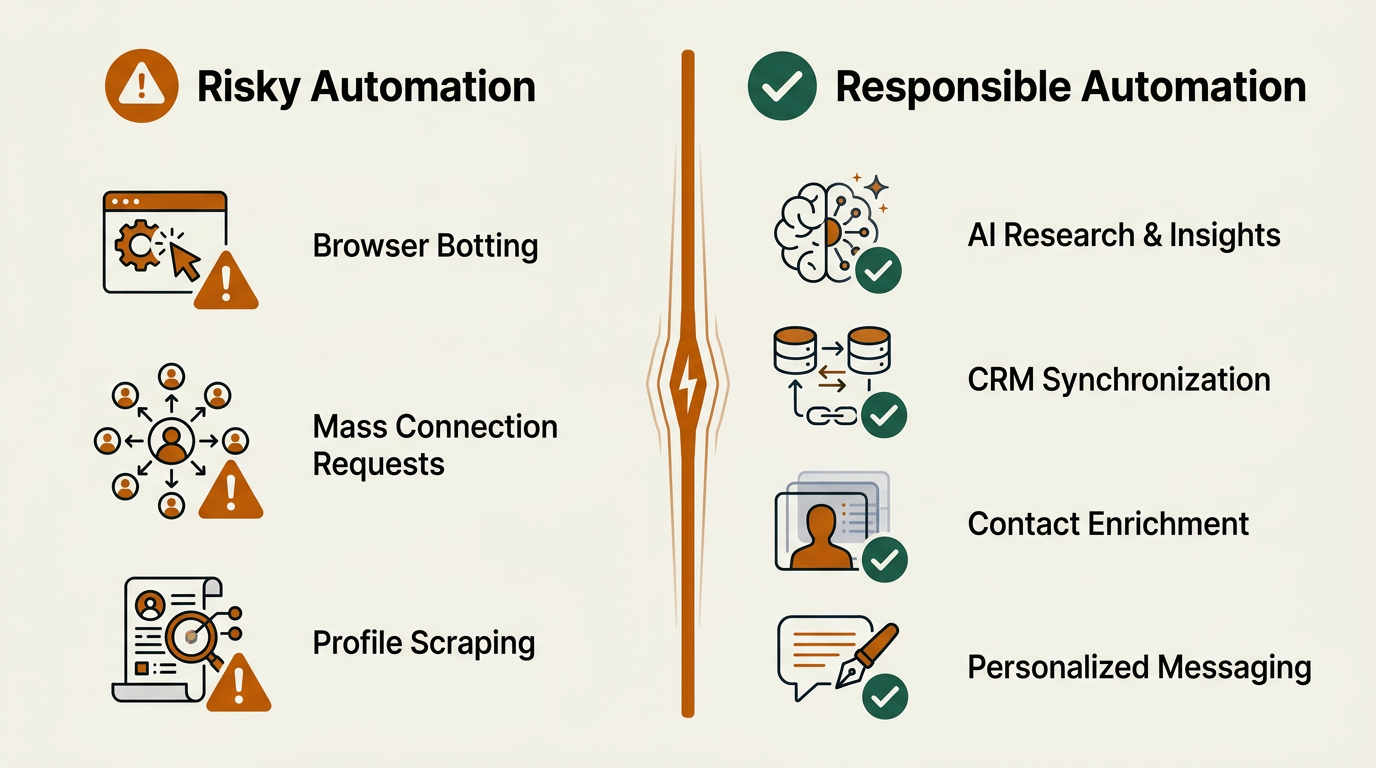
The line between risky and responsible automation comes down to where the automation runs.
The Modern LinkedIn Prospecting Workflow, Step by Step
A compliant LinkedIn prospecting motion tends to follow the same sequence across most B2B teams. The good news: you can automate big chunks of it without poking LinkedIn with unauthorized tools. Treat LinkedIn as the front door, and let your stack handle what happens after you identify the right people.
Step 1: Prospect Discovery and List Building
Start where the data is freshest: LinkedIn or Sales Navigator. Use filters like job title, company size, industry, geography, and recent job changes to assemble a tight list. Sales Navigator's lead and account lists are the safest and most capable way to do this natively. Export is intentionally limited, so don't try to turn LinkedIn into your database; use it as your discovery layer.
Once you've identified the right names, platforms like Bitscale can mirror those leads and accounts in a system you control, using firmographic, technographic, and intent data to add structure. The result is an enriched dataset outside LinkedIn that you can route, score, and sequence without fighting platform constraints. If you want the bigger picture on how the pieces fit, see our breakdown of building a modern prospecting stack.
Step 2: Lead Qualification and Scoring
Not every LinkedIn connection deserves a spot in your pipeline. Qualification is where you separate "looks interesting" from "fits the ICP and has a reason to buy." The old-school version is a rep bouncing between a company site, news tabs, and databases to check size, stack, and momentum. AI-assisted qualification does the same cross-checking at speed, scoring leads against your ICP and weighting timing signals so reps spend their attention where it matters.
Sales intelligence platforms pull in signals like recent funding rounds, hiring velocity, technology adoption, and leadership changes. Those indicators help you decide whether an account is likely in a buying window or just browsing. When you identify buying signals early, you can work the right accounts before they become everyone else's top priority too.
Step 3: Contact Enrichment and CRM Sync
A LinkedIn profile gives you a name, a title, and a company. That's enough to recognize the person, but not enough to run a serious multi-channel sequence. CRM enrichment fills in the missing fields: verified work email, direct phone, revenue and employee count, and often a view into the tech stack. Bitscale's enrichment workflows look up verified work emails and phone numbers, then push a complete contact record into your CRM automatically. That cuts out the spreadsheet-and-copy-paste routine that quietly drains hours from every rep's week.
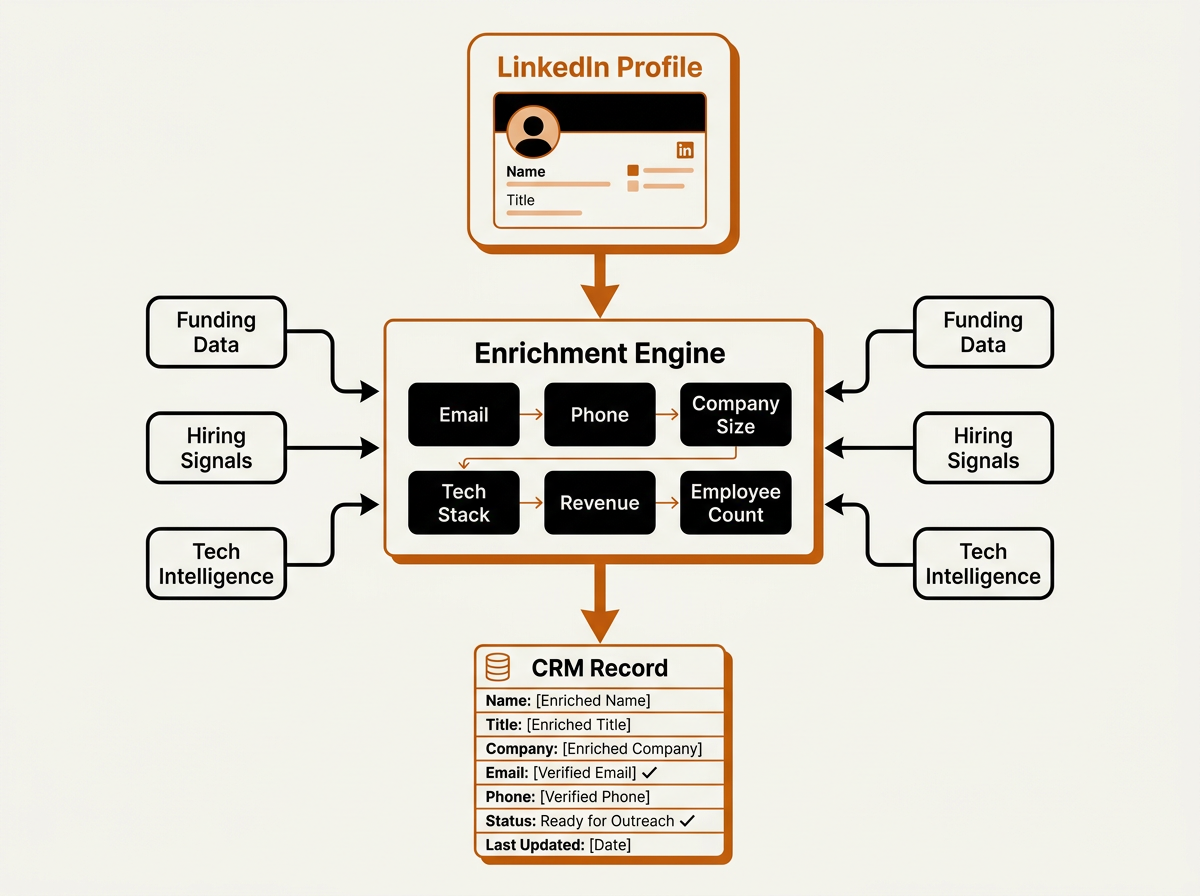
Bitscale's enrichment engine transforms a sparse LinkedIn profile into a fully populated CRM record automatically.
Step 4: AI Prospect Research
This is where ai linkedin prospecting tends to pay for itself. Instead of a rep spending significant time per prospect reading posts, skimming company updates, and hunting for mutual context, AI can synthesize that into a usable brief in seconds. AI-powered prospect research surfaces the kind of specifics that make outreach feel earned: a recent conference talk, a product launch, a blog post the prospect wrote. Those details are what separates a message that gets accepted from one that gets ignored.
Step 5: Personalized Outreach and Follow-Up
Personalized connection requests generally achieve stronger acceptance rates because they demonstrate genuine relevance, context, and intent. Scaling personalization starts with the inputs: the research from Step 4 and the enriched data from Step 3. Your linkedin outreach should point to something real about the person or their company, not just rephrase their job title and hope for the best.
Keep the follow-up machinery outside LinkedIn. After a connection is accepted, a sensible sequence might include a tailored email to the enriched work address, a second LinkedIn message a few days later (sent manually), and a call if the prospect shows engagement. Automation tools handle the timing, channel coordination, reminders, and CRM logging. The rep owns the LinkedIn touches; the system runs the scaffolding that makes those touches consistent.
Manual vs AI-Assisted LinkedIn Prospecting
The point of AI-assisted workflows is not to sideline reps. It's to stop paying highly paid sellers to do low-leverage work like data entry, tab-hopping research, and list cleanup. When the repetitive pieces are automated, reps get back to the part that actually moves deals: informed conversations and relationship building.
| Activity | Manual Approach | AI-Assisted Approach |
|---|---|---|
| Prospect discovery | Run LinkedIn filters one at a time and manually review profiles | AI assembles targeted lists from multiple data sources and cross-checks them against ICP criteria |
| Lead qualification | Rep manually checks the company site, Crunchbase, and news | AI automatically scores leads using firmographic fit, intent signals, and buying stage |
| Contact enrichment | Copy names and companies into a spreadsheet and hunt for emails by hand | An enrichment engine finds verified email, phone, and tech stack, then pushes the record into the CRM |
| Prospect research | Read LinkedIn posts, company blogs, and news (significant time per prospect) | AI summarizes relevant context, recent activity, and mutual connections in seconds |
| Outreach personalization | Rep writes every message from scratch or falls back to generic templates | AI drafts tailored messages from research; the rep edits, approves, and sends |
| Follow-up tracking | Rep relies on memory, notes, or a manual checklist to follow up | Workflow automation creates follow-up tasks across channels based on engagement |
| CRM updates | Manual data entry after each interaction | CRM sync logs activity and updates records automatically |
| AI-assisted workflows remove repetitive tasks while keeping human judgment in the loop. |
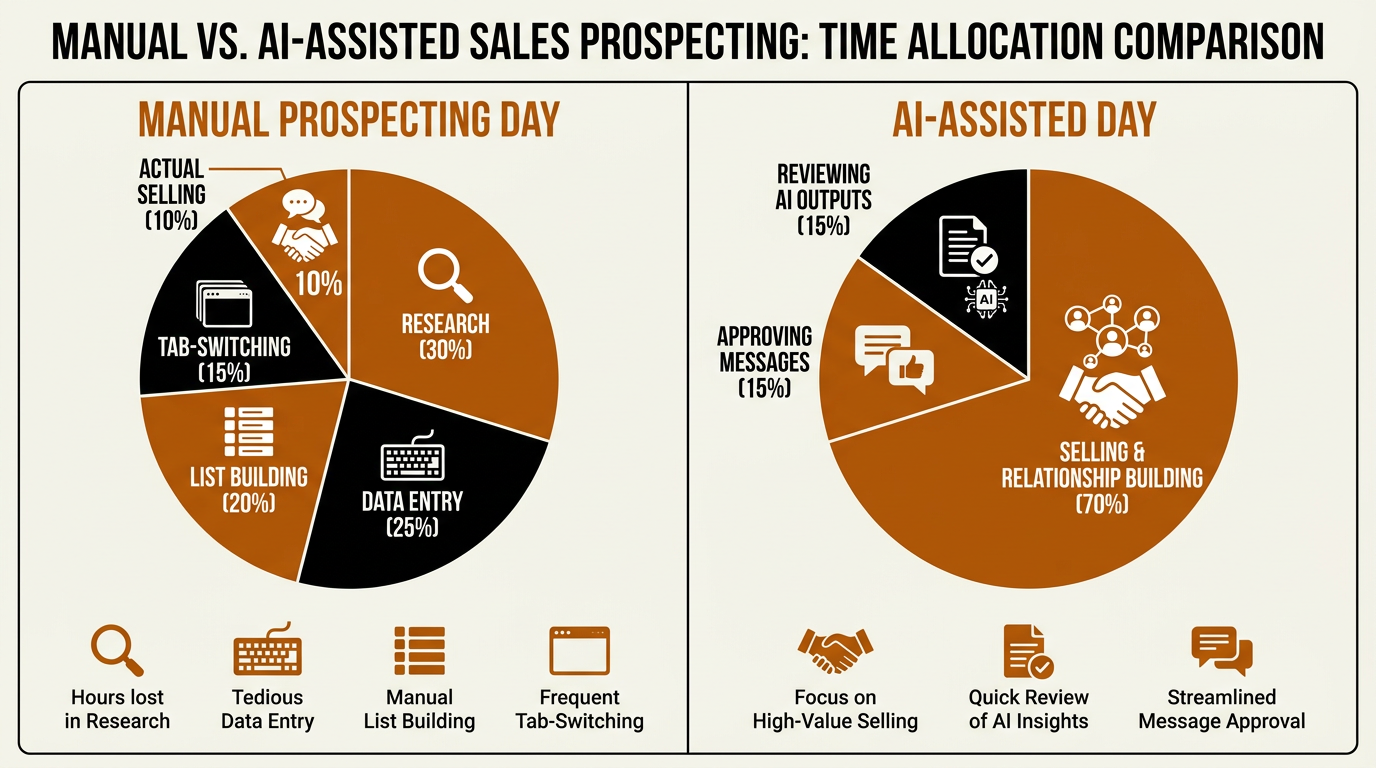
AI-assisted prospecting reclaims rep time from admin work, redirecting it toward actual selling.
LinkedIn-Only Workflow vs Modern GTM Workflow
A lot of teams still treat LinkedIn like a self-contained sales channel: prospect there, message there, follow up there. That approach hits a ceiling quickly, mostly because it limits your data and your reach. A modern go-to-market workflow uses LinkedIn as one high-signal input in a multi-channel motion that runs on enriched data and clean CRM execution.
| Dimension | LinkedIn-Only Workflow | Modern GTM Workflow |
|---|---|---|
| Data sources | LinkedIn profiles only | LinkedIn + firmographic databases + intent data + technographics |
| Contact info | LinkedIn InMail or connection message | Verified work email, direct phone, LinkedIn message |
| Buying signals | Job changes visible on LinkedIn | Funding events, hiring surges, tech adoption, content engagement, web visits |
| CRM integration | Manual entry or basic CSV export | Automated sync with bi-directional record updates |
| Outreach channels | LinkedIn messages only | LinkedIn + email + phone + ads (coordinated sequences) |
| Personalization depth | Based on LinkedIn profile summary | Based on AI research across news, social, company data, and intent signals |
| Scalability | Limited by daily LinkedIn activity caps | Scales across channels without violating platform limits |
| A multi-channel GTM workflow treats LinkedIn as a discovery layer, not the entire pipeline. |
Bitscale sits in the orchestration layer of that workflow. After prospects are identified on LinkedIn, Bitscale enriches profiles, flags buying signals, syncs the data into your CRM, and kicks off outreach sequences across email and other channels. LinkedIn remains the place where relationships are built; Bitscale runs the data plumbing that keeps the motion consistent. For a closer look at how those pieces come together, explore Bitscale's sales intelligence platform.
Tool Categories for LinkedIn Sales Automation Workflows
No single platform covers the entire workflow end to end. In practice, teams stitch together a few categories of tools depending on how mature their RevOps motion is and how strict they need to be about compliance and data hygiene.
| Category | What It Does | Example Platforms |
|---|---|---|
| LinkedIn-native prospecting | Advanced search, lead lists, InMail, relationship tracking | LinkedIn Sales Navigator |
| Contact and company enrichment | Finds verified emails, phones, firmographics, technographics | Bitscale, Apollo.io, Lusha, Cognism |
| AI prospect research | Summarizes prospect context, generates talking points, scores leads | Bitscale, Clay |
| Intent and buying signals | Tracks funding, hiring, tech adoption, content engagement | Bitscale, Cognism |
| CRM and data sync | Pushes enriched records to CRM, maintains data hygiene | Bitscale, Apollo.io |
| Outreach sequencing | Orchestrates multi-channel email and task sequences | Instantly.ai, Apollo.io |
| Workflow orchestration | Connects tools, triggers actions based on events, automates GTM flows | Bitscale, Clay |
| Most teams combine 2-4 tools across these categories to build a complete linkedin lead generation workflow. |
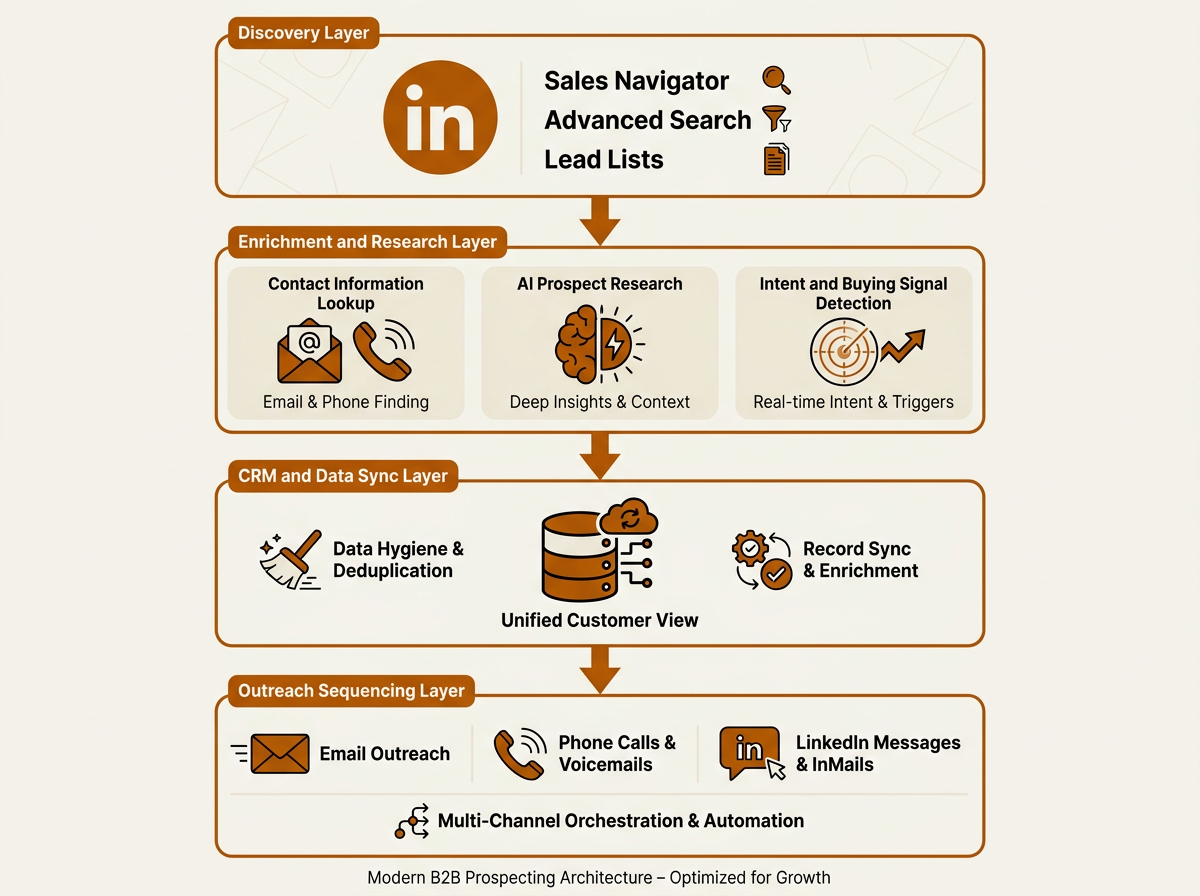
A well-designed stack separates discovery, enrichment, data management, and outreach into distinct layers.
Compliance, Daily Limits, and What Most Teams Get Wrong
Most LinkedIn restrictions aren't bad luck; they're self-inflicted. A team installs a browser extension that fires off hundreds of connection requests a day, or they run a scraping tool until LinkedIn's detection catches up. Then the account gets restricted, the team loses access at the worst possible time, and the cleanup becomes a weeks-long distraction. Repeat the pattern and the platform can shut the account down permanently.
LinkedIn does not publish official daily activity limits, and any specific numbers you see circulating online are community-sourced estimates rather than platform policy. What is clear from LinkedIn's User Agreement is that automated or excessive activity, particularly through unauthorized third-party tools, puts accounts at risk. Rather than optimizing for a specific daily quota, teams should focus on authentic, manually performed interactions. Prioritize quality over volume: thirty well-qualified, well-researched connection requests will outperform hundreds of generic ones because the acceptance is only the first gate. The real goal is a conversation.
Common mistakes that lead to account issues:
- Using browser extensions that simulate clicks or auto-send messages inside LinkedIn
- Scraping LinkedIn profile data with unauthorized tools (violates Section 8.2 of LinkedIn's User Agreement)
- Sending identical connection request messages to hundreds of prospects
- Engaging in repetitive, high-volume activity patterns that trigger LinkedIn's rate-limiting systems
- Connecting enrichment tools directly to LinkedIn's interface rather than using exported or manually gathered data
If you want the compliant path, keep it simple: use LinkedIn's native tools (Sales Navigator and LinkedIn's own export features) for discovery, then move the data into your enrichment and automation stack. Bitscale's ready-made sales workflows are built for that handoff. Prospects you identify on LinkedIn can be enriched, scored, and routed into outreach sequences without any unauthorized access to LinkedIn's platform.
Practical Implementation: Getting Started
You don't need to rebuild your entire sales process to get value out of smarter linkedin sales automation. Many teams can stand up the core workflow over the course of a couple of weeks, depending on their existing systems, CRM maturity, and available resources. The goal is to prove data quality and start shipping consistent outreach without creating chaos for the team.
Week 1: Foundation. Tighten your ICP so it actually drives searches, not vague debates. Configure Sales Navigator with saved searches for your top 3 segments. Pick an enrichment platform (Bitscale is purpose-built for this) and connect it to your CRM. Then run a small test: pull 50 prospects from Sales Navigator, enrich them through Bitscale, and check the records in your CRM for accuracy and completeness. Our B2B prospecting guide goes deeper on ICP definition and segmentation.
Week 2: Activation. Build your first sequence and keep it focused. Use AI prospect research to generate specific talking points for your top 20 prospects. Send connection requests manually on LinkedIn with a short, relevant note. For prospects with verified work emails from enrichment, trigger the email portion of your sequence. Finally, set CRM automation rules so every touchpoint (connection accepted, email opened, reply received) updates the record and queues the next step for the rep.
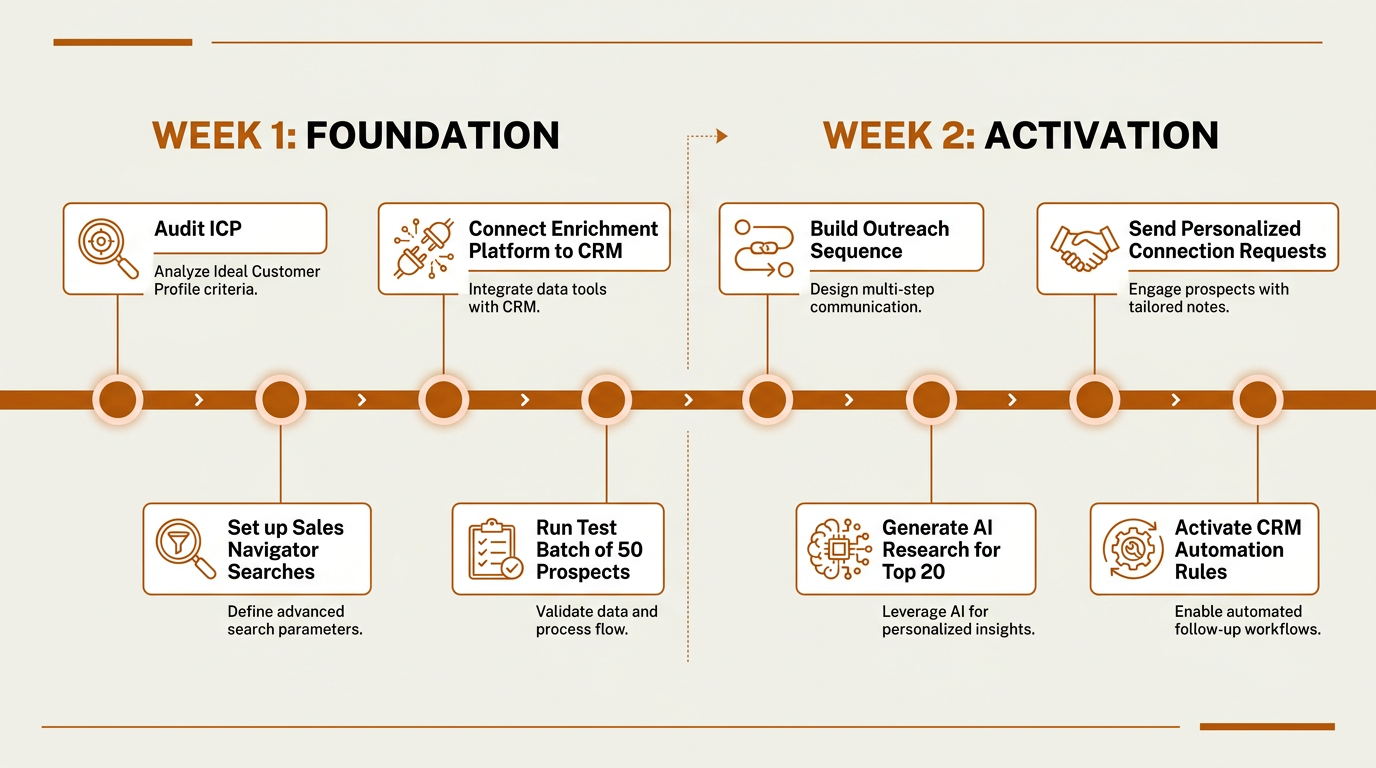
A focused two-week sprint proves data quality and activates consistent outreach without disrupting existing sales workflows.
Advanced Considerations: Signals, Sequencing, and Scale
After the basics are stable, sophistication comes from two things: buying signals and dynamic sequencing. Instead of treating every enriched prospect the same, route them based on signal strength. A company that just raised a Series B, hired three new SDRs, and adopted a competitor's product should land in a high-priority, multi-touch sequence. An account with no movement and no clear triggers belongs in a lighter, nurture cadence.
This is where workflow orchestration earns its keep. Bitscale supports trigger-based workflows so that when a prospect matches defined signal criteria, the system can enrich the contact, assign a lead score, create the CRM record, and place the prospect into the right sequence automatically. That shifts the rep's time away from collecting context and toward reviewing an AI-prepared brief and running the conversation.
One nuance that matters: many B2B organizations are moving away from disconnected point solutions toward integrated, signal-driven GTM workflows that combine prospecting, enrichment, CRM synchronization, and automation. Teams that run prospecting as a set of disconnected tools (lists over here, email over there, CRM somewhere else) are getting outpaced by teams that connect those tools into coherent, event-driven workflows. The tooling is now mature enough that this isn't just for enterprise sales ops teams; smaller orgs can run the same playbook.
Key Takeaways
- Automated LinkedIn prospecting should automate the work around LinkedIn (research, enrichment, CRM sync, sequencing), not automate actions inside LinkedIn itself.
- LinkedIn's User Agreement bans unauthorized bots, scraping, and automated messaging. Treat compliance as a requirement, not a preference.
- AI prospect research and contact enrichment cut hours of manual work per rep and make personalization realistic at scale.
- Buying signals like funding, hiring, and tech adoption should determine who gets prioritized and which sequence they enter.
- Many teams can get the core motion live within a couple of weeks: Sales Navigator for discovery, Bitscale for enrichment and orchestration, and your CRM for system-of-record execution.
- Personalization beats volume. Well-researched, relevant requests consistently outperform generic ones.
Frequently Asked Questions
Is automated LinkedIn prospecting against LinkedIn's terms of service?
It depends on what you automate and where it runs. Tools that send connection requests, scrape profiles, or auto-message inside LinkedIn through unauthorized software violate LinkedIn's User Agreement. Automating work outside LinkedIn, like contact enrichment, CRM sync, AI research, and email sequencing, stays compliant because it doesn't use unauthorized access to LinkedIn's platform.
How many LinkedIn connection requests can I safely send per day?
LinkedIn does not publish official daily limits for connection requests or profile views. Numbers you see cited online are community-sourced estimates, not platform policy. The safest approach is to send requests manually, personalize each one, and avoid repetitive or high-volume patterns that could trigger LinkedIn's rate-limiting systems. Focus on quality and relevance rather than optimizing for a specific daily number.
What is the difference between LinkedIn automation and CRM enrichment?
LinkedIn automation usually means a tool taking actions inside LinkedIn for you, such as sending messages, viewing profiles, or firing off connection requests. CRM enrichment is different: it's an external system that appends missing prospect data (work email, phone number, company details) and writes it into your CRM. Enrichment tools like Bitscale work independently of LinkedIn's interface.
Can AI write my LinkedIn outreach messages?
AI can draft messages using prospect research and enriched context, which speeds up the writing. A rep should still review and send every LinkedIn message so the tone, timing, and level of specificity are right for the relationship. Used that way, AI saves time without turning outreach into low-quality automation.
How does Bitscale fit into a LinkedIn prospecting workflow?
Bitscale picks up after discovery. Once you identify prospects on LinkedIn or Sales Navigator, Bitscale enriches contact data (verified emails, phone numbers, firmographics), surfaces buying signals, syncs records into your CRM, and orchestrates outreach workflows across email and other channels. LinkedIn remains the relationship layer; Bitscale handles the data and workflow execution.