AI Sales Assistant: Should Your Sales Team Use One in 2026?
AI sales assistant evaluation for 2026: what it automates (research, enrichment, CRM sync, buying signals), where it breaks, and rollout guidance by team size.
AI sales assistants have rapidly evolved from experimental tools into an established part of many modern B2B sales technology stacks. Prospecting, enrichment, follow-ups, and CRM hygiene are moving from manual effort to automated systems. AI has become increasingly common across sales organizations, particularly for prospect research, forecasting, CRM management, lead prioritization, and workflow automation. The debate is not whether AI belongs in the stack. It is whether the AI sales assistant you pick will improve pipeline execution or just become one more tab your reps ignore.
This piece breaks down what AI sales assistants do in practice, how they differ from classic sales automation, where they produce measurable lift, and where the limits show up fast. You will see three comparison tables, adoption guidance by team size, and a straight look at governance and rollout. Here is the structure: Foundations (what AI sales assistants are and are not), Core Capabilities (prospect research, enrichment, buying signals, CRM sync, outreach), Comparison Tables (manual vs. AI, traditional automation vs. AI, adoption by team size), Implementation and Governance, RevOps Alignment, and Key Takeaways.
What Is an AI Sales Assistant, Really?
Ignore the vendor gloss and you can describe an AI sales assistant pretty plainly: software that uses machine learning, natural language processing, and integrations to take over the operational parts of selling. It is not there to replace account executives. It is there to clear the work that keeps AEs from selling in the first place: researching accounts, enriching records, logging CRM activity, watching for buying signals, drafting outreach, and nudging follow-ups. In a well-run stack, it functions like an always-on ops layer between your data sources and the rep's daily workflow.
That definition matters because "AI sales tool" gets slapped on everything from chat widgets to email sequencers. Chatbots handle inbound. Sequencers push templated steps on a timer. An AI sales assistant is closer to an orchestrator: it connects prospect research, enrichment, qualification, and CRM automation into workflows that run end to end. Platforms like Bitscale position themselves as a unified GTM layer, not a single-purpose bot that solves one narrow task.
Core Capabilities That Matter for B2B Teams
AI Prospect Research and Lead Generation
Industry analysts expect AI to play an increasingly important role in prospect research, account planning, and revenue operations over the coming years. The driver is not mysterious: manual research is slow, inconsistent, and hard to standardize across a team. An AI prospecting engine can pull from firmographic databases, technographic signals, job postings, funding announcements, and social activity to assemble targeted account lists quickly. Bitscale, for example, ships ready-made sales workflows that pair AI for prospect research with enrichment and scoring, so reps get a qualified list rather than a raw export. If you are comparing the category more broadly, a roundup of B2B lead generation tools is a useful benchmark for feature coverage.
Contact and Company Enrichment
Enrichment is where CRMs quietly fall apart. Contact and company data changes continuously as people change jobs, organizations evolve, technologies change, and business information becomes outdated. AI sales software addresses that decay by continuously cross-referencing records against multiple data providers and appending work emails, direct dials, technographic details, and firmographic attributes. Bitscale's data enrichment solution bakes enrichment into automated workflows instead of forcing teams into manual CSV cycles, which keeps records current without leaning on reps to do cleanup.
Buying Signals and Sales Intelligence
A full lead list is not the same thing as a ready-to-buy list. AI sales assistants watch intent data, website visits, content downloads, job postings, and technographic changes to flag accounts that look like they are entering a buying window. IBM defines sales intelligence as the integration of AI and automation to help teams gather and analyze data for better decision-making. On the ground, that translates into a prioritized feed: accounts hiring for relevant roles, evaluating competitor tools, or expanding into new markets. Signal quality matters more than signal volume, and a primer on understanding buying signals can help teams align on what to trust.
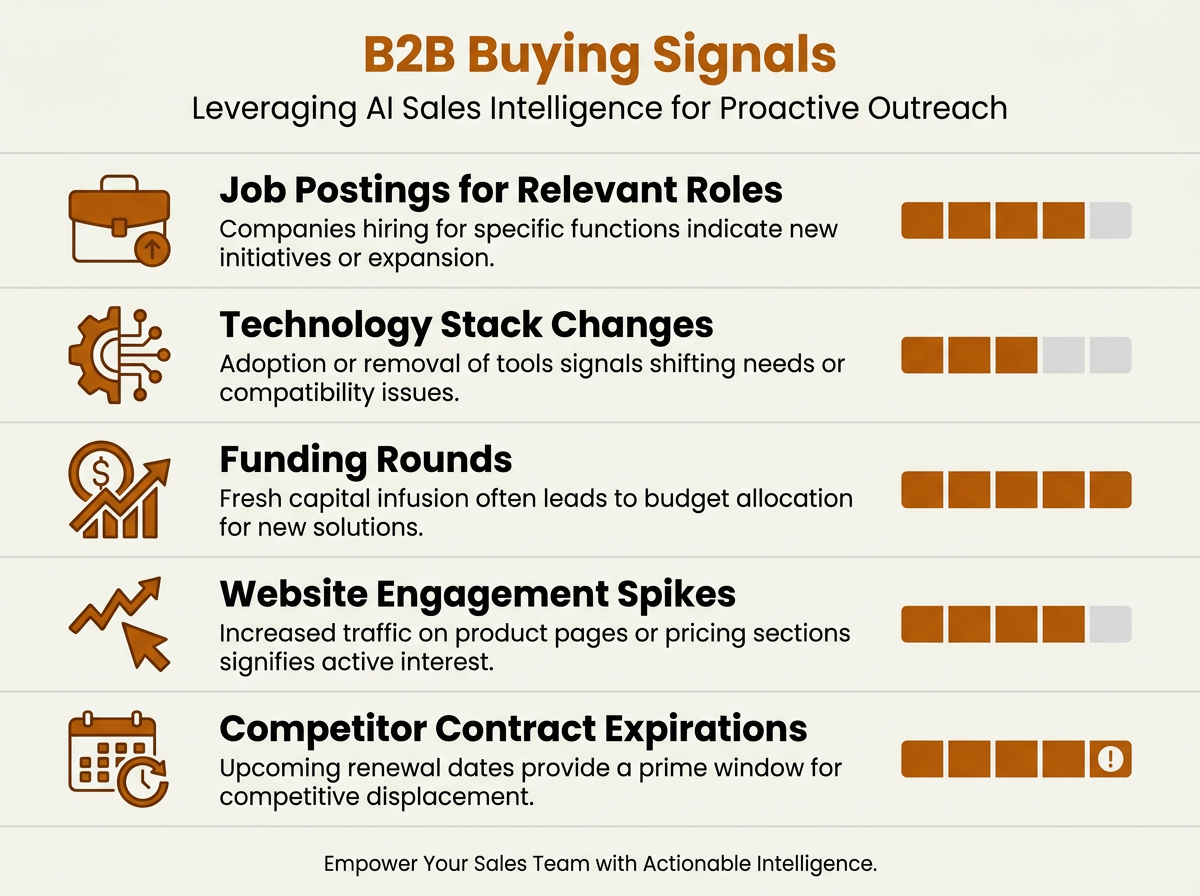
AI sales assistants continuously monitor these signals, alerting reps when accounts enter active buying windows.
CRM Synchronization and Workflow Automation
AI can automate many repetitive administrative tasks such as CRM updates, activity logging, workflow routing, and record enrichment, allowing sales teams to spend more time on customer-facing work. A big slice of that reclaimed time comes from CRM work. Every manual call log, stage update, and note is a tax on selling time, and it adds up across a week. AI assistants sync activities bidirectionally with platforms like Salesforce and HubSpot so records stay accurate without constant rep entry. Bitscale pushes this further with outbound tool integrations, sending enriched data straight into sequencing tools and CRM fields without the export/import treadmill.
Workflow automation is bigger than logging. It can trigger follow-up sequences when a prospect opens an email three times, route leads based on territory rules, and escalate stale deals before they sit for weeks. Teams that want to operationalize this kind of pipeline can use this guide on sales workflow automation built for mid-market B2B orgs.
Personalized Outreach and Follow-Up Automation
Prospects can spot generic outreach instantly, and they treat it accordingly. AI sales automation helps reps reference a funding round, tech stack, or a piece of published content without spending 15 minutes per contact doing background work. The workflow that tends to work is simple: the AI drafts the relevant snippets, and the rep reviews and sends. Follow-ups can also change based on behavior: someone who clicks a case study link should not get the same second touch as someone who never opened the first email. This is where the AI SDR idea comes up. An AI SDR does not replace a human SDR; it takes on repetitive sequencing and personalization prep so the human can spend more time in live conversations. For a deeper analysis, see AI SDR tools in 2026.
Manual Sales Activities vs. AI Sales Assistants
| Activity | Manual Approach | AI Sales Assistant Approach |
|---|---|---|
| Prospect research | Rep hunts across LinkedIn, news sites, and databases one by one | AI scans multiple sources at once and returns enriched prospect lists |
| Contact enrichment | Rep copies fields from different tools into the CRM | AI appends verified emails, phone numbers, and firmographics automatically |
| Lead qualification | Rep checks each lead against ICP criteria by hand | AI scores leads against ICP parameters and elevates the strongest matches |
| CRM updates | Rep logs calls, emails, and notes after each interaction | AI syncs activities bidirectionally, in real time |
| Follow-up sequencing | Rep relies on calendar reminders and drafts one-off emails | AI triggers adaptive sequences based on prospect engagement |
| Buying signal monitoring | Rep periodically checks news and intent platforms | AI monitors intent data continuously and alerts reps when signals fire |
| Manual processes are not wrong, but they consume hours that AI can reclaim for relationship-building. |
Traditional Sales Automation vs. AI Sales Assistants
Traditional automation (think Marketo-style drip campaigns or basic CRM workflows) runs on static rules: if lead score > 50, send email B. AI sales assistants run on models that respond to what is happening now: engagement patterns, fresh enrichment, and new intent data that changes who should be prioritized. The table below lays out the differences you will feel in day-to-day execution.
| Dimension | Traditional Sales Automation | AI Sales Assistant |
|---|---|---|
| Logic model | Rule-based (if/then) | Machine learning with adaptive scoring |
| Personalization | Merge fields (first name, company) | Contextual snippets referencing recent events, tech stack, role |
| Data enrichment | Manual imports or scheduled batch syncs | Continuous, multi-source enrichment |
| Lead prioritization | Static scoring thresholds | Dynamic scoring based on intent and engagement signals |
| Workflow flexibility | Predefined sequences | Branching workflows that adjust based on prospect behavior |
| Setup complexity | Moderate (marketing ops typically manages) | Varies; unified platforms like Bitscale reduce integration overhead |
| AI assistants build on traditional automation by adding intelligence, adaptability, and real-time data. |
Adoption Recommendations by Team Size
AI adoption is not one-size-fits-all. A five-person startup does not have the same budget, process maturity, or integration appetite as a 200-rep enterprise team. The recommendations below are anchored in what usually breaks first: tool sprawl, messy routing logic, and reporting that no one trusts.
| Team Size | Recommended Approach | Key Priorities | Platform Consideration |
|---|---|---|---|
| 1 to 10 reps | Start with a unified platform that bundles prospecting, enrichment, and outreach | Avoid tool sprawl; automate CRM data entry and basic sequencing first | Bitscale or similar all-in-one GTM platforms that require minimal ops support |
| 11 to 50 reps | Layer AI lead generation and intent signals onto existing CRM and sequencing tools | Standardize lead qualification criteria; implement buying signal monitoring | Evaluate integration depth with existing CRM; consider platforms offering ready-made workflows |
| 51 to 200 reps | Deploy dedicated AI sales assistant with RevOps governance and custom scoring models | Align AI outputs with territory rules, routing logic, and pipeline reporting | Prioritize platforms with robust API access, CRM sync, and admin controls |
| 200+ reps | Enterprise rollout with phased adoption, custom ML models, and cross-functional RevOps alignment | Data governance, compliance, change management, and rep enablement programs | Require SOC 2 compliance, SSO, role-based access, and dedicated support |
| Match your AI investment to your team's operational maturity, not just headcount. |
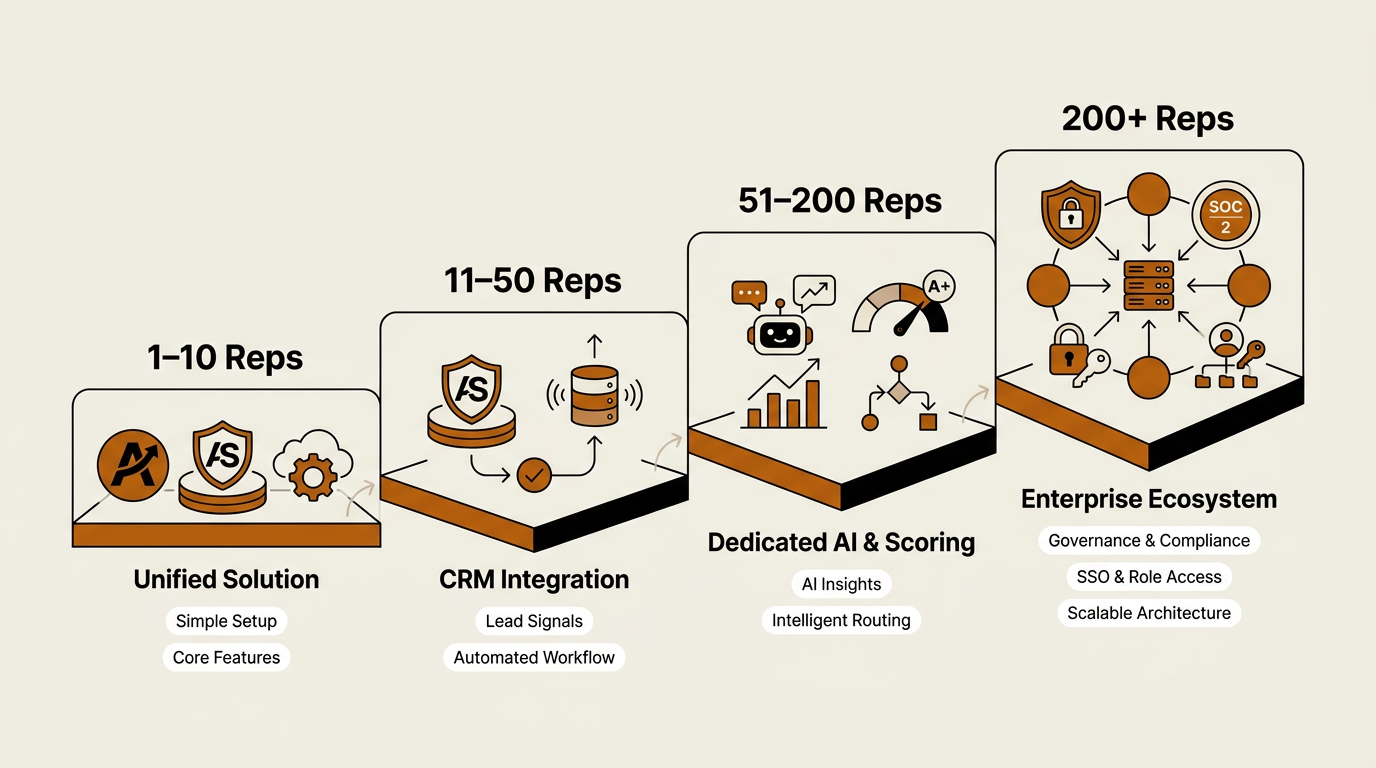
Matching AI platform complexity to team size prevents tool sprawl and adoption failure.
Implementation Considerations and Governance
Most vendor pages talk about "setup" like it is a toggle switch. In practice, the hard part is rarely the model. It is data hygiene, process alignment, and change management. If your CRM is packed with duplicates, stale contacts, and inconsistent field usage, an AI assistant will happily automate the mess and spread it faster. Fix the foundation first.
Practical governance checklist before deployment:
- Data audit: Deduplicate CRM records, standardize field formats, and establish ownership rules for accounts and contacts.
- Compliance review: Confirm that your AI vendor's data sourcing complies with GDPR, CCPA, and any industry-specific regulations your team operates under.
- Human-in-the-loop policy: Define which AI outputs require rep review before execution (outbound emails, lead disqualification, deal stage changes).
- Measurement framework: Establish baseline metrics for pipeline velocity, response rates, and CRM accuracy before rollout so you can measure actual impact.
- Rollout cadence: Start with one team or territory, gather feedback for 30 to 60 days, then expand. Avoid org-wide launches without a pilot.
AI has become a priority investment for a growing number of sales leaders, and many now consider intelligent automation a critical part of meeting business demands. "Critical" still leaves room for reality: these systems are not "set and forget." The teams that get sustained value treat an AI sales assistant like any other revenue system, with ongoing tuning, monitoring, and clear ownership.
Limitations Worth Acknowledging
AI sales assistants are not a universal fix. Complex enterprise deals with long cycles and messy stakeholder maps still depend on human judgment: navigating internal politics, reading the room, and building trust over time. An AI system cannot replicate the instincts a seasoned AE brings into a negotiation. It also tends to underperform on accounts with limited public data, including privately held companies in niche industries.
Over-automation is the other trap. When every touch sounds machine-made, prospects tune out. Strong implementations use AI to prep the rep, not to impersonate the rep. Let the system draft the email, then have a human make it sound like a person. Let it score the lead, then allow overrides when a real conversation contradicts the model. Reviewing best AI tools for sales with that mindset helps teams avoid automating for automation's sake.
RevOps Alignment: Where AI Sales Assistants Fit in the Revenue Engine
RevOps is paid to care about consistency: clean data, predictable pipeline, and alignment across marketing, sales, and customer success. An AI sales assistant that runs off to the side, enriching contacts without syncing to attribution or CS handoff workflows, just creates another silo. The compounding value shows up when the assistant feeds a shared revenue data layer that every team can use.
Bitscale leans into that model by combining AI prospect research, enrichment, intent signals, and CRM synchronization in one platform instead of asking RevOps to stitch together five or six point solutions. That design choice matters because integrations are where systems usually fail: broken mappings, drifted fields, and silent sync errors. Fewer connections means fewer places for data to break. If you are mapping the broader stack, this comparison of RevOps tools for 2026 adds context on how AI assistants sit alongside forecasting, attribution, and pipeline management.
Key Takeaways and Next Steps
An AI sales assistant is not a substitute for a sales team. It is an operational multiplier: research, enrichment, CRM automation, and signal monitoring handled in the background so reps can spend more time on the work that closes revenue: discovery, relationship building, and negotiation. Adoption is growing across teams of every size, and the technology is mature enough to deliver real results. Outcomes, though, are still earned. Data quality, rollout discipline, and a real human-in-the-loop policy decide whether this becomes a pipeline advantage or another tool that quietly rots.
Actionable next steps:
- Audit your current CRM data quality and fix foundational issues before evaluating any AI tool.
- Map your reps' weekly time allocation to identify which operational tasks consume the most hours.
- Define your ICP criteria and lead qualification rules so the AI has clear parameters to work against.
- Run a 30-day pilot with a unified platform like Bitscale on a single team before expanding.
- Establish measurement baselines (pipeline velocity, response rates, CRM accuracy) so you can evaluate real impact, not vendor promises.
Frequently Asked Questions
Does an AI sales assistant replace human SDRs?
No. An AI sales assistant takes on repetitive operational work like prospect research, data enrichment, and follow-up sequencing. Human SDRs are still needed for live conversations, objection handling, and relationship building. The assistant handles the prep so SDRs can spend more time selling.
What is the difference between AI sales software and a traditional CRM?
A CRM is the system of record for contacts, accounts, and deals. AI sales software adds an intelligence layer: it enriches records automatically, scores leads dynamically, monitors buying signals, and triggers workflows based on real-time engagement. In a modern stack, they are complementary, not replacements.
How long does it take to implement an AI sales assistant?
Implementation timelines vary depending on CRM complexity, existing integrations, data quality, governance requirements, and organizational readiness. Starting with a pilot team is typically the most effective approach, allowing you to validate workflows and gather feedback before expanding to the broader organization.
What data privacy considerations should teams evaluate?
Start with sourcing and compliance: confirm the vendor aligns with GDPR, CCPA, and any industry-specific rules you operate under. Then review how the platform stores, processes, and retains prospect data. Role-based access controls and audit logs matter for day-to-day governance and compliance reporting.
Can small sales teams benefit from AI sales tools?
Yes. Smaller teams often feel the impact fastest because there are fewer people to absorb admin work. A unified platform that bundles AI prospecting, enrichment, and CRM sync helps lean teams reduce repetitive administrative work and dedicate more time to prospecting, customer conversations, and revenue-generating activities.