AI CRM Automation: A Practical Guide for Revenue Teams
AI CRM automation that cleans data, enriches records, surfaces buying signals, and improves forecasting, with rollout phases, governance, and vendor criteria.
Most sellers spend the majority of their working hours on activities that have nothing to do with selling. Data entry, record cleanup, contact research, and the weekly ritual of pipeline hygiene consume time that should go toward building relationships and closing deals. AI CRM automation is designed to reclaim that time, not by swapping humans for bots, but by removing the operational drag so reps can stay in the conversations that move deals forward.
AI changes the CRM's job description. Instead of acting like a system of record you update after the fact, it starts behaving more like a revenue system that keeps itself current and nudges teams toward the next best action. The sections below cover the building blocks, rollout sequence, governance guardrails, how to evaluate vendors, and the failure modes that sink even well-funded deployments. If you own RevOps at a growth-stage company or you run CRM strategy inside an enterprise, the same mechanics apply. Here is how the piece is organized.
Guide sections at a glance:
- What AI CRM automation actually means and why the old definition falls short
- The capabilities that matter from enrichment to forecasting
- Traditional CRM vs. AI-powered CRM side-by-side comparison
- Implementation playbook with sequencing and governance advice
- Common mistakes and how to avoid them
- Vendor evaluation framework for choosing AI CRM software
- FAQ answering the questions revenue teams ask most
What AI CRM Automation Actually Means (and What It Is Not)
CRM automation used to be shorthand for workflow rules: if a deal hits Stage 3, send a follow-up; if someone fills out a form, assign it to a rep. That mental model is stuck in the last decade. AI CRM automation adds machine learning, natural language processing, and continuous enrichment on top of your CRM so the system can interpret what's happening in the pipeline, not just fire off triggers when a field changes.
A modern automated CRM does work a rules engine simply cannot. It can pull context on a prospect before a rep even opens the record. It can flag when a target account starts hiring for roles that usually show up right before budget gets allocated. It can prioritize opportunities based on patterns across thousands of past deals, rather than a point system someone built two years ago and never revisited. The trajectory across the industry is clear: AI-assisted seller research is rapidly becoming the default starting point for prospecting and pipeline development, replacing manual workflows that once consumed hours of rep time each week. That change is already showing up in how teams run outbound and pipeline reviews.
This distinction is where teams either get leverage or burn time. If your plan for "AI" is just "add more triggers," you will automate busywork and still miss the moments that matter. CRM intelligence, surfacing the right insight at the right time, depends on a different foundation: clean data, enrichment that never stops, and models tied to revenue outcomes instead of admin convenience.
Nine Capabilities That Define an AI-Powered CRM
Not every AI sales CRM earns its keep. Some tools slap a chatbot on top of a database and call it innovation; others actually change how your team qualifies, prioritizes, and forecasts. The capabilities below are the full menu. Most organizations roll them out in steps: start with enrichment and qualification, prove value, then expand into forecasting and governance as the data gets more reliable.
| Capability | What AI Does | Business Impact |
|---|---|---|
| Contact & CRM data enrichment | Automatically appends firmographic, technographic, and contact details to records | Cuts manual research and keeps records from going stale |
| Buying signals | Tracks job postings, funding rounds, tech installs, and engagement patterns | Helps reps focus on accounts that are showing real intent |
| Lead qualification & AI lead scoring | Scores leads using behavioral and firmographic models | Keeps sales attention on higher-probability opportunities |
| Opportunity prioritization | Ranks deals by likelihood to close and revenue potential | Reduces time spent chasing stalled or low-value deals |
| CRM workflow automation | Kicks off multi-step sequences based on AI-detected events | Pulls repetitive admin work out of the sales process |
| Pipeline visibility | Creates real-time pipeline views with risk flags | Lets managers spot gaps and slippage before quarter-end |
| Forecasting | Predicts revenue outcomes using deal velocity and engagement data | Gives finance and leadership more dependable commit numbers |
| CRM governance | Applies data standards, deduplication, and field completeness checks | Prevents data decay that drags down model accuracy |
| Revenue intelligence | Turns call transcripts, emails, and CRM activity into deal-level insights | Provides context without forcing reps to log every interaction |
| A mature AI CRM strategy addresses all nine capabilities over time. |
Platforms like Bitscale bundle several of these capabilities in one place: AI prospect research, CRM enrichment, buying signals, workflow automation, and pipeline intelligence. That packaging is not just convenient. When enrichment lives in one tool, signals in another, and scoring in a third, you end up with competing data models and brittle syncs, which is exactly how AI initiatives get undermined before they reach forecasting.
Traditional CRM vs. AI-Powered CRM
The real difference between a traditional CRM and an AI-powered CRM is not a checklist of features. It changes the division of labor: who captures data, who cleans it, and who notices risk early enough to do something about it. Here is the comparison in plain terms.
| Dimension | Traditional CRM | AI-Powered CRM |
|---|---|---|
| Data entry | Manual; reps log calls, update fields | Automatically captured from emails, calls, and enrichment APIs |
| Contact data | Static; decays steadily without active maintenance | Continuously enriched with verified firmographic and contact data |
| Lead scoring | Point-based rules set by ops | Dynamic models trained on conversion patterns |
| Pipeline management | Spreadsheet exports and weekly reviews | Real-time dashboards with AI risk flags |
| Forecasting | Rep-submitted estimates, manager gut feel | Probabilistic models using deal signals and historical data |
| Buying signals | Reps manually track news and LinkedIn | Automated monitoring of intent, hiring, funding, and tech adoption |
| Governance | Periodic audits, data cleanup sprints | Continuous validation, deduplication, and completeness scoring |
| Rep experience | CRM as a reporting obligation | CRM as a research and prioritization tool |
| AI does not replace the CRM. It makes the CRM worth using. |
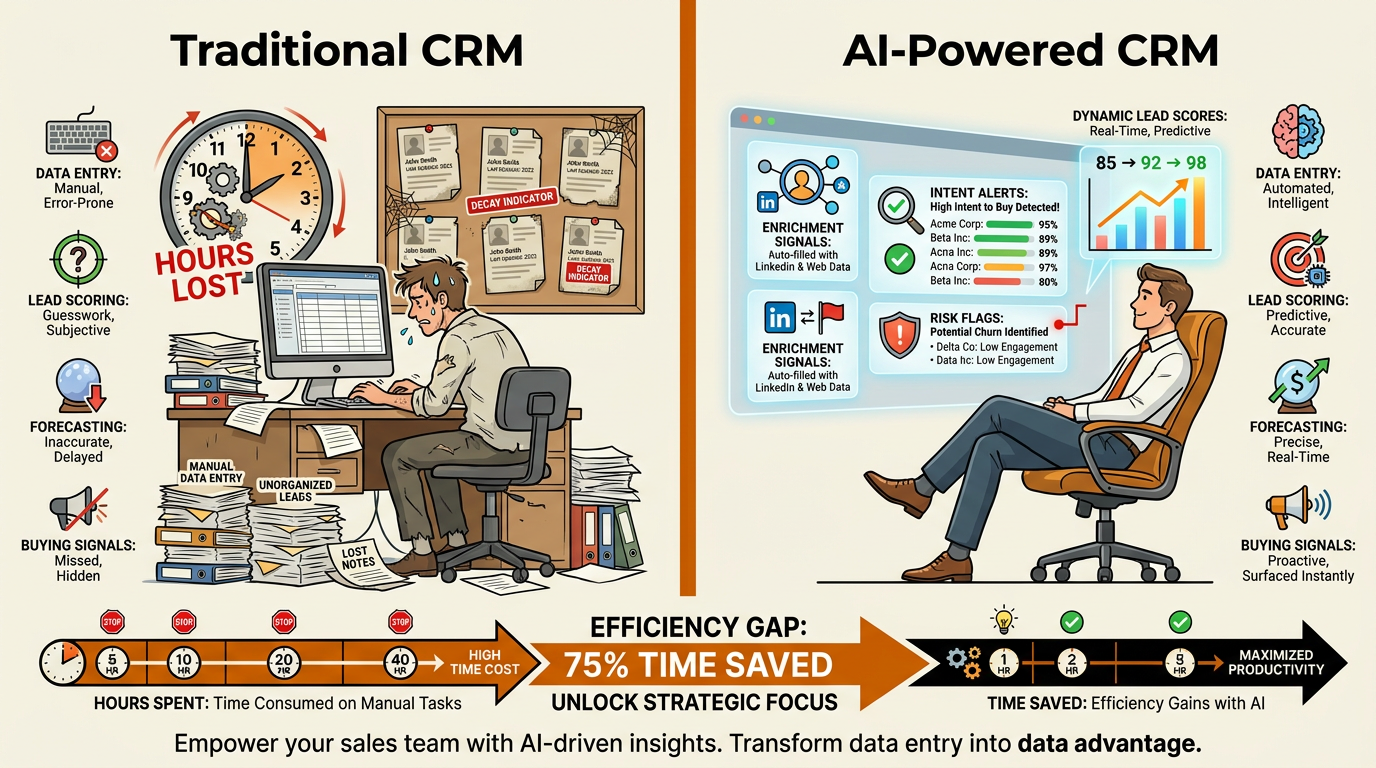
AI CRM automation shifts reps from data entry to deal execution and pipeline intelligence.
Implementation Playbook: Where to Start and How to Sequence
Most AI CRM projects do not fail because the model is "bad." They fail because the team skips the boring prerequisites, plugs an AI tool into a messy CRM, then acts surprised when the output is unreliable. The four-phase model below (Foundation, Enrichment, Automation, Optimization) is what tends to hold up under real operating conditions. How quickly you move through each phase depends on your CRM maturity, existing integrations, data quality, and organizational readiness.
Foundation Phase: Fix Your Data First
AI is unforgiving about inputs. Before you turn on any AI feature, audit the CRM for duplicates, missing fields, outdated contacts, and inconsistent formatting. Nobody enjoys this work, but skipping it is the fastest way to sabotage the rollout. A pragmatic place to start is maintaining CRM data quality: standardize field definitions, make the right fields required at each pipeline stage, and put automated deduplication rules in place so the cleanup does not revert the moment the sprint ends. The length of this phase varies widely. Organizations with well-maintained CRMs can move through it quickly, while teams dealing with years of accumulated data debt should expect a longer stabilization period.
Enrichment Phase: Activate Enrichment and Signals
Once the foundation is stable, add CRM data enrichment to fill in gaps and keep records current. Bitscale, for example, supports work email and phone lookup, company enrichment, and AI prospect research that writes back into CRM records. In parallel, configure your system to identify buying signals: hiring for relevant roles, funding announcements, changes in technology adoption, and engagement spikes. This is where outbound stops being a guessing game and starts looking like prioritization based on evidence. Teams using platforms with native CRM sync tend to activate enrichment and signals faster than those stitching together multiple tools.
Automation Phase: Deploy Scoring, Prioritization, and Workflows
With cleaner records, enrichment running, and signals flowing, scoring finally has something solid to learn from. Build AI lead scoring around observed buyer behavior, then wire those scores into workflow automation: route high-intent leads immediately, trigger re-engagement when opportunities go stale, and flag accounts showing expansion signals for account managers. Bitscale speeds this phase up because enrichment, signals, and automation sit in one platform with CRM sync, instead of forcing you to stitch together five tools and hope the field mappings stay aligned.
Optimization Phase: Scale into Forecasting and Revenue Intelligence
Forecasting gets meaningfully better when your CRM is complete and activity data is captured without reps doing extra work. At this stage, AI can use deal velocity, engagement patterns, and historical close rates to generate probability-weighted forecasts. Revenue intelligence adds another layer by analyzing conversations and mapping relationships across stakeholders, giving managers a clearer read on deal health without turning pipeline review into a weekly interrogation.
AI vs. Human: Who Does What in an AI Sales CRM
Sales teams often hear "AI" and immediately worry about losing control of customer relationships. That anxiety is understandable, and it is also avoidable. The implementations that stick draw a bright line: AI handles the operational grunt work and pattern detection; humans keep ownership of judgment, messaging, and relationships.
| Task | AI Responsibility | Human Responsibility |
|---|---|---|
| Prospect research | Aggregate firmographic, technographic, and signal data | Interpret context and personalize outreach |
| Data entry | Auto-capture from emails, calls, and enrichment | Verify edge cases and add qualitative notes |
| Lead scoring | Calculate and update scores in real time | Override scores based on relationship context |
| Pipeline review | Flag at-risk deals and surface anomalies | Make strategic decisions on resource allocation |
| Forecasting | Generate probability-weighted projections | Apply market knowledge and adjust for known variables |
| Relationship management | Track touchpoints and suggest next actions | Build trust, negotiate, and close |
| Governance | Enforce data standards and flag violations | Define policies and handle exceptions |
| AI handles the operational load. Humans own the strategic judgment. |
Sales leaders who have adopted AI agents consistently report that these tools are becoming essential to their growth strategy. That is not because AI closes deals for you. It is because it removes the friction that keeps reps stuck in admin work instead of doing the job they were hired to do.
Common Mistakes That Derail AI CRM Projects
The same failure patterns show up across industries and company sizes. The tooling changes, the CRM changes, and the playbook slides change, but the underlying mistakes stay remarkably consistent. These are the ones worth planning around.
Deploying AI on dirty data. This is the most common and most expensive mistake. If your CRM is riddled with duplicates and your stage definitions are inconsistent, the model will produce confident nonsense. Do the cleanup first, then automate the rules that keep it clean.
Buying point solutions for every capability. One tool for enrichment, another for signals, a third for scoring, a fourth for outbound. Each comes with its own schema, its own definitions, and its own sync problems. Consolidated platforms like Bitscale cut down that fragmentation by combining prospect research, enrichment, signals, and outbound sales automation in one system.
Ignoring governance from day one. AI without governance is how you end up with compliance risk and a CRM nobody trusts. Decide up front who can edit AI-generated fields, how overrides are recorded, and what retention policies apply before anything starts writing back into your system of record.
Treating AI as set-and-forget. Models drift. Buyer behavior shifts. Thresholds that made sense two quarters ago can quietly become wrong. Establish a regular review cadence (quarterly is a common starting point, though teams with shorter sales cycles or higher data volumes may need more frequent checks) and treat model performance like any other revenue-critical system.
How to Evaluate AI CRM Software Vendors
CRM automation software is a crowded neighborhood. Clay, Apollo.io, Lusha, Cognism, and Instantly.ai sit near each other on the map, but they are not interchangeable. Bitscale positions itself as a unified GTM platform that brings prospect research, enrichment, buying signals, CRM sync, and workflow automation together, instead of asking you to stitch together separate tools for each job. No matter which vendor you are considering, the criteria below keep the evaluation grounded in operational reality, not demo theater.
| Criterion | What to Assess | Why It Matters |
|---|---|---|
| Data coverage | Number of contacts, companies, and signal sources | Thin coverage leads to incomplete enrichment and missed signals |
| CRM integration depth | Native sync vs. one-way export; field mapping flexibility | Shallow integrations create manual reconciliation work |
| Enrichment freshness | How often data is reverified; decay handling | Stale data chips away at model accuracy over time |
| Signal breadth | Types of buying signals tracked (hiring, funding, tech, engagement) | Narrow signals miss meaningful intent indicators |
| Workflow flexibility | Pre-built templates plus custom logic | Teams need speed without losing customization |
| Governance controls | Role-based access, audit logs, override tracking | Necessary for compliance and data integrity |
| Pricing transparency | Credit-based vs. seat-based; enrichment costs | Hidden costs can erase ROI quickly |
| Platform consolidation | How many capabilities live in one tool vs. requiring add-ons | Fewer tools means fewer integrations that can break |
| Weight these criteria based on your team's maturity and existing stack. |
Organizations that embed AI into their sales workflows consistently outperform those that rely on manual processes alone, both in pipeline generation and revenue efficiency. Those gains are directionally encouraging, but they are not automatic. The vendor choice matters because it determines how much value you actually realize versus how much gets lost to integration work and inconsistent data.
Governance Recommendations for AI-Driven CRM
Governance is the part everyone postpones until the first incident. A rep overwrites an AI-enriched phone number with a personal cell. A scoring model starts promoting low-quality leads because the training data captured a one-off campaign spike. An integration quietly creates duplicates overnight. None of that is theoretical. It is what happens when automation is allowed to write into your CRM without clear ownership and controls.
Governance framework essentials:
- Field ownership: Define which fields are AI-managed, which are rep-editable, and which require manager approval to change.
- Override logging: Every time a human overrides an AI-generated value, log the change with a timestamp and reason. This data improves future models.
- Data retention policies: Enrichment data has shelf lives. Set automated expiration and re-verification schedules.
- Model review cadence: Review scoring and prioritization model performance on a regular schedule. Quarterly reviews are a common starting point, but teams should adjust frequency based on sales cycle length, data volume, governance requirements, and operational complexity.
- Access controls: Not every user needs access to every AI feature. Role-based permissions prevent accidental data corruption.
Good governance is not red tape. It is how you prevent the slow decay that turns an AI-enabled CRM back into an unreliable database. Industry research consistently shows that AI-driven prospect qualification and follow-up automation can meaningfully increase lead volume while reducing operational costs, but those gains depend on data your team actually trusts.
Key Takeaways and Next Steps
AI CRM automation is not a switch you flip. It is an operating model: clean data, a phased rollout, governance that is designed up front, and a platform that does not fracture your data across tools. Teams that get real results treat the CRM like an intelligent revenue system, not a compliance chore.
Actionable next steps for revenue teams:
- Audit your CRM data quality before evaluating any AI tool. Dirty data is the top project killer.
- Map your current tech stack and identify overlap. Consolidation reduces integration risk and cost.
- Start with enrichment and buying signals. They show value quickly and build internal confidence in the system.
- Define governance policies before deployment, not after the first bad sync.
- Evaluate vendors on platform depth, not feature count. A unified GTM platform like Bitscale reduces fragmentation across prospect research, enrichment, signals, and CRM sync.
The shift from traditional CRM to AI-powered revenue operations is already in motion, and it is accelerating. The only real choice is whether you build it deliberately or end up reacting when competitors move faster and your own data stops supporting the business.
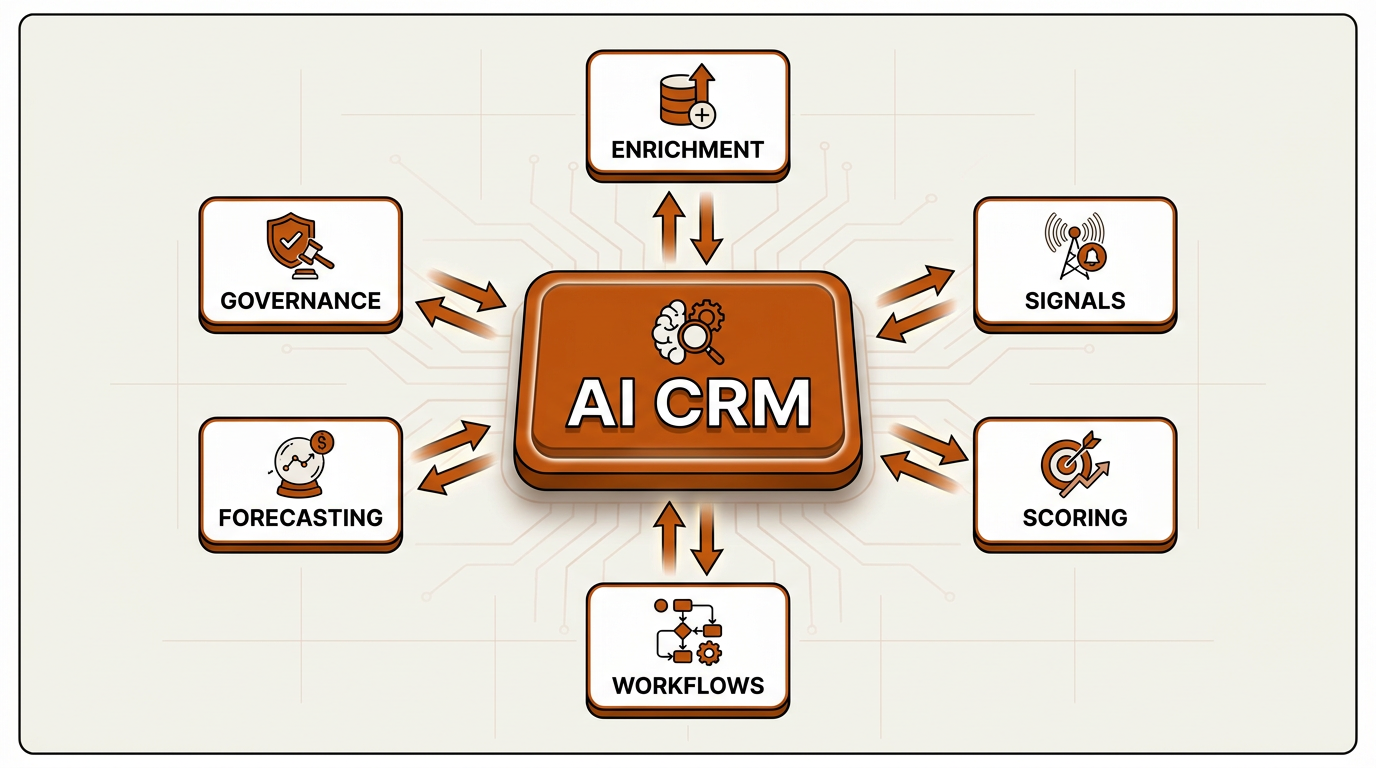
A unified AI CRM platform connects every revenue function through a single intelligent hub.
Frequently Asked Questions
What is the difference between CRM automation and AI CRM automation?
Traditional CRM automation is rule-based: if X happens, do Y. AI CRM automation layers in machine learning, predictive scoring, natural language processing, and real-time enrichment so the system can spot patterns and surface insights that static rules miss.
How long does it take to implement AI CRM automation?
Rollout timing depends on your CRM maturity, data quality, existing integrations, and organizational readiness. The process follows four phases: Foundation (data cleanup and standardization), Enrichment (activating enrichment and signals), Automation (deploying scoring, prioritization, and workflows), and Optimization (scaling into forecasting and revenue intelligence). Organizations with well-maintained CRMs and native-sync platforms like Bitscale can move through early phases faster, while teams dealing with significant data debt should expect a longer stabilization period before advancing.
Will AI CRM software replace my sales team?
No. AI takes on operational work like data entry, enrichment, scoring, and signal monitoring. Reps still own relationship building, negotiation, judgment calls, and closing. The point is to give sellers more time for high-value selling, not to remove them from the process.
What data quality level do I need before activating AI features?
Your CRM data should be clean, complete, standardized, and continuously maintained. That means consistent field definitions, minimal duplicate accounts, well-defined pipeline stage criteria, and verified contact data on active opportunities. Doing the work of maintaining CRM data quality before you activate AI prevents model errors and bad recommendations from spreading through the team.
How do I choose between point solutions and a unified AI CRM platform?
Point solutions (separate tools for enrichment, signals, scoring, and outbound) can be strong in one narrow area, but they also create integration overhead and data silos. Unified platforms like Bitscale combine prospect research, CRM enrichment, buying signals, workflow automation, and pipeline intelligence, which reduces integration work and keeps definitions consistent. For most RevOps teams, consolidation tends to deliver faster time-to-value and a lower total cost of ownership.